
Introduction
This manual provides essential instructions for the safe and effective use of the BOSCH TG503 5 In. Tuckpointing Dust Guard. Please read this manual thoroughly before operating the product to ensure proper installation, operation, and maintenance. Retain this manual for future reference.
Safety Information
Always observe general power tool safety warnings and guidelines when using this dust guard. Failure to follow all instructions may result in electric shock, fire, and/or serious injury. This dust guard is designed for use with compatible Bosch angle grinders and dust extraction systems to help manage silica dust.
- Personal Protective Equipment: Always wear appropriate personal protective equipment, including eye protection, hearing protection, and a dust mask, especially when working with materials that generate dust.
- Work Area: Ensure the work area is well-ventilated and clear of obstructions.
- Dust Extraction: Always connect the dust guard to a suitable dust extraction system to minimize airborne dust.
- Tool Compatibility: Use this dust guard only with Bosch angle grinders of compatible sizes (4-1/2 In., 5 In., and 6 In.) and appropriate tuckpoint diamond blades.
- Inspection: Before each use, inspect the dust guard for any damage or wear. Do not use if damaged.
Product Overview
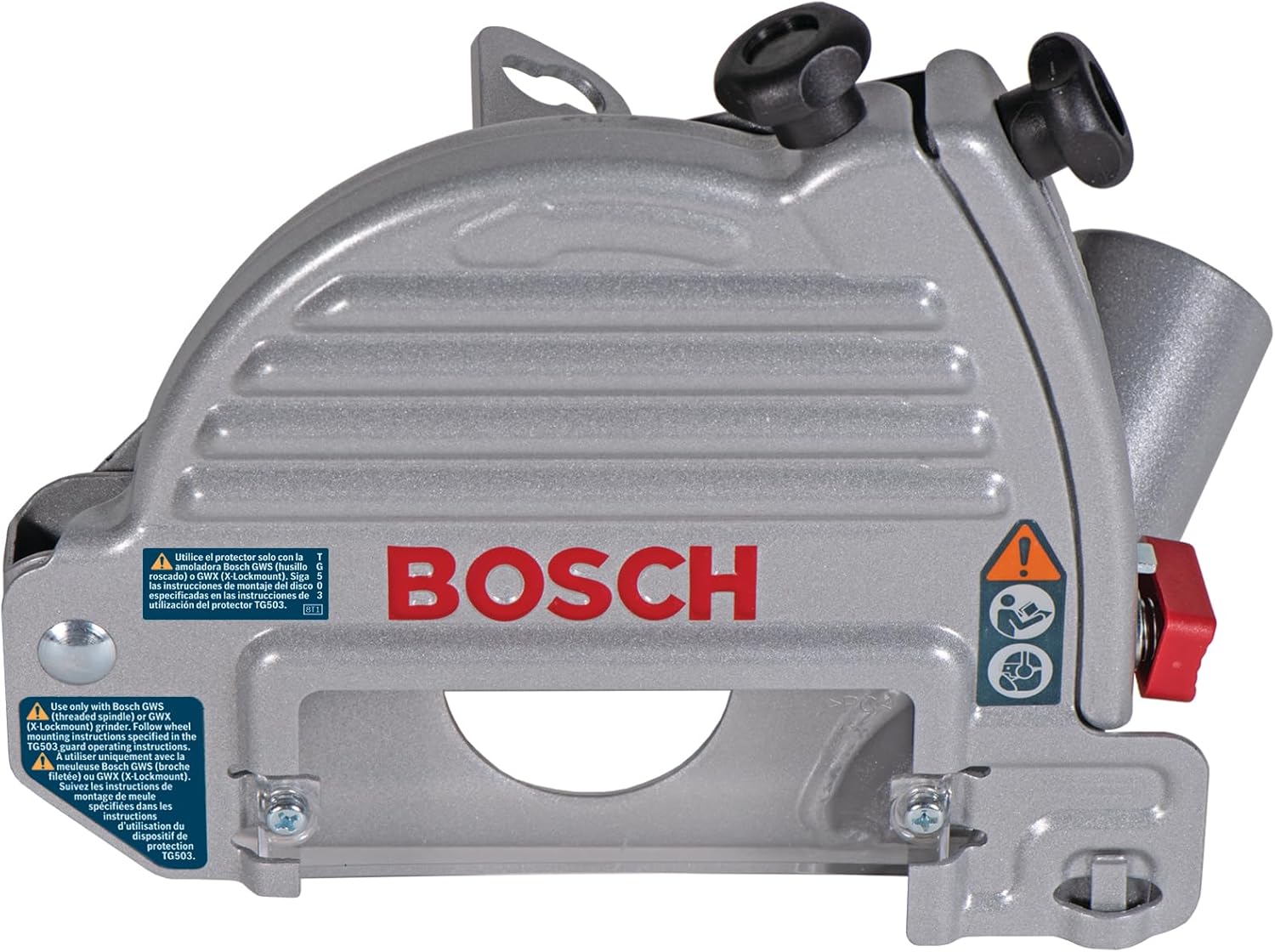
The BOSCH TG503 Tuckpointing Dust Guard is designed to enhance dust collection during tuckpointing applications with compatible angle grinders. Key features include:
- Tool-Free Installation: Allows for quick attachment and removal from the angle grinder.
- Spring-Loaded Guard: Collects dust effectively from the start of the cut.
- Variable-Depth Adjustment: Enables setting the desired cutting depth.
- Large Viewing Window: Provides visibility of the cutting line.
- 1-3/8 In. Dust Port: Compatible with Bosch vacuum hose nozzles; adapters available for other systems.
- Compatibility: Fits 4-1/2 In., 5 In., and 6 In. Bosch angle grinders (standard and X-LOCK mounts).

Setup
- Prepare the Angle Grinder: Ensure the angle grinder is unplugged or its battery is removed. Remove any existing guard or accessories.
- Attach the Dust Guard: The TG503 features tool-free installation. Align the dust guard with the angle grinder's mounting points. Secure it firmly according to the grinder's specific attachment mechanism. Ensure it is seated correctly and cannot rotate freely.
- Install Tuckpoint Blade: Install the appropriate tuckpoint diamond blade (7/8 In. arbor for spindle grinders or X-LOCK blade for X-LOCK grinders) onto the angle grinder spindle. Refer to your angle grinder's manual for blade installation instructions.
- Connect Dust Extraction: Connect a Bosch vacuum hose nozzle to the 1-3/8 In. dust port on the guard. If using a different vacuum system, use an appropriate adapter (sold separately). Ensure a secure connection to maximize dust collection efficiency.

Operating Instructions
- Set Cutting Depth: Use the variable-depth adjustment mechanism on the guard to set the desired cutting depth. Ensure the depth is appropriate for the material and application.
- Position the Tool: Hold the angle grinder firmly with both hands. Position the dust guard over the work surface, ensuring the blade is aligned with the intended cutting line. The large viewing window allows for precise alignment.
- Start Cutting: Turn on the angle grinder. Allow the blade to reach full speed before making contact with the material. Gently plunge the blade into the material. The spring-loaded guard will retract as the cut progresses, continuously collecting dust.
- Maintain Control: Guide the tool smoothly along the cutting line. Do not force the tool. Allow the blade to do the work.
- Finish Cut: Once the cut is complete, lift the tool away from the material before turning off the angle grinder.


Maintenance
Regular maintenance ensures the longevity and optimal performance of your dust guard.
- Cleaning: After each use, disconnect the dust guard from the angle grinder and dust extractor. Clean the guard thoroughly to remove any accumulated dust and debris. Use a brush or compressed air. Ensure the viewing window remains clear.
- Inspection: Periodically inspect the dust guard for signs of wear, cracks, or damage, especially around the dust port, adjustment mechanisms, and mounting points. Replace any damaged parts immediately.
- Storage: Store the dust guard in a clean, dry place, away from direct sunlight and extreme temperatures.
Troubleshooting
| Problem | Possible Cause | Solution |
|---|---|---|
| Poor dust collection | Dust port clogged; vacuum hose not securely connected; vacuum system not powerful enough; guard not properly sealed to surface. | Clear dust port; ensure secure hose connection; use a more powerful vacuum; ensure guard makes good contact with the work surface. |
| Guard does not fit angle grinder | Incompatible grinder model or size; incorrect installation. | Verify grinder compatibility (4-1/2 In., 5 In., 6 In. Bosch angle grinders); re-read installation instructions for your specific grinder model. |
| Difficulty adjusting cutting depth | Adjustment mechanism is dirty or jammed. | Clean the adjustment mechanism to remove debris. |
Specifications
- Model: TG503
- Brand: Bosch
- Compatible Grinder Sizes: 4-1/2 In., 5 In., 6 In. Bosch Angle Grinders (Standard and X-LOCK)
- Dust Port Diameter: 1-3/8 In.
- Material: Blend
- Item Weight: 2.97 pounds (1.35 Kilograms)
- Package Dimensions: 9.65 x 7.28 x 4.45 inches
Warranty and Support
For warranty information or technical support regarding your BOSCH TG503 Tuckpointing Dust Guard, please refer to the warranty documentation included with your original purchase or visit the official Bosch website. You may also contact Bosch customer service for assistance.
Bosch Official Website: www.boschtools.com