
Weytoll KZU2433838664227VM
Weytoll 18V Cordless Drill Driver User Manual
Model: KZU2433838664227VM
Brand: Weytoll
1. Introduction
Thank you for choosing the Weytoll 18V Cordless Drill Driver. This manual provides essential information for the safe and efficient operation, maintenance, and troubleshooting of your new tool. Please read this manual thoroughly before first use and keep it for future reference.
2. Safety Instructions
Always follow basic safety precautions when using electrical tools to reduce the risk of fire, electric shock, and personal injury.
- Wear appropriate personal protective equipment, including safety glasses, gloves, and hearing protection.
- Keep your work area clean and well-lit. Cluttered or dark areas invite accidents.
- Do not operate power tools in explosive atmospheres, such as in the presence of flammable liquids, gases, or dust.
- Ensure the tool is switched off before making any adjustments, changing accessories, or storing the tool.
- Keep children and bystanders away while operating a power tool.
- Use the correct tool for your application. Do not force the tool.
- Maintain tools with care. Keep cutting tools sharp and clean.
- Store idle tools out of reach of children and untrained persons.
- Only use batteries and chargers specified by the manufacturer.
3. Product Overview
The Weytoll 18V Cordless Drill Driver is designed for various drilling and screwdriving tasks. It features a compact and ergonomic design for comfortable use.
Key Features:
- Premium Material: Constructed from engineering plastic with an integrated innovative structure and ergonomic anti-slip handle for comfortable grip.
- Quality Bearing Design: Features full metal gears and bearings made from high-hardness carbon steel with a quenching heat hardening process for maximum precision and stability.
- Brushless Motor: Equipped with a powerful brushless motor, offering high torque and adjustable speed. This design ensures no sparks during operation, reduced motor wear, extended service life, and improved work efficiency.
- Multi-Shift Torque Adjustment: Easily adjustable torque settings provide stable torque distribution to meet various application needs.
- Two Speed Control Modes: Offers 2-speed gear adjustment and stepless speed adjustment for precise control over drilling and screwdriving tasks.
- Integrated LED Work Light: Automatically illuminates the work area, useful for working in dimly lit conditions.
Components:
Refer to the image below for a visual representation of the drill driver's main components.

Figure 3.1: Weytoll 18V Cordless Drill Driver, showing the main unit, 18V Li-ion battery, and charger adapter.

Figure 3.2: Detailed view of the drill driver highlighting features like positive and negative rotation, quality bearings design, brushless motor, and cooling system.
4. Setup
4.1 Battery Installation and Charging
The drill driver operates on an 18V Lithium-ion battery. Ensure the battery is fully charged before first use.
- Charging the Battery: Connect the battery adapter to a power outlet and then to the battery. The indicator light on the battery or charger will show the charging status. Charge until the battery is full.
- Installing the Battery: Align the battery with the base of the drill driver and slide it in until it clicks securely into place.
- Removing the Battery: Press the battery release button (if present) and slide the battery out from the tool.

Figure 4.1: The drill driver features an indicator light to remind users to recharge the battery in time, showing 3 power indicator lights.
4.2 Installing Drill Bits/Screwdriver Heads
This drill driver uses hexagon mounting chucks for various bits.
- Ensure the tool is off and the battery is removed before changing bits.
- Pull outward on the clips of the chuck to open it.
- Insert the desired drill bit or screwdriver head into the chuck.
- Release the clips to secure the bit. Ensure the bit is firmly seated.

Figure 4.2: Illustration of how to easily replace drill bits with different functions by pulling outward on the clips to install the screwdriver head.
5. Operating Instructions
5.1 Powering On/Off and Direction Control
The trigger switch controls the power. A forward/reverse switch allows for changing the rotation direction.
- To turn on, press the trigger switch. Release to turn off.
- To change rotation direction, use the forward/reverse switch located above the trigger. Push left for forward rotation (screwing in), push right for reverse rotation (unscrewing).
5.2 Speed Control
The drill driver offers two main speed control methods:
- 2-Gear Adjustment: Use the gear selector switch (usually on top of the tool) to choose between low speed (for mounting screws, higher torque) and high speed (for punching/drilling, lower torque).
- Stepless Speed Adjustment: The speed can be continuously varied by the amount of pressure applied to the trigger switch. Pressing the trigger further increases the speed.
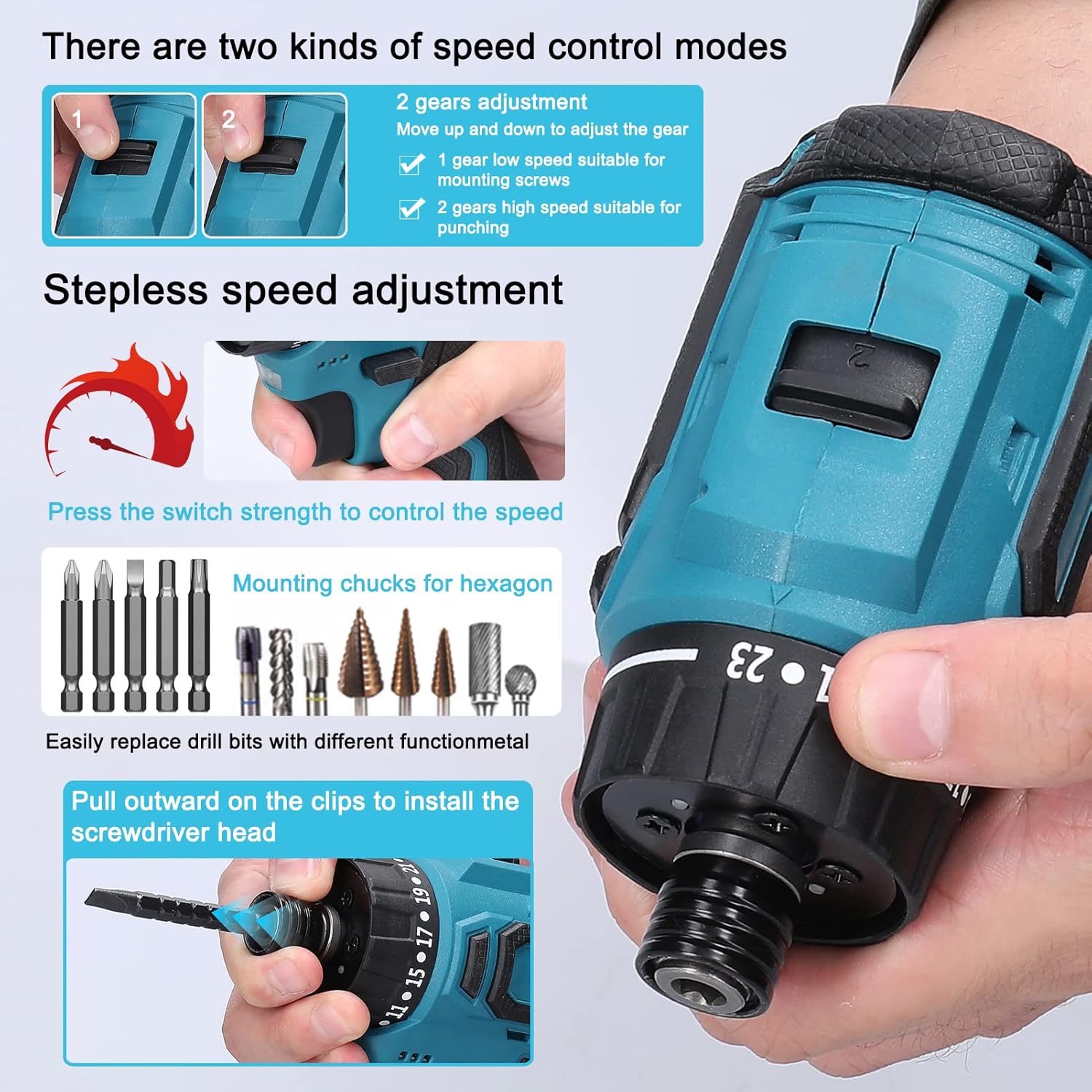
Figure 5.1: Illustration of the two speed control modes: 2-gear adjustment (1 for low speed, 2 for high speed) and stepless speed adjustment via trigger pressure.
5.3 Torque Settings (23 + 1 Stage)
The torque adjustment ring allows you to set the desired torque for screwdriving applications, preventing overtightening or stripping screws. The "drill" setting is for drilling tasks, providing maximum torque.
- Rotate the torque adjustment ring to select a setting from 1 to 23. Lower numbers are for smaller screws or softer materials, higher numbers for larger screws or harder materials.
- Select the drill icon for drilling operations.
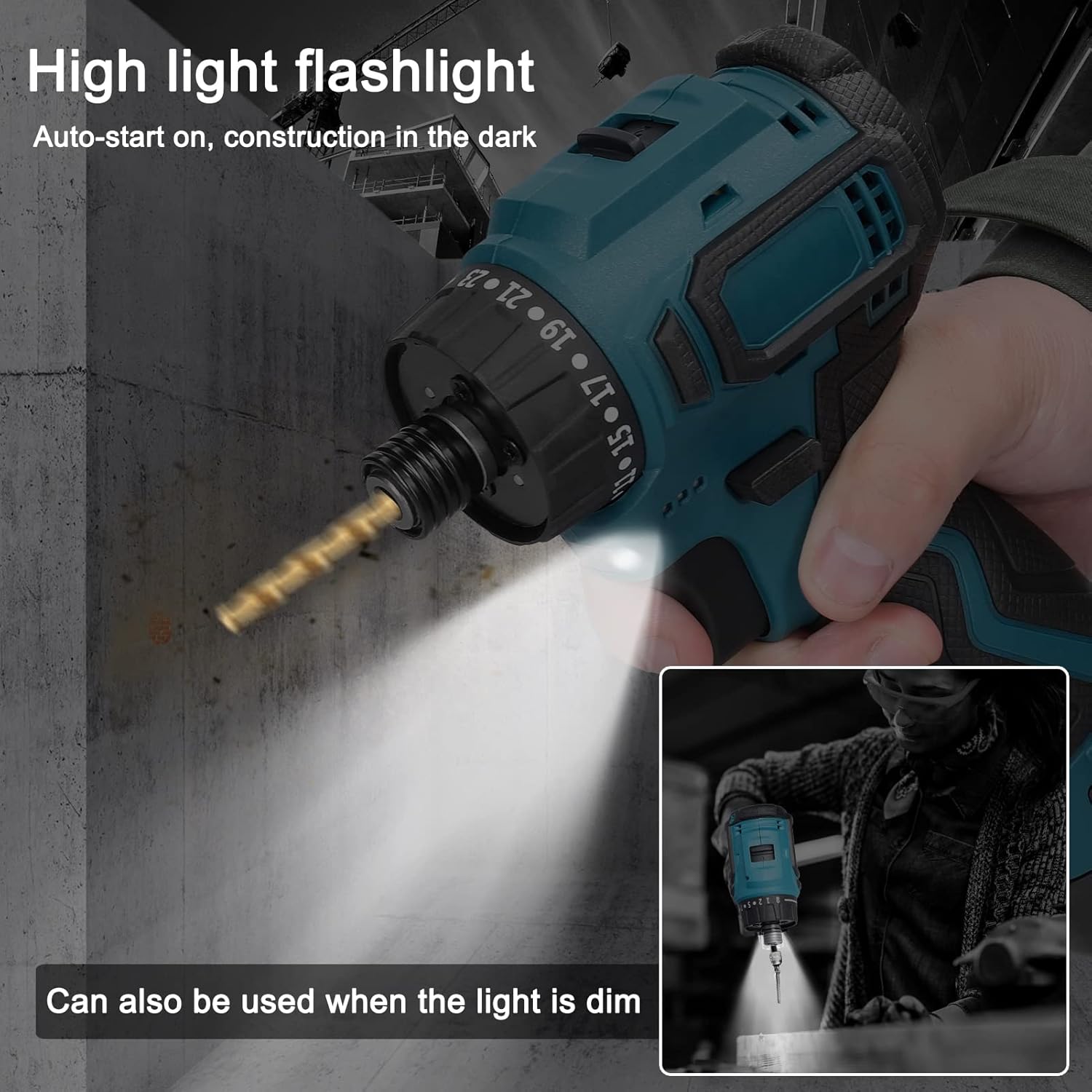
Figure 5.2: The drill driver offers 23+1 stage settings for various tasks, including hammer drill mode for metal, PVC, plastics, and wood, and removal of screws for electrical disassembly and repair.
5.4 Integrated LED Work Light
The built-in LED light automatically activates when the trigger is pressed, illuminating the work area for improved visibility, especially in dark or confined spaces.

Figure 5.3: The high-light flashlight feature automatically turns on, assisting with construction in dark environments and can also be used when the light is dim.
5.5 Applications
This versatile tool is suitable for a wide range of applications, including:
- Tightening and loosening screws in household projects.
- Installation of lamps and light fixtures.
- Assembly and disassembly of furniture.
- Repair of household appliances.
- Drilling holes in various materials like wood, plastic, and soft metals.
Figure 5.4: The drill driver is suitable for tightening screws in various home scenarios, such as installing lamps, household appliances, and door locks, as well as other assembly/disassembly tasks.
6. Maintenance
Regular maintenance ensures the longevity and optimal performance of your drill driver.
- Cleaning: After each use, wipe the tool with a clean, damp cloth. Do not use harsh chemicals or abrasive cleaners. Keep ventilation openings clear of dust and debris.
- Storage: Store the tool, batteries, and charger in a cool, dry place, away from direct sunlight and moisture. Ensure the tool is disconnected from the battery when not in use.
- Battery Care: Do not store batteries in a discharged state. Recharge them periodically if not used for extended periods. Avoid exposing batteries to extreme temperatures.
- Inspection: Periodically inspect the tool for any signs of damage, loose screws, or worn parts. Do not use a damaged tool.
7. Troubleshooting
| Problem | Possible Cause | Solution |
|---|---|---|
| Tool does not start. | Battery not charged or not properly installed. | Ensure battery is fully charged and securely inserted. |
| Reduced power or speed. | Low battery charge. / Incorrect speed setting. | Recharge battery. / Adjust speed setting to high. |
| Bit wobbles or falls out. | Bit not properly secured in chuck. | Re-insert bit and ensure it is firmly locked in place. |
| Overheating during use. | Continuous heavy use. / Blocked ventilation. | Allow tool to cool down. / Clear ventilation holes. |
8. Specifications
| Feature | Specification |
|---|---|
| Brand | Weytoll |
| Model Number | KZU2433838664227VM |
| Material | Plastic |
| Power Source | Battery (Cordless) |
| Battery Type | 18V Lithium-ion (1300 mAh) |
| Torque | 45 Nm (Newton-meters) |
| Rotation Speed | 405-1400 rpm (revolutions per minute) |
| Dimensions (L x W x H) | 18.2 x 5.08 x 12.2 cm (7.17 x 2.00 x 4.80 inches) |
| Weight (Host) | 591 g (1.30 lbs) |
| Special Features | Brushless Motor, Multi-shift Torque Adjustment, Two Speed Control Modes, Integrated LED Work Light |
9. Warranty and Support
For warranty information or technical support, please contact Weytoll customer service through your point of purchase. Keep your purchase receipt as proof of purchase.
Information regarding spare parts availability is currently unavailable. Please refer to the manufacturer or retailer for further assistance.