
Product Overview
These Maozhren replacement TV stand legs are designed for specific Samsung 55-inch TU7000 series televisions. They provide a stable and secure base for your TV, offering an alternative to wall mounting. The legs are constructed from durable PP GF4 material and feature a non-slip design for enhanced stability.
Compatible Samsung TV Models:
- UN55TU7000BXZA
- UN55TU700DFXZA
- UN55TU700DF
- LH55BETHLGFXGO
- LH55BETHLGFXZC
- LH55BETHLGFXZA
Compatible Samsung TV Stand Part Numbers:
- BN96-50856C
- BN96-50859A
Important Note: These legs are not universal. Please verify your TV model and the shape/dimensions of the bottom mounting holes before purchase to ensure compatibility. They are not compatible with NU and RU series models.
Package Contents
Please ensure all components are present before beginning installation.
- 2 x TV Stand Legs (Left and Right)

Image: The package includes two black TV stand legs, one marked 'L' for left and one 'R' for right. A small image of a TV resting on these legs is visible in the background.
Installation Instructions
Installation is designed to be quick and straightforward, requiring no tools or screws.
Step 1: Prepare Your TV
Carefully place your television face down on a soft, clean, and stable surface (e.g., a blanket or foam pad on a table) to prevent screen damage during installation.
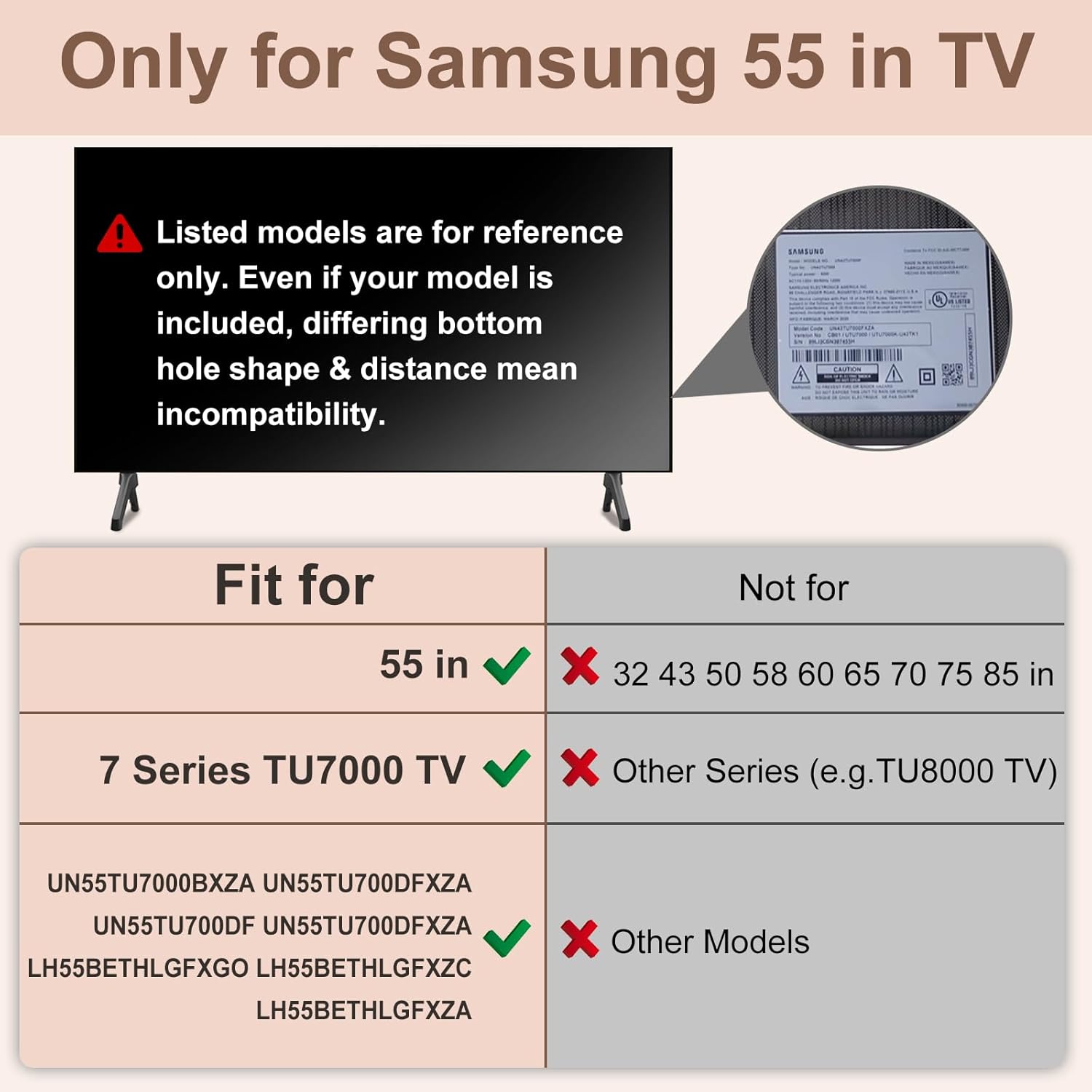
Image: A visual representation of a TV lying face down on a flat surface, illustrating the first step of preparation for attaching the stand legs.
Step 2: Attach the TV Legs
Identify the 'L' (Left) and 'R' (Right) markings on the TV stand legs. Align each leg with the corresponding slot on the bottom of your TV. Gently insert the legs into the slots until they click securely into place. No screws are required for this process.

Image: A detailed diagram showing the 'L' and 'R' labels on the TV legs and how they are inserted into the designated slots on the underside of the television. An arrow indicates the direction of insertion.
The entire installation process can typically be completed in under 3 minutes.
Video: Installation Guide
Video: This official Maozhren Store video demonstrates the two-step installation process for the TV stand legs, highlighting the ease of assembly and the drill-free design. It also shows the non-slip pads and the product's compatibility with various furniture surfaces.
Features and Benefits
- Drill-Free Installation: Avoids damage to walls, offering flexibility in TV placement.

Image: A comparison illustrating the benefit of drill-free installation. One panel shows a damaged wall from drilling for a wall mount, while the other shows a TV on stand legs with an intact wall, emphasizing ease of movement.
- Enhanced Stability: Made from durable PP GF4 material, capable of supporting TVs up to 80 lbs. Includes 4mm non-slip pads to prevent scratching and ensure a firm grip on various surfaces like wood, marble, or glass.

Image: A visual comparison highlighting the non-slip pad feature. One panel shows a TV stand without pads potentially damaging a surface, while the other shows a TV on Maozhren legs with visible non-slip pads, ensuring stability and surface protection.
- Versatile Placement: Suitable for various rooms and settings, including living rooms, bedrooms, and meeting rooms.

Image: A collage of three images demonstrating the versatility of the TV stand legs. It shows a TV placed on a stand in a living room, a bedroom, and a meeting room, illustrating its adaptability to different environments.
Specifications
| Brand: | Maozhren |
| Model Numbers: | BN96-50856C, BN96-50859A |
| Material: | Acrylonitrile Butadiene Styrene (ABS) / PP GF4 |
| Color: | Black |
| Maximum Weight Capacity: | 80 lbs |
| Mounting Type: | Tabletop Mount |
| Product Dimensions (each leg): | Approximately 25cm (9.8in) length, 11.5cm (4.52in) height, 5.3cm (2.08in) base width. Slot dimensions: 2.0cm (0.78in) width, 2.5cm (0.92in) height. |

Image: A detailed diagram illustrating the dimensions of a single TV stand leg, including its overall length, height, base width, and the specific measurements of the TV slot for compatibility verification.
Troubleshooting
Issue: Legs do not fit into the TV slots.
Possible Cause: Incompatibility with your specific TV model or incorrect orientation.
Solution:
- Double-check your TV's model number against the list of compatible models provided in the "Product Overview" section.
- Ensure you are inserting the 'L' leg into the left slot and the 'R' leg into the right slot, as marked.
- Verify the shape and dimensions of your TV's bottom mounting holes match the specifications shown in the product images. Even if your model is listed, variations can occur.
Issue: TV feels unstable after installation.
Possible Cause: Legs not fully seated, uneven surface, or excessive TV weight.
Solution:
- Ensure both TV legs are fully inserted and securely clicked into their respective slots.
- Place the TV on a flat, level, and sturdy surface.
- Confirm your TV's weight does not exceed the 80 lbs maximum capacity of the stand legs.
- Check that the 4mm non-slip pads are correctly positioned on the bottom of the legs.
Maintenance
To maintain the condition and stability of your TV stand legs:
- Regularly check that the legs are securely attached to the TV.
- Clean the legs with a soft, dry cloth. Avoid abrasive cleaners or solvents.
- Ensure the non-slip pads are free from debris to maintain optimal grip.
Warranty and Support
For warranty information or technical support, please contact Maozhren customer service through the retailer where the product was purchased. Keep your purchase receipt as proof of purchase.
You can also visit the official Maozhren Store for more products and support: