
ERBAUER EMT18-Li
Erbauer EMT18-Li 18V Brushless Multi-Tool
User Manual
Model: EMT18-Li | Brand: ERBAUER
1. Introduction
This manual provides essential information for the safe and effective operation, maintenance, and troubleshooting of your Erbauer EMT18-Li 18V Brushless Multi-Tool. Please read this manual thoroughly before using the tool and keep it for future reference.
The Erbauer EMT18-Li is a versatile cordless multi-tool designed for various applications such as cutting, sanding, scraping, and grinding. Its brushless motor technology ensures extended runtime and durability.
2. Safety Information
WARNING: Read all safety warnings, instructions, illustrations, and specifications provided with this power tool. Failure to follow all instructions listed below may result in electric shock, fire, and/or serious injury.
- Always wear eye protection, hearing protection, and a dust mask when operating the tool.
- Ensure the workpiece is securely clamped before beginning any operation.
- Keep hands and body parts away from the cutting or sanding area.
- Do not operate the tool in explosive atmospheres, such as in the presence of flammable liquids, gases, or dust.
- Use the correct accessory for the task. Do not force the tool.
- Disconnect the battery pack from the tool before making any adjustments, changing accessories, or storing the tool.
- Store idle tools out of the reach of children and do not allow persons unfamiliar with the power tool or these instructions to operate the power tool.
3. Package Contents
Upon opening the package, ensure all items are present and undamaged. If any parts are missing or damaged, contact your retailer immediately.
- Erbauer EMT18-Li 18V Brushless Multi-Tool (Tool only - battery and charger sold separately)
- Instruction Manual
- Standard accessories (e.g., sanding pad, various blades - specific accessories may vary by package)
4. Product Features and Components
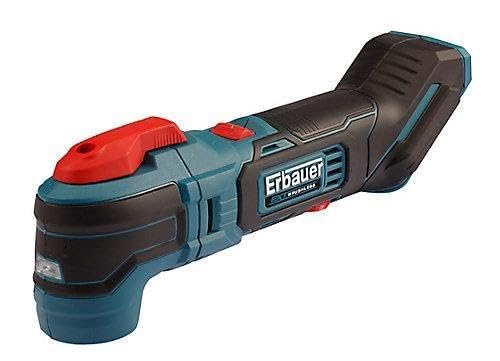
Figure 1: Erbauer EMT18-Li 18V Brushless Multi-Tool. This image displays the multi-tool from a side angle, showing its ergonomic handle, accessory attachment point, and power switch.
Familiarize yourself with the main components of your multi-tool:
- Accessory Attachment Point: For mounting various blades, sanding pads, and other attachments.
- Quick-Release Lever: Allows for fast and tool-free accessory changes.
- On/Off Switch: Activates and deactivates the tool.
- Variable Speed Dial: Adjusts the oscillation speed for different materials and applications.
- Ergonomic Handle: Provides comfortable grip and control during operation.
- Battery Port: For inserting a compatible Erbauer 18V battery pack.
5. Setup and Assembly
5.1. Battery Installation
The Erbauer EMT18-Li is sold as a bare tool, meaning the battery and charger are not included. Use only compatible Erbauer 18V battery packs.
- Ensure the tool is switched off.
- Align the battery pack with the battery port on the tool.
- Slide the battery pack into the port until it clicks securely into place.
- To remove the battery, press the release button on the battery pack and slide it out.
5.2. Attaching Accessories
- Ensure the battery is removed from the tool for safety.
- Locate the quick-release lever on the accessory attachment point.
- Push the quick-release lever to open the accessory clamp.
- Align the accessory (e.g., saw blade, sanding pad) with the attachment point, ensuring it fits snugly.
- Release the quick-release lever to secure the accessory. Ensure it is firmly locked in place before use.
6. Operating Instructions
6.1. Powering On/Off
- To turn the tool ON, slide the On/Off switch to the 'I' position.
- To turn the tool OFF, slide the On/Off switch to the 'O' position.
6.2. Adjusting Speed
The variable speed dial allows you to adjust the oscillation rate to suit the material and application:
- Rotate the speed dial to increase or decrease the oscillation speed.
- Lower speeds are suitable for delicate work, softer materials, or when more control is needed.
- Higher speeds are ideal for faster material removal on harder materials.
6.3. General Operation Tips
- Apply light, consistent pressure. Do not force the tool, let the accessory do the work.
- For cutting, allow the blade to reach full speed before engaging the workpiece.
- For sanding, move the tool in a consistent pattern to ensure even material removal.
- Regularly check the accessory for wear and replace it when dull or damaged.
7. Maintenance
Regular maintenance ensures the longevity and optimal performance of your multi-tool.
- Cleaning: After each use, wipe down the tool with a clean, damp cloth. Do not use harsh chemicals or abrasive cleaners. Keep ventilation openings clear of dust and debris.
- Accessory Inspection: Inspect accessories before and after each use for wear, cracks, or damage. Replace worn accessories promptly.
- Storage: Store the tool in a dry, secure location out of reach of children. Remove the battery pack before long-term storage.
- Lubrication: The tool's internal components are factory-lubricated and do not require additional lubrication.
8. Troubleshooting
| Problem | Possible Cause | Solution |
|---|---|---|
| Tool does not start | Battery not inserted correctly; Battery discharged; On/Off switch not fully engaged. | Ensure battery is fully inserted; Charge battery; Fully engage On/Off switch. |
| Reduced performance | Dull or damaged accessory; Overheating; Battery low. | Replace accessory; Allow tool to cool down; Charge battery. |
| Excessive vibration or noise | Accessory not properly secured; Damaged accessory. | Re-secure accessory; Replace damaged accessory. |
If the problem persists after attempting these solutions, please contact customer support.
9. Specifications
| Feature | Specification |
|---|---|
| Brand | ERBAUER |
| Model | EMT18-Li |
| Voltage | 18V (Battery not included) |
| Motor Type | Brushless |
| Weight | 4 Kilograms (Tool only) |
| ASIN | B0C7JDR95B |
10. Warranty and Support
This Erbauer product is manufactured to high-quality standards and is guaranteed for a period of time from the date of purchase against faulty materials or workmanship. Please refer to the warranty card included with your purchase for specific terms and conditions.
For technical assistance, spare parts, or warranty claims, please contact Erbauer customer support through your retailer or the official Erbauer website. Keep your proof of purchase for any warranty claims.
Related documentsEMT18-Li

Ask a question about this manual
Ask about setup, troubleshooting, compatibility, parts, safety, or missing instructions. Manuals+ will review the question and use this page’s manual context to help answer it.