
1. Introduction
This manual provides detailed instructions for the installation, operation, and maintenance of your Fexfor 2.4G/5G 1080P Light Bulb Security Camera. Please read this manual thoroughly before using the product to ensure correct usage and optimal performance. Keep this manual for future reference.

Image: The Fexfor Light Bulb Security Camera shown alongside a smartphone displaying its live video feed.
2. Product Overview
The Fexfor Light Bulb Security Camera is a versatile surveillance device designed for both indoor and outdoor use. It features 1080P resolution, 2.4G/5G Wi-Fi connectivity, 360-degree pan and 100-degree tilt capabilities, color night vision, two-way audio, and motion detection with siren alerts. It integrates with smart home systems like Amazon Alexa for convenient control.
Key Features:
- High-Definition Video: 1080P resolution for clear imaging.
- Dual-Band Wi-Fi: Supports both 2.4GHz and 5GHz networks for flexible connectivity.
- 360-Degree Coverage: Pan and tilt functionality provides comprehensive area monitoring.
- Color Night Vision: Enhanced visibility in low-light conditions with a range of up to 50 feet.
- Two-Way Audio: Built-in microphone and speaker for real-time communication.
- Advanced Motion Detection: AI-powered human shape detection and customizable alarm zones to reduce false alerts.
- Siren and Spotlight Alarm: Deter intruders with an audible siren and bright spotlight.
- Storage Options: Supports local storage via TF card (up to 128GB) and cloud storage service.
- Smart Home Integration: Compatible with Amazon Alexa for voice control.

Image: Illustration of the camera's 360-degree horizontal rotation and 100-degree vertical tilt capabilities.
3. Package Contents
Please check the package contents upon receipt. If any items are missing or damaged, contact customer support.
- Fexfor Light Bulb Security Camera
- E27/E26 Bulb Base (for testing/installation)
- User Manual
- Mounting Screws (if applicable, not explicitly shown but common)

Image: The camera and its included bulb base, demonstrating how to remove it from the packaging.
4. Setup Guide
Follow these steps to set up your Fexfor Light Bulb Security Camera.
- Download the App: Scan the QR code provided in the manual or search for the designated app (e.g., 'iCam365' or similar, as implied by common camera apps) on the App Store (iOS) or Google Play Store (Android). Register for an account.
- Install the Camera: Screw the bulb camera into a standard E27/E26 light socket. Ensure the power to the socket is turned off before installation. Once installed, turn on the power.
- Connect to Wi-Fi: Ensure your smartphone is connected to a 2.4GHz or 5GHz Wi-Fi network. The camera supports both bands.
- Pair the Camera: Open the app and follow the on-screen instructions to add a new device. The app will likely generate a QR code. Point the camera lens at the QR code on your phone screen. You will hear a 'cuckoo' sound when pairing is successful.
- Complete Registration: Wait approximately one minute for the camera to connect and register to your account. The included bulb base is for testing purposes and not intended for long-term use.

Image: A visual guide illustrating the five steps for easy installation, from app download to camera pairing.

Image: A diagram illustrating the wireless connectivity and effective range of the security camera within a home environment.
5. Operating Instructions
5.1 App Interface and Live View
Once connected, open the app to access the live view of your camera. The interface typically includes options for live streaming, accessing recorded history, cloud storage, taking screenshots, using the intercom, and recording video.
5.2 Pan, Tilt, and Digital Zoom
Use the controls within the app to remotely adjust the camera's viewing angle. The camera supports 360-degree horizontal pan and 100-degree vertical tilt. Digital zoom allows you to magnify specific areas of the live feed.
5.3 Motion Detection and Alerts
The camera features intelligent motion detection with AI human shape recognition. You can customize detection zones and sensitivity levels within the app to minimize false alarms. When motion is detected, you will receive instant notifications on your smartphone.

Image: The mobile application interface demonstrating how to define specific alarm areas for motion detection.

Image: Screenshot of the app's motion detection settings, allowing users to adjust sensitivity and select custom modes.
5.4 Siren and Spotlight Alarm
In the event of suspicious activity, you can activate the built-in siren and spotlight directly from the app to deter potential intruders. The camera can also be configured to trigger these alarms automatically upon motion detection.

Image: The camera's siren and spotlight activating in response to a detected event, with corresponding notification push on the mobile app.
5.5 Two-Way Audio
Utilize the two-way audio feature to communicate with individuals near the camera. This is useful for speaking to delivery personnel, family members, or deterring unwanted visitors.
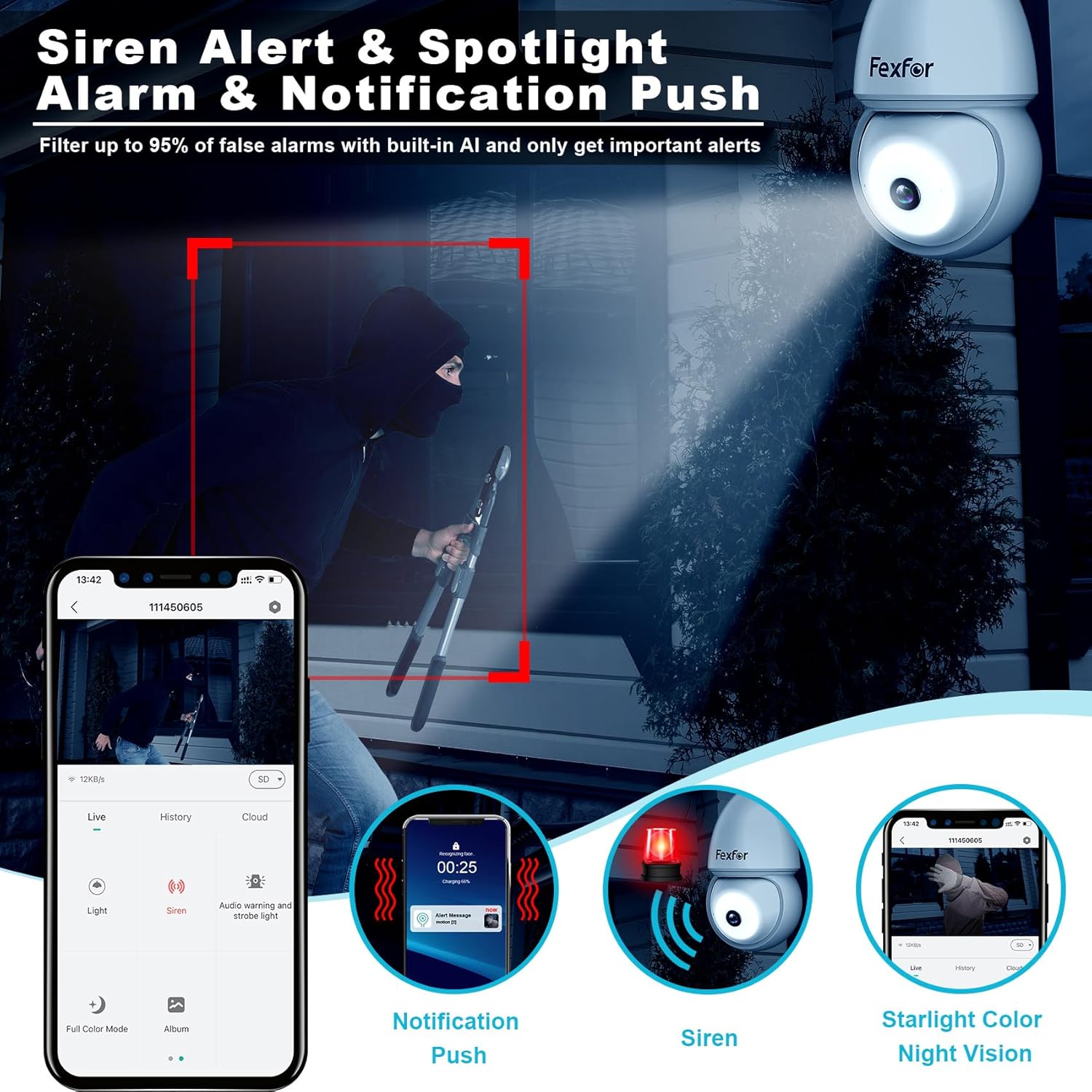
Image: A user interacting with a delivery person at their front door using the camera's two-way audio function.
5.6 Color Night Vision
The camera provides full-color night vision, allowing for clear and detailed images even in very low light conditions, up to 50 feet. This is achieved through advanced low-light technology and integrated spotlights.

Image: A visual comparison highlighting the superior clarity and color reproduction of Fexfor's color night vision compared to typical spotlight night vision.
5.7 Storage Options
The camera supports local storage via a TF (microSD) card up to 128GB (card not included). Additionally, a permanent free 7-day rolling cloud storage service is available for recorded events.

Image: The camera's SD card slot and an icon representing the permanent 7-day free cloud storage service.
5.8 Multi-User Sharing
You can share camera access with multiple users through the app, allowing family members or trusted individuals to view the live feed and receive alerts.

Image: A smartphone displaying the camera app, indicating that multiple users can share access to the camera feed.
5.9 Smart Home Integration
The camera is compatible with Amazon Alexa. You can use voice commands to view the camera feed on compatible smart displays.

Image: The camera shown in a room, with a speech bubble indicating an Alexa voice command to view the camera feed.
6. Maintenance
Regular maintenance ensures the longevity and optimal performance of your security camera.
- Cleaning: Gently wipe the camera lens and body with a soft, dry cloth. Avoid using harsh chemicals or abrasive materials that could scratch the lens.
- Firmware Updates: Periodically check the app for available firmware updates. Keeping the firmware updated ensures you have the latest features and security enhancements.
- Wi-Fi Stability: Ensure your Wi-Fi network is stable and strong in the camera's location to prevent disconnections and ensure continuous recording.
- Storage Management: If using a TF card, periodically check its status and ensure it has sufficient space. For cloud storage, verify your subscription status if applicable beyond the free 7-day rolling service.
7. Troubleshooting
If you encounter issues with your camera, refer to the following common problems and solutions:
| Problem | Possible Cause | Solution |
|---|---|---|
| Camera fails to connect to Wi-Fi | Incorrect Wi-Fi password; camera too far from router; 5GHz network selected but camera only supports 2.4GHz (or vice versa); router firewall settings. | Verify Wi-Fi password. Move camera closer to router. Ensure correct Wi-Fi band is selected (2.4GHz or 5GHz). Check router settings or temporarily disable firewall. Reset camera and try again. |
| No live view or offline status | No power; Wi-Fi disconnected; app issue. | Check power supply to the light socket. Verify Wi-Fi connection. Restart the app. Restart the camera by turning off/on the power. |
| Motion detection alerts are too frequent or not working | Sensitivity too high/low; detection zone not set correctly; environmental factors (e.g., moving branches). | Adjust motion detection sensitivity in the app. Redefine detection zones to exclude irrelevant areas. Ensure camera lens is clean. |
| Poor image quality | Dirty lens; insufficient lighting; network bandwidth issues. | Clean the camera lens. Ensure adequate lighting for optimal image quality. Check your internet speed. |
| Two-way audio not working | Microphone/speaker muted in app; app permissions; network delay. | Check app settings to ensure microphone and speaker are enabled. Grant necessary audio permissions to the app on your phone. Ensure a stable network connection. |
8. Specifications
| Feature | Detail |
|---|---|
| Brand | Fexfor |
| Model | B0C7GYNKTJ |
| Video Capture Resolution | 1080p, 2K |
| Connectivity Technology | Wireless (Wi-Fi) |
| Wireless Communication Technology | Wi-Fi (2.4G/5G) |
| Special Feature | Motion Sensor, Color Night Vision, Two-Way Audio, Siren, Spotlight |
| Indoor/Outdoor Usage | Indoor, Outdoor (covered areas recommended for outdoor) |
| Night Vision Range | 50 Feet |
| Controller Type | Amazon Alexa |
| Mounting Type | Wall Mount (via light socket) |
| Storage | TF Card (up to 128GB), Cloud Storage (7-day free rolling) |
| Item Weight | 11.3 ounces |
| Package Dimensions | 6.69 x 4.02 x 3.62 inches |
| Manufacturer | Shenzhen CTV Int Cloud Technology Co., Ltd. |
9. Warranty and Support
9.1 Warranty Information
Fexfor offers a 12-month replacement warranty for this product, instead of repair, from the date of purchase. This warranty covers manufacturing defects and malfunctions under normal use. Please retain your proof of purchase for warranty claims.

Image: Details on Fexfor's exclusive customer service, highlighting the 12-month replacement policy and permanent 7-day free cloud storage.
9.2 Customer Support
For technical assistance, troubleshooting, or warranty inquiries, please contact Fexfor customer support:
- Email: support@fexfor.com
- Website: www.fexfor.com/support
Please provide your product model number (B0C7GYNKTJ) and a detailed description of the issue when contacting support.