
1. Introduction
Thank you for purchasing the BXLIYER SXAUTO Android 12 Universal Single Din Autoradio Stereo. This manual provides detailed instructions for the installation, operation, and maintenance of your new car stereo system. Please read this manual thoroughly before use to ensure proper functionality and to prevent damage.
2. Safety Information
- Professional Installation Recommended: Due to the complexity of car electrical systems, professional installation is highly recommended to avoid damage to the unit or your vehicle.
- Power Supply: Ensure the unit is connected to a 12V DC power supply with a negative ground.
- Wiring: Incorrect wiring can cause damage or fire. Always follow the wiring diagram provided.
- Driving Safety: Do not operate the unit in a way that distracts you from driving. Always prioritize road safety.
- Temperature: Avoid exposing the unit to extreme temperatures or direct sunlight for prolonged periods.
- Moisture: Keep the unit away from water and excessive moisture.
3. Package Contents
Verify that all items are present in the package:
- Autoradio Unit
- Power Cable
- RCA Output Socket A (for Subwoofer, AUX In, Front Camera)
- RCA Output Socket B (for WiFi Antenna, Camera, Parking, Bluetooth Antenna)
- RCA Output Socket C
- GPS Antenna
- USB Cables (2x)
- Frame Kit
- Rear Camera (FREE)
- User Manual
- Accessories (MIC)
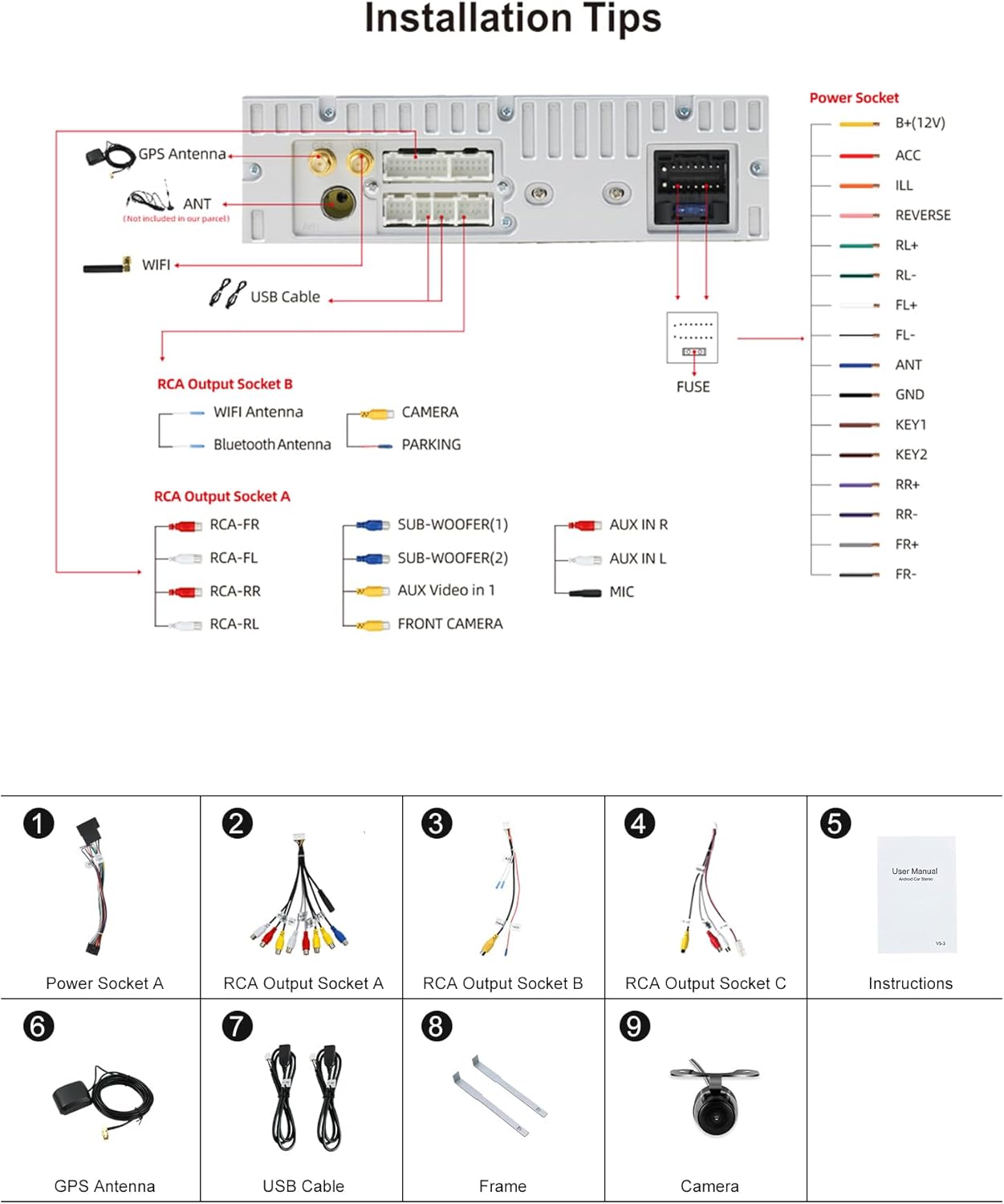
Image: Package Contents and Wiring Diagram. This image displays the various components included in the package, such as the main unit, power cables, RCA cables, GPS antenna, USB cables, frame, and rear camera. It also illustrates the detailed wiring connections for the power socket and RCA output sockets A and B.
4. Installation
This section provides a general guide for installing the autoradio. Specific vehicle models may require additional adapters or modifications. Consult a professional if you are unsure.
4.1 Wiring Connections
Refer to the wiring diagram for correct connections. Ensure all connections are secure to prevent intermittent issues.
- Power Socket: Connect B+(12V) to constant 12V, ACC to ignition switched 12V, ILL to illumination, REVERSE to reverse gear signal, ANT to antenna power, GND to ground.
- RCA Output Socket A: Connect for subwoofer, auxiliary audio input (AUX IN R/L), and front camera input.
- RCA Output Socket B: Connect the WiFi antenna, rear camera input, parking brake signal, and Bluetooth antenna.
- USB Cables: Connect the provided USB cables for external devices.
- GPS Antenna: Connect the GPS antenna and place it in a location with a clear view of the sky.
Image: Detailed Wiring Diagram. This diagram illustrates the connections for the power socket, including B+(12V), ACC, ILL, REVERSE, ANT, and GND. It also shows the connections for RCA Output Socket A (subwoofer, AUX IN, front camera) and RCA Output Socket B (WiFi antenna, camera, parking, Bluetooth antenna), along with the GPS antenna and USB cable connections.
4.2 Physical Installation
- Remove the existing car stereo unit.
- Connect all necessary wiring harnesses to the new autoradio.
- Mount the autoradio into the dashboard using the provided frame kit.
- Secure the unit and reassemble the dashboard trim.
5. Initial Setup
5.1 First Power On
After installation, turn on your vehicle's ignition. The unit should power on automatically. The system features a fast-boot function, allowing access to the Android system in less than 2 seconds.

Image: Fast-boot Feature. This image illustrates the fast-boot capability of the autoradio, highlighting that the system can be accessed in less than 2 seconds, significantly reducing startup time.
5.2 Language and Time Settings
Navigate to the system settings to configure the language, time, and date. The unit supports up to 196 languages.
Image: Language and Multicolor Illumination Settings. This image shows the interface for selecting from up to 196 languages and customizing the button light color, allowing for personalized aesthetic preferences.
5.3 Wi-Fi Connection
Connect the unit to a Wi-Fi network for internet access, app downloads, and online navigation. The unit supports dual-band Wi-Fi (2.4GHz and 5GHz).

Image: Dual Band Wi-Fi and 4G Connectivity. This image highlights the unit's support for both 2.4GHz and 5GHz Wi-Fi bands, along with 4G connectivity, enabling robust internet access for streaming and online services.
6. Operation
6.1 Basic Controls
The unit features a 7-inch touchscreen for most operations. Physical buttons or knobs may be present for common functions like volume, power, and menu access.
6.2 Radio (AM/FM/RDS)
Access the Radio application to tune into AM/FM stations. The unit supports RDS (Radio Data System) for displaying station information.
6.3 Bluetooth 5.0
Pair your smartphone via Bluetooth for hands-free calling, contact synchronization, and audio streaming. Navigate to the Bluetooth settings on the unit and your phone to initiate pairing.
Image: Bluetooth 5.0 Technology. This image highlights the benefits of Bluetooth 5.0, including more efficient data transmission and accurate positioning, supporting phone calls, call records, phone book access, and music streaming.
6.4 USB/MicroSD Playback
Insert a USB drive or MicroSD card (up to 256GB) into the designated ports to play audio and video files.
6.5 Steering Wheel Control
Connect your vehicle's steering wheel controls to the SXAUTO system to manage functions like volume, track skipping, and mode switching directly from your steering wheel.
Image: Steering Wheel Control. This image demonstrates how the unit supports original car steering wheel controls, allowing users to easily switch songs, adjust volume, and navigate for a safer and more enjoyable driving experience.
7. Key Features
7.1 Android 12 System
The unit runs on Android 12 with a Quad Core Cortex-A7 processor (up to 1.8 GHz), 2GB RAM, and 32GB ROM, providing a responsive and stable user experience.
7.2 Wireless CarPlay & Android Auto
Integrate your smartphone seamlessly. Connect wirelessly via Wi-Fi (BT) or wired via USB to access navigation, music, messages, and calls directly from the unit's display.

Image: Built-in CarPlay & Android Auto. This image illustrates the integrated CarPlay and Android Auto features, showing how a smartphone can be connected wirelessly or wired to access phone functions like music, navigation, and messaging on the car stereo display.
7.3 IPS Screen
Enjoy a clear and vibrant display with the IPS screen, offering a wide viewing angle of 178 degrees and a resolution of 1280x720 for Full HD 1080P video playback.
Image: IPS Screen. This image highlights the IPS screen technology, emphasizing its premium display quality, 178-degree viewing angle, and 1280x720 resolution for 1080P video playback.
7.4 Split Screen Mode
Run two applications simultaneously on the screen. Easily switch between full-screen and split-screen modes with a simple swipe.
Image: Split Screen Mode. This image demonstrates the split-screen mode, showing two applications (navigation and video) running concurrently on the display, enhancing multitasking capabilities.
7.5 GPS Navigation
The unit supports both online and offline GPS navigation. Download your preferred navigation apps like Waze or IGO from the Play Store.
Image: GPS Navigation. This image illustrates the GPS navigation capabilities, showing both online and offline map options, ensuring reliable guidance even without an internet connection.
7.6 Reversing Camera Support
Connect a backup camera (a free LED camera is included). The unit will automatically switch to the camera view when reverse gear is engaged, assisting with safe parking.
Image: Reversing Camera Support. This image demonstrates the reversing video support, showing how the car stereo monitor automatically displays the rear view when backing up, with examples of both day and night vision for enhanced safety.
7.7 DAB+ Digital Radio (Optional)
For enhanced audio quality, the unit is compatible with a DAB+ module (sold separately, ASIN: B092D31BVX). Connect the DAB+ antenna for digital radio reception.
Image: DAB+ Digital Radio Support. This image illustrates the optional DAB+ digital radio feature, showing the interface for receiving digital audio broadcasting channels with near CD-quality sound and noise-free transmission.
7.8 Mirror-Link Mode
Connect your Android or Apple phone to mirror its screen onto the autoradio display, allowing you to control your phone's apps and content.
Image: Mirror-Link Mode. This image demonstrates the Mirror-Link mode, showing a smartphone screen mirrored onto the car stereo display, enabling control and viewing of phone content directly from the unit.
7.9 OBD2 Compatibility
The unit is compatible with most OBD2 scanners and Wi-Fi OBD2 modules. With a suitable app (e.g., Torque), you can retrieve vehicle error codes and display real-time vehicle data on the screen.
8. Maintenance
8.1 Cleaning
Use a soft, dry cloth to clean the screen and unit exterior. Avoid abrasive cleaners or solvents that could damage the surface.
8.2 Software Updates
Periodically check for software updates to ensure optimal performance and access to new features. Updates can typically be downloaded via Wi-Fi.
9. Troubleshooting
| Problem | Possible Cause | Solution |
|---|---|---|
| Unit does not power on | Incorrect wiring; Blown fuse; No power supply | Check power connections (B+, ACC, GND). Inspect vehicle's fuse box and the unit's fuse. Ensure 12V power is supplied. |
| No sound | Speaker wires disconnected; Volume too low; Mute activated | Check speaker wiring. Increase volume. Deactivate mute function. |
| Bluetooth not connecting | Bluetooth off; Device not in pairing mode; Interference | Ensure Bluetooth is enabled on both devices. Put phone in pairing mode. Try pairing in a different location. |
| GPS signal lost | GPS antenna obstructed or disconnected | Ensure GPS antenna has a clear view of the sky and is securely connected. |
| Rear camera not displaying | Camera not connected; Reverse trigger wire not connected | Check camera video input and power connections. Verify the REVERSE trigger wire is correctly connected to the vehicle's reverse light signal. |
10. Specifications
- Operating System: Android 12
- CPU: T3 Quad Core Cortex-A7, up to 1.8 GHz
- RAM: 2GB DDR3
- ROM: 32GB
- Screen Size: 7 Inch
- Screen Resolution: 1280x720
- Audio Output: 4 x 50W max
- Bluetooth: Version 5.0
- Wi-Fi: Dual band (2.4GHz / 5GHz)
- Radio Tuner: AM/FM with RDS
- USB/MicroSD Support: Up to 256GB
- Weight: 2 Kilograms
- Model Number: SXAUTO-G14D-BX
11. Warranty and Support
11.1 Warranty
This product comes with a 2-year warranty from the date of purchase, covering manufacturing defects. Please retain your proof of purchase for warranty claims.
11.2 Technical Support
For technical assistance, installation queries, or troubleshooting not covered in this manual, please contact SXAUTO technical support at: sxauto_techsupport@163.com.


