
1. Introduction
Thank you for choosing the YUNTX Android 14 Car Stereo. This manual provides detailed instructions for the installation, operation, and maintenance of your new car stereo system. Please read this manual thoroughly before installation and use to ensure proper functionality and to maximize your user experience. Keep this manual for future reference.
2. Product Overview and Features
The YUNTX Android 14 Car Stereo is an advanced infotainment system designed for Nissan Qashqai and X-Trail models from 2013 to 2017. It features a high-resolution IPS touchscreen and a powerful Octa-Core processor for smooth performance.
Key Features:
- Operating System: Android 14
- Processor: Octa Core-2.0GHz
- Memory: 6GB RAM, 128GB ROM
- Display: 10.1-inch IPS 2.5D Digital Touchscreen with 1280*600 resolution
- Audio Output: 4*50W with Integrated DSP (64-band equalizer, surround sound)
- Connectivity: Built-in Wireless/Wired Apple CarPlay & Android Auto, Bluetooth 5.0, Integrated WIFI, 4G compatibility (optional modem)
- Navigation: Pre-installed online and offline GPS applications with 3D map support and voice guidance
- Radio: NXP TEF7708 Radio IC, AM/FM tuner, RDS support
- Mirror Link: Supports smartphone screen mirroring via USB or Wi-Fi
- Additional Functions: Rear camera input (camera included), Steering Wheel Control support, OBD support (optional adapter), 4K video playback, 360° panoramic camera support (optional)
Included Accessories:
The package includes essential components for installation and operation:
- Power Cable
- RCA Output Cables (A, B, C, D)
- GPS Antenna
- USB Cable
- External Microphone
- Radio Antenna
- Rear Camera
- Autoradio Unit
- Installation Brackets
- User Manual (this document)

Figure 2.1: Overview of System Features
3. Setup and Installation
Proper installation is crucial for the optimal performance of your car stereo. It is recommended that installation be performed by a qualified professional.
3.1 Vehicle Compatibility
This unit is specifically designed for Nissan Qashqai and X-Trail models manufactured between 2013 and 2017. If you are unsure about compatibility, please consult with the seller or a professional installer, providing a photo of your car's dashboard.
3.2 Installation Steps Overview
- Preparation: Ensure the vehicle's ignition is off and the battery is disconnected before starting installation.
- Remove Original Unit: Carefully remove the existing car stereo and dashboard panel.
- Mounting: Use the provided installation brackets to secure the new autoradio unit into the dashboard opening.
- Wiring Connections: Connect all necessary cables as per the wiring diagram. This includes power, GPS antenna, USB cables, RCA output sockets, external microphone, and the rear camera.
- Test Functionality: Before fully reassembling the dashboard, reconnect the battery and perform a basic test of the unit's functions (power, audio, radio, touchscreen).
- Final Assembly: Once confirmed working, carefully reassemble the dashboard panels.
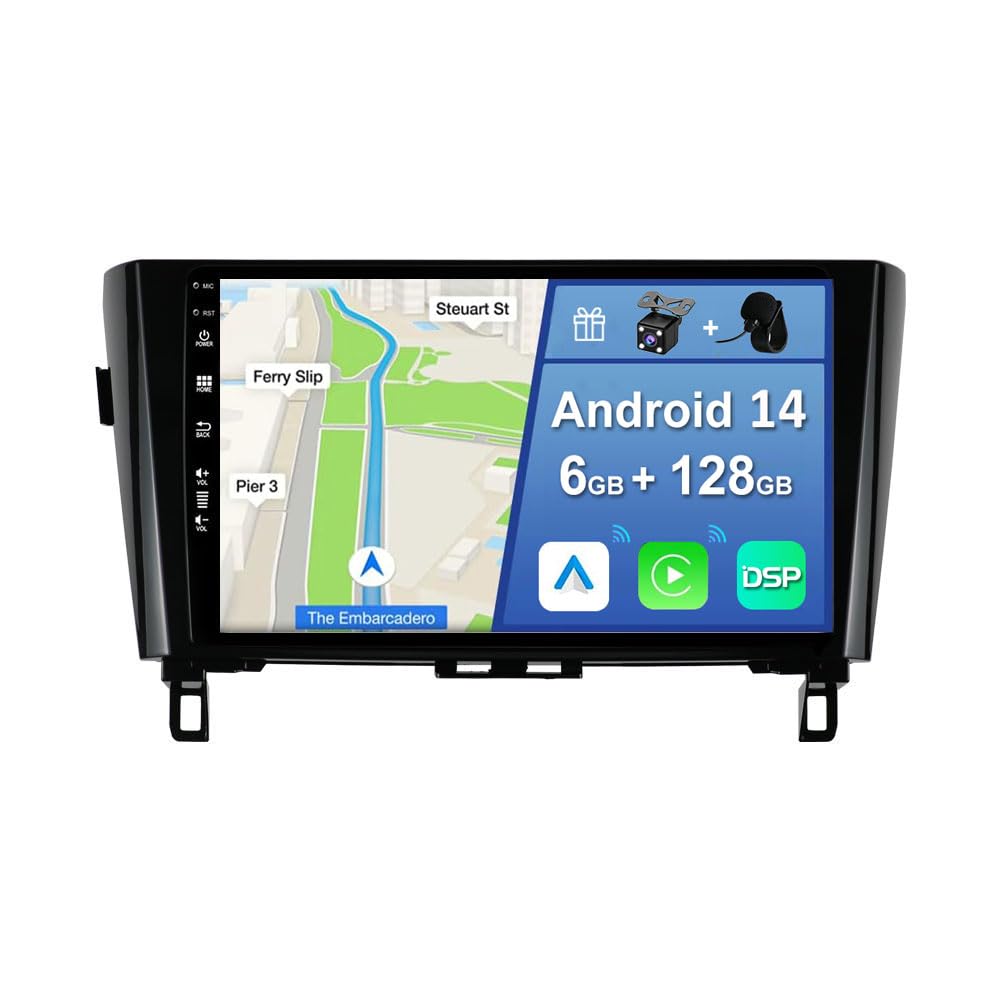
Figure 3.1: Autoradio and OEM Panel Integration
3.3 Wiring Diagram
Refer to the diagram below for detailed wiring connections. Ensure each cable is connected to its corresponding port.
- Power Socket: Connects to the vehicle's power harness.
- GPS Antenna: Connect for navigation functionality.
- USB Cables: For data transfer, media playback, and smartphone connectivity.
- RCA Output Sockets: For connecting external amplifiers, subwoofers, or additional displays.
- Rear Camera Input: Connect the included rear camera for automatic reverse view.
- External Microphone: Connect for improved call quality.
- CANBUS: If applicable to your vehicle model, connect the CANBUS decoder for steering wheel controls and other vehicle data integration.

Figure 3.2: Installation Tips and Package Contents
4. Operating Instructions
This section details the various functions and how to operate your YUNTX car stereo.
4.1 Basic Operation
- Power On/Off: The unit powers on automatically with the vehicle's ignition. To manually power off or restart, press and hold the power button (if available) or use the system menu.
- Touchscreen: Navigate the interface by tapping, swiping, and pinching on the 10.1-inch IPS display.
- Volume Control: Adjust volume using the on-screen controls or the vehicle's steering wheel controls.
4.2 Apple CarPlay & Android Auto
Connect your smartphone via USB or wirelessly to access CarPlay or Android Auto. This allows you to use navigation, make calls, send messages, and listen to music directly from your phone's interface on the car stereo screen.
4.3 Navigation (GPS)
The unit comes with pre-installed online and offline GPS navigation applications. Select your preferred navigation app from the main menu. The system supports 3D maps and voice guidance. You can listen to radio, Bluetooth audio, or USB/SD media while navigation is active.
4.4 Bluetooth 5.0
Pair your mobile phone via Bluetooth for hands-free calling and audio streaming.
- Go to the Bluetooth settings on the car stereo.
- Enable Bluetooth on your smartphone and search for available devices.
- Select the car stereo's Bluetooth name (e.g., "YUNTX Car Stereo") and pair.
- Once paired, you can access your phonebook, make calls, and play music.
4.5 Radio (AM/FM/RDS)
Access the Radio application from the main menu. You can scan for stations, save presets, and view RDS (Radio Data System) information where available.
4.6 Mirror Link
Mirror Link allows you to display your smartphone's screen on the car stereo. Connect your phone via USB or Wi-Fi and follow the on-screen instructions in the Mirror Link application.
4.7 Digital Sound Processor (DSP)
The integrated DSP allows for advanced audio customization. Access the DSP settings to adjust the 64-band equalizer, control surround sound, and independently adjust front and rear speaker settings for optimal sound quality.
4.8 Steering Wheel Controls
If properly connected via CANBUS, the unit supports your vehicle's original steering wheel controls. This allows you to conveniently change tracks, adjust volume, and answer calls without taking your hands off the wheel.
4.9 Rear Camera Function
The included rear camera automatically displays the rear view on the screen when the vehicle is shifted into reverse gear, enhancing safety during parking and maneuvering.
4.10 Split-Screen Mode
Utilize the split-screen function to run two applications simultaneously, such as navigation and music playback, for enhanced multitasking.
4.11 Fast Boot
The Fast Boot feature allows the system to start up quickly, typically within 2 seconds, after the initial boot cycle.
4.12 Multicolor Illumination
Customize the button illumination color to match your vehicle's interior or your personal preference. This setting can usually be found in the system's display or general settings menu.

Figure 4.1: Feature Demonstrations
5. Maintenance
To ensure the longevity and optimal performance of your YUNTX car stereo, follow these maintenance guidelines:
- Cleaning the Screen: Use a soft, lint-free cloth to gently wipe the touchscreen. For stubborn smudges, slightly dampen the cloth with water or a screen-safe cleaner. Avoid harsh chemicals or abrasive materials.
- General Cleaning: Keep the unit free from dust and debris. Use a soft brush or compressed air to clean vents and crevices.
- Software Updates: Periodically check for available software updates from the manufacturer to ensure you have the latest features and bug fixes.
- Avoid Extreme Temperatures: Do not expose the unit to extreme heat or cold for extended periods, as this can affect its electronic components.
6. Troubleshooting
If you encounter issues with your car stereo, refer to the following common troubleshooting steps. If the problem persists, contact customer support.
6.1 No Power / Unit Not Turning On
- Check all power connections to ensure they are securely fastened.
- Verify the vehicle's fuse related to the car stereo.
- Ensure the vehicle's battery is properly connected and charged.
6.2 No Sound / Distorted Audio
- Check speaker connections and ensure they are correctly wired.
- Verify volume levels on the unit and any connected devices.
- Check DSP settings; reset to default if necessary.
- Ensure RCA cables are properly connected if using external amplifiers.
6.3 GPS Not Working / Inaccurate Positioning
- Ensure the GPS antenna is properly connected and placed in a location with a clear view of the sky.
- Check GPS settings within the navigation application.
- Update map data if available.
6.4 Bluetooth Connectivity Issues
- Ensure Bluetooth is enabled on both the car stereo and your smartphone.
- Delete previous pairings on both devices and attempt to re-pair.
- Move the smartphone closer to the car stereo to rule out interference.
6.5 Touchscreen Unresponsive
- Restart the unit by turning the vehicle's ignition off and on.
- Ensure the screen is clean and free of debris.
- If the issue persists, a factory reset might be necessary (note: this will erase all user data and settings).
6.6 Installation Fit Issues
One user reported that the frame was too large, making installation difficult. Ensure you have the correct model for your specific vehicle year and trim. If the frame does not fit, contact the seller for assistance or to verify compatibility.
7. Specifications
| Feature | Specification |
|---|---|
| Operating System | Android 14 |
| CPU | Rockchip AC8257 Octa Core-2.0GHz |
| RAM | 6GB LPDDR4 |
| ROM | 128GB SSD |
| Screen Size | 10.1 inches |
| Screen Type | IPS 2.5D Digital Touchscreen |
| Resolution | 1280*600 |
| Audio Output | 4*50W |
| Bluetooth Version | 5.0 |
| Radio IC | NXP TEF7708 |
| Dimensions (L x W x H) | 2 x 3 x 1 cm |
| Weight | 2 Kilograms |
| CarPlay/Android Auto | Built-in Wireless/Wired |
| DSP | Integrated 64-band equalizer |
8. Warranty and Support
Specific warranty information for this product is not provided in the available documentation. For details regarding warranty coverage, return policies, or technical support, please contact the seller directly through your purchase platform. Ensure you have your purchase details and product model number ready when contacting support.