
1. Introduction
This manual provides detailed instructions for the assembly, operation, and maintenance of your HEONAM Dual Motor Standing Desk. Designed for ergonomic comfort and efficiency, this electric height-adjustable desk allows seamless transitions between sitting and standing positions, promoting a healthier work environment. Please read all instructions carefully before assembly and use.
2. Safety Information
To ensure safe operation and prevent injury or damage, please adhere to the following safety guidelines:
- Always follow the assembly instructions carefully.
- Keep fingers and other body parts away from moving parts during assembly and use.
- Do not exceed the maximum weight limit of 154 lbs (70 kg) for the desk surface.
- Ensure the desk is placed on a flat, stable surface and is properly anchored to prevent tipping.
- Keep the power cord away from heat sources and liquids.
- Unplug the desk from the power outlet when not in use or during maintenance.
3. Package Contents
Before beginning assembly, verify that all components listed below are present and undamaged. Refer to the parts list diagram for visual identification.

Figure 3.1: All components included in the package.
- Desktop Panels (Walnut finish)
- Desk Frame (Legs, Support Beams - Black)
- Control Panel with LED Display
- Power Adapter and Cables
- Fabric Drawer
- Wooden Monitor Stand
- Cup Holder
- Desk Hook
- Outlet Boxes (Cable Management Grommets)
- Assembly Tools (Allen Key, Screws)
- Instruction Manual
If any parts are missing or damaged, please contact customer service immediately.
4. Setup and Assembly
Assembly typically requires two people. Ensure you have enough space and a soft surface (like a blanket or carpet) to protect the desk components during assembly. All screw holes are pre-drilled for convenience.
Assembly Steps:
- Unpack Components: Carefully remove all parts from the packaging and lay them out on a protected surface. Refer to the parts list to ensure all items are present.
- Assemble the Desk Frame: Attach the desk legs to the support beams using the provided screws and Allen key. Ensure all connections are secure.
- Attach Desktop Panels: Carefully place the desktop panels upside down on the assembled frame. Align the pre-drilled holes and secure the desktop to the frame using the designated screws.
- Install Control Panel and Power: Mount the control panel to the underside of the desk in the designated location. Connect the power adapter and motor cables to the control box, ensuring all connections are firm.
- Attach Accessories: Install the fabric drawer, wooden monitor stand, cup holder, and desk hook as indicated in the detailed manual diagrams.
- Cable Management: Use the provided wire clips to neatly route and secure all cables, preventing them from dangling or getting caught.
- Final Placement: With assistance, carefully flip the desk upright and move it to its desired location. Ensure it is stable and level.
5. Operating Instructions
Your HEONAM standing desk features an intuitive control panel for easy height adjustment and memory functions.

Figure 5.1: Control Panel Overview.
Control Panel Functions:
- Up/Down Arrows (▲ / ▼): Press and hold to continuously adjust the desk height. Release to stop at the desired height.
- LED Display: Shows the current desk height in inches.
- Memory Buttons (1, 2, 3, 4): These buttons allow you to save and recall up to four preferred desk heights.
Setting Memory Heights:
- Adjust the desk to your desired height using the Up/Down arrows.
- Press the 'M' button (or similar 'Set' button if present) once. The LED display may flash.
- Within 3 seconds, press one of the number buttons (1, 2, 3, or 4) to save the current height to that memory slot. The display will confirm the setting.
Recalling Memory Heights:
- Simply press the desired memory button (1, 2, 3, or 4). The desk will automatically move to the saved height.
Reset Function:
- If the desk encounters an error or needs to be reset, press and hold the 'M' button (or both Up/Down arrows simultaneously, depending on the model) until the display shows 'RST' or similar, and the desk moves to its lowest position. Release the button once the reset is complete.
6. Key Features
- Dual Motor System: Equipped with two motors for smoother, faster, and more stable height adjustments compared to single motor desks.
- Electric Height Adjustment: Easily adjust desk height from 27 inches to 45 inches with the touch of a button.
- Memory Presets: Four programmable memory buttons to save your preferred sitting and standing heights.
- Ergonomic Design: Promotes a healthy work posture by allowing effortless transitions between sitting and standing, reducing physical strain.
- Spacious Desktop: A seamless 63" x 30" engineered wooden tabletop provides ample workspace.
- Integrated Storage: Includes a convenient fabric drawer for personal items and a wooden monitor stand for optimal screen height.
- Additional Conveniences: Features a built-in cup holder and a desk hook for headphones or bags.
- Quiet Operation: Operates at less than 50dB for a quiet work environment.
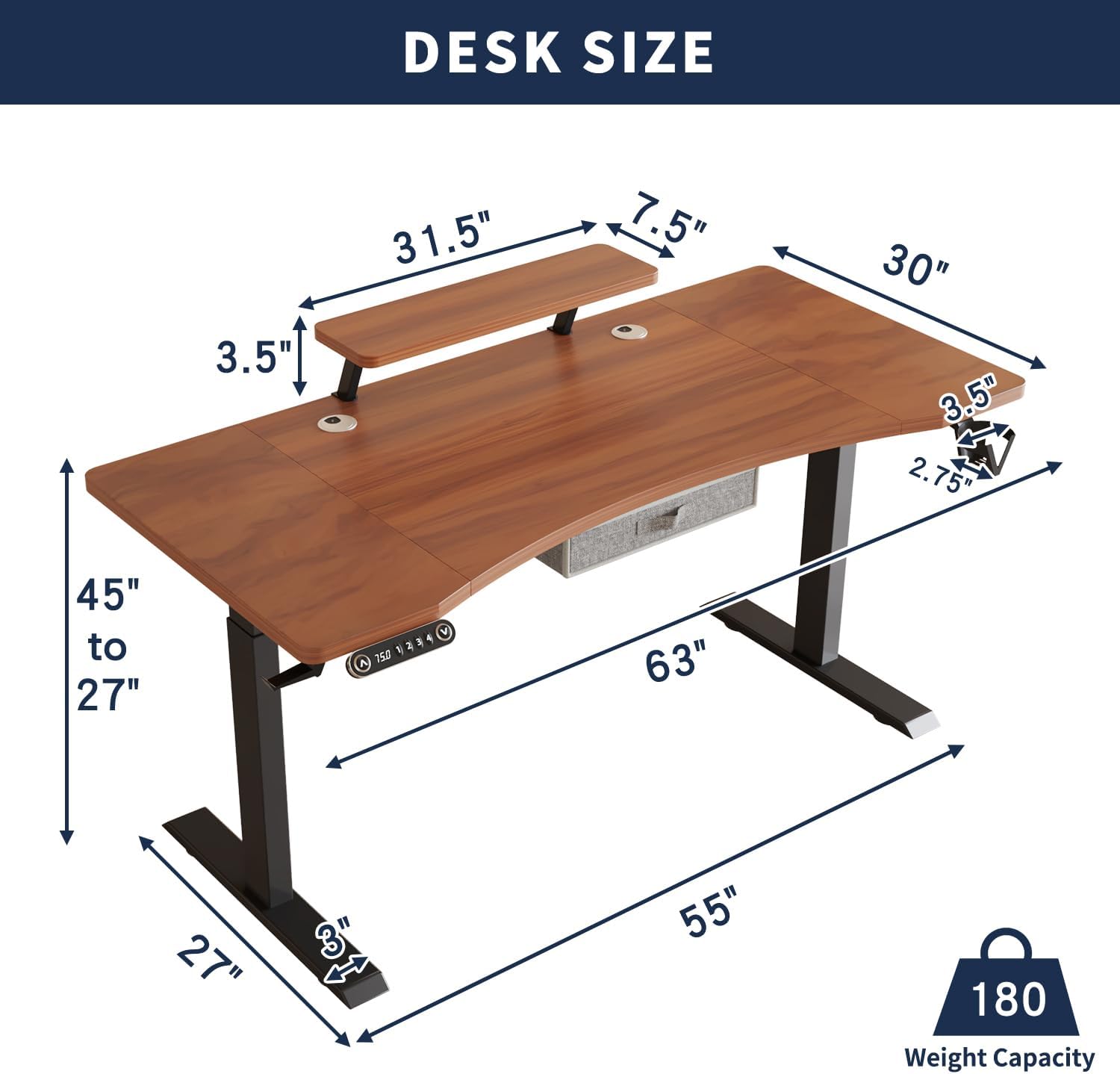
Figure 6.1: Desk Dimensions and Weight Capacity.

Figure 6.2: Dual Motor System.
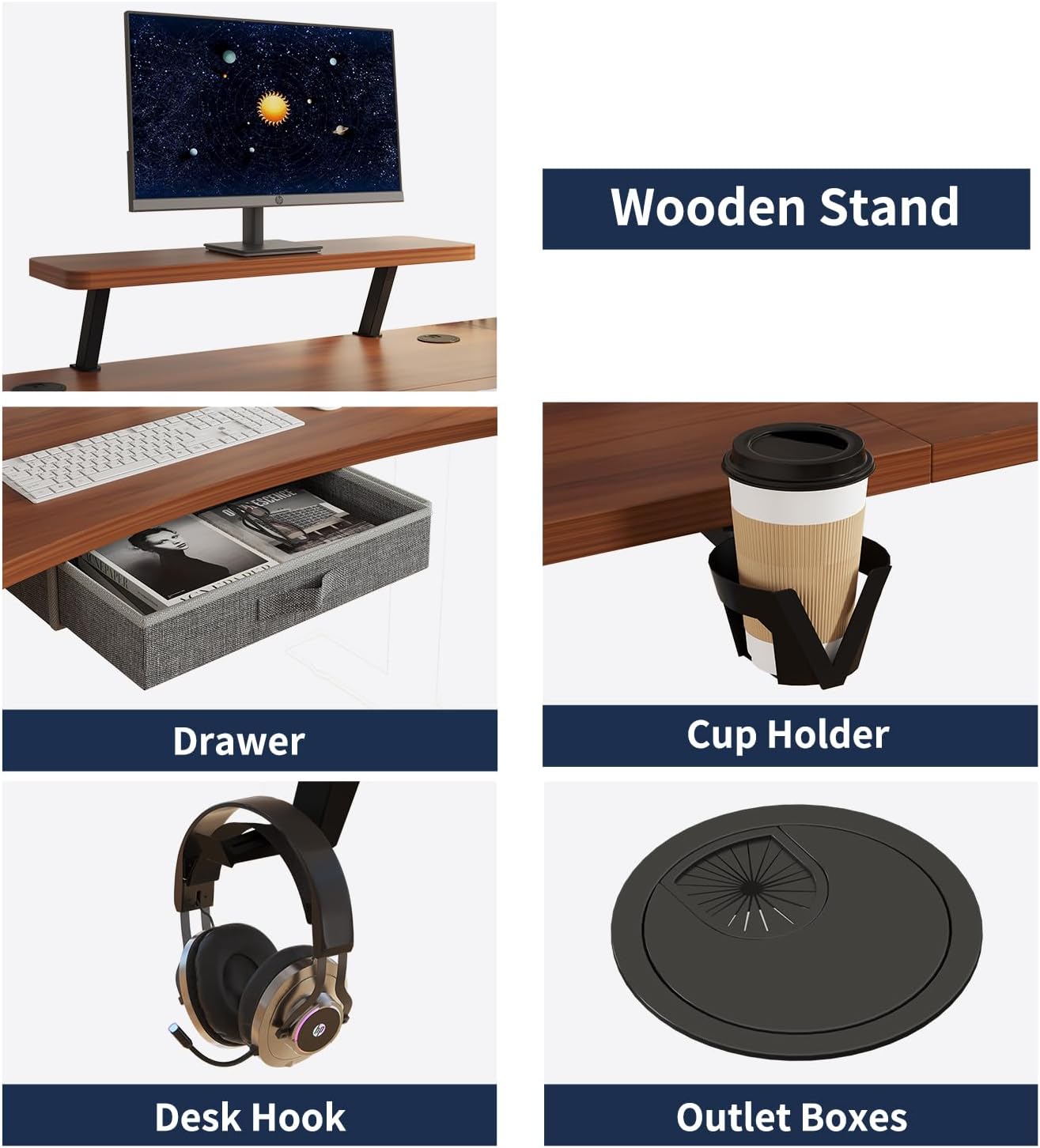
Figure 6.3: Integrated Accessories.

Figure 6.4: Quiet and Smooth Adjustment.
7. Maintenance
Proper care will extend the life and appearance of your standing desk:
- Cleaning: Wipe the desk surface and frame with a dry, soft cloth. For stubborn marks, use a lightly damp cloth with mild soap, then dry thoroughly.
- Moisture Protection: Avoid excessive moisture. Use coasters for drinks to prevent water rings and damage to the desktop.
- Cable Management: Periodically check and re-secure cables to prevent tangling or damage.
- Inspection: Regularly inspect all screws and connections to ensure they remain tight. Tighten if necessary.
8. Troubleshooting Guide
If your standing desk is not operating as expected, please refer to the following common issues:
- Desk Not Moving: Check if the power cable is securely plugged into both the desk and the wall outlet. Ensure all motor cables are properly connected to the control box. Try performing a reset (refer to the 'Reset Function' in Operating Instructions).
- Uneven Movement: Ensure the desk is not overloaded beyond its weight capacity. Check that the desk is on a level surface.
- Error Codes: If the LED display shows an error code, refer to the specific troubleshooting section in the printed manual or contact customer support.
If problems persist after attempting these steps, please contact customer service for further assistance.
9. Specifications
| Brand | HEONAM |
| Model | 63x30 Dual Motor Standing Desk |
| Product Dimensions (D x W x H) | 30" x 63" x 27"-45" |
| Height Adjustment Range | 27 inches to 45 inches |
| Desktop Material | Engineered Wood (Walnut Finish) |
| Frame Material | Metal (Black Finish) |
| Motor Type | Dual Motor |
| Weight Capacity | 154 lbs (70 kg) |
| Noise Level | < 50dB |
| Number of Memory Presets | 4 |
| Included Accessories | Fabric Drawer, Wooden Monitor Stand, Cup Holder, Desk Hook |
| Assembly Required | Yes (Recommended 2 people) |
10. Warranty and Customer Support
HEONAM is committed to providing quality products and excellent customer service.
- Warranty: Your HEONAM Dual Motor Standing Desk comes with a two-year warranty covering product quality issues that are not caused by artificial damage.
- Customer Support: If you have any questions, concerns, or require assistance with your product, please do not hesitate to contact our customer support team. We provide 7x24 hours customer support to ensure a positive experience.
Please refer to your purchase documentation or the HEONAM website for specific contact details.


