Introduction
The Yamaha APX Series acoustic-electric guitars are renowned for their comfortable thinline body, easy upper fret access, superb playability, and natural acoustic tone. The APX600M model is specifically designed for live performance, offering a balanced sound and comfortable handling.
Key Features:
- Comfortable thinline body with single cutaway for enhanced playability.
- 25-inch scale length with narrow string spacing for improved comfort.
- Special bracing pattern designed to provide a deep yet balanced low end.
- Stage-focused pickup system allowing sound shaping for live mixes.
- Matte finish body and neck, featuring black ABS with white dot bridge pins.
- Oval soundhole with ABS and abalone rosette.
Product Overview

Figure 1: Front view of the Yamaha APX600M Thin Body Acoustic-Electric Guitar in Smoky Black Matte. This image highlights the guitar's sleek design, oval soundhole, and matte finish.

Figure 2: Back view of the Yamaha APX600M guitar, showcasing the matte finish on the back of the body and neck. The slim profile of the thinline body is also visible.

Figure 3: Angled view of the Yamaha APX600M, emphasizing the thin body design and the single cutaway which allows for easier access to higher frets.
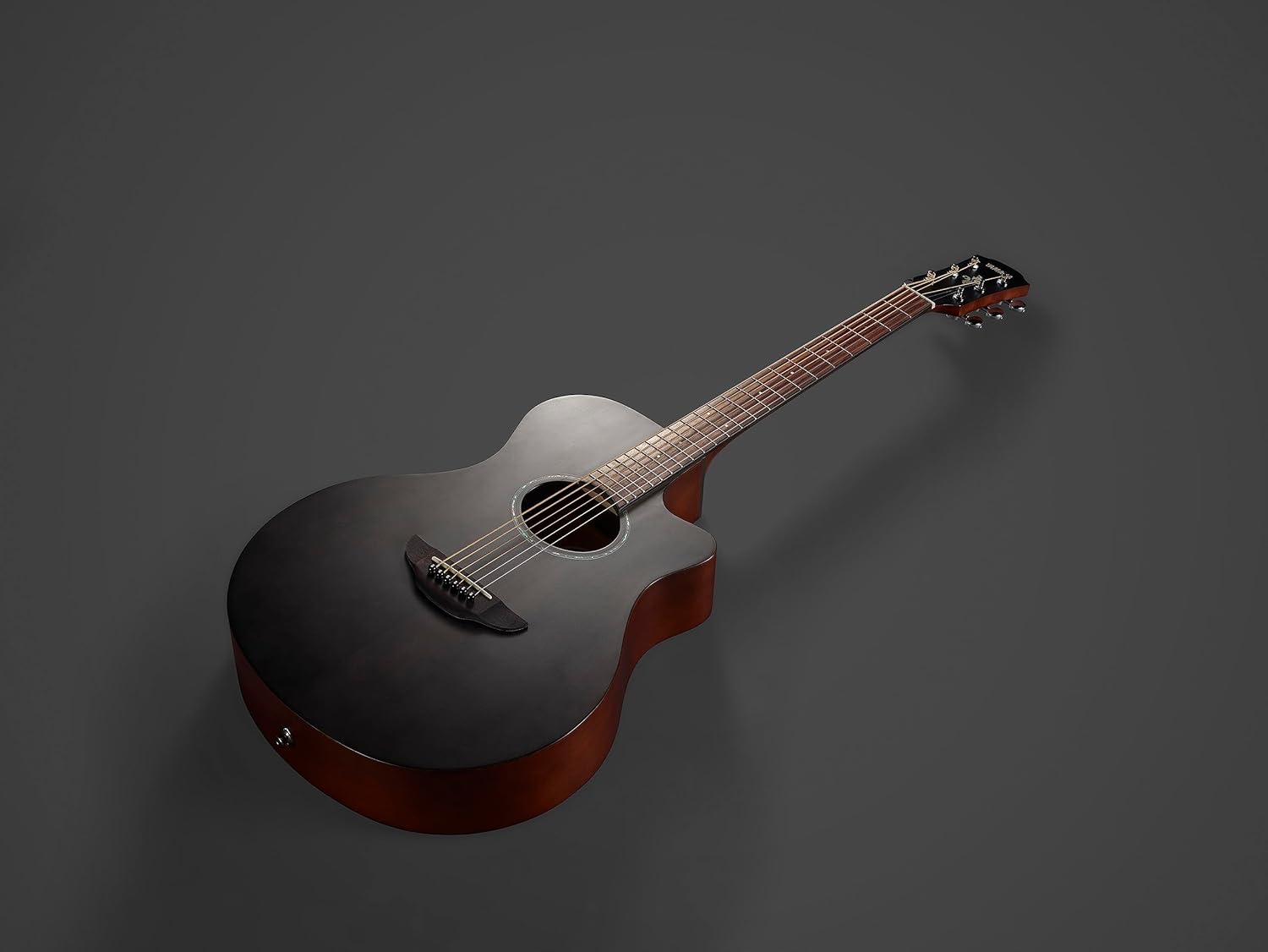
Figure 4: Close-up of the Yamaha APX600M headstock, featuring the Yamaha logo and chrome die-cast tuning pegs, which contribute to stable tuning.
Setup
Initial Inspection:
- Carefully remove the guitar from its packaging.
- Inspect the guitar for any visible damage.
- Ensure all accessories (if included) are present.
Tuning:
The APX600M features a built-in tuner for convenience. To tune your guitar:
- Locate the tuner controls on the side of the guitar body.
- Press the "BATT. TUNER" button to activate the tuner.
- Pluck each string individually. The display will show the note being played and indicate if it is sharp, flat, or in tune.
- Adjust the corresponding tuning peg until the display shows the string is in tune (typically indicated by a green light or centered needle).
- Repeat for all six strings (E, A, D, G, B, e).
Connecting to an Amplifier:
To amplify your guitar's sound:
- Ensure the guitar's internal battery for the preamp is charged (2 AA batteries).
- Connect a standard 1/4-inch instrument cable from the guitar's output jack (located at the bottom of the body) to your amplifier's input.
- Turn on your amplifier and adjust the volume and tone settings as desired.
Operating the Controls
The APX600M features a System65 piezo and preamp with tuner, offering versatile sound shaping options:
- Volume Control: Adjusts the overall output level of the amplified sound.
- Low, Mid, High Controls: These equalizer controls allow you to shape the bass, midrange, and treble frequencies of your guitar's tone. Adjust to suit your playing style and environment.
- AMF (Adjustable Mid-Frequency) Control: This slider allows you to select the specific mid-frequency range that the "Mid" control will affect, providing finer control over your tone.
- Battery/Tuner Button: Activates the built-in tuner and also indicates low battery status.
Playing the Guitar:
The thinline body and narrow string spacing are designed for comfortable playability, making it suitable for both beginners and experienced players. Experiment with different strumming and fingerpicking techniques to explore the guitar's tonal range.
Maintenance
Cleaning:
- Wipe down the guitar body and neck with a soft, dry cloth after each use to remove sweat and oils.
- For matte finishes, use a specialized matte guitar cleaner to avoid creating shiny spots.
- Clean the fretboard periodically with a fretboard conditioner to prevent drying and cracking.
String Replacement:
Strings should be replaced regularly, depending on usage, to maintain optimal tone and playability. Refer to standard guitar string replacement guides for detailed instructions.
Storage:
Store the guitar in a stable environment, away from extreme temperature changes and humidity fluctuations, to prevent wood warping or damage. A guitar case or gig bag is recommended for protection.
Troubleshooting
- No Sound When Plugged In: Check the instrument cable, amplifier settings, and ensure the guitar's internal battery is not depleted.
- Poor Sound Quality: Replace old strings, check amplifier settings, or adjust the guitar's onboard EQ controls.
- Buzzing Frets: This can be caused by low string action, worn frets, or neck relief issues. Professional setup may be required.
- Tuning Instability: Ensure strings are properly stretched, tuning pegs are tight, and the guitar is not exposed to rapid temperature changes.
Specifications
| Feature | Detail |
|---|---|
| Brand | Yamaha |
| Model Name | APX600M SMB |
| Color | Smoky Black Matte |
| Top Material Type | Spruce Wood |
| Body Material | Spruce and locally sourced tonewood |
| Back Material Type | ABS |
| Neck Material Type | Spruce Wood |
| Fretboard Material Type | Rosewood |
| Guitar Pickup Configuration | Piezo |
| String Material Type | Nickel |
| Hand Orientation | Right |
| Guitar Bridge System | Fixed |
| Number of Strings | 6 |
| Scale Length | 25 inches |
| Item Dimensions L x W x H | 40.25"L x 3.56"W x 15.12"H |
| Item Weight | 4.63 Pounds |
Official Product Videos
Video 1: A detailed review of the Yamaha APX600 acoustic-electric guitar, highlighting its features and sound quality. Provided by Music Village (Seller).
Video 2: A demonstration of the Yamaha APX600 BL Thin Body Acoustic-Electric Guitar, showcasing its design and playability. Provided by Alexander (Seller).
Video 3: A review highlighting the Yamaha APX600 as a beautiful guitar suitable for beginners. Provided by Honest Reviews with A (Seller).
Video 4: A close-up look at the Yamaha APX600 guitar, detailing its construction and features. Provided by The Opinionated Cat (Seller).
Warranty and Support
Warranty Information:
The Yamaha APX600M comes with a 1-year manufacturer warranty from Yamaha Corporation of America. Yamaha prides itself on the experience and craftsmanship in every product. The limited warranty applies only to products purchased from an authorized Yamaha retailer in the fifty United States (including the District of Columbia) and used in this area. For more information, please review the Yamaha limited warranty for this product on their official website.
Product Support:
For additional support, product registration, or to explore other Yamaha musical instruments, please visit the Official Yamaha Store.