
Introduction
This manual provides essential information for the safe and effective use of the GY BW-1079 UV Coated Flash Tube. This high-quality xenon flash tube, made from quartz glass, is designed as a professional replacement part for Bowens Gemini PRO and previous Esprit 1000 studio flash units. With proper handling and operation, this flash tube is engineered to provide tens of thousands of flashes, ensuring consistent performance for your photography needs.
The BW-1079 flash tube is manufactured by a professional xenon flash tube manufacturer in China, known for producing OEM flash tubes for various renowned flashgun brands. Its quartz glass construction ensures excellent quality and flash durations comparable to original equipment tubes. This product is new and offers easy installation and removal, being both lightweight and durable.
Setup and Installation
Before attempting to install or replace the flash tube, ensure the flash unit is completely powered off and disconnected from the mains electricity supply. Always allow sufficient time for the flash unit's capacitors to fully discharge after powering off to prevent electric shock.
- Power Off and Disconnect: Turn off the Bowens Gemini PRO or Esprit 1000 flash unit and unplug it from the power outlet.
- Discharge Capacitors: Wait for at least 5-10 minutes after disconnecting power to allow the internal capacitors to discharge. Refer to your flash unit's manual for specific discharge procedures if available.
- Access Flash Tube: Carefully remove any protective covers or reflectors to access the existing flash tube.
- Remove Old Flash Tube (if applicable): Gently grasp the base of the old flash tube and pull it straight out from its socket. Avoid touching the glass part directly. Dispose of the old tube responsibly.
- Insert New Flash Tube: Align the pins of the GY BW-1079 flash tube with the corresponding sockets in the flash unit. Apply gentle, even pressure to push the tube firmly into place until it is securely seated. Do not force it.
- Replace Covers: Reattach any protective covers or reflectors that were removed.
- Power On: Reconnect the flash unit to the power supply and turn it on. Perform a test flash to ensure proper operation.
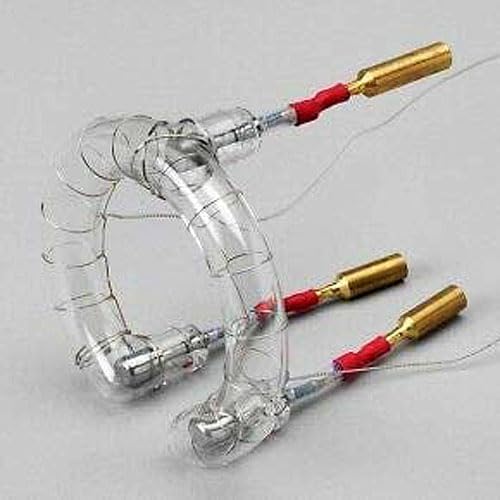
Figure 1: Front view of the GY BW-1079 UV Coated Flash Tube, showing the coiled xenon tube and connection pins. This image illustrates the general appearance of the flash tube before installation.
Operating Instructions
The GY BW-1079 flash tube functions as an integral component of your Bowens Gemini PRO or Esprit 1000 studio flash unit. Once correctly installed, its operation is governed by the controls and settings of the flash unit itself. This flash tube is designed to produce high-intensity light for photographic purposes.
- Integration: The flash tube integrates seamlessly with compatible Bowens flash units, utilizing their power and triggering mechanisms.
- Flash Synchronization: The flash tube supports a synchronization speed of up to 1/250 seconds, depending on the capabilities of your camera and flash unit.
- Exposure Control: It operates under a slave exposure control type, meaning it fires in response to a trigger signal from the main flash unit or camera.
- Wireless Communication: The flash tube is compatible with optical pulse wireless communication technology, allowing it to be triggered remotely by compatible systems.
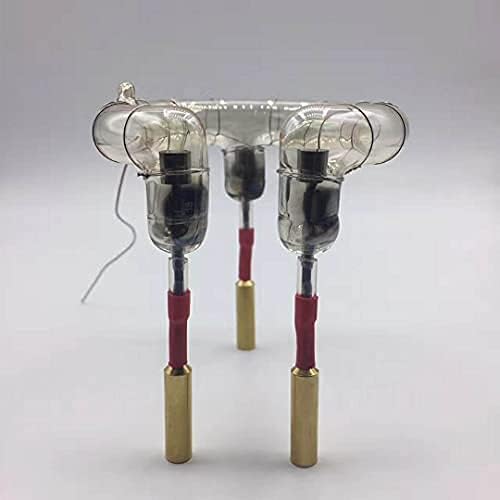
Figure 2: Side view of the GY BW-1079 UV Coated Flash Tube, highlighting the robust connection pins. This view helps in understanding the orientation for correct insertion into the flash unit socket.
Maintenance and Care
To ensure the longevity and optimal performance of your GY BW-1079 flash tube, follow these maintenance guidelines:
- Handling: Always handle the flash tube by its base or connection points. Avoid touching the quartz glass directly, as oils from your skin can create hot spots and reduce the tube's lifespan. If touched, clean with a lint-free cloth and isopropyl alcohol.
- Cleaning: Periodically inspect the flash tube for dust or debris. Use a soft, dry, lint-free cloth to gently wipe the glass surface. Do not use abrasive cleaners or solvents.
- Storage: When not in use, store the flash tube in a clean, dry, and dust-free environment, preferably in its original packaging or a protective case.
- Lifespan: With correct operation and care, the flash tube is designed to last for tens of thousands of flashes. Replace the tube if you notice a significant decrease in light output, inconsistent flashes, or visible damage to the glass or electrodes.
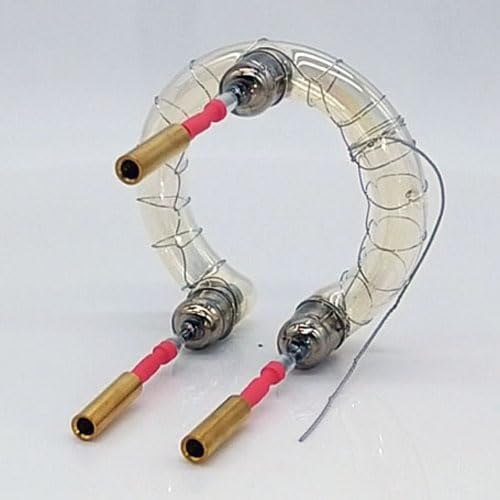
Figure 3: Angled view of the GY BW-1079 UV Coated Flash Tube, showcasing its coiled design and overall construction. This image provides a comprehensive look at the product's form factor.
Troubleshooting
If you encounter issues with your GY BW-1079 flash tube, consider the following common troubleshooting steps:
| Problem | Possible Cause | Solution |
|---|---|---|
| Flash tube does not fire. |
|
|
| Inconsistent or weak flashes. |
|
|
| Visible damage to the flash tube. |
|
|
If the problem persists after following these steps, consult the manual for your Bowens flash unit or contact customer support.
Specifications
| Model Number | BW-1079 |
| Manufacturer | GY |
| Material | Quartz Glass |
| Coating | UV Coated |
| Compatibility | Bowens Gemini PRO, Bowens Esprit 1000 |
| Flash Synchronization Speed | Up to 1/250 seconds |
| Exposure Control Type | Slave |
| Mount Type | Bowens Mount |
| Wireless Technology | Optical Pulse |
| Included Components | Flash tube |
| UPC / GTIN | 797639717286 |
Warranty Information
Specific warranty details for the GY BW-1079 UV Coated Flash Tube are not provided in this manual. For information regarding warranty coverage, terms, and conditions, please refer to the product listing where you purchased the item or contact the seller directly. Keep your proof of purchase for any warranty claims.
Customer Support
For technical assistance, product inquiries, or support related to the GY BW-1079 flash tube, please contact the seller or the manufacturer, GY. Ensure you have your product model number (BW-1079) and purchase details ready when contacting support.
Manufacturer: GY