
1. Introduction and Safety Information
Thank you for choosing the TECNOFIT TF 5.80 Professional Electric Treadmill. This manual provides essential information for the safe and effective use of your new fitness equipment. Please read all instructions carefully before assembly and operation. Keep this manual for future reference.
Important Safety Precautions:
- Always consult with a physician before starting any exercise program.
- Ensure the safety key is properly attached to the console and your clothing before beginning a workout.
- Keep children and pets away from the treadmill during operation.
- Place the treadmill on a flat, stable surface with adequate clearance around it.
- Do not operate the treadmill if it is damaged or malfunctioning.
- Wear appropriate athletic footwear and clothing.
- The maximum user weight for this treadmill is 160 kg.

Figure 1: Side view of the TECNOFIT TF 5.80 Treadmill, illustrating its sturdy construction.
2. What's in the Box
Carefully unpack all components and ensure you have received the following items:
- TECNOFIT TF 5.80 Treadmill Unit
- User Manual (this document)
- Power Cable
- Lubricant for running belt maintenance
- Assembly Tools (if required, typically included)
If any parts are missing or damaged, please contact customer support immediately.
3. Setup and Assembly
The TECNOFIT TF 5.80 treadmill is designed for relatively straightforward assembly. Follow these steps carefully:
3.1 Unpacking and Placement
- Remove all packaging materials. Retain packaging for potential future transport or returns.
- Place the treadmill base on a firm, level surface. Ensure there is at least 2 meters of clear space behind the treadmill and 0.5 meters on each side.
3.2 Assembly Steps
While the treadmill comes partially pre-assembled, some components like the console and uprights may require attachment. Refer to the detailed assembly diagrams in the separate assembly guide (if provided) or follow these general steps:
- Carefully lift and secure the uprights to the base frame using the provided bolts and tools.
- Attach the console assembly to the top of the uprights, ensuring all cables are connected securely.
- Tighten all bolts and nuts to ensure stability. Do not overtighten.
3.3 Power Connection
- Connect the power cable to the treadmill's power input port.
- Plug the other end of the power cable into a grounded electrical outlet.
- Ensure the power switch (usually located near the power cord) is in the 'ON' position.
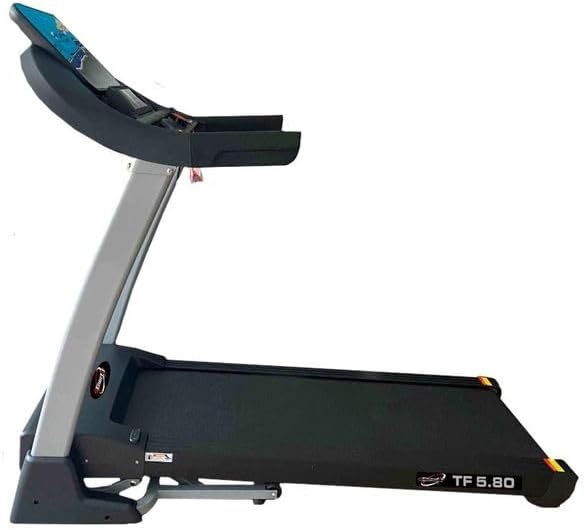
Figure 2: Full side view of the TECNOFIT TF 5.80 Treadmill, ready for use.
4. Operating Instructions
Familiarize yourself with the console and controls before starting your workout.
4.1 Console Overview
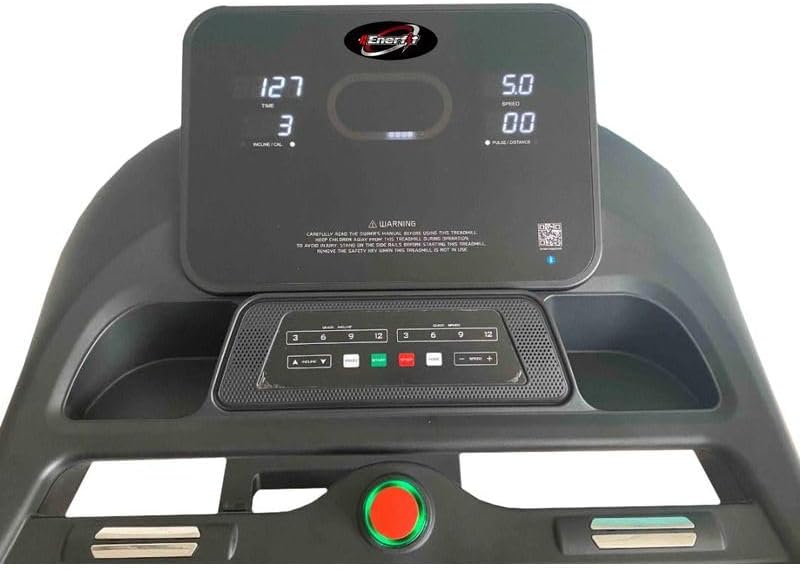
Figure 3: Detailed view of the control console with LCD display and quick access buttons.
The LCD display shows workout data such as time, speed, distance, calories burned, and heart rate. The console features quick-access buttons for speed and incline, along with program selection.
4.2 Starting a Workout
- Ensure the safety key is placed in its designated slot on the console and the clip is attached to your clothing. The treadmill will not start without the safety key.
- Press the 'START' button. The belt will begin moving at a low speed after a short countdown.
- Gradually increase your speed using the '+' button or quick speed buttons (e.g., 3, 6, 9, 12 km/h).
4.3 Adjusting Speed and Incline
- Speed: Use the '+' and '-' buttons on the console or handlebars to adjust the speed from 0 to 20 km/h. Quick speed buttons (e.g., 3, 6, 9, 12) allow for instant speed changes.
- Incline: Use the 'INCLINE +' and '-' buttons on the console or handlebars to adjust the incline from 0% to 18%. Quick incline buttons (e.g., 3, 6, 9, 12) allow for instant incline changes.
4.4 Workout Programs
The TF 5.80 offers 12 pre-set workout programs, including HRC (Heart Rate Control), toning, slimming, and cardio programs. Select a program using the 'PROGRAM' button and follow the on-screen prompts.
4.5 Heart Rate Monitoring
Grip the heart rate sensors on the handlebars to display your pulse on the console. For HRC programs, the treadmill will adjust speed/incline to maintain your target heart rate.
4.6 MP3/USB and App Connectivity
- MP3/USB: Connect your MP3 player or USB device to the console to play music through the integrated speakers.
- App Connectivity: The treadmill supports connectivity with fitness applications like Kinomap and Zwift. Download the respective app on your smartphone or tablet and follow the app's instructions to connect to your treadmill via Bluetooth. This allows for interactive workouts and tracking.

Figure 4: Examples of compatible fitness applications for interactive training.
4.7 Stopping a Workout
- Press the 'STOP' button to gradually bring the treadmill to a halt.
- In case of emergency, pull the safety key from the console. The treadmill will stop immediately.
4.8 Folding and Storage
The TF 5.80 is foldable for convenient storage.
- Ensure the treadmill is powered off and unplugged.
- Carefully lift the running deck until it locks into the upright position.
- To unfold, gently release the locking mechanism and lower the deck slowly until it rests on the floor.

Figure 5: The treadmill in its folded position for space-saving storage.
5. Maintenance
Regular maintenance ensures the longevity and optimal performance of your treadmill.
5.1 Cleaning
- Wipe down the console and exterior surfaces with a damp cloth after each use. Avoid abrasive cleaners.
- Vacuum underneath the treadmill regularly to prevent dust buildup.
5.2 Running Belt Lubrication
The running belt requires periodic lubrication to reduce friction and wear. Use the provided lubricant.
- Turn off and unplug the treadmill.
- Loosen the rear roller bolts slightly to lift the belt.
- Apply a thin line of lubricant evenly under the center of the running belt.
- Tighten the rear roller bolts.
- Run the treadmill at a slow speed for 5 minutes to distribute the lubricant.
Frequency: Lubricate every 3-6 months, or after every 100-150 hours of use, depending on usage.
5.3 Running Belt Adjustment
If the running belt shifts to one side or slips, it may need adjustment.
- Centering: If the belt drifts to the left, turn the left rear roller bolt clockwise in quarter-turn increments. If it drifts right, turn the right rear roller bolt clockwise. Run the treadmill at a slow speed for 2 minutes after each adjustment.
- Tension: If the belt slips, turn both rear roller bolts clockwise by quarter-turn increments to increase tension. Do not overtighten.
6. Troubleshooting
Refer to this section for common issues and their solutions.
| Problem | Possible Cause | Solution |
|---|---|---|
| Treadmill does not power on. | Power cable not connected; Power switch off; Circuit breaker tripped. | Check power cable connection; Ensure power switch is ON; Reset circuit breaker. |
| Treadmill belt does not move. | Safety key not in place; 'STOP' button pressed; Motor issue. | Ensure safety key is correctly inserted; Press 'START'; Contact support if issue persists. |
| Belt slips during use. | Belt tension too loose. | Adjust belt tension (refer to Section 5.3). |
| Belt drifts to one side. | Belt alignment off. | Adjust belt centering (refer to Section 5.3). |
| Unusual noise from treadmill. | Loose parts; Lack of lubrication; Motor issue. | Check for loose bolts; Lubricate belt (Section 5.2); Contact support. |
If you encounter a problem not listed here or if the suggested solutions do not resolve the issue, please contact TECNOFIT customer support.
7. Specifications
Detailed technical specifications for the TECNOFIT TF 5.80 Treadmill:
| Feature | Specification |
|---|---|
| Model | TF 5.80 |
| Brand | TECNOFIT |
| Motor Power | 3.5 Horsepower (continuous) |
| Speed Range | 0 - 20 km/h |
| Incline Range | 0 - 18% |
| Maximum User Weight | 160 Kilograms |
| Running Surface Width | 49 cm |
| Running Belt | Orthopedic, 2 mm thick |
| Display Type | LCD (backlit) |
| Programs | 12 pre-set programs (HRC, toning, slimming, cardio, etc.) |
| Connectivity | MP3, USB, APP (Kinomap, Zwift compatible) |
| Suspension System | Rubbertech patent with elastomers and 2+ hydraulic shock absorbers |
| Frame Material | Alloy Steel |
| Product Dimensions (L x W x H) | 140 x 160 x 86 cm |
| Foldable | Yes |
| Color | Black |
8. Warranty and Support
For warranty information, please refer to the documentation provided at the time of purchase or contact your retailer. TECNOFIT is committed to providing quality products and customer satisfaction.
Customer Support:
If you have any questions, require technical assistance, or need to report a problem, please contact the seller or manufacturer directly. Have your product model (TF 5.80) and purchase details ready when contacting support.