
1. Introduction
Thank you for choosing the WINFLIKE AKB73755451 Infrared Remote Control. This remote is designed as a direct replacement for various LG TV models, offering a comfortable grip, sensitive keys, and ease of use without requiring any programming. This manual provides essential information for its setup, operation, and maintenance.
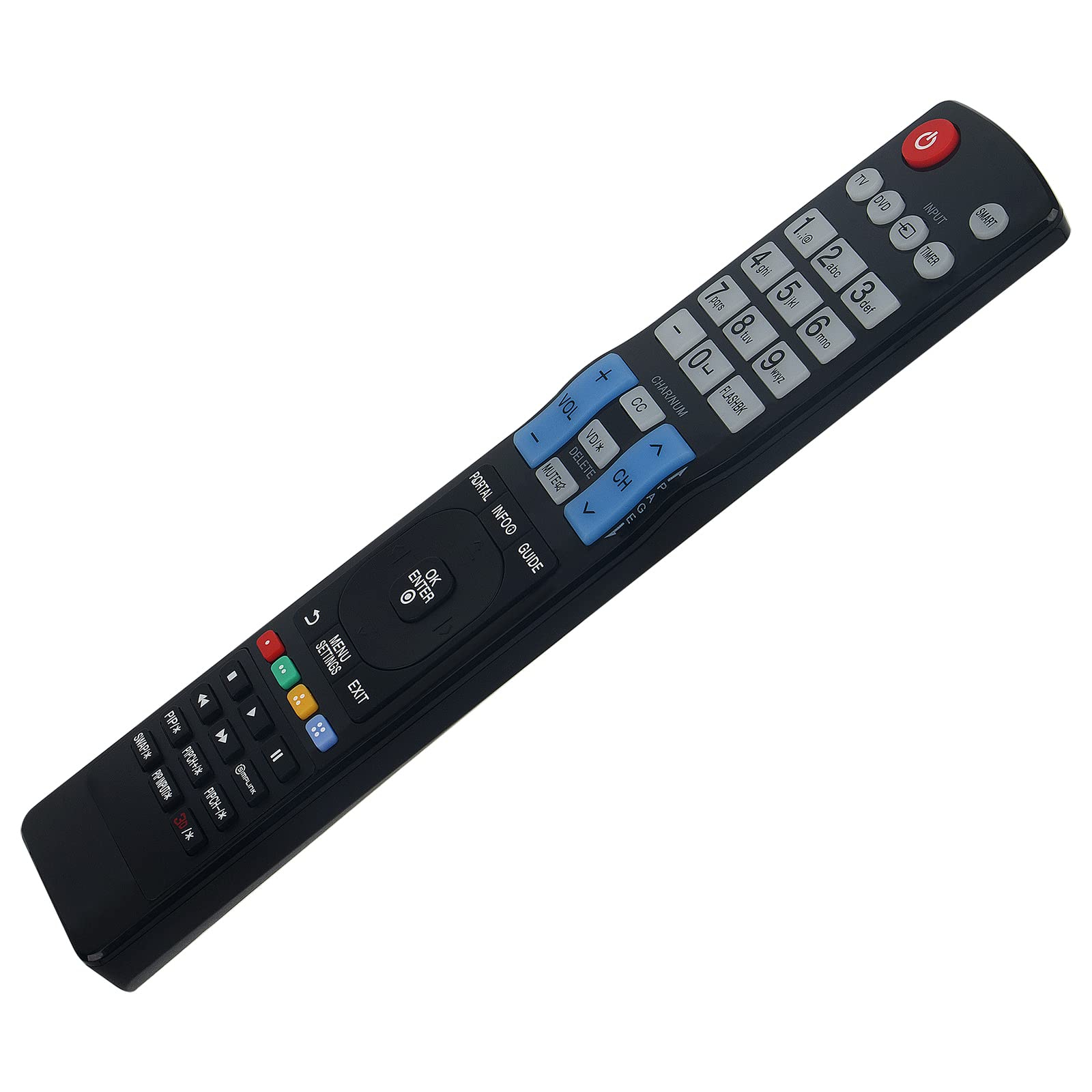
Image 1.1: Front view of the WINFLIKE AKB73755451 Infrared Remote Control, showing all buttons and layout.
2. Setup: Battery Installation
The WINFLIKE AKB73755451 remote control operates on alkaline batteries (not included). Proper battery installation is crucial for the remote's functionality.
- Locate the Battery Compartment: Turn the remote control over. The battery compartment cover is typically located on the back, near the bottom.
- Open the Cover: Gently slide the battery compartment cover downwards or press the latch and lift to open it.
- Insert Batteries: Insert two new alkaline batteries, ensuring that the positive (+) and negative (-) terminals align correctly with the markings inside the compartment. Incorrect insertion can prevent the remote from working.
- Close the Cover: Slide the battery compartment cover back into place until it clicks securely.
Once batteries are installed, the remote is ready for use. No programming or pairing is required.

Image 2.1: Angled view of the remote control, illustrating its ergonomic design and the location of the battery compartment on the underside.
3. Operating Instructions
This remote control is designed to replicate the functions of your original LG TV remote. Point the remote directly at your LG TV's infrared receiver for optimal performance. The maximum effective range is approximately 33 feet (10 meters).
Basic Functions:
- Power Button (Power Symbol): Turns the TV on or off.
- Input Button: Cycles through available input sources (HDMI, AV, etc.).
- Number Buttons (0-9): Directly select channels.
- Volume Up/Down (VOL +/-): Adjusts the TV's volume level.
- Channel Up/Down (CH +/-): Changes the TV channel.
- Mute Button: Mutes or unmutes the TV's audio.
- Navigation Pad (Up, Down, Left, Right, OK/Enter): Navigates through on-screen menus and confirms selections.
- Menu/Settings Button: Accesses the TV's main menu or settings.
- Exit Button: Exits the current menu or on-screen display.
- Back/Return Button: Returns to the previous screen or menu.
Advanced Functions:
Depending on your specific LG TV model, additional buttons such as 'SMART', 'PORTAL', 'INFO', 'GUIDE', 'FLASHBK', 'CC', 'PIP', and colored function buttons (Red, Green, Yellow, Blue) may provide access to smart TV features, program information, closed captions, picture-in-picture, and other specific functions. Refer to your LG TV's original manual for detailed explanations of these advanced features.
4. Compatibility
The WINFLIKE AKB73755451 remote control is compatible with a wide range of LG TV models, including but not limited to:
- 65UU670H, 49UU670H, 55LX770H-UA, 65LX770H-UA, 55LX774H-UA
- 49UX970H-UA, 49UV770H, 65UV770H, 65UW970HUA, 65UW970H-UA
- 75UU770H, 75UW970H, 75UW970HUA, 75UW970H-UA
- 43UU670H, 43UW660H, 49UW970H, 55UW660H, 55UW970H
- 40LX774H-UA, 43LX774H-UA, 49LX774H-UA, 55LX774H-UA
- 65UV970H-UC, 75UV770HUA, 75UV770H-UA, 43US670H0UA
- And many other LG TV models listed in the product description.
If your specific LG TV model is not explicitly listed, but your original remote control was an AKB73755451 or similar, this replacement remote is likely compatible.
5. Troubleshooting
If you experience issues with your remote control, please follow these troubleshooting steps:
- Check Batteries: Ensure that new alkaline batteries are correctly inserted with the proper polarity (+/-). Replace old batteries with fresh ones, even if they seem to be working.
- Line of Sight: Make sure there are no obstructions between the remote control and the TV's infrared receiver. The remote requires a clear line of sight to function.
- Remote Distance: Confirm you are within the effective operating range (approximately 33 feet or 10 meters) of the TV.
- TV Receiver: Ensure the TV's infrared receiver is not covered or dirty.
- Test with Camera: You can test if the remote is emitting an IR signal by pointing the remote at a smartphone camera (most smartphone cameras can detect IR light) and pressing a button. You should see a light flash on your phone screen if the remote is working.
If the problem persists after trying these steps, please refer to the 'Warranty and Support' section for further assistance.
6. Maintenance
To ensure the longevity and optimal performance of your remote control, follow these maintenance guidelines:
- Cleaning: Wipe the remote control with a soft, dry cloth. For stubborn dirt, slightly dampen the cloth with water or a mild cleaning solution, then wipe dry immediately. Avoid using harsh chemicals or abrasive cleaners.
- Avoid Liquids: Do not expose the remote control to water or other liquids.
- Temperature Extremes: Do not leave the remote control in direct sunlight or in areas with high humidity or extreme temperatures.
- Battery Replacement: If the remote control will not be used for an extended period, remove the batteries to prevent leakage and potential damage.
- Handle with Care: Avoid dropping the remote control or subjecting it to strong impacts.
7. Specifications
| Model Number | AKB73755451 |
| Brand | WINFLIKE |
| Connectivity Technology | Infrared (IR) |
| Compatible Devices | LG Televisions |
| Power Source | 2 x Alkaline Batteries (AAA or AA, typically specified on compartment) |
| Maximum Range | 33 Feet (10 meters) |
| Special Features | Ergonomic, Lightweight, No Programming Required |
| Dimensions (L x W x H) | 6"L x 2"W x 0.5"H (approximately) |
| Item Weight | 3 Ounces (approximately) |
8. Warranty and Support
WINFLIKE is committed to providing high-quality products and customer satisfaction. While specific warranty details are not provided in this manual, we encourage you to contact us directly if you encounter any issues with your AKB73755451 remote control.
For product support, troubleshooting assistance, or any questions regarding your purchase, please contact WINFLIKE customer service through the retailer's platform or via the contact information provided with your product packaging.
We are dedicated to resolving any concerns you may have and ensuring your satisfaction with our product.