Teslord PVS 14 Gen 2+ Night Vision Monocular User Manual
Model: PVS 14 | Brand: Teslord
Introduction
The Teslord PVS 14 Gen 2+ Night Vision Monocular (Model DM2041) is a versatile optical device designed for enhanced visibility in low-light and nighttime conditions. This monocular can be used handheld, head-mounted, helmet-mounted, or weapon-mounted, making it suitable for various applications including surveillance, navigation, and outdoor activities in environments with minimal ambient light. It features a Gen 2+ image intensifier tube, multi-layer anti-reflection coatings for clear images, a built-in infrared illuminator, and automatic brightness control for user comfort and device protection.
Package Contents
Please verify that all items listed below are included in your package:
1 x Night Vision Monocular (DM2041)
1 x Protective Carrying Bag
1 x Instruction Manual
1 x Lens Cleaning Cloth
1 x Desiccant
Product Overview
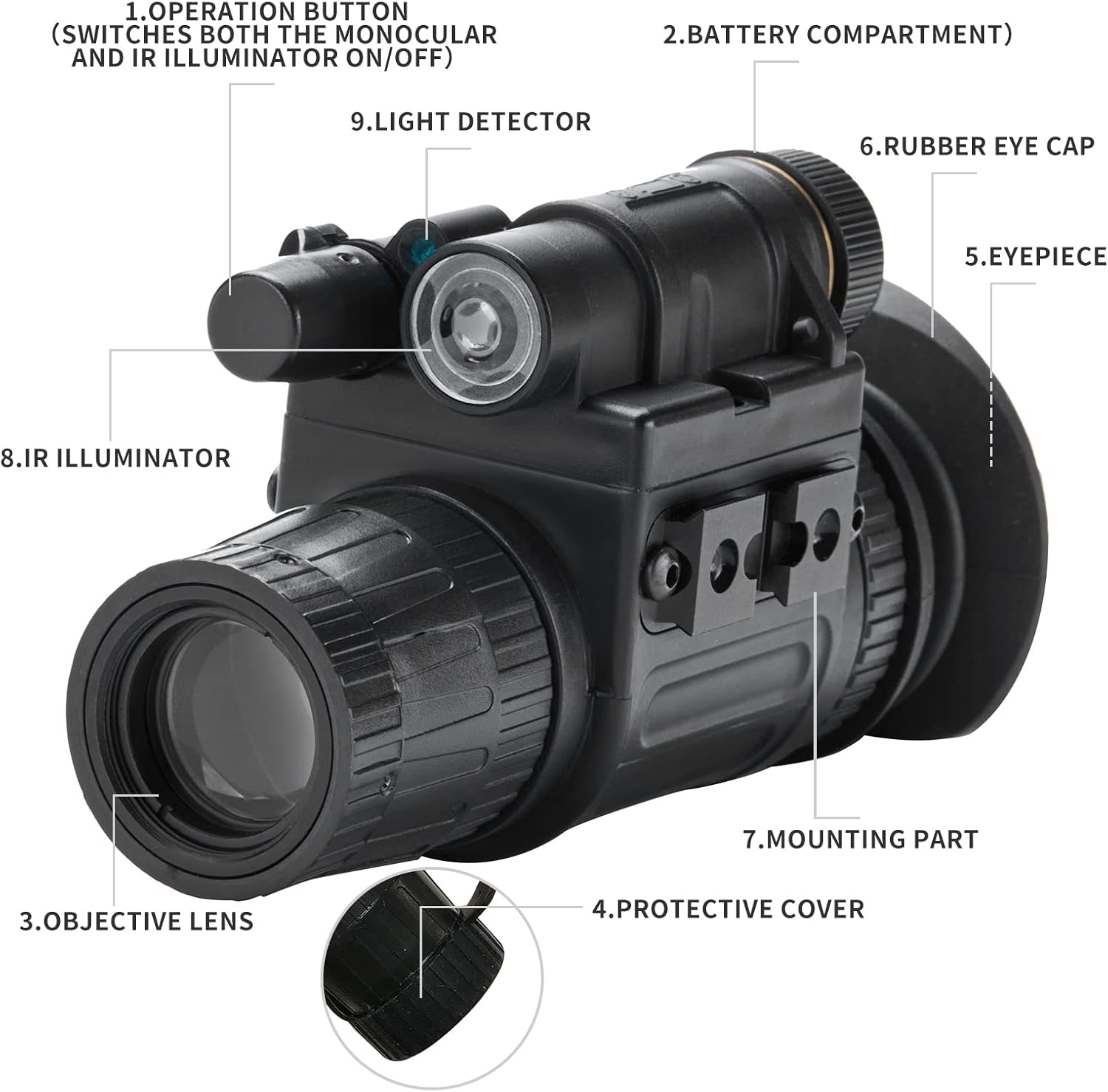
Familiarize yourself with the components of your Teslord PVS 14 Night Vision Monocular:
Figure 1: Labeled components of the PVS 14 Monocular.
Operation Button: Controls power and IR illuminator.
Battery Compartment: Houses the CR123A battery.
Objective Lens: Gathers ambient light and infrared.
Protective Cover: Protects the objective lens when not in use.
Eyepiece: Where the user views the intensified image.
Rubber Eye Cap: Provides comfort and blocks stray light.
Mounting Part: Attachment point for head, helmet, or weapon mounts.
IR Illuminator: Emits infrared light for use in absolute darkness.
Light Detector: Senses ambient light for automatic brightness control and bright source protection.
Setup
1. Battery Installation
The PVS 14 monocular requires one CR123A battery (not included). To install:
Locate the battery compartment (2) on the device.
Unscrew the battery compartment cap.
Insert one CR123A battery with the correct polarity, usually positive (+) end first.
Securely screw the battery compartment cap back on.
Note: A greenish light flickering at the edge of the eyepiece indicates a low battery. Replace the battery promptly.
2. Mounting Options
The monocular can be attached to various mounts using the mounting part (7):
Head Mount: For hands-free operation. Adjust straps for a secure and comfortable fit.
Helmet Mount: Attaches to compatible tactical helmets. Ensure the monocular is securely locked into place.
Weapon Mount: For use with firearms. Ensure proper alignment and secure attachment to avoid damage from recoil.
Figure 2: Monocular mounted on a helmet.
Figure 3: Side view of the monocular mounted on a helmet.
Operating Instructions
1. Powering On/Off
To power on the monocular, press the operation button (1). Press it again to power off. The device will automatically activate the image intensifier tube.
2. Focusing
The PVS 14 features manual focus. To achieve a clear image:
Look through the eyepiece (5).
Rotate the objective lens (3) until the image appears sharp.
Adjust the eyepiece diopter if necessary for individual eye comfort.
Video 1: Demonstration of the PVS 14 monocular's operation and view through the eyepiece. This video shows the physical device and the green-tinted night vision view of plants.
3. Infrared (IR) Illuminator
The built-in IR illuminator (8) provides additional illumination in conditions of absolute darkness where no ambient light is available. To activate the IR illuminator, press and hold the operation button (1) for a few seconds. Repeat to turn off. The IR illuminator is not visible to the naked eye but enhances the image seen through the monocular.
4. Automatic Brightness Control (ABC)
The monocular features Automatic Brightness Control (ABC) which automatically adjusts the image intensifier tube's gain to maintain a consistent image brightness as ambient light conditions change. This feature ensures a stable viewing experience and protects the user's eyesight.
5. Bright Source Protection (BSP)
To prevent damage to the image intensifier tube, the device is equipped with Bright Source Protection (BSP). If the ambient light exceeds 40 Lux, the monocular will automatically shut off within 10 seconds. This protects the internal components from excessive light exposure.
Maintenance
1. Cleaning
Lenses: Use the provided lens cleaning cloth or a soft, lint-free cloth. For stubborn smudges, use a small amount of lens cleaning fluid specifically designed for optics. Avoid abrasive materials.
Body: Wipe the monocular's body with a soft, damp cloth. Do not use harsh chemicals or solvents.
2. Storage
Always store the monocular in its protective carrying bag when not in use.
Remove the battery if the device will not be used for an extended period to prevent leakage and damage.
Store in a cool, dry place, away from direct sunlight and extreme temperatures.
Use the included desiccant to absorb moisture in humid environments.
3. Battery Care
Use only recommended CR123A batteries.
Do not mix old and new batteries, or different types of batteries.
Dispose of used batteries according to local regulations.
Troubleshooting
Problem
Possible Cause
Solution
Device does not power on.
Dead or incorrectly installed battery.
Check battery polarity, replace with a fresh CR123A battery.
Note on Zoom Ratio: The listed zoom ratio of 20x-60x is typically associated with spotting scopes or high-power binoculars, not standard PVS-14 night vision monoculars which are usually 1x magnification. Please refer to the product packaging or manufacturer's official documentation for the most accurate magnification specifications.
Warranty and Support
For warranty information, technical support, or service inquiries regarding your Teslord PVS 14 Night Vision Monocular, please refer to the warranty card included in your package or contact Teslord customer service directly. Contact details can typically be found on the manufacturer's official website or through your point of purchase.