
EMPORIA EMV3A-2P-16
Emporia Gen 3 Smart Home Energy Monitor User Manual
Brand: EMPORIA | Model: EMV3A-2P-16
Your comprehensive guide to real-time home energy monitoring and automation.
1. Introduction
The Emporia Gen 3 Smart Home Energy Monitor provides comprehensive, real-time electricity monitoring for your home. Equipped with 16 50A circuit level sensors, it allows for detailed insights into your energy consumption, enabling automation and control to optimize usage and reduce costs. This manual will guide you through the installation, operation, and maintenance of your energy monitor.
Key Features:
- UL Certified for Safety: Meets rigorous safety standards for electrical products.
- 24/7 Energy Management: Monitor and control energy use from anywhere via the Emporia Energy App.
- Detailed Appliance Monitoring: Comes with sixteen 50A sensors to track individual circuits and appliances.
- Solar/Net Metering Support: Monitor energy production and consumption for homes with solar installations.
- Real-Time Data: Access minute-by-minute energy insights and historical data.
- Automated Energy Savings: Configure settings for time of use, peak demand, and rewards programs.
2. Safety Information
WARNING: Installation of this device involves working with high voltage electricity. It is strongly recommended that installation be performed by a qualified electrician. Failure to follow these instructions may result in electric shock, fire, or other serious injury or death.
- Always turn off the main breaker before opening your electrical panel or attempting any wiring.
- Verify that power is off using a voltage tester before touching any wires or components.
- Ensure all connections are secure and properly insulated.
- The Emporia Vue is UL Listed, ensuring it meets safety standards.

Figure 2.1: The Emporia Vue 3 is UL Certified for Safety, meeting top safety and quality standards for reliable energy management.
3. Setup and Installation
The Emporia Gen 3 Smart Home Energy Monitor is designed for installation within your home's electrical panel. Professional installation is recommended.
3.1 Components Overview
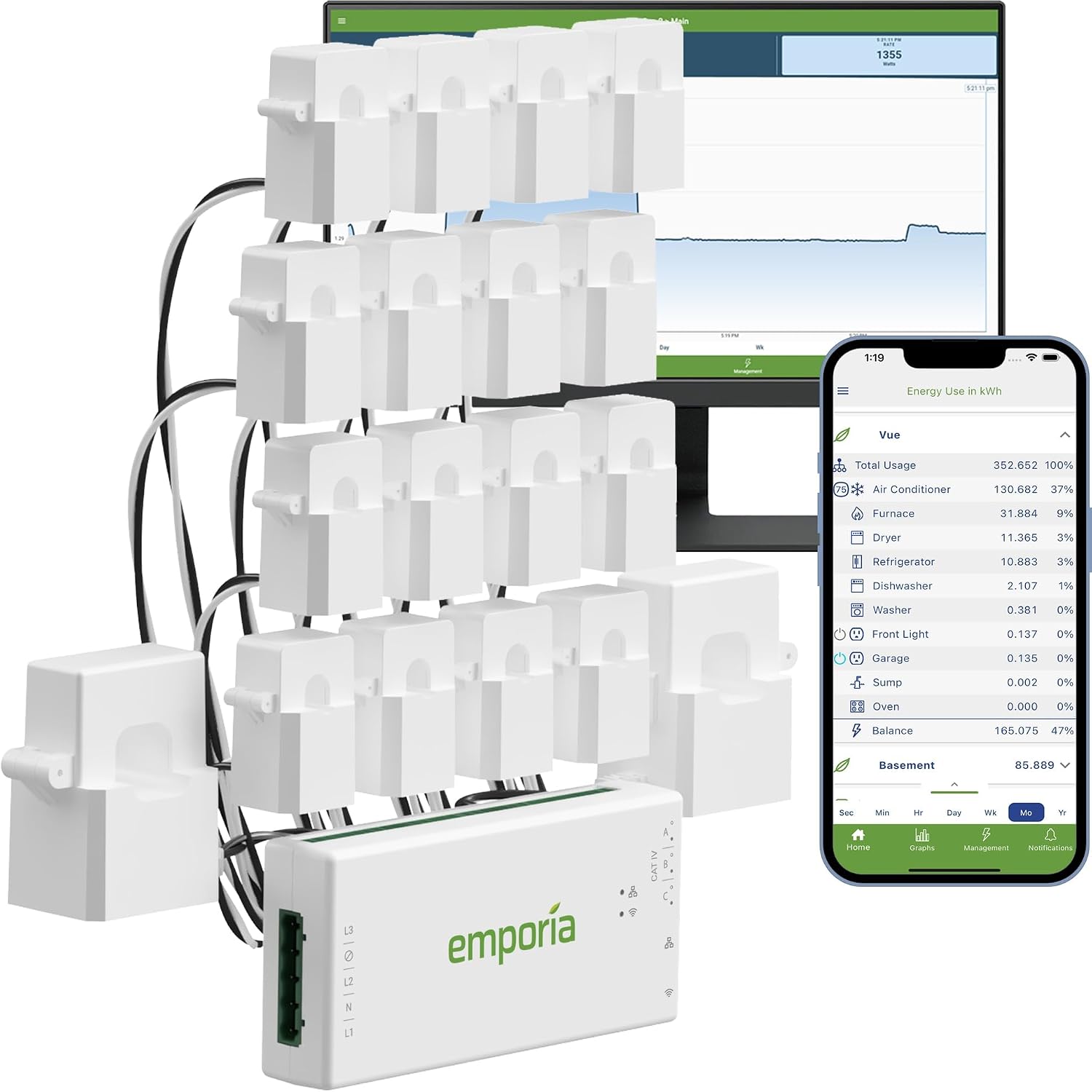
Figure 3.1: Emporia Gen 3 Smart Home Energy Monitor with 16 50A Circuit Level Sensors and accompanying app interface.
3.2 Installation Steps
- Turn off Main Power: Locate your main electrical panel and turn off the main breaker to de-energize the entire panel. Verify with a voltage tester.
- Mount the Monitor: Install the Emporia Vue 3 monitor inside the electrical panel. It is designed to fit most standard panels.
- Connect Power Wires: Connect the monitor's power wires (L1, L2, N) to the appropriate hot and neutral lines within your panel. Ensure proper phase connection for accurate readings.
- Install Current Transformers (CTs):
- For main power monitoring, install the two larger 200A CTs around the main service lines coming into your panel. Ensure the arrows on the CTs point towards the load (away from the utility meter).
- For individual circuit monitoring, install the 16 smaller 50A CTs around the individual circuit wires you wish to monitor. Again, ensure arrows point towards the load.
- Connect the CT wires to the corresponding ports on the Emporia Vue 3 monitor (ports 1-16 for branch circuits).
- Install Wi-Fi Antenna: Connect the Wi-Fi antenna to the monitor and route it outside the metal enclosure for optimal signal strength.
- Secure Wiring: Neatly arrange all wires within the panel, ensuring they do not obstruct the panel cover or other components.
- Restore Power: Close the electrical panel cover and turn the main breaker back on.

Figure 3.2: Typical installation diagram showing the monitor and CT sensors within an electrical panel.

Figure 3.3: An example of a fully installed Emporia Vue 3 system within a home electrical panel, showing the main unit and multiple circuit sensors.
3.3 Video Guide: What's Included
Video 3.1: This official video from Emporia Corp. provides an overview of the components included with the Emporia Vue Smart Home Energy Monitor, aiding in understanding the physical setup.
4. Operating Instructions
Once installed, the Emporia Vue 3 connects to your home's 2.4 GHz Wi-Fi network and sends data to the Emporia Energy App (available for iPhone/Android/Web).
4.1 Emporia Energy App
The app provides real-time energy data, historical usage, and customizable alerts. It requires an internet connection to monitor energy use.
- Real-Time Monitoring: View live energy consumption in kilowatts (kW) or other preferred units. Data is updated every second when the app is actively open.
- Historical Data: Access minute, hour, day, week, month, and year data. Minute data is retained for 7 days, and hour data is retained indefinitely in the cloud.
- Customizable Alerts: Set up notifications for various events, such as approaching monthly peak energy use, appliances left on, or unusual energy consumption patterns.
- Energy Management: Configure settings to automate energy management based on time of use, peak demand, excess solar generation, and rewards programs.

Figure 4.1: The Emporia Energy App provides minute-by-minute energy insights for instant control and maximized savings.

Figure 4.2: Customizable instant alerts help users manage energy consumption effectively.

Figure 4.3: The system supports automated scheduling, peak demand management, and excess solar management.
5. Maintenance
The Emporia Gen 3 Smart Home Energy Monitor is designed for long-term, maintenance-free operation once properly installed. However, periodic checks can ensure continued optimal performance:
- Visual Inspection: Annually, with the main power off, visually inspect the wiring and connections within the electrical panel to ensure all connections remain secure and free from dust or debris.
- Software Updates: Ensure your Emporia Energy App is always updated to the latest version to benefit from new features, improvements, and security patches. The monitor's firmware updates are typically handled automatically via the app.
- Wi-Fi Connectivity: Periodically check the Wi-Fi signal strength in the app to ensure a stable connection for continuous data transmission.
6. Troubleshooting
If you encounter issues with your Emporia Gen 3 Smart Home Energy Monitor, consider the following troubleshooting steps:
- No Power to Monitor:
- Verify the main breaker is ON.
- Ensure the L1, L2, and N connections to the monitor are secure and correctly wired.
- No Data in App / Offline:
- Check your home's 2.4 GHz Wi-Fi network. The monitor requires a stable internet connection.
- Ensure the Wi-Fi antenna is properly connected and positioned outside the metal panel for optimal signal.
- Restart your Wi-Fi router.
- Check the LED indicators on the monitor; refer to the app or online resources for LED status meanings.
- Inaccurate Readings:
- Verify that all CT sensors are correctly installed with the arrows pointing towards the load.
- Ensure CT wires are securely connected to the correct ports on the monitor.
- Confirm that the correct CT type (50A or 200A) is used for the respective circuits.
- App Issues:
- Ensure your app is updated to the latest version.
- Try force-closing and reopening the app.
- Reinstall the app if problems persist.
For further assistance, refer to the support section of this manual or the Emporia Energy App's help resources.
7. Specifications
| Feature | Detail |
|---|---|
| Manufacturer | Emporia Corp. |
| Part Number | EMV3A-2P-16 |
| Item Weight | 4.77 pounds |
| Product Dimensions | 10 x 5 x 5 inches |
| Country of Origin | India |
| Item Model Number | EMV3A-2P-16 |
| Size | whole home monitor with 16 circuit sensors |
| Color | White |
| Style | whole home monitor with 16 circuit sensors |
| Material | Gen 3 |
| Included Components | Energy monitor, Current Transformers, Wire Harness, WiFi Antenna Assembly, Wire Nuts, Splicing Wires |
| Batteries Included? | No |
| Batteries Required? | No |
| Date First Available | June 6, 2023 |


Figure 7.1: Dimensions of the 200A (left) and 50A (right) Current Transformers.
8. Warranty and Support
8.1 Product Warranty
The Emporia Gen 3 Smart Home Energy Monitor is protected by a 1-year warranty from the date of purchase. This warranty covers defects in materials and workmanship under normal use. Please retain your proof of purchase for warranty claims.
8.2 Customer Support
Emporia offers comprehensive customer support to assist with any technical, product, or installation questions you may have.

Figure 8.1: Emporia provides 24/7 live support from their Colorado-based customer support team.
For assistance, please contact Emporia's Colorado-based customer support team. Contact details can typically be found on the Emporia Energy App or their official website.