
1. Introduction
This manual provides detailed instructions for the setup, operation, and maintenance of your LOKMAT APPLLP Max 4G Smart Watch. This device combines advanced smartwatch features with 4G cellular capabilities, running on Android 9.0. Please read this manual thoroughly to ensure proper usage and to maximize your experience with the product.
2. Package Contents
Upon opening the package, verify that all items are present:
- LOKMAT APPLLP Max Smart Watch
- Charging Cable
- User Manual
- SIM Card Ejector Tool (if applicable)
3. Device Overview
Familiarize yourself with the physical components of your smartwatch.

Image 3.1: Front view of the LOKMAT APPLLP Max Smart Watch, displaying an active video call. The large rectangular screen is prominent, showing a contact's image and call controls.

Image 3.2: Side and top views illustrating the dimensions of the LOKMAT APPLLP Max Smart Watch. The watch measures approximately 77.2mm in length, 53.6mm in width, and 15mm in thickness.
- Display: 2.88-inch LCD touchscreen (480 x 640 resolution).
- Side Buttons: Typically for power on/off, screen wake, and back functions.
- Camera: Dual cameras for video calls and photography.
- SIM Card Slot: For 4G cellular connectivity.
- Charging Ports: Magnetic charging pins on the back.
- Heart Rate Sensor: Located on the back for health monitoring.
4. Setup
4.1. SIM Card Installation
The LOKMAT APPLLP Max supports 4G cellular connectivity via a Nano SIM card. Follow these steps to install your SIM card:
- Power off the smartwatch completely.
- Locate the SIM card slot on the side of the watch.
- Use the provided SIM ejector tool (or a small pin) to open the SIM tray.
- Carefully place your Nano SIM card into the tray, ensuring correct orientation.
- Insert the SIM tray back into the watch until it clicks into place.

Image 4.1: Illustration of a Nano SIM card being inserted into the LOKMAT APPLLP Max Smart Watch. The image highlights the SIM card slot and the 4G network capability.
4.2. Initial Power On and Configuration
Press and hold the power button (usually on the side) until the LOKMAT logo appears. Follow the on-screen prompts to select your language, connect to a Wi-Fi network, and set up your Google account. Adjust date, time, and other personal preferences as guided by the Android 9.0 operating system.
5. Operating Instructions
5.1. Basic Navigation
- Swipe Up/Down/Left/Right: Navigate through menus, notifications, and quick settings.
- Tap: Select an item or open an application.
- Long Press: Access additional options or customize watch faces.
- Side Button: Typically acts as a 'back' button or returns to the home screen.
5.2. Making and Receiving Calls
With the installed Nano SIM card, your smartwatch can make and receive 4G calls, including video calls.
- Voice Calls: Open the 'Phone' app, dial a number, or select a contact.
- Video Calls: Utilize compatible video calling applications (e.g., Google Duo, WhatsApp) through the watch's dual cameras.
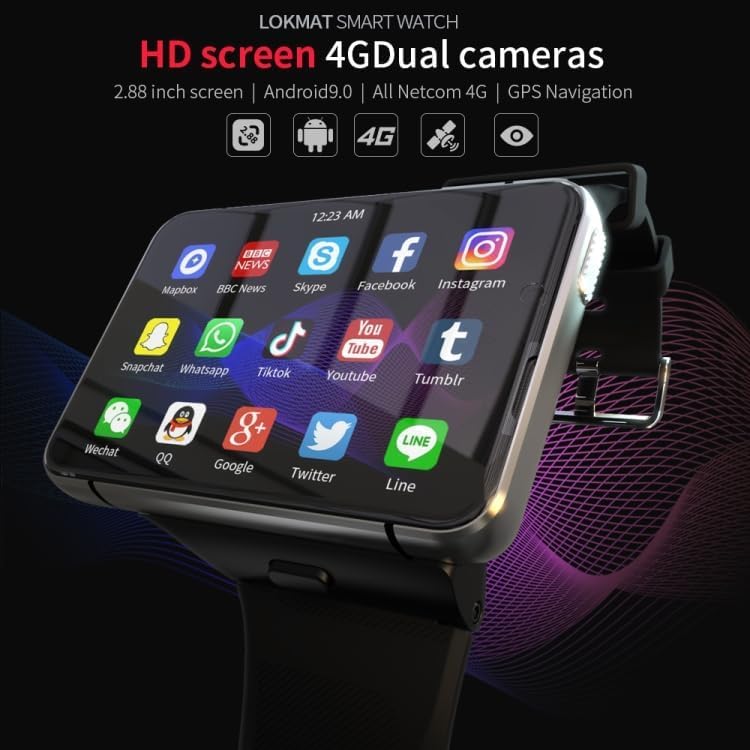
Image 5.1: The LOKMAT APPLLP Max Smart Watch screen showing a grid of application icons, including social media, news, and communication apps, demonstrating its Android 9.0 capabilities.
5.3. Fitness Tracking
The smartwatch includes sensors for monitoring various fitness activities and health metrics.
- Heart Rate Monitoring: Access the heart rate app to measure your pulse.
- Movement Patterns: Track activities such as outdoor running, indoor running, walking, hiking, and mountaineering.
- Step Counter: Monitor your daily steps, distance, and calories burned.

Image 5.2: A visual representation of the smartwatch's fitness tracking capabilities, showing options for various movement patterns like running and hiking, along with real-time display of heart rate, duration, and steps.
5.4. GPS Navigation
The built-in GPS allows for accurate location tracking and navigation. Use compatible mapping applications available on the Android 9.0 platform.
5.5. Camera Functions
The LOKMAT APPLLP Max features dual cameras for various photographic and video functions.
- Take Pictures: Open the camera app to capture photos.
- Video Chat: Engage in video conversations using supported applications.
- Video Replay: View recorded videos directly on the watch.

Image 5.3: A close-up view of the smartwatch's camera lens, highlighting its capabilities for video chat, video replay, and taking pictures.
6. Maintenance
6.1. Charging
To charge your smartwatch, connect the provided charging cable to the magnetic charging pins on the back of the watch and a compatible USB power source. Ensure the pins are clean and dry before charging.
6.2. Cleaning
Wipe the watch screen and body with a soft, lint-free cloth. For stubborn smudges, slightly dampen the cloth with water. Avoid using harsh chemicals or abrasive materials.
6.3. Storage
When not in use for extended periods, store the smartwatch in a cool, dry place. It is recommended to charge the device to about 50% before long-term storage to preserve battery health.
7. Troubleshooting
- Watch does not power on: Ensure the watch is fully charged. Try connecting it to the charger for at least 30 minutes.
- No 4G signal: Check if the SIM card is correctly inserted and activated. Verify network coverage in your area.
- Touchscreen unresponsive: Restart the watch. If the issue persists, ensure the screen is clean and dry.
- Apps crashing or slow performance: Close background applications. Clear app cache or consider a factory reset if problems continue (back up data first).
- GPS not accurate: Ensure you are in an open area with a clear view of the sky. Check if location services are enabled in settings.
8. Specifications
| Model | APPLLP Max |
| Operating System | Android 9.0 |
| Processor | MTK6761 Quad Core |
| Memory | 4GB RAM + 64GB Storage |
| Display | 2.88 inches LCD, 480 x 640 resolution |
| Connectivity | 4G (Nano SIM), Wi-Fi, Bluetooth |
| GPS | Built-in GPS |
| Cameras | Dual Cameras (1300W + 500W) |
| Special Features | Video Call, Heart Rate Monitor, Multiple Movement Patterns |
| Battery Capacity | 2300 mAh |
| Dimensions | Approx. 77.2 x 53.6 x 15 mm |
| Weight | 320 g |
Note: Specifications are subject to change without prior notice.
9. Warranty and Support
For warranty information and technical support, please refer to the warranty card included in your product packaging or visit the official LOKMAT website. Keep your purchase receipt as proof of purchase for warranty claims.


