
1. Introduction
Thank you for choosing the HyperSonic True Wireless in-Ear High Definition Speakers. This manual provides essential information for the proper setup, operation, and maintenance of your new earbuds. Designed for an immersive audio experience, HyperSonic earbuds feature 3D HyperDefinition Spatial Sound, are waterproof, offer passive noise cancellation, and are controlled via capacitive touch.
2. What's in the Box
- HyperSonic True Wireless Earbuds
- Charging Case
- USB Charging Cable
- Multiple Sizes of Eartips
- User Manual (this document)
3. Product Overview
The HyperSonic earbuds are designed for comfort and high-fidelity audio. Each earbud features a compact design with a secure fit, while the accompanying charging case provides portable power and protection.
Earbuds and Charging Case
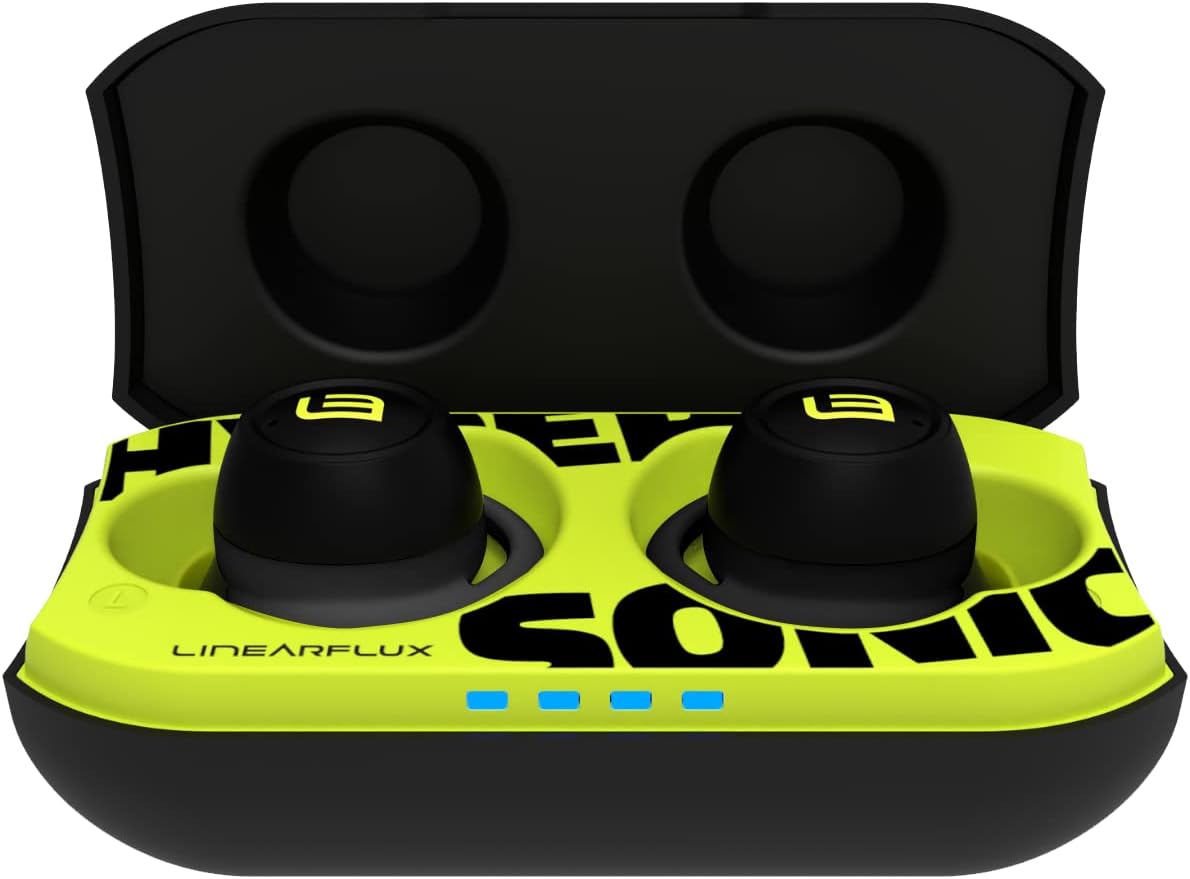
Image: HyperSonic earbuds resting in their open charging case, ready for charging or use. The case features LED indicators for battery status.

Image: A pair of HyperSonic earbuds, showcasing their design and waterproof capability with water splashes.
Earbud Fit and Design

Image: A HyperSonic earbud comfortably seated in a user's ear, illustrating its ergonomic design.

Image: Detailed view of the HyperSonic earbuds, showing the ear tips and the overall shape designed for in-ear placement.
4. Setup
4.1 Charging the Earbuds and Case
Before first use, fully charge your HyperSonic earbuds and charging case.
- Charging the Case: Connect the provided USB-C cable to the charging port on the case and to a power source. Alternatively, place the charging case on a Qi-compatible wireless charging pad. The LED indicators on the case will show charging status.
- Charging the Earbuds: Place the earbuds into their respective slots in the charging case. Ensure they are properly seated to make contact with the charging pins. The earbuds will begin charging automatically.
A 5-minute charge provides approximately 1 hour of playtime. A full charge for the earbuds offers up to 7 hours of battery life, and the charging case provides an additional 18 hours of battery life.
4.2 Pairing with Your Device
HyperSonic earbuds use Bluetooth 5.0 for a stable wireless connection.
- Initial Pairing: Open the charging case. The earbuds will automatically enter pairing mode.
- On your device (smartphone, tablet, laptop), go to the Bluetooth settings and ensure Bluetooth is enabled.
- Look for "HyperSonic" in the list of available devices and select it to connect.
- You will hear voice prompts such as "HyperSonic on," "HyperSonic pairing," "left bud," "right bud," and "HyperSonic connected" as the earbuds power on and establish a connection.
Once paired, the earbuds will automatically connect to the last paired device when removed from the case.
4.3 Fitting the Earbuds
Proper fit is crucial for optimal sound quality and comfort.
- Select the ear tips that provide the best seal and comfort for your ears from the included options. The earbuds are designed with pillow-soft ear-tips and form-hugging shells to minimize ear fatigue.
- Gently insert each earbud into your ear canal and twist slightly until it feels secure and comfortable.
- Ensure a snug fit to experience the full passive noise cancellation and sound isolation capabilities. Note that using larger, non-standard aftermarket ear tips may interfere with the charging contacts in the case.
5. Operating Your HyperSonic Earbuds
5.1 Capacitive Touch Controls
Your HyperSonic earbuds feature intuitive capacitive touch controls on the outer surface of each earbud. Specific functions may vary slightly, but common controls include:
- Single Tap: Play/Pause music, Answer/End call.
- Double Tap (Left/Right): Skip to previous/next track.
- Triple Tap (Left/Right): Adjust volume up/down.
- Long Press: Activate voice assistant (Siri, Google Assistant), Reject call.
Be aware that the touch controls are sensitive. When adjusting the earbuds' fit, avoid accidental touches that may trigger commands.
5.2 Water Resistance
The HyperSonic earbuds are water resistant, making them suitable for workouts and outdoor activities. They are designed to withstand splashes and sweat. Do not submerge the earbuds in water.
5.3 Noise Control
Experience enhanced audio clarity with passive noise cancellation and sound isolation features. A proper earbud fit is essential to maximize these benefits, reducing ambient noise for an immersive listening experience.
6. Maintenance
6.1 Cleaning
Regular cleaning helps maintain performance and hygiene.
- Earbuds: Gently wipe the earbuds, especially the ear tips and mesh, with a soft, dry, lint-free cloth. For stubborn dirt, a slightly damp cloth with water can be used, ensuring no moisture enters the speaker openings.
- Charging Case: Wipe the exterior of the charging case with a soft, dry cloth. Use a dry cotton swab to clean the charging contacts inside the case if necessary.
Avoid using abrasive materials, solvents, or harsh chemicals.
6.2 Storage
When not in use, store your HyperSonic earbuds in their charging case to protect them from damage and keep them charged. Store the case in a cool, dry place away from extreme temperatures.
7. Troubleshooting
If you encounter issues with your HyperSonic earbuds, try the following solutions:
- Earbuds Not Pairing/Connecting:
- Ensure both earbuds are charged and removed from the case.
- Turn off and on your device's Bluetooth.
- Forget "HyperSonic" from your device's Bluetooth list and attempt to re-pair.
- If one earbud disconnects, try placing both earbuds back in the case, closing it for a few seconds, then reopening to reset the connection.
- No Sound or Poor Sound Quality:
- Check the volume level on both your device and the earbuds.
- Ensure earbuds are properly seated in your ears with a good seal. Try different ear tip sizes.
- Clean any debris from the earbud speaker mesh.
- Charging Issues:
- Ensure the charging cable is securely connected or the case is correctly placed on the wireless charging pad.
- Verify that the charging contacts on both the earbuds and the case are clean and free of obstruction.
- If using aftermarket ear tips, ensure they do not prevent the earbuds from making proper contact with the charging pins in the case.
- Earbuds Not Turning On:
- Ensure the earbuds and charging case are sufficiently charged.
7.1 Factory Reset
If issues persist, a factory reset may resolve them. Specific reset procedures can vary; please refer to the LINEARFLUX support website or contact customer service for detailed instructions for your HyperSonic model.
8. Specifications
| Feature | Specification |
|---|---|
| Model Name | HyperSonic |
| Item Model Number | HS |
| Brand | LINEARFLUX |
| Connectivity Technology | Bluetooth |
| Wireless Communication Technology | Bluetooth |
| Bluetooth Version | 5.0 |
| Bluetooth Range | 10 Meters |
| Control Type | Touch Control |
| Control Method | Touch, Voice |
| Ear Placement | In Ear |
| Form Factor | In Ear |
| Noise Control | Sound Isolation (Passive Noise Cancellation) |
| Water Resistance Level | Water Resistant |
| Battery Life (Earbuds) | 7 Hours |
| Carrying Case Battery Average Life | 18 Hours |
| Special Features | 5 minute charge = 1 hour playtime, Lightweight, Passive Noise Cancellation |
| Compatible Devices | Gaming Consoles, Laptops, Tablets, iPhone |
| Product Dimensions | 1.18 x 0.67 x 1.1 inches |
| Item Weight | 9.6 ounces |
| Material | Evo |
| Color | Black EVO |
9. Warranty and Support
LINEARFLUX products are manufactured to the highest quality standards. For information regarding warranty coverage, technical support, or customer service, please visit the official LINEARFLUX website or contact their customer support directly.
You can also visit the LINEARFLUX Store on Amazon for more product information and support resources.