1. Introduction
This manual provides detailed instructions for the EC Buying XY-BT-Mini Bluetooth 4.1 MP3 Decoding Amplifier Module. Please read this manual thoroughly before installation and operation to ensure proper use and optimal performance. This module is designed for integrating Bluetooth audio capabilities into various electronic projects and audio systems.
2. Product Features
- Audio Decoding: Supports WAV, APE, FLAC, and MP3 lossless audio formats for high-quality stereo output.
- Bluetooth Connectivity: Features Bluetooth 4.1 with automatic callback function for easy reconnection.
- Power Supply Options: Can be powered via universal Micro USB 5V or an external 3.7V-5V lithium battery.
- Compact Design: Small form factor (30mm x 30mm) suitable for various applications.
- Audio Output: Standard 3.5mm stereo audio interface for connecting headphones, power amplifiers, and other audio devices.
- Status Indicator: Onboard LED indicator shows Bluetooth mode (blue light).
3. Specifications
| Parameter | Value |
|---|---|
| Power Supply | DC 3.7V-5V |
| Dimensions | 30mm x 30mm (1.81in x 1.81in) |
| Signal-to-Noise Ratio (SNR) | 90dB |
| Total Harmonic Distortion + Noise (THD+N) | -70dB |
| Crosstalk | -86dB |
| Dynamic Range (DNR) | 91dB |
| Supported Bluetooth Profiles | A2DP/AVCTP/AVDTP/AVRCP/HFP |
| Line of Sight (LOS) Range | >15m |
| Bluetooth Version | 4.1 |
| Supported Audio Formats | WAV, APE, FLAC, MP3 |
4. Interface Description
The XY-BT-Mini module features several key interfaces for power and audio connections:
- USB Power Supply: Universal Micro USB 5V port for power input.
- 3.7-5V Power Supply Pad: Allows for external 3.7V-5V lithium battery power supply.
- LED Indicator: A blue LED illuminates when the module is in Bluetooth mode.
- 3.5mm Stereo Audio Interface: Standard 3.5mm jack providing stereo sound output. This can be connected to headphones, external power amplifiers, or other audio devices.
- Audio Output Pins:
- R: Right channel audio output.
- L: Left channel audio output.
- GND: Common ground for audio.
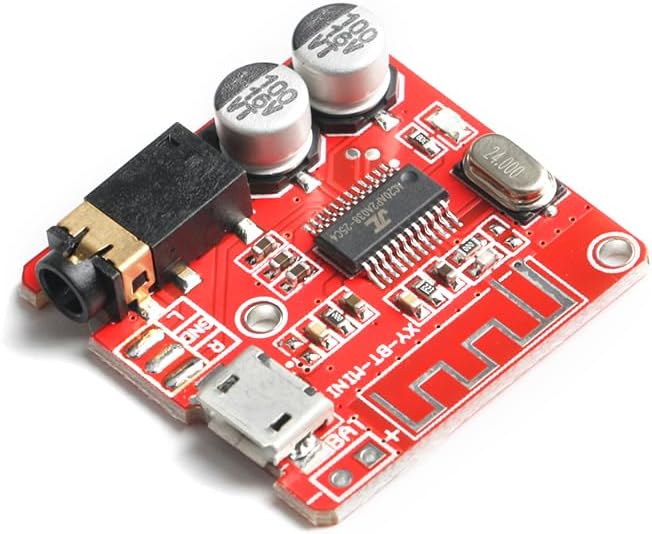
Figure 1: Top view of the XY-BT-Mini Bluetooth module. This image displays the Micro USB power input, the 3.5mm audio output jack, and the main Bluetooth chip, along with other surface-mounted components.

Figure 2: Angled view of the XY-BT-Mini module, highlighting its compact 30mm x 30mm dimensions. This view shows the various connection points and the overall size of the board.
5. Setup and Installation
- Power Connection:
- Connect a DC 5V power source to the Micro USB port.
- Alternatively, for portable applications, connect a 3.7V-5V lithium battery to the designated power supply pads (BAT+ and BAT-). Ensure correct polarity.
- Audio Output Connection:
- Connect your headphones or an external amplifier to the 3.5mm stereo audio jack.
- For custom integrations, solder wires to the R (Right), L (Left), and GND (Ground) pins for audio output.
- Mounting: The module is small and can be integrated into various enclosures or projects. Ensure adequate ventilation if used in a confined space.
Video 1: This video demonstrates the physical handling and basic connections of a similar mini Bluetooth amplifier board. It shows how the board can be integrated into a project.
6. Operating Instructions
- Power On: Once power is supplied, the blue LED indicator on the module will light up, indicating it is in Bluetooth mode and ready for pairing.
- Pairing:
- Enable Bluetooth on your audio source device (e.g., smartphone, tablet, computer).
- Search for available Bluetooth devices. The module will typically appear as "XY-BT-Mini" or a similar identifier.
- Select the module to initiate pairing. No password is usually required.
- Once successfully paired, the module's LED may change its blinking pattern or remain solid blue, depending on the specific firmware.
- Audio Playback: After successful pairing, any audio played on your source device will be transmitted wirelessly to the XY-BT-Mini module and output through its 3.5mm jack or soldered audio pins.
- Automatic Callback: The module supports an automatic callback function, meaning it will attempt to reconnect to the last paired device when powered on, if that device is within range and has Bluetooth enabled.
Video 2: This video illustrates the process of connecting a Bluetooth audio module to a smartphone and playing music. It provides a visual guide to the pairing and playback steps.
7. Troubleshooting
- No Power:
- Ensure the power supply (Micro USB 5V or 3.7V-5V battery) is correctly connected and providing the specified voltage.
- Check for loose connections or damaged wires.
- Cannot Pair:
- Make sure the module is powered on and the blue LED is active.
- Ensure Bluetooth is enabled on your source device and it is within the 15m line-of-sight range.
- Try restarting both the module (by cycling power) and your source device's Bluetooth.
- Ensure no other devices are currently paired with the module.
- No Audio Output:
- Verify that the module is successfully paired with your source device.
- Check the audio connections (3.5mm jack or soldered pins) to your headphones or amplifier. Ensure they are secure and correctly wired (L, R, GND).
- Confirm that the volume on both your source device and any connected amplifier is turned up.
- Test with different audio cables or headphones/speakers to rule out faulty peripherals.
- Poor Audio Quality:
- Ensure the audio source is playing high-quality audio files.
- Reduce the distance between the module and the source device to minimize interference.
- Avoid placing the module near strong electromagnetic interference sources.
- Check for proper grounding in your audio setup to prevent hum or noise.
8. Safety Information
- Do not expose the module to moisture or extreme temperatures.
- Ensure proper power supply voltage (DC 3.7V-5V) to prevent damage.
- Handle the circuit board with care to avoid electrostatic discharge.
- Keep out of reach of children.
- If soldering, ensure proper ventilation and use appropriate safety equipment.
9. Maintenance
- Keep the module clean and free from dust. Use a soft, dry cloth for cleaning.
- Avoid physical shock or dropping the module.
- Regularly check connections for any signs of wear or corrosion.
10. Warranty and Support
For warranty information or technical support, please refer to the EC Buying official website or contact your retailer. Keep your purchase receipt as proof of purchase.


