
TOPXCDZ WS2812B
WS2812B WS2812 Digital Flexible Individually Addressable Pixel LED Strip User Manual
Brand: TOPXCDZ | Model: WS2812B
Product Overview
The WS2812B LED Strip is a digital, flexible, individually addressable pixel LED strip designed for various lighting applications. Each LED on the strip can be controlled independently, allowing for complex and dynamic lighting effects. This manual provides essential information for the proper setup, operation, and maintenance of your LED strip.
This product operates on a 5V power supply and requires a suitable controller for operation. It is available in various pixel densities (30, 60, 74, 96, 144 LEDs per meter) and different ingress protection (IP) ratings (IP30, IP65, IP67) to suit diverse environmental conditions.

Image: Close-up view of the WS2812B LED strip, highlighting the individual addressable LEDs and the circuit board.
Key Features
- Individually Addressable LEDs: Each 5050 SMD RGB LED has a built-in improved version of the WS2811 IC, allowing for independent control of each pixel.
- Flexible Design: The strip is flexible, enabling installation around curves and corners.
- Cuttable Segments: The LED strip can be cut between every LED to achieve custom lengths without damaging the remaining sections.
- Easy Connectivity: Equipped with 3-pin JST-SM connectors on both ends for straightforward installation. Separate power/ground wires are also provided.
- Adhesive Backing: IP30 and IP65 rated strips feature 3M adhesive tape on the back for convenient mounting (IP67 strips do not include adhesive).
- Versatile Applications: Suitable for various decorative and functional lighting purposes, including TV backlighting, KTV, bars, game rooms, car decoration, and home accents.
What's in the Box
The package includes the following components:
- 1 x 5V WS2812B LED Strip (Length and LED density vary by model: 5m for 30/60/74/96 LED/m, 1m for 144 LED/m)
Note: Power supply and remote controller are NOT included and must be purchased separately.
Setup Instructions
- Power Supply: Ensure you have a stable 5V DC power supply. Do not use 12V or 24V power supplies as this will damage the strip.
- Controller Connection: Connect the 3-pin JST connector from the LED strip to a compatible WS2812B controller. The pinout is: Red (VCC), White (GND), Green (DATA).
- Surface Preparation: For IP30 and IP65 strips, clean and dry the installation surface thoroughly before applying the adhesive tape. The surface must be smooth for optimal adhesion.
- Cutting the Strip (Optional): If a custom length is required, the strip can be cut between any two LEDs at the designated cut marks. Ensure power is disconnected before cutting.
- Voltage Drop Management: For longer runs of the LED strip, it is recommended to power the strip from both ends to minimize voltage drop and ensure consistent brightness along the entire length.

Image: Illustration of different IP ratings (IP20, IP65, IP67) and physical dimensions for 30, 60, and 74 LEDs/meter strips.
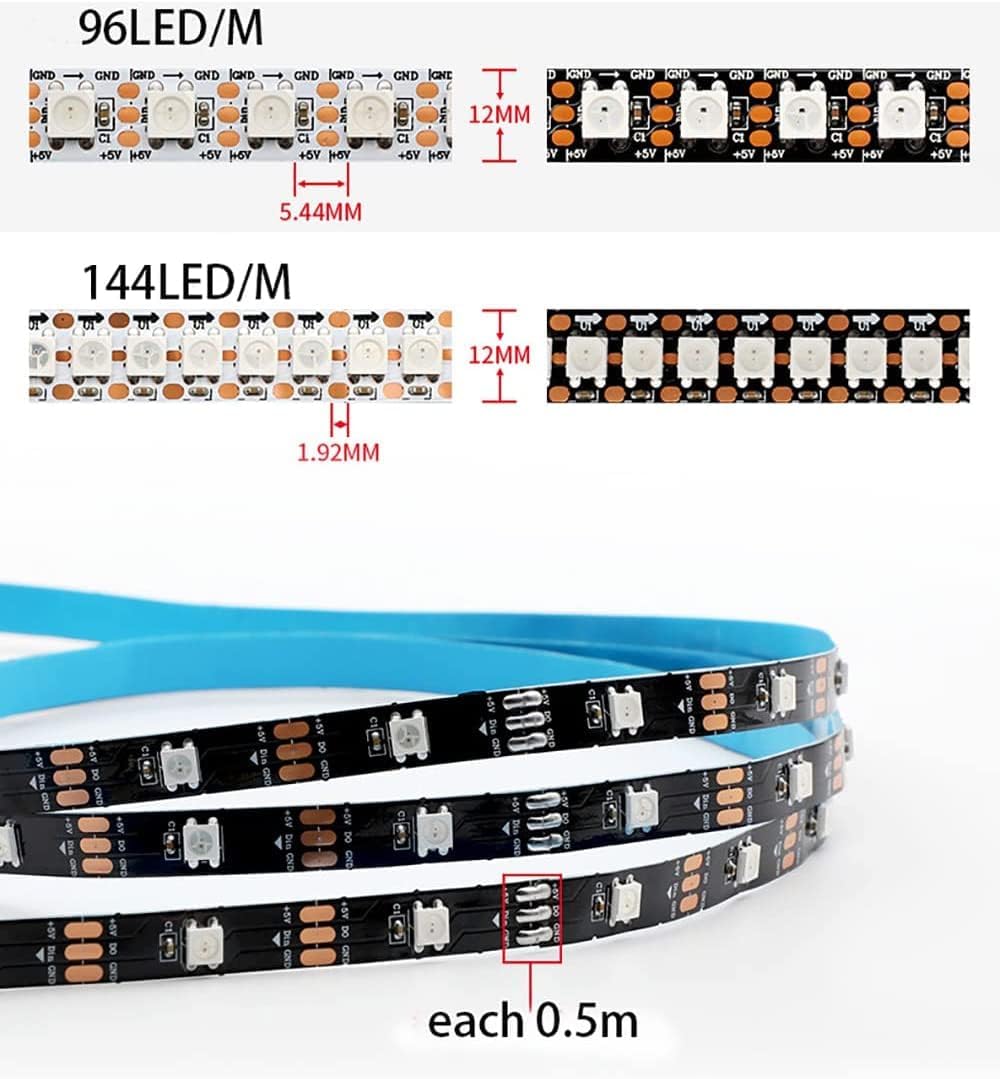
Image: Illustration of physical dimensions for 96 and 144 LEDs/meter strips, indicating that each LED can be cut.
Operating Instructions
Once properly connected to a 5V power supply and a compatible controller, the WS2812B LED strip can display a wide range of lighting effects. The specific operation will depend on the features of your chosen controller.
- Controller Functions: Use your LED controller to select various pre-programmed lighting effects such as curtain-up, flowing water, raindrop, jump flash, and more.
- Custom Effects: Advanced users can create custom animation effects using software like Coreldraw, Flash, or LedEdit, depending on the controller's capabilities.
- Color Control: The individually addressable nature of the LEDs allows for precise control over color and brightness for each pixel.
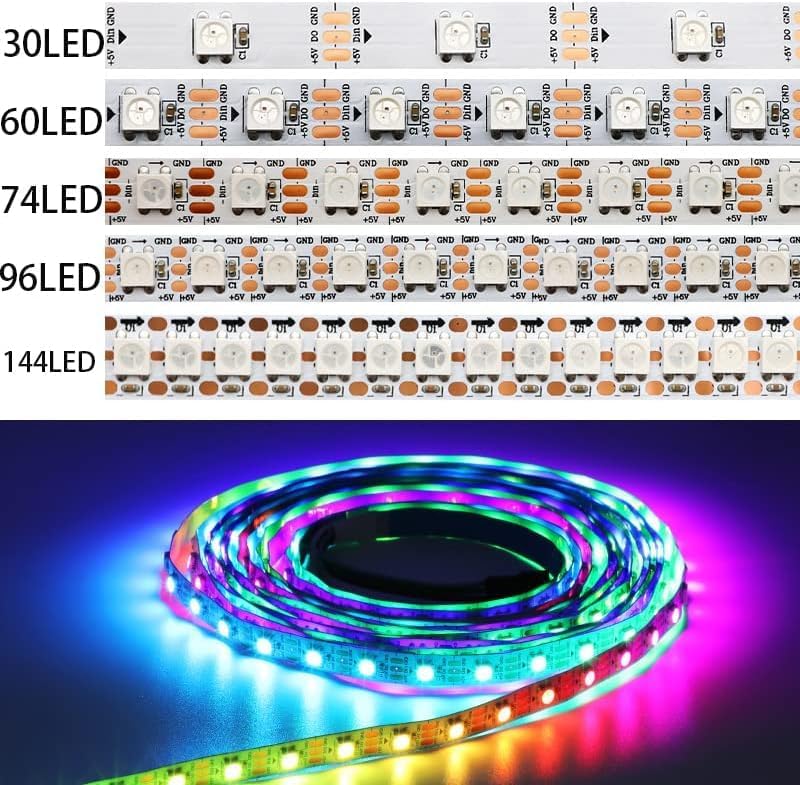
Image: Comparison of WS2812B LED strips showing varying LED densities from 30 to 144 LEDs per meter.
Maintenance
- Handling: Avoid bending the LED strip sharply, as this can damage the internal circuitry and LEDs.
- Cleaning: For IP30 and IP65 strips, gently wipe with a dry, soft cloth if cleaning is necessary. For IP67 strips, a damp cloth can be used, but ensure connectors are dry before powering on.
- Environmental Protection: Ensure the appropriate IP-rated strip is used for the intended environment (e.g., IP65/IP67 for outdoor or damp locations).

Image: Visual representation of WS2812B LED strips with different ingress protection (IP) ratings: IP67 (waterproof), IP20 (non-waterproof), and IP65 (splashproof).
Troubleshooting
- Strip Not Lighting Up:
- Verify the power supply is 5V DC and correctly connected (VCC to +, GND to -).
- Check all connections, especially the 3-pin JST connector, for secure contact.
- Ensure the controller is powered on and functioning correctly.
- Incorrect Colors or Flickering:
- Confirm the data line (Green wire) is correctly connected to the controller's data output.
- Check for voltage drop on longer runs; consider powering from both ends.
- Ensure the controller's settings match the LED type (WS2812B) and pixel count.
- Partial Strip Not Working:
- Inspect the non-working section for physical damage or sharp bends.
- If a segment is damaged, it can be cut out and the strip re-connected, or replaced.
Specifications
| Attribute | Detail |
|---|---|
| Input Voltage | DC5V |
| LED Resource | WS2812B LED (5050 SMD RGB LED with built-in improved version of WS2811 IC) |
| IC Type | Improved Version WS2812 IC (1 IC drives 1 LED chip) |
| Pixels per Meter | 30, 60, 74, 96, 144 (depending on model) |
| Grey Scale | 256 |
| Bits/Color | 8-Bits/Color |
| FPC Width | 10mm (for 30, 60, 74, 96 LEDs/m), 12mm (for 144 LEDs/m) |
| FPC Color | Black/White (depending on model) |
| Protection Rate | IP30 / IP65 / IP67 (depending on model) |
| Colors | Full Color RGB, Dream Color Changing |
| Cuttable | Every LED is cuttable |
| Adhesive Tape | 3M adhesive tape on back for IP30/IP65 (IP67 without adhesive) |
| JST Connector Wire | 20AWG |
Power Consumption (approximate):
- 30 LEDs/m: 6 Watt/meter
- 60 LEDs/m: 12 Watt/meter
- 74 LEDs/m: 14.8 Watt/meter
- 96 LEDs/m: 19.8 Watt/meter
- 144 LEDs/m: 28.8 Watt/meter
Warranty and Support
For warranty information and technical support, please contact the manufacturer, TOPXCDZ, directly or refer to the product listing on the retailer's website where the product was purchased.
You can often find support contact details on the TOPXCDZ brand page on Amazon or through your order history.
Ask a question about this manual
Ask about setup, troubleshooting, compatibility, parts, safety, or missing instructions. Manuals+ will review the question and use this page’s manual context to help answer it.