
Introduction
Thank you for choosing the HINISO Dehumidifier. This manual provides important information regarding the safe operation, installation, maintenance, and troubleshooting of your new appliance. Please read this manual thoroughly before use and keep it for future reference.
This portable dehumidifier is designed to reduce excess moisture in your home, improving air quality and preventing issues related to high humidity. It features a 3800ml water tank, auto shut-off, 7-color ambient light, and a 24-hour timer, suitable for areas up to 550 sq.ft.
Important Safety Instructions
- Read all instructions before using the appliance.
- Do not operate the dehumidifier with a damaged cord or plug.
- Ensure the appliance is placed on a stable, level surface to prevent tipping.
- Keep the appliance away from heat sources, direct sunlight, and flammable materials.
- Do not block the air inlet or outlet. Maintain at least 20 cm (8 inches) clearance around the unit.
- Do not immerse the appliance, power cord, or plug in water or other liquids.
- Unplug the dehumidifier before cleaning, maintenance, or when not in use.
- This appliance is for indoor use only.
- Do not allow children to operate the appliance unsupervised.
- Only use attachments/accessories specified by the manufacturer.
Product Overview
Familiarize yourself with the components and controls of your HINISO Dehumidifier.

Image: Front view of the HINISO Dehumidifier, showing the digital display indicating humidity level, and touch control buttons below it. Airflow arrows illustrate moisture removal.
Main Components:
- Air Inlet: Where humid air is drawn into the unit.
- Air Outlet: Where dry air is released.
- Control Panel: Digital display and touch buttons for operation.
- Water Tank: Transparent, 3800ml capacity for collecting condensed water.
- Power Cord: For connecting to an electrical outlet.
- Built-in Handle: Located on the back for easy portability.
Control Panel Functions:
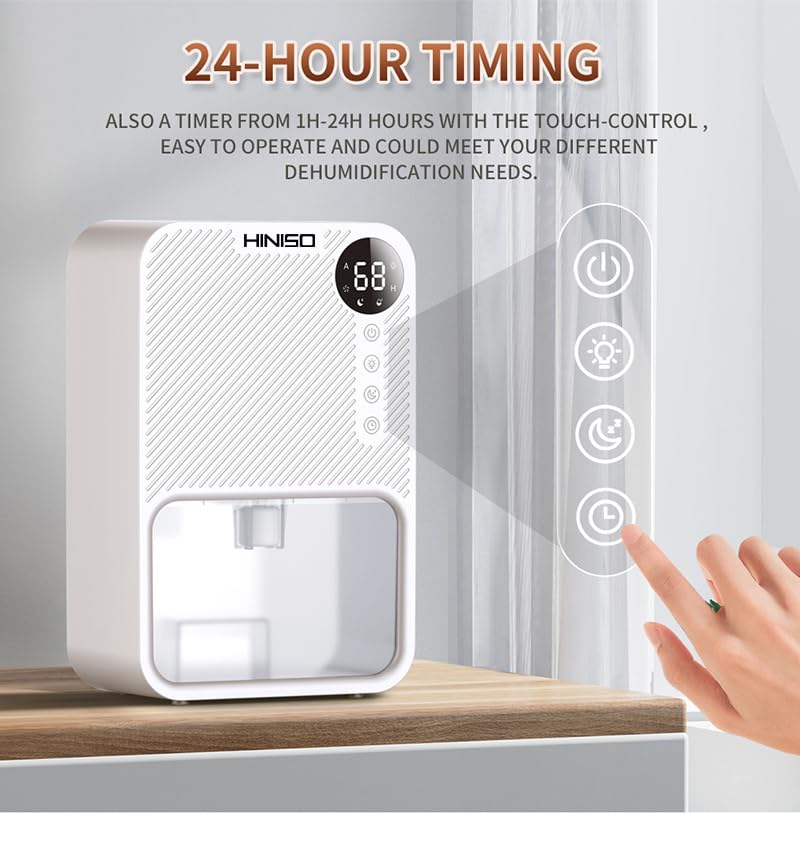
Image: Close-up of the dehumidifier's control panel, highlighting the touch-sensitive buttons for Power, Light, Mode, and Timer functions, with a digital display showing a humidity reading.
- Power Button: Turns the unit On/Off.
- Light Button: Controls the 7-color ambient light.
- Mode Button: Switches between High Power and Sleep Mode.
- Timer Button: Sets the 1-24 hour timer.
- Digital Display: Shows current humidity level or timer setting.
Setup
- Unpack: Carefully remove the dehumidifier from its packaging. Retain packaging for future storage or transport.
- Placement: Place the dehumidifier on a firm, level surface in the desired room. Ensure there is at least 20 cm (8 inches) of clear space around all sides of the unit for proper airflow. Avoid placing it near heat sources or in direct sunlight.
- Power Connection: Plug the power cord into a suitable electrical outlet (refer to specifications for voltage requirements, typically standard household voltage).
- Initial Check: Ensure the water tank is correctly inserted and empty before starting operation.

Image: The HINISO Dehumidifier positioned inside a closet, illustrating its compact dimensions (5.3in x 9.3in x 14.6in) and ease of placement in small spaces.
The dehumidifier is suitable for various spaces including small rooms, bathrooms, bedrooms, closets, basements, and RVs, covering areas up to 550 sq.ft.
Operating Instructions
1. Power On/Off
- Press the Power Button (represented by a circle with a vertical line) once to turn the dehumidifier ON. The digital display will show the current humidity level.
- Press the Power Button again to turn the dehumidifier OFF.
2. Mode Selection
- Press the Mode Button (represented by a fan icon or crescent moon) to switch between operating modes.
- High Power Mode: For maximum dehumidification.
- Sleep Mode: Operates at an ultra-quiet 26dB, ideal for use in bedrooms or during sleep.

Image: The dehumidifier displaying its two working modes, highlighting the quiet operation of the dehumidifier compared to street or office noise levels.
3. Timer Setting
- Press the Timer Button (represented by a clock icon) to set the desired operating duration.
- Each press will cycle through 1-24 hours. The unit will automatically turn off after the set time.
4. Ambient Light Control
- Press the Light Button (represented by a light bulb icon) to cycle through the 7-color ambient light options or turn the light off.

Image: The dehumidifier operating in a bedroom, demonstrating its quiet sleep mode and the soft glow of its 7-color ambient light feature.
5. Water Tank Management
- The dehumidifier is equipped with a 3800ml transparent water tank.
- Auto Shut-Off: When the water tank is full, the dehumidifier will automatically shut off, and a red light will flash to indicate that the tank needs to be emptied.
- Emptying the Water Tank:
- Carefully pull out the water tank from the front of the unit.
- Pour out the collected water.
- Slide the empty water tank back into the unit until it clicks into place. The dehumidifier will resume operation if it was running before the tank filled.
Maintenance
Regular maintenance ensures optimal performance and extends the lifespan of your dehumidifier.
1. Cleaning the Exterior
- Before cleaning, always unplug the dehumidifier from the power outlet.
- Wipe the exterior of the unit with a soft, damp cloth. Do not use abrasive cleaners, solvents, or harsh chemicals, as these may damage the surface.
- Ensure no water enters the control panel or air vents.
2. Cleaning the Water Tank
- Empty the water tank as described in the Operating Instructions.
- Rinse the water tank with clean water. For thorough cleaning, use a mild detergent and a soft brush, then rinse completely.
- Dry the tank thoroughly before reinserting it into the unit to prevent mold or mildew growth.
3. Cleaning the Air Filter (Recommended)
Although not explicitly detailed in product features, most dehumidifiers have an air filter. Regular cleaning of the air filter is crucial for efficient operation.
- Locate the air filter (typically at the air inlet, often on the back or side).
- Gently remove the filter.
- Clean the filter with a vacuum cleaner or wash it with warm, soapy water.
- Allow the filter to air dry completely before reinstalling it. Do not operate the dehumidifier without the filter or with a wet filter.
4. Storage
- If storing the dehumidifier for an extended period, ensure the water tank is empty and clean.
- Clean the entire unit and air filter.
- Store the unit in a cool, dry place, away from direct sunlight and extreme temperatures.
Troubleshooting
Before contacting customer support, please refer to the following common issues and solutions.
| Problem | Possible Cause | Solution |
|---|---|---|
| Dehumidifier does not turn on. | No power supply. Power cord not properly connected. Water tank is full or incorrectly inserted. | Check if the power outlet is working. Ensure the power cord is securely plugged in. Empty the water tank and ensure it is correctly reinserted. |
| No water collected or low dehumidification. | Room humidity is already low. Air inlet/outlet blocked. Room temperature is too low. Unit is in Sleep Mode. | Dehumidifier will not collect water if humidity is below optimal levels. Ensure proper clearance around the unit. Dehumidifiers are less effective in very cold environments. Switch to High Power Mode for faster dehumidification. |
| Unit stops operating and red light flashes. | Water tank is full. | Empty the water tank and reinsert it properly. |
| Unusual noise during operation. | Unit not on a level surface. Obstruction in fan. | Place the unit on a flat, stable surface. Unplug and check for any foreign objects. |
Specifications
| Model | B0C7167V46 |
| Brand | HINISO |
| Dehumidification Capacity | Up to 950ml/day (at 86°F, 80% RH) |
| Water Tank Capacity | 3800ml |
| Coverage Area | 50-550 sq.ft |
| Noise Level | 26dB (Sleep Mode) |
| Dimensions (L x W x H) | 5.3in x 9.3in x 14.6in |
| Timer | 1-24 hours |
| Ambient Light | 7-color breathing light |
| Material | Acrylonitrile Butadiene Styrene (ABS) |
| Color | WHITE |
Warranty and Support
Your HINISO Dehumidifier comes with a 2-year warranty.
HINISO offers dedicated customer support and lifetime technical assistance. If you encounter any issues or have questions regarding your product, please contact our customer service team.
For assistance, please refer to the contact information provided with your purchase or visit the official HINISO website.