
IIIF150 IIIF150 Raptor
IIIF150 Raptor (2023) User Manual
Model: IIIF150 Raptor
Introduction
Welcome to the user manual for your IIIF150 Raptor (2023) Outdoor Smartphone. This device is engineered for durability and high performance, featuring a thermal camera, night vision, a powerful 108MP main camera, and a robust 10000mAh battery. This manual provides essential information on setting up, operating, maintaining, and troubleshooting your device to ensure optimal performance and longevity.

Image: The IIIF150 Raptor (2023) smartphone, showcasing its rugged design, thermal imaging capabilities on the display, and the multi-camera setup on the rear.
Brand Philosophy

Image: An illustration of IIIF150's brand philosophy, explaining their approach to making rugged phones thin and light through design, process technology, and construction.
Unlike regular smartphones, rugged phones typically have a structural design that makes them relatively thick. However, IIIF150 believes that lightness and ruggedness are not mutually exclusive.
The Design
Through the exploration of endless design details and repeated verification of the curvature and haptics of various closed corners, IIIF150 achieves a light, thin, and octagonal design.
Process Technology
Obsessed with precision down to the 0.01-0.1mm level of change, IIIF150 constantly optimizes space for motherboard design and layout. This ensures the internal structure meets both space efficiency and performance requirements.
Construction
To make the IIIF150 Rugged Smartphone waterproof, drop-proof, and dust-proof, while also ensuring long battery life, it is meticulously constructed to be thin and light.
Setup Guide
1. What's in the Box
- IIIF150 Raptor (2023) Smartphone
- USB Cable
- SIM Tray Ejector
- User Manual (this document)
2. SIM Card Installation
- Locate the SIM card tray on the side of your device.
- Insert the SIM tray ejector tool into the small hole next to the tray.
- Gently push until the tray pops out.
- Place your Nano-SIM cards (up to two) and/or a microSD card (if applicable) into the designated slots on the tray. Ensure the gold contacts face downwards.
- Carefully reinsert the tray into the phone until it clicks into place.
3. Initial Power On and Charging
- Press and hold the Power button (usually on the right side) until the IIIF150 logo appears.
- Follow the on-screen prompts to complete the initial setup, including language selection, Wi-Fi connection, and Google account setup.
- For optimal battery life, fully charge your device before first use. Connect the USB cable to the phone's charging port and the other end to a 65W GaN compatible power adapter (not included) or a standard USB power source.
- The 10000mAh battery supports 65W GaN fast charging for quick power-ups.
Operating Your Device
Basic Navigation (Android 13)
Your IIIF150 Raptor runs on Android 13, offering an intuitive user experience.
- Home Screen: Swipe left or right to access different home screens.
- App Drawer: Swipe up from the bottom of the screen to view all installed applications.
- Notifications & Quick Settings: Swipe down from the top of the screen to access notifications and quick settings toggles (Wi-Fi, Bluetooth, etc.).
- Navigation Gestures/Buttons: Configure your preferred navigation method (gestures or traditional three-button navigation) in Settings > System > Gestures.
Camera Features
The IIIF150 Raptor is equipped with advanced camera systems for various scenarios.

Image: Close-up of the IIIF150 Raptor's rear camera module, highlighting the multiple lenses for different photographic capabilities.
- 108MP Main Camera: For high-resolution photos with exceptional detail. Open the Camera app and select "Photo" mode. You may find an option to switch to 108MP mode for full resolution.
- 64MP Night Vision Camera: Designed for clear imaging in low-light or complete darkness. Switch to "Night Vision" mode in the Camera app. This camera utilizes infrared technology.
- Thermal Camera: Detects heat signatures and displays them as thermal images. Access this feature through a dedicated "Thermal" mode in the camera app or a separate pre-installed application. This is useful for identifying heat leaks, electrical issues, or observing wildlife.
Push-to-Talk (PTT) Function
The device supports Push-to-Talk functionality, allowing for instant communication similar to a walkie-talkie.
- The PTT button is typically a dedicated physical button on the side of the phone.
- Configure the PTT button's action through the device settings or a specific PTT application.
- Ensure you have a compatible PTT service or application installed and configured for this feature to work.
Display and Performance
- 6.8" FHD+ 120Hz Display: Enjoy smooth visuals and vibrant colors. Adjust refresh rate settings in Display settings for battery optimization or performance.
- 24GB RAM (12+12)/256GB Storage: The device offers ample memory for multitasking and storage for apps, photos, and videos.
Connectivity
- Dual 4G SIM: Supports two 4G SIM cards simultaneously for flexible network usage.
- NFC: Use Near Field Communication for contactless payments, quick pairing with accessories, and data transfer. Enable NFC in Settings > Connected devices > Connection preferences.
Maintenance
Cleaning Your Device
To maintain the appearance and functionality of your IIIF150 Raptor:
- Wipe the screen and body with a soft, lint-free cloth.
- For stubborn smudges, slightly dampen the cloth with water or a screen cleaner.
- Avoid using harsh chemicals, abrasive materials, or aerosol sprays.
- Ensure all port covers are securely closed before cleaning with liquids.
Water and Dust Resistance (IP68)
Your IIIF150 Raptor is rated IP68 for water and dust resistance, meaning it can withstand immersion in water up to 1.5 meters for 30 minutes and is protected against dust ingress.
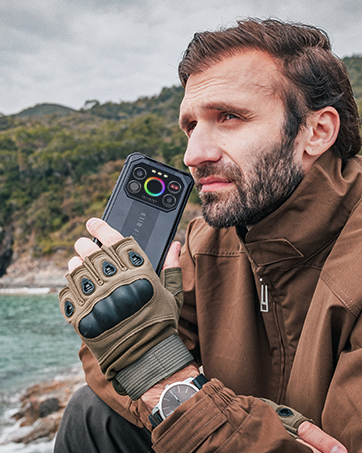
Image: The IIIF150 Raptor smartphone shown in water, illustrating its IP68 water resistance capabilities.
- Always ensure all port covers (USB-C, SIM tray) are firmly sealed before exposing the device to water or dust.
- Rinse the phone with clean water if exposed to saltwater or other liquids, then dry thoroughly.
- Avoid exposing the device to high-pressure water jets or extreme temperatures.
- The IP68 rating is not permanent and resistance may decrease as a result of normal wear.
Software Updates
Regular software updates provide security enhancements, bug fixes, and new features.
- Check for updates: Go to Settings > System > System update.
- Ensure your device has sufficient battery life and a stable Wi-Fi connection before performing an update.
Troubleshooting
Common Issues and Solutions
| Issue | Possible Solution |
|---|---|
| Device not powering on | Ensure the battery is charged. Press and hold the Power button for at least 10-15 seconds to force a restart. |
| Camera not working or blurry | Clean the camera lenses. Restart the camera app or the phone. Check for software updates. |
| Battery drains quickly | Reduce screen brightness, close unused apps, disable unnecessary features (GPS, Bluetooth, Wi-Fi when not in use). Check battery usage in Settings to identify power-hungry apps. |
| Network connectivity issues | Check SIM card insertion. Toggle Airplane mode on/off. Reset network settings (Settings > System > Reset options > Reset Wi-Fi, mobile & Bluetooth). |
| Device freezing or slow performance | Close background apps. Clear cache of problematic apps. Restart the device. Ensure sufficient storage space. |
If you encounter issues not listed here or if the suggested solutions do not resolve the problem, please refer to the Warranty and Support section for further assistance.
Specifications
| Feature | Detail |
|---|---|
| Model Name | IIIF150 Raptor |
| Operating System | Android 13.0 |
| Installed RAM Size | 24 GB (12GB physical + 12GB virtual) |
| Storage Capacity | 256 GB |
| Display Size | 17.3 cm (6.8 inches) |
| Resolution | 2400 x 1080 (FHD+) |
| Refresh Rate | 120 Hz |
| Main Camera | 108 MP |
| Night Vision Camera | 64 MP |
| Battery Capacity | 10000 mAh |
| Charging Technology | 65W GaN |
| Water/Dust Resistance | IP68 |
| Connectivity | 4G, Dual SIM, NFC |
Warranty and Support
Warranty Information
Your IIIF150 Raptor (2023) is covered by a standard manufacturer's warranty. Please refer to the warranty card included with your purchase for specific terms, conditions, and duration. Keep your proof of purchase for warranty claims.
Customer Support
For technical assistance, troubleshooting, or warranty inquiries, please contact IIIF150 customer support through their official website or the retailer from whom you purchased the device.
Online Resources: Visit the official IIIF150 website for FAQs, updated drivers, and additional support materials.
Ask a question about this manual
Ask about setup, troubleshooting, compatibility, parts, safety, or missing instructions. Manuals+ will review the question and use this page’s manual context to help answer it.