
T5
T5 Smart Fitness Wristband User Manual
Model: T5 | Brand: Generic
1. Introduction
Thank you for choosing the T5 Smart Fitness Wristband. This manual provides essential information on how to set up, operate, and maintain your device. Please read it carefully to ensure optimal performance and longevity of your wristband.
2. Product Features
- Activity Tracking: Monitors steps, distance, and calories burned.
- Sleep Monitoring: Tracks sleep patterns to help you understand your sleep quality.
- IP65 Water and Dust Resistance: Designed to withstand splashes, rain, and dust, making it suitable for daily wear and light exercise.
- LED Display: Clear digital display for time and activity data.
- Detachable Silicone Strap: Comfortable and easy to clean, with a detachable design for convenience.
- Long Battery Life: Up to 40 days standby time on a single charge.
- Vibration Alarm Clock: Set silent alarms that wake you gently.
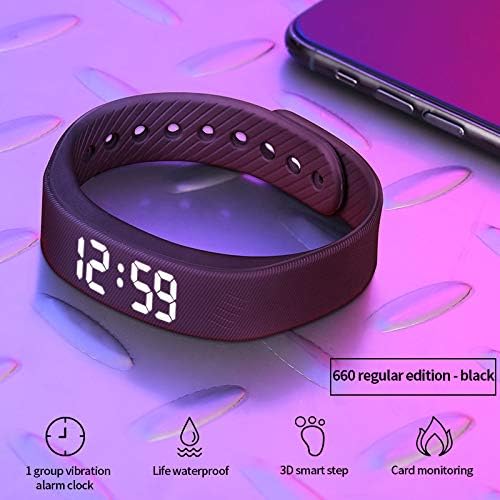
Image: The T5 Smart Fitness Wristband showing the time and icons representing its features: vibration alarm clock, life waterproof, 3D smart step tracking, and card monitoring.
3. Specifications
| Model Name | T5 Smart |
| Brand | Generic |
| Water Resistance Rating | IP65 (Water and Dust Resistant) |
| Display Type | LED |
| Screen Shape | Rectangular/Square |
| Strap Material | Silicone |
| Connectivity Technology | Bluetooth |
| Operating System | Android (compatible) |
| Special Features | Pedometer, Alarm Clock, Call Function (via Bluetooth) |
4. Setup and Charging
4.1 Initial Charge
Before first use, fully charge your T5 Smart Fitness Wristband. A full charge provides approximately 40 days of standby time.
4.2 Charging Instructions
- Carefully remove the main unit from the silicone wristband. This is typically done by pulling the strap away from the display module.
- Locate the USB charging head on the main unit.
- Insert the USB charging head directly into any standard USB port (e.g., computer, wall adapter, power bank).

Image: A charging diagram illustrating three steps: 1. Taking the main unit out of the wristband, 2. Inserting the charging head, and 3. USB port charging.

Image: The T5 Smart Fitness Wristband connected to a power bank via its integrated USB charging port, demonstrating its long standby time of 40 days on one charge.
5. Operating Instructions
5.1 Power On/Off
The device typically powers on automatically when charged or when a button is pressed (if available). To power off, refer to the specific instructions in the accompanying quick start guide or app.
5.2 Time Display
The LED display shows the current time. Time synchronization usually occurs automatically when connected to your smartphone via Bluetooth.
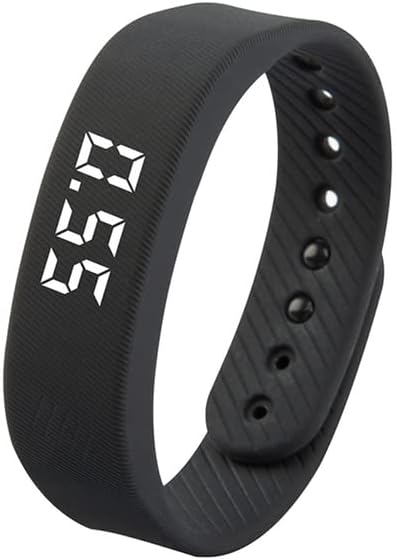
Image: A black T5 Smart Fitness Wristband displaying the time "8:50" on its LED screen.
5.3 Activity Tracking
The wristband automatically tracks your steps throughout the day. For detailed activity data, connect the wristband to its dedicated mobile application via Bluetooth. The application will provide insights into your steps, distance, and calories burned.
5.4 Sleep Monitoring
Wear the wristband while sleeping for automatic sleep pattern analysis. The mobile application will display your sleep duration and quality.
5.5 Bluetooth Connection
To access all smart features, download the compatible application (refer to product packaging or online store page for app name) and pair your wristband via Bluetooth. Ensure Bluetooth is enabled on your smartphone.
6. Maintenance and Care
6.1 Cleaning
Clean the wristband regularly with a soft, damp cloth. Do not use harsh chemicals or abrasive cleaners. Ensure the charging contacts are clean and dry before charging.
6.2 Water Resistance (IP65)
The T5 Smart Fitness Wristband is IP65 rated, meaning it is protected against dust ingress and low-pressure water jets from any direction. It is suitable for daily use, such as washing hands or light rain. It is not suitable for swimming, showering, or prolonged submersion in water.
6.3 Long-Wearing Comfort
The silicone strap is designed for long-wearing comfort and breathability, even during physical activity. If skin irritation occurs, discontinue use and consult a doctor.

Image: A close-up view of the T5 Smart Fitness Wristband's silicone strap, highlighting its sweat pattern design for comfortable and breathable long-term wear.
7. Troubleshooting
- Device not turning on: Ensure the device is fully charged. Check the charging connection.
- Cannot connect via Bluetooth: Make sure Bluetooth is enabled on your phone and the wristband is within range. Restart both devices. Ensure the correct app is installed.
- Inaccurate activity data: Ensure the wristband is worn snugly on your wrist. Calibrate the device through the app if an option is available.
- Display not working: Try charging the device. If the issue persists, contact customer support.
8. Warranty and Support
Your T5 Smart Fitness Wristband comes with a 12-month warranty from the date of purchase. This warranty covers manufacturing defects and quality issues. In case of any product quality problems, please do not hesitate to contact us. We offer a full refund or a new product replacement to ensure 100% customer satisfaction.
For support, please refer to the contact information provided with your purchase or on the product's online listing page.
Ask a question about this manual
Ask about setup, troubleshooting, compatibility, parts, safety, or missing instructions. Manuals+ will review the question and use this page’s manual context to help answer it.