
RAXMETRY CBG-W100
RAXMETRY Electric Waterproof Trimmer User Manual
Brand: RAXMETRY | Model: CBG-W100
Introduction
This manual provides detailed instructions for the safe and effective use of your RAXMETRY Electric Waterproof Trimmer. Please read this manual thoroughly before first use and retain it for future reference.
Key Features:
- Smooth and Safe Shaving: Special R-design and sharp ceramic blade for irritation-free shaving.
- All-in-One Trimmer: Two blade widths (20mm/32mm) and three guard combs for various body areas.
- USB Rechargeable & Cordless: Up to 90 minutes of use after full charge.
- IPX7 Waterproof: Suitable for wet and dry use, with a washable and removable ceramic head.
- Compact and Portable: Lightweight design suitable for home, business, and personal travel.
- Low Noise Shaving: High-quality torque motors (6500 RPM) for quiet operation.
Safety Warnings
WARNING:
- Do not immerse the entire trimmer in water. Only the head is waterproof (IPX7).
- Keep out of reach of children.
- Do not use if the device or blades are damaged.
- Ensure the device is fully charged before use to avoid power loss during operation.
- Use only the provided USB cable for charging.
Product Overview
The RAXMETRY Electric Waterproof Trimmer is designed for personal grooming, offering a versatile and gentle shaving experience.
Components:
- Main Trimmer Unit
- Ceramic Blade Head (detachable)
- Detail Trimmer Head
- Guard Combs (2mm, 3-6mm, 9-12mm)
- USB Charging Cable
- Cleaning Brush

Image: The main trimmer unit, showing its waterproof capability with water splashing around the base, along with the three different sized guard combs and the detail trimmer attachment.

Image: An exploded view highlighting the internal components of the trimmer head, including the stainless steel and ceramic blades, and the 8000 RPM copper motor, emphasizing its powerful yet quiet operation.
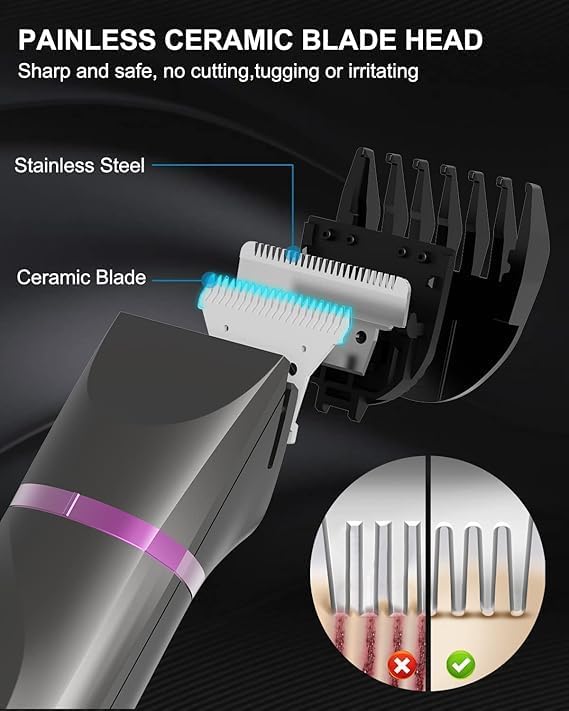
Image: A close-up of the ceramic blade head, illustrating its sharp and safe design. An inset diagram compares the effect of traditional blades (causing irritation) versus the ceramic blade (smooth, irritation-free).
Setup
Charging the Trimmer:
- Connect the USB charging cable to the trimmer's charging port.
- Plug the other end of the USB cable into a computer, adapter, power bank, or car charger.
- The indicator light will show charging status. A full charge takes approximately 2 hours.
- Once fully charged, the trimmer provides up to 90 minutes of cordless operation.

Image: The RAXMETRY trimmer connected to a laptop via its USB charging cable, demonstrating various charging options like computer, adapter, power bank, and car charger, along with charging time and running time details.
Attaching/Detaching Guard Combs and Heads:
- To attach a guard comb, align the comb with the trimmer head and gently push until it clicks into place.
- To detach, gently pull the comb away from the trimmer head.
- To change the trimmer head (e.g., from body trimmer to detail trimmer), gently pull the current head off and snap the desired head into place.
Operating Instructions
General Usage:
- Ensure the trimmer is charged.
- Select the appropriate trimmer head and guard comb for your desired hair length and body area.
- Press the power button to turn on the trimmer.
- Hold the trimmer loosely against the skin.
- Move the machine slowly and steadily in the direction of hair growth.
- For best results, ensure the skin is clean and dry, or use in the shower for wet trimming.
Specific Usage Areas:
The RAXMETRY trimmer is versatile for various body parts:
- Body Hair Trimmer: Ideal for legs, arms, armpits, and bikini area. Use the larger 20mm or 32mm blade with or without guard combs (2mm, 3-6mm, 9-12mm) as needed.
- Cutlass Detail Trimmer: Suitable for face and sideburns for precise trimming.

Image: A visual guide demonstrating the application of the trimmer for various body parts, including face, sideburns, legs, arms, armpits, and the bikini area, highlighting the versatility of the body hair trimmer and cutlass detail trimmer.

Image: The trimmer displayed with its various comb attachments (2mm, 3-6mm, 9-12mm) and different trimmer heads (20mm, 32mm), emphasizing its waterproof and splashproof design for multiple uses across the body.

Image: A woman demonstrating the use of the trimmer on her leg, accompanied by inset images illustrating its effectiveness for armpit, leg, bikini, and arm areas, promoting it as a whole body groomer.
Maintenance and Cleaning
Cleaning the Trimmer:
- Turn off the trimmer before cleaning.
- Detach the ceramic blade head.
- Rinse the detachable head under running water. The IPX7 waterproof design allows for easy cleaning.
- Use the provided cleaning brush to remove any trapped hairs from the blades and inside the trimmer head.
- Allow the head to air dry completely before reattaching or storing.
- Wipe the main body of the trimmer with a damp cloth. Do not immerse the main body in water.
Storage:
- Store the trimmer in a cool, dry place, away from direct sunlight and moisture.
- Ensure the trimmer is clean and dry before storing.
Troubleshooting
| Problem | Possible Cause | Solution |
|---|---|---|
| Trimmer does not turn on. | Low battery. | Charge the trimmer for at least 2 hours. |
| Trimmer performance is weak or pulls hair. | Blades are clogged with hair or dull. | Clean the blade head thoroughly. If performance does not improve, consider replacing the blade head. |
| Trimmer makes unusual noise. | Hair trapped inside or component misalignment. | Clean the trimmer head. Ensure all attachments are correctly secured. |
| Charging indicator not working. | Faulty cable or power source. | Try a different USB cable or power adapter. Ensure connections are secure. |
Specifications
| Feature | Detail |
|---|---|
| Brand | RAXMETRY |
| Model Number | CBG-W100 |
| Color | Grey |
| Special Feature | Shaver |
| Dimensions (L x W x H) | 14.73 x 3.3 x 3.05 cm (5.8 x 1.3 x 1.2 inches) |
| Weight | 240 grams (0.53 lbs) |
| Waterproof Rating | IPX7 (head only) |
| Blade Material | Ceramic |
| Motor Speed | 6500 RPM |
| Battery Life | Up to 90 minutes (after 2 hours charge) |
| Power Source | USB Rechargeable |
Warranty and Support
For warranty information and customer support, please refer to the product packaging or contact RAXMETRY customer service directly. Keep your purchase receipt as proof of purchase.
For further assistance, visit the official RAXMETRY website or contact their support team.
Ask a question about this manual
Ask about setup, troubleshooting, compatibility, parts, safety, or missing instructions. Manuals+ will review the question and use this page’s manual context to help answer it.