
1. Product Overview
The SKP Pro Audio Q10 MK2 is a 10-inch powered monitor speaker designed for professional audio applications. It features a 1300W power rating, Bluetooth connectivity, and a 3-input channel mixer with XLR line output. This speaker is suitable for various events, including DJ sets, live performances, and stage monitoring, delivering clear and powerful sound.

Figure 1: Front view of the SKP Pro Audio Q10 MK2 Powered Monitor Speaker.
2. Package Contents
Ensure all items are present in the package:
- SKP Pro Audio Q10 MK2 Powered Monitor Speaker
- Power Cable
- User Manual (this document)
3. Key Features
- 10-inch Woofer: Delivers robust low-frequency response.
- 1300W Peak Power: Provides high output for various applications.
- Bluetooth Connectivity: Seamless wireless audio streaming from compatible devices.
- XLR Line Output: Allows connection to additional speakers or sound systems.
- 3-Input Channel Mixer: Accommodates multiple audio sources (Microphone, Line, Bluetooth/AUX).
- Integrated DSP: Features 4 DSP EQ presets (Monitor, Live, Speech, Music) for optimized sound.
- 2-Band Analog Equalizer: For fine-tuning high and low frequencies.
- True Wireless Stereo (TWS): Connect two Q10 MK2 speakers wirelessly for stereo sound.
- Durable Polypropylene Cabinet: Ensures longevity and portability.
- Ergonomic Handles: For easy transport and setup.
4. Setup Instructions
4.1 Speaker Placement
Position the Q10 MK2 speaker on a stable surface, speaker stand, or use it as a floor monitor. Ensure adequate ventilation around the unit.
4.2 Power Connection
- Ensure the speaker's power switch is in the OFF position.
- Connect the provided power cable to the AC IN socket on the rear panel of the speaker.
- Plug the other end of the power cable into a suitable electrical outlet.
- Turn the power switch to the ON position. The power indicator LED will illuminate.

Figure 2: Side view showing the ergonomic handle for transport.
5. Operating Instructions
5.1 Rear Panel Controls and Connections
The rear panel of the Q10 MK2 features all input/output connections and control knobs. Familiarize yourself with these components before operation.
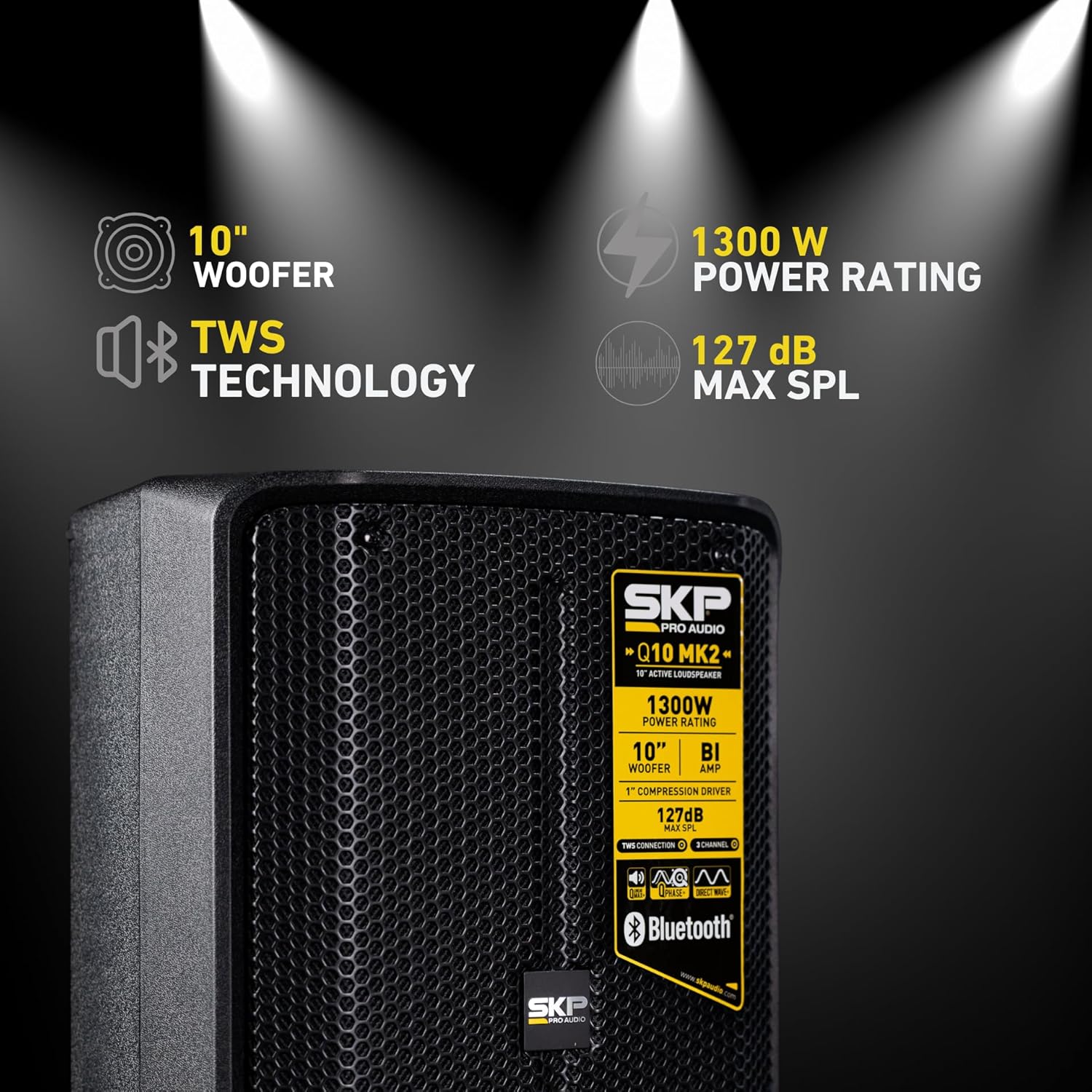
Figure 3: Detailed view of the Q10 MK2 rear control panel.
5.2 Input Channels
The Q10 MK2 features three input channels:
- MIC/LINE 1 & 2: These channels accept XLR or 1/4-inch TRS inputs. Use the switch to select between Microphone (MIC) or Line level input. Adjust the corresponding gain knob to set the input level.
- BT/AUX: This channel supports Bluetooth audio streaming and a 3.5mm AUX input. Use the dedicated volume knob for this channel.
5.3 Master Volume and Equalization
- Master Volume: Controls the overall output level of the speaker.
- HI/LO EQ: Use these knobs to adjust the high and low frequencies of the master output. Turn clockwise to boost, counter-clockwise to cut.
6. DSP Presets and Functionality
The Q10 MK2 includes a Digital Signal Processor (DSP) with four optimized presets to suit different applications. Press the DSP button to cycle through the presets:
- MONITOR: Optimized for use as a stage monitor, providing clear sound for performers.
- LIVE: General-purpose setting for live sound reinforcement.
- SPEECH: Enhances vocal clarity for public speaking engagements.
- MUSIC: Provides a balanced frequency response for music playback.
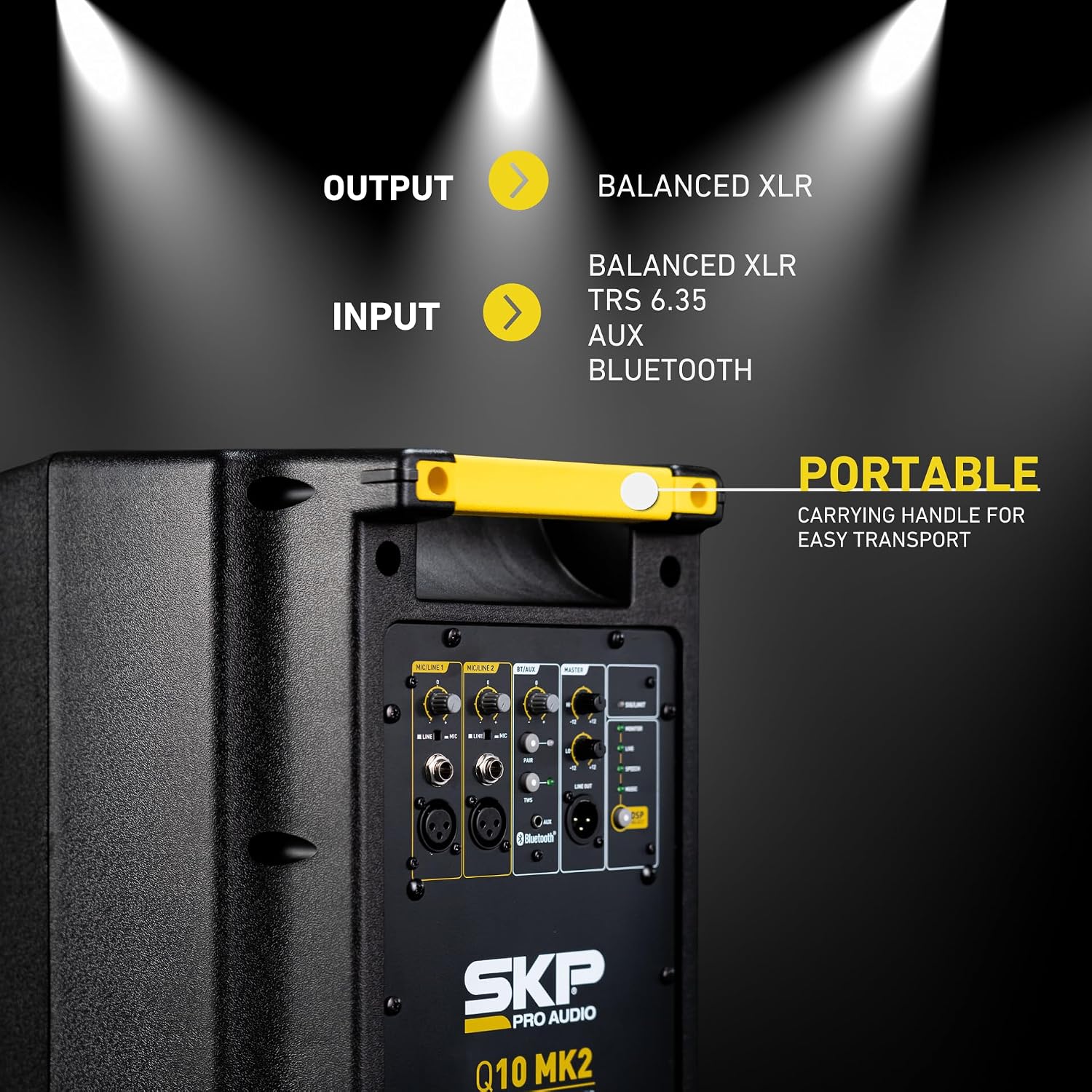
Figure 4: Close-up of the DSP preset selection and indicator lights.
7. Bluetooth Connectivity
7.1 Pairing a Bluetooth Device
- Ensure the Q10 MK2 speaker is powered on.
- On the rear panel, press the 'PAIR' button in the BT/AUX section. The Bluetooth indicator LED will flash, indicating it is in pairing mode.
- On your Bluetooth-enabled device (smartphone, tablet, etc.), enable Bluetooth and search for available devices.
- Select "SKP Q10 MK2" from the list of devices.
- Once paired, the Bluetooth indicator LED on the speaker will glow solid, and you can stream audio wirelessly.
7.2 True Wireless Stereo (TWS) Connection
To connect two Q10 MK2 speakers for a stereo experience:
- Power on both Q10 MK2 speakers.
- On one speaker (this will be your primary speaker), press and hold the 'TWS' button. The TWS indicator LED will flash.
- On the second speaker, press the 'TWS' button briefly.
- The speakers will attempt to connect. Once connected, the TWS indicator LEDs on both speakers will glow solid.
- Now, pair your Bluetooth device to the primary speaker as described in Section 7.1. Audio will play in stereo across both speakers.
8. Maintenance
- Cleaning: Use a soft, dry cloth to clean the exterior of the speaker. Do not use abrasive cleaners or solvents.
- Storage: When not in use for extended periods, store the speaker in a cool, dry place, away from direct sunlight and extreme temperatures.
- Ventilation: Ensure the speaker's vents are not obstructed to prevent overheating.
9. Troubleshooting
| Problem | Possible Cause | Solution |
|---|---|---|
| No power | Power cable not connected; Power outlet faulty; Power switch off | Check power cable connection; Try a different outlet; Ensure power switch is ON |
| No sound output | Volume too low; Input source not connected; Incorrect input selected; Muted device | Increase Master and Channel volumes; Check input connections; Verify correct input selection; Unmute source device |
| Bluetooth not pairing | Speaker not in pairing mode; Device too far; Interference | Ensure speaker is in pairing mode (flashing LED); Move device closer; Reduce interference sources |
| Distorted sound | Input level too high; Master volume too high; Faulty cable | Reduce input gain; Lower Master volume; Try a different cable |
10. Specifications
| Feature | Detail |
|---|---|
| Model Name | Q10 MK2 |
| Speaker Type | Powered Monitor Speaker |
| Woofer Diameter | 10 Inches |
| Speaker Maximum Output Power | 1300 Watts |
| Frequency Response | 50 KHz |
| Connectivity Technology | Bluetooth |
| Bluetooth Range | 10 Meters |
| Audio Output Mode | Mono (Stereo with TWS) |
| Control Method | Touch (buttons) / Rotary Knobs |
| Product Dimensions | 17"D x 16"W x 27"H |
| Item Weight | 33 Pounds |
| Included Components | Power Cable |
| Recommended Uses | DJing, live performances, events, parties, indoor/outdoor |
11. Official Product Video
Video 1: Overview of the SKP Pro Audio Q MKII Lineup, showcasing features and connectivity options for the Q10 MK2 and other models.
12. Warranty and Support
The SKP Pro Audio Q10 MK2 Powered Monitor Speaker comes with a limited warranty. For detailed warranty information, technical support, or service inquiries, please refer to the warranty card included with your product or visit the official SKP Pro Audio website.
You can also visit the SKP Pro Audio Store on Amazon for more information and product updates.


