
Introduction
This manual provides essential information for the safe and efficient use of your Tekswamp HP 45W AC Adapter Charger. This adapter is designed for compatibility with the 20- All-in-One Desktop PC Model TPC-Q023-19, providing reliable power and charging capabilities.
Safety Information
Please read and understand all safety instructions before using this product. Failure to follow these instructions may result in electric shock, fire, or damage to the product or connected devices.
- Indoor Use Only: This adapter is designed for indoor use in dry locations. Do not expose it to rain, moisture, or extreme temperatures.
- Proper Ventilation: Ensure the adapter has adequate ventilation. Do not cover it or place it in an enclosed space during operation, as this can lead to overheating.
- Avoid Liquids: Keep the adapter away from water, beverages, and other liquids. If liquid enters the adapter, disconnect it immediately and do not use it.
- Correct Voltage: Only connect the adapter to power outlets that provide the specified input voltage (100-240V AC).
- Cable Care: Do not place heavy objects on the power cord or adapter cable. Avoid bending, twisting, or pulling the cables excessively. Inspect cables regularly for damage.
- Disconnect When Not in Use: Unplug the adapter from the wall outlet and your device when not in use for extended periods.
- No User Serviceable Parts: Do not attempt to open or repair the adapter. Refer all servicing to qualified personnel.
Package Contents
Verify that your package contains the following items:
- 1 x HP 45W AC Adapter (Model TPC-Q023-19)
- 1 x Power Cord

Image: The HP 45W AC Adapter and its accompanying power cord, as received in the package.
Specifications
| Brand | HP (Genuine) |
| Wattage | 45W |
| Output | 19.5V 2.31A |
| Input Voltage | 100-240V~1.4A 50-60Hz (Worldwide Compatible) |
| Connector Tip Size | 4.5 x 3.0 mm (Blue Tip) |
| Safety Features | Incorrect Voltage (IV) Protection, Short Circuit (SC) Protection, Internal Overheating (IO) Protection |

Image: Close-up view of the adapter's label, displaying detailed electrical specifications and safety certifications.

Image: Detailed view of the 4.5 x 3.0 mm blue tip connector, which plugs into the desktop PC.
Setup
Follow these steps to properly connect your AC adapter to your desktop PC:
- Connect Power Cord to Adapter: Take the power cord and firmly insert its female end into the input port on the AC adapter.
- Connect Power Cord to Outlet: Plug the male end of the power cord into a standard wall electrical outlet.
- Connect Adapter to PC: Carefully insert the adapter's DC output connector (the 4.5 x 3.0 mm blue tip) into the power input port on your 20- All-in-One Desktop PC. Ensure a snug and secure connection.
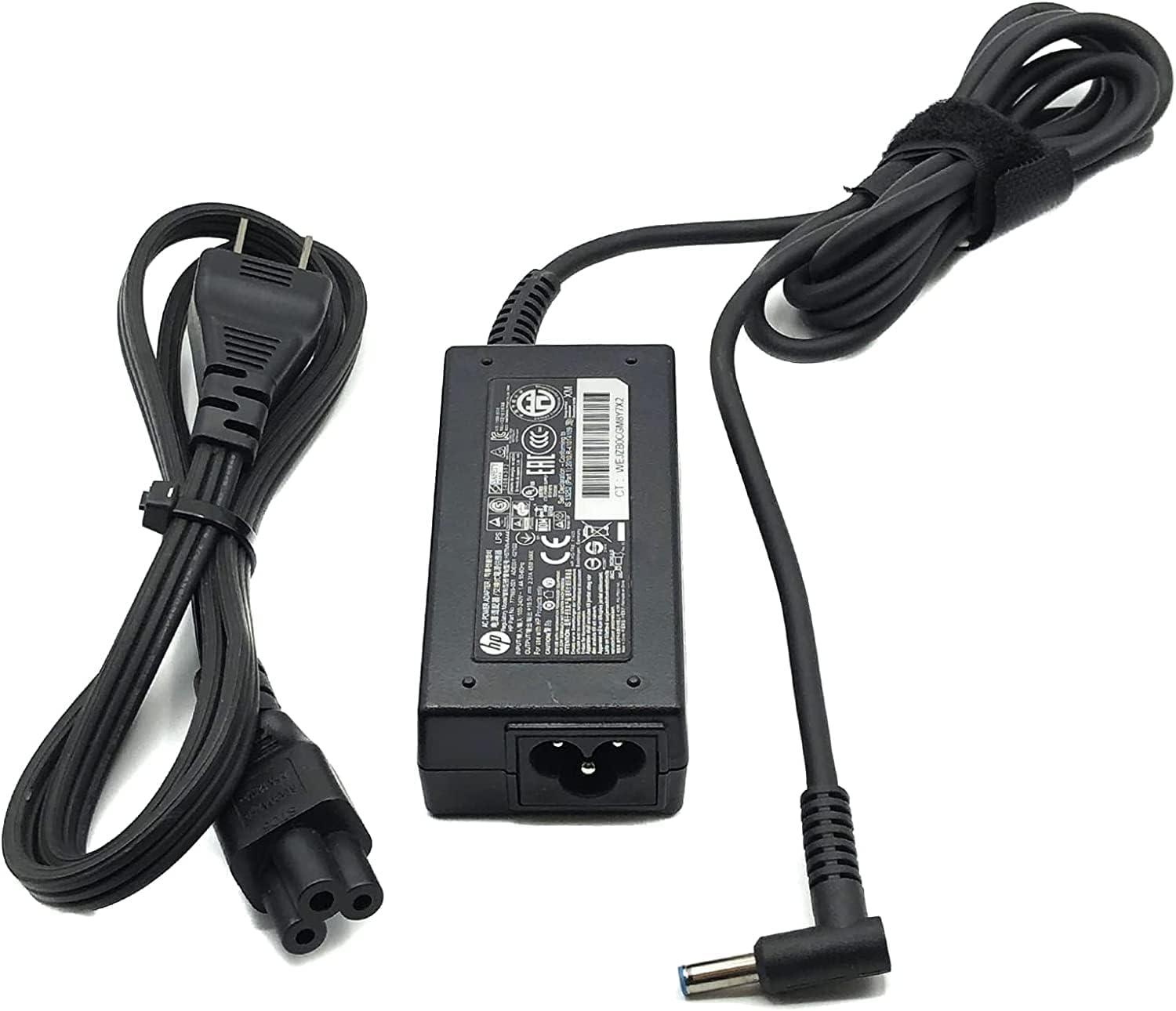
Image: The complete adapter assembly, showing the AC adapter, power cord, and the DC output connector ready for connection.
Operating Instructions
Once properly connected, the adapter will automatically begin supplying power to your desktop PC. If your PC has an internal battery, the adapter will also charge it.
- Ensure all connections are secure before powering on your PC.
- Avoid disconnecting the adapter abruptly during critical operations to prevent data loss or system instability.
- The adapter may become warm during operation; this is normal. However, if it becomes excessively hot, disconnect it and check for proper ventilation.
Maintenance
To ensure the longevity and optimal performance of your AC adapter, follow these maintenance guidelines:
- Cleaning: Use a soft, dry cloth to clean the adapter. Do not use liquid cleaners or solvents.
- Storage: When not in use, store the adapter in a cool, dry place. Avoid tightly wrapping the cables to prevent damage.
- Inspection: Periodically inspect the adapter and cables for any signs of damage, such as frayed wires, exposed conductors, or cracked casing. Discontinue use if damage is found.
Troubleshooting
If you encounter issues with your AC adapter, refer to the following table for common problems and solutions:
| Problem | Possible Cause | Solution |
|---|---|---|
| PC not powering on or charging | Loose connection, faulty outlet, damaged adapter/cable | Ensure all connections are secure. Try a different wall outlet. Inspect adapter and cables for damage. If damaged, replace the adapter. |
| Adapter is excessively hot | Poor ventilation, overloaded circuit, internal fault | Ensure adapter is in a well-ventilated area. Disconnect and allow to cool. If problem persists, discontinue use. |
| Intermittent power supply | Loose connection, damaged cable, internal adapter issue | Check all connections for tightness. Inspect cables for damage. If issues continue, the adapter may need replacement. |
Warranty and Support
This product comes with a 30-day warranty from the date of purchase, covering manufacturing defects.
For technical support, warranty claims, or further assistance, please contact Tekswamp customer service. You can find more information and contact details by visiting the official Tekswamp store on Amazon: Tekswamp Store.