
Introduction
Thank you for purchasing the HOOBRO Bar Table Set. This manual provides detailed instructions for the assembly, operation, maintenance, and troubleshooting of your new bar table and stools. Please read this manual carefully before assembly and retain it for future reference.

Image: The HOOBRO Bar Table Set, featuring a rustic brown tabletop, black metal frame, two backless stools, and a visible power outlet on the side of the table.
Safety Information
- Always follow the assembly instructions carefully.
- Ensure all screws and bolts are securely tightened before use. Periodically check and re-tighten as necessary.
- Do not overload the table or stools. The bar table supports up to 264 lb (120 kg), and each stool supports up to 198 lb (90 kg).
- Keep children away from the assembly area. Small parts can be a choking hazard.
- For electrical safety, do not expose the power outlet to moisture or liquids. Do not attempt to disassemble or modify the power outlet unit.
- Place the furniture on a level surface to prevent wobbling and instability.
Package Contents
Please verify that all components are present before beginning assembly. If any parts are missing or damaged, contact customer support.
- Bar Table Top (1)
- Table Legs and Support Frames (Various)
- Power Outlet Unit with Cord (1)
- Stool Seats (2)
- Stool Legs and Support Frames (Various)
- Hardware Kit (Screws, Allen Wrench, etc.)
- Instruction Manual (1)
Setup (Assembly Instructions)
Assembly is required for this product. It is recommended to assemble on a soft, clean surface to prevent scratches. Do not fully tighten screws until all parts are loosely assembled.
Tools Required:
- Included Allen Wrench
Assembly Steps:
- Assemble the Bar Table Frame: Attach the table legs and support beams according to the diagrams in your separate assembly guide. Ensure the frame is stable.
- Attach the Table Top: Secure the rustic brown tabletop to the assembled frame using the provided screws.
- Install the Power Outlet: Mount the power outlet unit into the designated slot on the side of the table frame. Secure it with the provided screws.
- Assemble the Stool Frames: For each stool, connect the leg frames and footrests.
- Attach the Stool Seats: Secure the stool seats to the assembled stool frames.
- Final Tightening: Once all components are loosely assembled, go back and fully tighten all screws and bolts on both the table and stools.

Image: A person seated on a HOOBRO bar stool, illustrating the comfortable footrest position. Note: This image shows a stool with a backrest, which may be part of the BF04BY01G1 bundle.
Operating the Power Outlet
The HOOBRO Bar Table is equipped with an integrated power outlet for convenient access to electricity.

Image: A detailed view of the power outlet unit, showing two AC outlets (120V/12A) and two USB ports (5V/2A), along with the 4.9-foot power cord.
Usage:
- Plug the table's power cord (approximately 4.9 feet long) into a standard wall outlet.
- You can now use the two AC outlets (120V/12A) for small appliances or electronics.
- The two USB ports (5V/2A) are suitable for charging mobile devices.
Important Safety Notes:
- Do not exceed the maximum electrical load for the outlets.
- Avoid spilling liquids near the power outlet.
- Unplug the table from the wall outlet when not in use or during cleaning.
Maintenance
Proper care will extend the life and appearance of your HOOBRO Bar Table Set.
- Cleaning: Wipe the surfaces with a damp cloth, then immediately wipe dry with a clean, dry cloth. Avoid abrasive cleaners or harsh chemicals that may damage the finish.
- Regular Checks: Periodically inspect all screws and bolts to ensure they remain tight. Re-tighten if necessary to maintain stability.
- Spills: Clean up spills immediately to prevent staining, especially on the rustic brown panels.
Troubleshooting
| Problem | Possible Cause | Solution |
|---|---|---|
| Table/Stool wobbles | Loose screws or uneven floor | Check and tighten all assembly screws. Ensure the furniture is on a level surface. |
| Power outlet not working | Not plugged in, tripped circuit, or faulty device | Ensure the table's power cord is securely plugged into a working wall outlet. Check your home's circuit breaker. Test with a different device. If issues persist, contact customer support. |
| Parts do not align during assembly | Screws overtightened prematurely or incorrect orientation | Loosen all screws, adjust parts to align, then gradually tighten. Refer to the assembly guide for correct part orientation. |
Specifications
- Brand: HOOBRO
- Model: BF45UBT01-BF04BY01G1
- Color: Brown
- Material: Particleboard, Metal Frame
- Assembly Required: Yes
- Bar Table Dimensions: 39.4"L x 15.7"W x 36"H
- Stool Dimensions (each): 15.7"L x 11.8"W x 25.6"H (for backless stools shown in main image)
- Power Outlet: 2 AC Outlets (120V/12A), 2 USB Ports (5V/2A)
- Power Cord Length: 4.9 feet (59 inches)
- Bar Table Weight Capacity: 264 lb (120 kg)
- Stool Weight Capacity (each): 198 lb (90 kg)
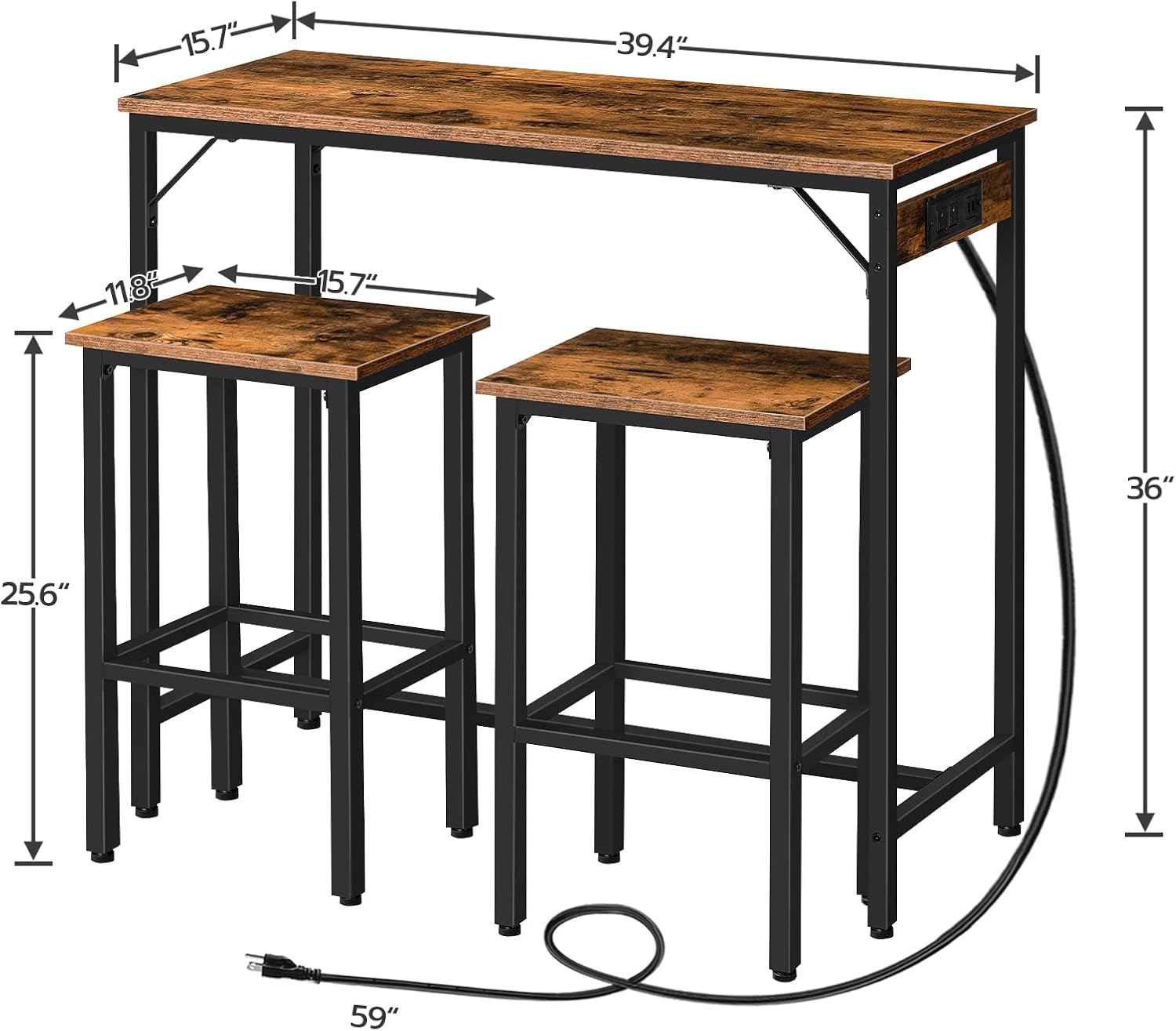
Image: Dimensional diagram illustrating the length, width, and height of the bar table and stools.
Warranty and Support
HOOBRO products are designed for quality and durability. For any questions, concerns, or assistance with your product, please contact HOOBRO customer support through the retailer's platform or the official HOOBRO website. Please have your model number (BF45UBT01-BF04BY01G1) and purchase information ready when contacting support.