Product Overview
The ASONPAO 893MAX universal garage door opener remote is designed for wide compatibility with various garage door opener brands. It features advanced security protocols, a long operating range, and a user-friendly design for convenient access to your garage.
- Wide Compatibility: Works with 1993-Current LiftMaster, Chamberlain, MyQ, and Sears Craftsman garage door openers that utilize Yellow, Purple, Red/Orange, or Green Learn buttons. Note: Does not support Dip Switch openers.
- Enhanced Security: Utilizes Rolling Code technology to protect against unauthorized access.
- Extended Range: Offers an operating range of up to 164 feet (50 meters).
- Durable Construction: Built with an ABS alloy case for reliability and longevity.
- Long Battery Life: Powered by a 240mAh lithium battery and a smart low-power chip.
Compatibility
This remote is compatible with a broad range of garage door openers. Please identify the color of the 'Learn' button on your garage door opener motor unit to confirm compatibility.

Image: Compatibility chart for LiftMaster, Chamberlain, and Sears Craftsman garage door openers, detailing compatible learn button colors (Yellow, Purple, Red/Orange, Green) and their corresponding manufacturing years (e.g., Yellow: 2011-Present, Purple: 2005-2014, Red/Orange: 1997-2005, Green: 1993-1997).
Supported Learn Button Colors and Years:
- Yellow Learn Button: 2011 - Present
- Purple Learn Button: 2005 - 2014
- Red/Orange Learn Button: 1997 - 2005
- Green Learn Button: 1993 - 1997
Important: This remote is not compatible with garage door openers that use DIP switches or Craftsman Series 100 models.
Setup and Programming
Follow these steps to program your ASONPAO 893MAX remote to your garage door opener.

Image: A visual guide illustrating the five steps to program the ASONPAO 893MAX remote, including locating the learn button, pressing the remote's program button, selecting the correct number of presses based on learn button color, pressing the learn button on the opener, and finally pressing the remote button to confirm programming.
- Locate Learn Button: Find the 'Learn' button on your garage door opener motor unit. Identify its color.
- Enter Programming Mode: Using the visor clip or a small pointed object, press the 'PROG' button on the back of the remote until the LED light on the remote turns on.
- Select Learn Button Color: Choose the button on the remote you wish to program. Press it 1 to 4 times based on the color of your opener's 'Learn' button:
- 1 Press: Yellow Learn Button
- 2 Presses: Purple Learn Button
- 3 Presses: Red/Orange Learn Button
- 4 Presses: Green Learn Button
- Activate Opener's Learn Mode: Press and immediately release the 'Learn' button on your garage door opener. The 'Learn' LED on the opener will glow steadily for approximately 30 seconds.
- Finalize Programming: Within 30 seconds of activating the opener's learn mode, press and hold the button on your ASONPAO remote that you just programmed. Release the button when the opener lights blink or you hear two clicks. This indicates successful programming.
The remote can operate up to three garage doors independently.

Image: The ASONPAO 893MAX remote is shown capable of operating three distinct garage doors, highlighting its multi-functionality.
Operating Instructions
Once programmed, operating the remote is straightforward.
- Opening/Closing: Press the programmed button on the remote to open or close your garage door.
- Range: The remote has an operating range of up to 164 feet (50 meters). For optimal performance, ensure a clear line of sight to the garage door opener.
- Mounting: The remote includes a visor clip for convenient placement in your vehicle. Its compact design also allows it to be carried in a pocket.

Image: The ASONPAO 893MAX remote is displayed in two common usage scenarios: clipped to a car's sun visor for easy access while driving, and stored in a jeans pocket, demonstrating its compact and user-friendly design.
Maintenance
The ASONPAO 893MAX remote is designed for durability and long battery life. It uses a CR2032 Lithium battery.
- Battery Replacement: When the remote's LED light becomes dim or the range decreases significantly, it may be time to replace the battery. The remote uses a CR2032 Lithium battery. Refer to the remote's casing for instructions on how to open it and replace the battery.
- Cleaning: Wipe the remote with a soft, dry cloth. Avoid using harsh chemicals or abrasive cleaners.
- Storage: Store the remote in a dry place, away from extreme temperatures.
Troubleshooting
If your remote is not syncing or operating correctly, consider the following solutions:
- Solution 1: Verify Learn Button Color: Double-check the exact color of the 'Learn' button on your garage door opener. Ensure you pressed the remote button the correct number of times during programming according to the learn button color.
- Solution 2: Proximity to Opener: If programming fails, ensure your garage door opener is not in 'sleep' mode. Try moving closer to the garage door opener motor unit during the programming process.
- Solution 3: Clear Opener Memory: Your opener's memory may be full. To clear it, press and hold the 'Learn' button on the garage door opener for several seconds until the LED light turns off. This will erase all previously programmed remotes. Then, re-program your ASONPAO remote following the steps in the 'Setup and Programming' section.
Specifications
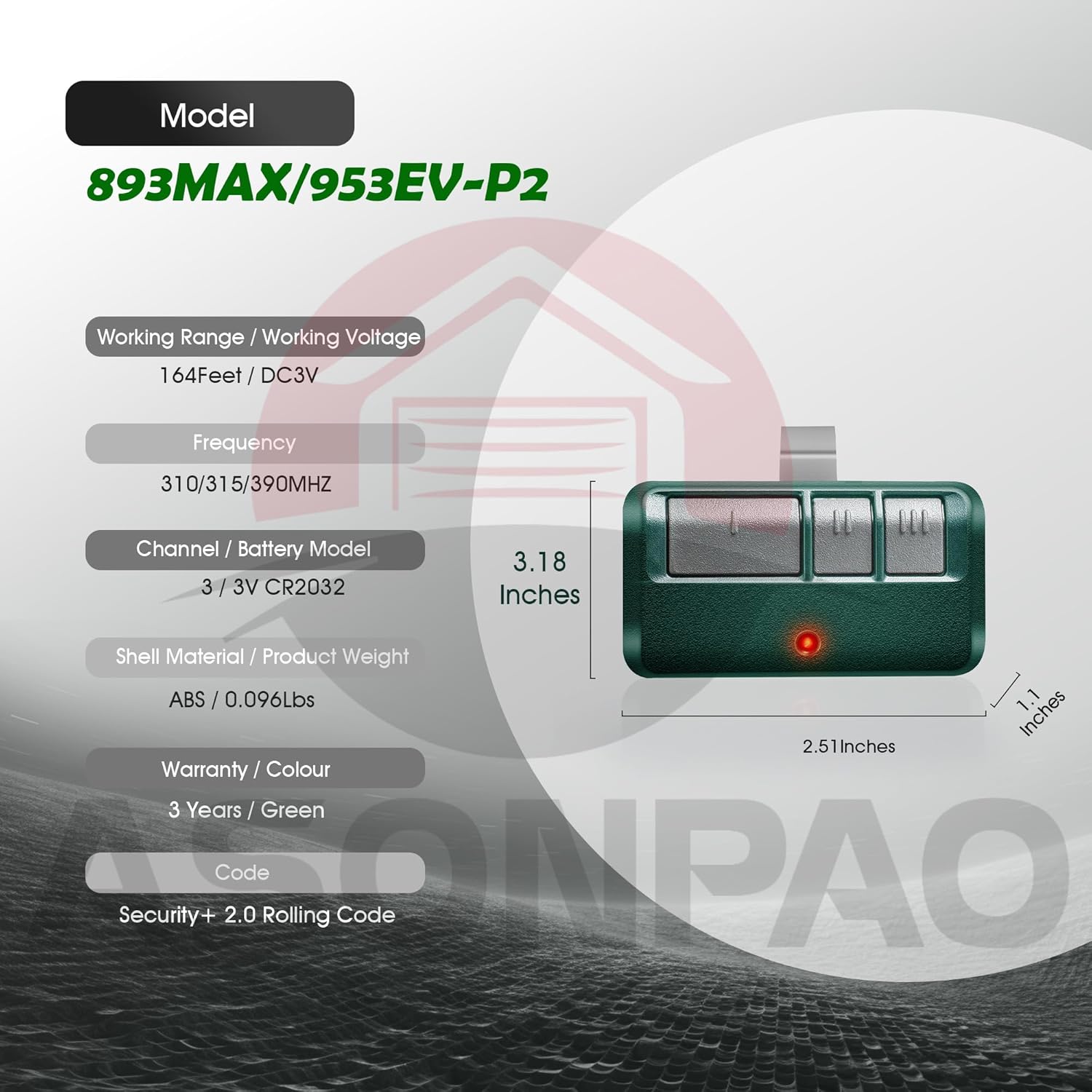
Image: A detailed diagram of the ASONPAO 893MAX remote, illustrating its physical dimensions (2.51 inches length, 1.1 inches width, 3.18 inches with clip) and listing key technical specifications such as working range, frequency, battery type, shell material, and security code type.
| Feature | Detail |
|---|---|
| Model | 893MAX / 953EV-P2 |
| Working Range | 164 feet (50 meters) |
| Working Voltage | DC3V |
| Frequency | 310/315/390 MHz |
| Battery Type | CR2032 Lithium (240mAh) |
| Shell Material | ABS Alloy |
| Product Weight | 0.096 lbs (approx. 43.5g) |
| Color | Green |
| Security Code | Security+ 2.0 Rolling Code |
| Product Dimensions | 6.2 x 3.9 x 0.7 inches (packaging) |
| Item Weight | 4.2 ounces (packaging) |
Warranty and Support
ASONPAO is committed to product quality and customer satisfaction.
- Warranty: This product comes with a 10-year warranty.
- Customer Support: For any questions or assistance, please contact ASONPAO customer support through the store homepage's "Ask a question" feature or via email. Support is available within 24 hours.
- Certifications: The product is FCC certified.

Image: A graphic highlighting ASONPAO's customer support, including 24-hour online tech support, a 3-year warranty (note: product description states 10-year warranty), lifetime service, and FCC certification.