
1. Introduction
This manual provides comprehensive instructions for the installation, operation, and maintenance of the OKwillBE MAM-890 Air Compressor Controller Panel. Please read this manual thoroughly before using the product to ensure proper function and safety. Keep this manual for future reference.
2. Safety Information
Always observe the following safety precautions to prevent injury or damage to the equipment:
- Ensure the power supply is disconnected before performing any installation, maintenance, or troubleshooting.
- Only qualified personnel should perform electrical connections and repairs.
- Do not expose the controller panel to excessive moisture, dust, or extreme temperatures.
- Verify all connections are secure and correct before applying power.
- Refer to the air compressor's manual for specific safety guidelines related to the compressor unit.
3. Product Overview
3.1 Panel Components
The OKwillBE MAM-890 controller panel features an intuitive layout for easy operation. Below is an illustration of the panel and its key components:
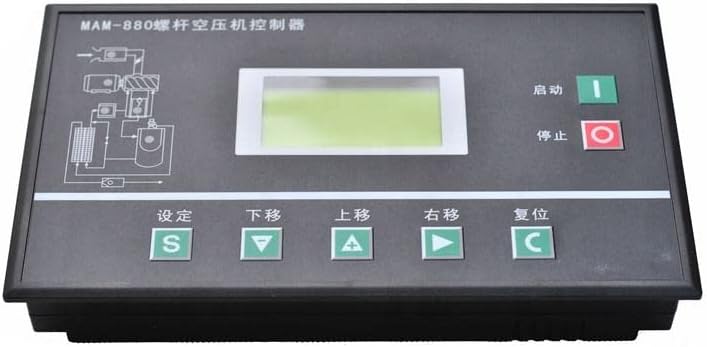
Image: Front view of the OKwillBE MAM-890 Air Compressor Controller Panel. The panel is dark gray with a central LCD display. To the right of the display are green 'Start' and red 'Stop' buttons. Below the display, there is a row of five green buttons: 'Setting' (S), 'Down' (down arrow), 'Up' (up arrow), 'Right' (right arrow), and 'Reset' (C). A diagram of an air compressor system is visible on the top left of the panel.
Key components and their functions:
- Display Screen: Shows operational status, parameters, and error messages.
- Start Button (Green, “启动”): Initiates the air compressor operation.
- Stop Button (Red, “停止”): Halts the air compressor operation.
- Setting Button (S, “设定”): Enters the parameter setting mode.
- Down Button (“下移”): Navigates down through menu options or decreases a parameter value.
- Up Button (“上移”): Navigates up through menu options or increases a parameter value.
- Right Button (“右移”): Moves to the next digit or confirms a selection.
- Reset Button (C, “复位”): Resets alarms or returns to the main display.
- Air Compressor System Diagram: Provides a visual representation of the compressor's internal flow.
4. Setup
4.1 Installation
Follow these general steps for installing the controller panel:
- Mounting: Securely mount the controller panel in a suitable location, ensuring it is protected from vibration and direct exposure to environmental elements.
- Wiring: Connect the panel to the air compressor's electrical system according to the wiring diagram provided with your air compressor. Ensure all power connections are correctly polarized and grounded.
- Sensor Connections: Connect any necessary sensors (e.g., pressure, temperature) to the designated terminals on the controller panel.
- Power Supply: Connect the main power supply to the controller panel. Verify the voltage matches the panel's requirements.
- Initial Power-Up: After all connections are verified, apply power to the unit. The display should illuminate.
5. Operation
5.1 Basic Operation
- Starting the Compressor: Press the green Start button. The display will show the operational status.
- Stopping the Compressor: Press the red Stop button. The compressor will cease operation.
- Accessing Settings: Press the Setting (S) button to enter the parameter adjustment menu. Use the Up and Down buttons to navigate through options.
- Adjusting Parameters: While in setting mode, use the Up and Down buttons to change values. Use the Right button to confirm a selection or move to the next digit.
- Resetting Alarms: If an alarm occurs, address the underlying issue, then press the Reset (C) button to clear the alarm and resume normal operation.
5.2 Display Information
The display screen provides real-time information about the compressor's status, including:
- Current operating pressure.
- Operating temperature.
- Run hours.
- Error codes or alarm messages.
- Selected operating mode.
6. Maintenance
Regular maintenance ensures the longevity and optimal performance of your controller panel:
- Cleaning: Periodically clean the panel surface and display with a soft, dry cloth. Do not use abrasive cleaners or solvents.
- Inspection: Regularly inspect all wiring connections for signs of wear, corrosion, or looseness. Tighten any loose connections.
- Environmental Check: Ensure the operating environment remains within specified temperature and humidity ranges to prevent damage.
- Firmware Updates: If available, consult the manufacturer for information on firmware updates to ensure the controller has the latest features and bug fixes.
7. Troubleshooting
This section addresses common issues you might encounter with the MAM-890 controller panel.
| Problem | Possible Cause | Solution |
|---|---|---|
| Panel does not power on | No power supply; Loose wiring; Blown fuse | Check power source; Inspect and secure wiring; Replace fuse if necessary. |
| Compressor fails to start | Emergency stop engaged; Low pressure alarm; Motor overload | Disengage emergency stop; Check pressure settings; Reset motor overload protection. |
| Incorrect readings on display | Faulty sensor; Loose sensor connection | Check sensor wiring; Replace sensor if defective. |
| Alarm message displayed | System fault; Parameter out of range | Note the error code and consult the air compressor manual; Adjust parameters as needed; Press Reset (C) after resolving the issue. |
If the problem persists after attempting these solutions, contact technical support.
8. Specifications
Technical specifications for the OKwillBE MAM-890 Controller Panel:
| Feature | Detail |
|---|---|
| Brand | OKwillBE |
| Model Number | MAM-890 |
| Manufacturer | OKwillBE |
| ASIN | B0C6TM5J4M |
| Date First Available | June 1, 2023 |
9. Warranty and Support
For warranty information and technical support, please refer to the documentation provided with your purchase or contact OKwillBE customer service. Ensure you have your product model number (MAM-890) and purchase details available when seeking support.