
1. Product Overview
The A.JAZZ AK832Pro mechanical keyboard is designed with a compact 75% 81-key layout, featuring a smart TFT color screen and innovative low-profile Outemu switches. This design contributes to its ultra-thin profile, making it one of the slimmest mechanical keyboards on the market. It comes with durable double-shot PBT keycaps that resist oiling and wear, ensuring a consistent and clear typing experience. The transparent casing and blue color theme provide a modern and versatile aesthetic, easily matching various desktop setups.
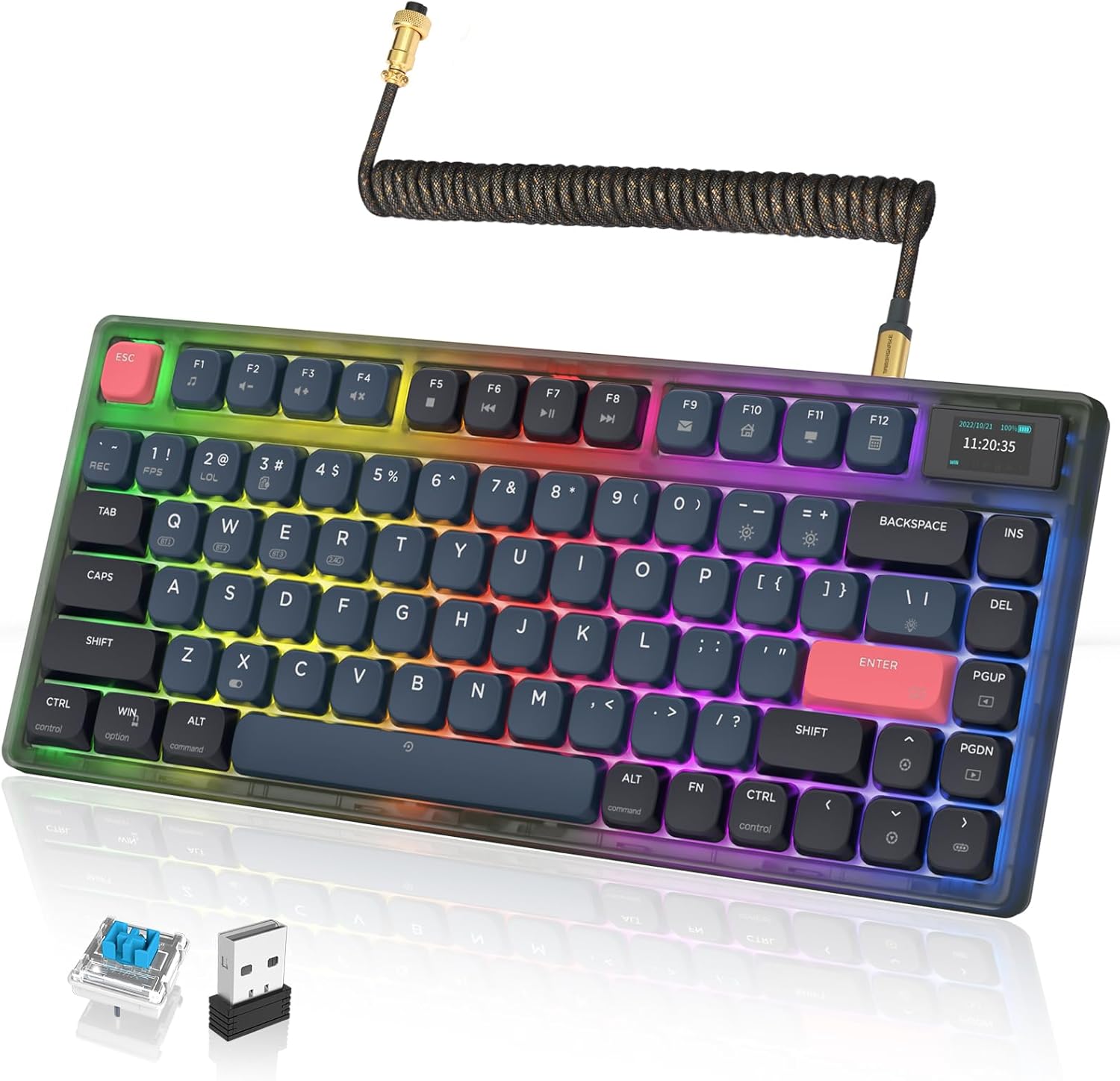
The A.JAZZ AK832Pro keyboard showcasing its compact design and vibrant RGB backlighting.
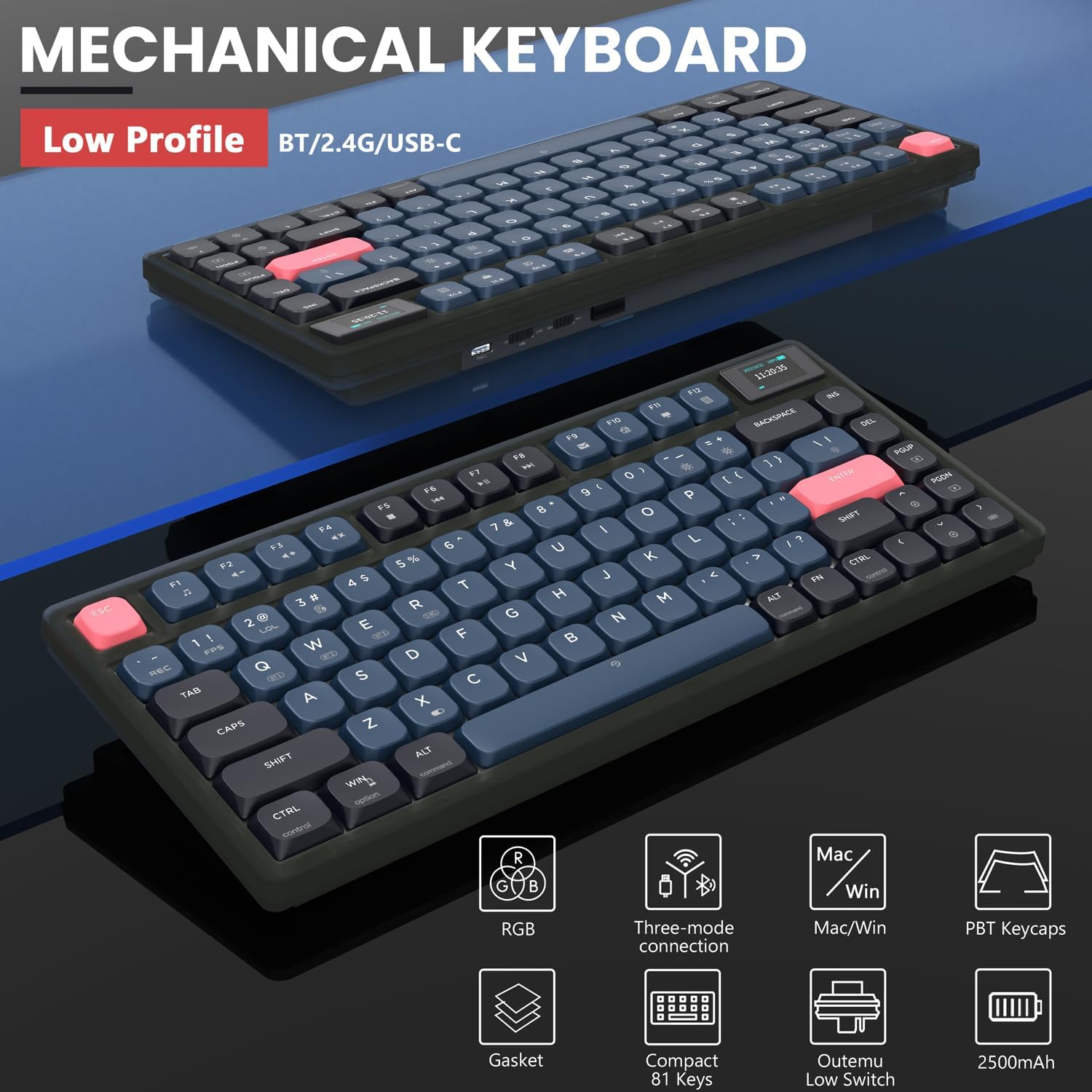
Key features of the AK832Pro, including its low-profile design, triple-mode connectivity, RGB lighting, gasket mount, and battery capacity.
2. Setup
2.1 Package Contents
Before you begin, please ensure all items are present in the package:
- A.JAZZ AK832Pro Mechanical Keyboard
- USB receiver (for 2.4Ghz wireless connection)
- Coiled aviator USB-C to USB-A cable (for wired connection and charging)
- Built-in 2500mAh battery (pre-installed)
2.2 Connection Methods
The AK832Pro offers three versatile connection modes:
- 2.4Ghz Wireless: Plug the USB receiver into an available USB port on your computer. The keyboard will automatically connect.
- Bluetooth 5.0: Pair the keyboard with up to three Bluetooth-enabled devices (smartphones, tablets, laptops). Refer to the on-screen display for pairing instructions.
- Wired (USB-C): Connect the keyboard to your computer using the provided coiled aviator USB-C to USB-A cable. This mode also charges the keyboard.
Switching between modes is simple and can be done with a single button press, offering flexibility for multi-tasking across different devices.

The AK832Pro supports low-profile design and triple-mode connectivity for versatile use.
3. Operating Instructions
3.1 Smart TFT Color Screen
The integrated smart TFT color screen provides real-time information and allows for quick adjustments. You can easily check the current connection mode, battery level, time, and system (Windows/Mac). It also enables direct adjustment of volume and backlight settings.

The TFT-LED Smart Screen provides quick access to various settings and information.
3.2 RGB Backlight Modes
The AK832Pro offers 20 distinct Chroma RGB backlight effects, available in both dynamic and static modes. Brightness and flowing speed are adjustable directly on the keyboard. The transparent casing enhances light transmission, creating a stunning visual experience. Backlight customization is supported, allowing you to create personalized lighting effects. Please note that the keycaps themselves are not backlit.
3.3 Key Functions and Layout
This 75% layout keyboard features 81 keys, optimized for both gaming and productivity. It utilizes low-profile Outemu Blue switches, known for their tactile clicky feedback, ideal for users who prefer a distinct keystroke feel. The gasket-mounted design minimizes vibrations and unwanted noise, providing a stable and precise typing experience.
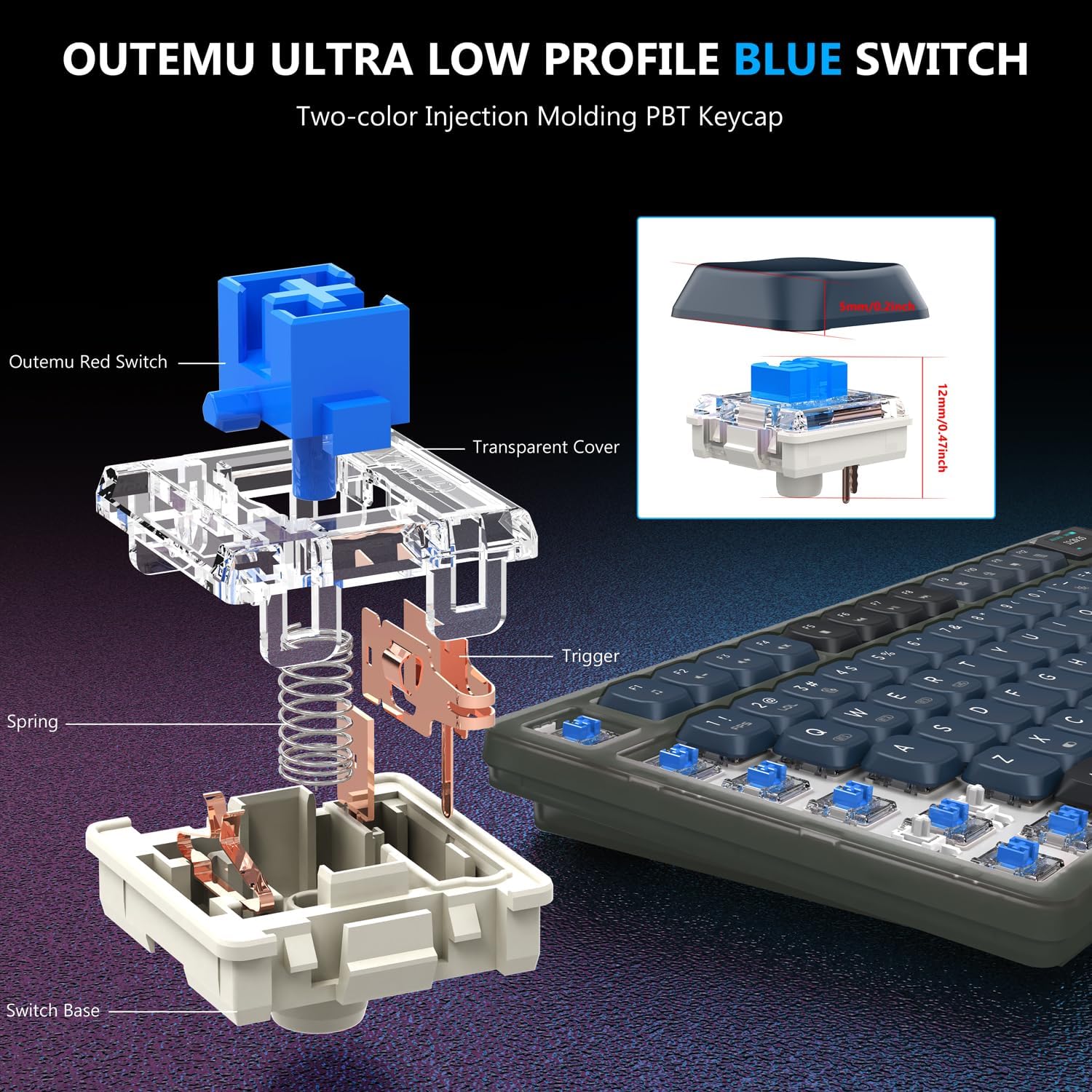
Detailed view of the Outemu Ultra Low Profile Blue Switch, highlighting its components and low-profile design.
3.4 Battery Life
Equipped with a built-in 2500mAh battery, the keyboard can last up to 110 hours without backlight in wireless mode (laboratory test results; actual usage may vary). The smart screen display allows you to monitor the battery level.

The keyboard features a 2500mAh large capacity battery with an auto-sleep function for extended use.
3.5 Product Display

The AK832Pro keyboard integrated into a desktop setup, demonstrating its compact form factor.

Comparison of the AK832Pro (RGB Backlight) and AK832 (White Backlight) models.
3.6 Official Product Video
Official product video showcasing the Low Profile RGB Mechanical Gaming Keyboard with Smart Screen Display AK832PRO.
4. Maintenance
4.1 Care and Cleaning
To ensure the longevity and optimal performance of your A.JAZZ AK832Pro keyboard, follow these simple maintenance guidelines:
- Regular Cleaning: Use a soft, dry cloth to wipe down the keycaps and casing. For deeper cleaning, you may use a slightly damp cloth with mild soap, ensuring no liquid enters the keyboard.
- Dust Removal: Use compressed air to remove dust and debris from between the keycaps and switches.
- Avoid Liquids: Do not spill liquids on the keyboard. In case of accidental spills, immediately disconnect the keyboard and allow it to dry completely before reconnecting.
- Storage: When not in use for extended periods, store the keyboard in a cool, dry place away from direct sunlight and extreme temperatures.
5. Troubleshooting
5.1 Common Issues and Solutions
- Keyboard Not Responding (Wired Mode):
- Ensure the USB-C cable is securely connected to both the keyboard and your computer.
- Try a different USB port on your computer.
- Test the cable with another device to confirm it is not faulty.
- If lights are on but keypresses are not registered, try restarting your computer or reinstalling keyboard drivers.
- Wireless Connection Issues (2.4Ghz/Bluetooth):
- Ensure the keyboard is in the correct wireless mode (2.4Ghz or Bluetooth) as indicated on the smart screen.
- For 2.4Ghz, ensure the USB receiver is properly inserted and within range.
- For Bluetooth, ensure Bluetooth is enabled on your device and re-attempt pairing.
- Check battery level; low battery can affect wireless performance.
- Backlight Not Working or Incorrect:
- Adjust brightness settings using the smart screen or dedicated keyboard shortcuts.
- Cycle through different backlight modes to see if any work.
- Ensure the keyboard is not in a mode where backlighting is intentionally off.
- Smart Screen Not Displaying Information:
- Ensure the keyboard is powered on and has sufficient battery.
- Try restarting the keyboard (if applicable, by turning it off and on).
6. Specifications
| Feature | Detail |
|---|---|
| Model | AK832Pro |
| Layout | 75% (81 Keys) |
| Switches | Low Profile Outemu Blue Switch |
| Keycaps | Double Shot PBT |
| Connectivity | 2.4Ghz Wireless, Bluetooth 5.0, Wired (USB-C) |
| Backlight | RGB (20 Chroma Modes) |
| Battery Capacity | 2500mAh |
| Compatible Devices | PC (Windows, Mac) |
| Item Weight | 2.23 pounds |
| Package Dimensions | 14.17 x 6.77 x 2.24 inches |
| Manufacturer | A.JAZZ |
| Date First Available | June 1, 2023 |
7. Warranty and Support
For warranty information and technical support, please refer to the documentation included with your purchase or visit the official A.JAZZ brand store. The manufacturer provides support for product-related inquiries and assistance with any issues you may encounter.
Visit the A.JAZZ Store for more products and support.

A.JAZZ brand story hero image, showcasing a complete gaming setup.

A.JAZZ keyboard and mouse, highlighting the RGB lighting effects.