
Retevis RM20
Retevis RM20 Advanced Fixed Mount Marine Radio User Manual
Model: RM20 | Brand: Retevis
1. Introduction
This manual provides comprehensive instructions for the installation, operation, and maintenance of your Retevis RM20 Advanced Fixed Mount Marine Radio. Please read this manual thoroughly before using the radio to ensure proper operation and to prevent damage.
The Retevis RM20 is a robust marine radio designed for reliable communication on the water, featuring built-in GPS, Digital Selective Calling (DSC), IP67 waterproofing, and a high-power speaker for clear audio in challenging marine environments.
2. Package Contents
Upon opening the package, please verify that all the following items are included:
- 1 x Retevis RM20 Marine Transceiver
- 1 x Handheld Microphone
- 1 x Mounting Bracket
- 1 x DC Power Cable
- 1 x English Manual (this document)
- 1 x MA06 Marine fiberglass antenna (156-163MHz 1.1m SL16J interface)
- 1 x Fixed bracket
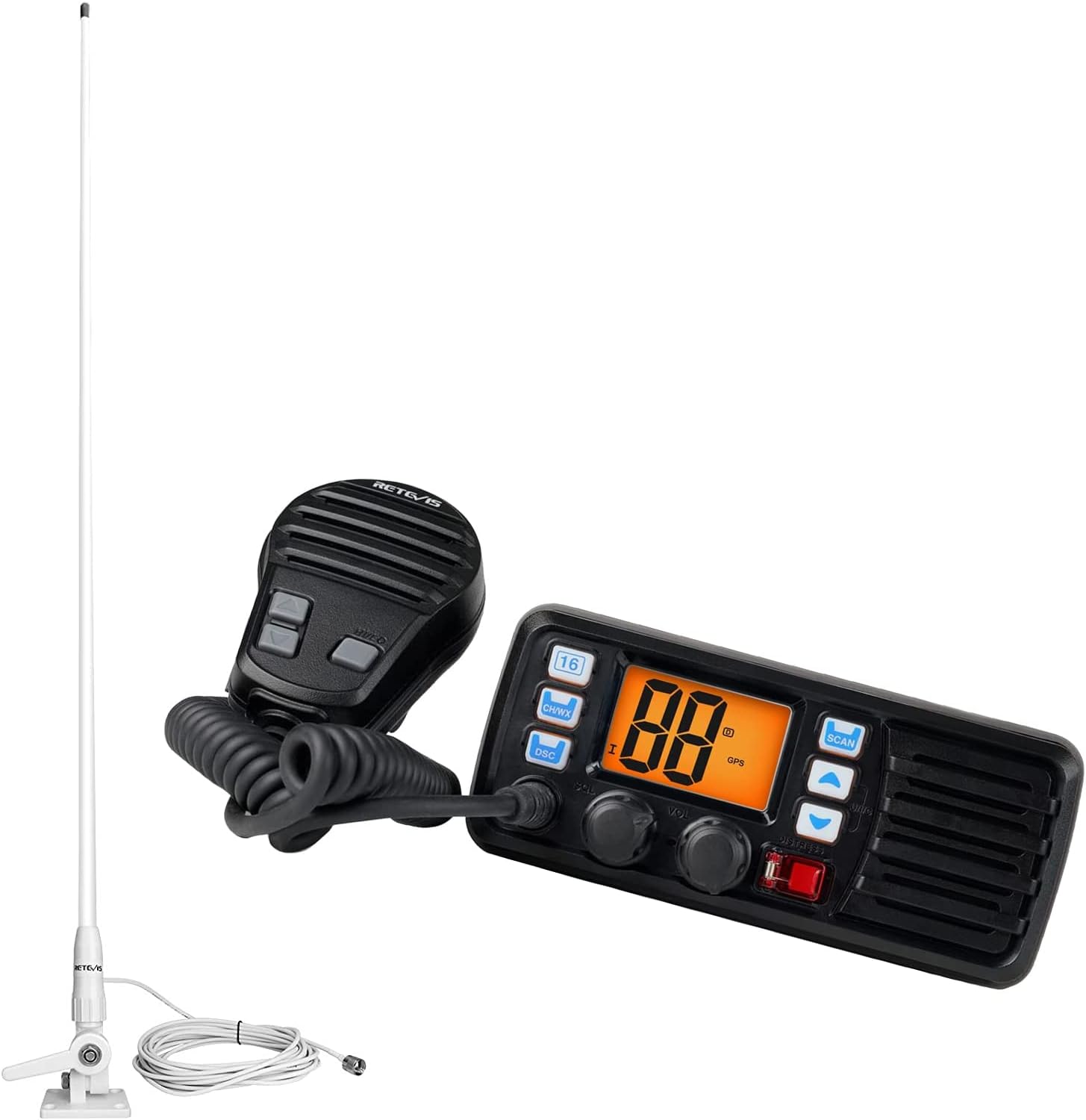
Image: The Retevis RM20 marine radio unit, handheld microphone, and the MA06 marine fiberglass antenna, illustrating the main components included in the package.
3. Safety Information
Please observe the following safety precautions to prevent injury, damage to the radio, or damage to your vessel:
- Power Source: Connect the radio only to a 12V DC power source. Ensure correct polarity.
- Antenna: Never transmit without a properly connected antenna. Transmitting without an antenna can damage the radio's final amplifier.
- Water Exposure: While the RM20 is IP67 waterproof, ensure all covers and connectors are securely fastened before exposing the unit to water.
- Installation: Ensure the radio is mounted in a secure location where it will not interfere with vessel operation or navigation.
- Maintenance: Do not attempt to open or repair the radio yourself. Refer all servicing to qualified personnel.
- FCC Compliance: This device complies with FCC rules. Any changes or modifications not expressly approved by the manufacturer could void the user's authority to operate the equipment.
4. Product Features
The Retevis RM20 is equipped with advanced features for reliable marine communication:
4.1. Built-in GPS and DSC Capability

Image: The Retevis RM20 radio displaying its screen, with an overlay highlighting the built-in DSC and GPS functionality, and a 'One-click for help' prompt.
The RM20 features an integrated GPS receiver, eliminating the need for external GPS wiring for DSC functions. This allows for immediate use of Digital Selective Calling (DSC) features, including distress calls and position sharing with other vessels, enhancing safety and communication efficiency on the water.
4.2. High-Power Speaker

Image: A diagram showing the internal speaker of the Retevis RM20 and an illustration of how to connect an external 3.5mm speaker, emphasizing its high-power audio output.
Equipped with a high-power speaker, the RM20 delivers clear and loud audio, with volume levels up to 110dB. This ensures that calls can be heard even in noisy marine environments. The unit also supports connection to an external 3.5mm speaker for enhanced audio output.
4.3. IP67 Waterproof Rating

Image: The Retevis RM20 radio partially submerged in water, demonstrating its IP67 waterproof capability, with a boat in the background.
The RM20 complies with IP67 waterproof standards, meaning it can withstand immersion in water up to 1 meter deep for 30 minutes. This robust design ensures reliable performance in harsh marine conditions, including splashes, rain, and accidental submersion.
4.4. Compatible Antenna and Mounting

Image: The Retevis RM20 radio showing its antenna connection port (male 50Ω impedance) and a separate marine antenna, illustrating compatibility.
The radio is designed for use with compatible marine antennas, such as the included MA06 fiberglass antenna. The antenna connection port is a male 50Ω impedance type. The MA06 antenna features FRP encapsulation and IP66 waterproofing, making it suitable for various marine environments and offering an extra-long range of approximately 4.6 km.

Image: The MA06 Marine fiberglass antenna, highlighting its FRP package and IP66 waterproof rating, suitable for various marine environments.

Image: A close-up of the antenna mount ratchet, a strong and durable base for securing the marine antenna.
The included antenna mount ratchet provides a strong and durable base for securing the antenna, ensuring stability even in rough conditions. This VHF marine antenna system is suitable for a wide range of vessels, including motorboats, yachts, trucks, RVs, cruise ships, and kayaks.

Image: A large yacht sailing on the water, illustrating the type of vessel for which the VHF marine antenna is suitable, along with a list of other compatible vehicles.
5. Setup and Installation
Proper installation is crucial for the optimal performance and longevity of your Retevis RM20 marine radio.
5.1. Mounting the Transceiver
- Choose a location that is dry, well-ventilated, and away from direct sunlight or excessive heat.
- Ensure the mounting surface is sturdy enough to support the radio's weight.
- Use the provided mounting bracket and hardware to securely attach the radio to the chosen surface.
- Allow sufficient space around the unit for ventilation and cable connections.
5.2. Power Connection
- Connect the supplied DC power cable to the radio's power input port.
- Connect the red wire to the positive (+) terminal of your vessel's 12V DC power supply.
- Connect the black wire to the negative (-) terminal or a suitable ground point.
- It is recommended to install an appropriate fuse (not supplied) in the positive power line close to the battery for protection.
5.3. Handheld Microphone Connection
- Plug the handheld microphone cable into the designated microphone port on the front of the radio.
- Ensure the connection is secure to prevent accidental disconnection during operation.
5.4. Antenna Installation
- Mount the MA06 Marine fiberglass antenna in a location that provides an unobstructed view of the horizon for optimal signal reception and transmission.
- Use the provided antenna mount ratchet to securely fasten the antenna. Ensure the mount is stable and can withstand marine conditions.
- Connect the antenna cable to the antenna port on the rear of the RM20 transceiver. Ensure the connection is tight and waterproof.
5.5. External Speaker Connection (Optional)
- If using an external speaker, connect it to the 3.5mm external speaker jack on the rear of the radio.
- Ensure the external speaker is rated for marine use and has appropriate impedance.
6. Operating Instructions
This section details the basic operation of your Retevis RM20 marine radio.
6.1. Power On/Off and Volume Control
- To power on the radio, rotate the VOL/PWR knob clockwise until the display illuminates.
- Continue rotating the VOL/PWR knob to adjust the audio volume.
- To power off, rotate the VOL/PWR knob counter-clockwise until it clicks off.
6.2. Channel Selection
- Use the CH/WX button to cycle through available channels or switch to Weather (WX) mode.
- Use the Up/Down arrow buttons (next to SCAN) to select specific channels.
- Channel 16 is the international distress, safety, and calling channel. Press the dedicated 16 button for quick access.
6.3. Digital Selective Calling (DSC)
- Press the DSC button to access DSC functions.
- Distress Call: In an emergency, press and hold the DISTRESS button (often red, located under a cover) for several seconds to send an automated distress alert with your vessel's position.
- Individual Calling: Use the menu to initiate calls to specific vessels using their MMSI (Maritime Mobile Service Identity) number.
- Position Sharing: The built-in GPS allows for easy sharing of your vessel's current position with other DSC-equipped radios.
6.4. Scanning
- Press the SCAN button to initiate channel scanning. The radio will cycle through programmed channels and stop on any active transmission.
- Press SCAN again to stop scanning.
6.5. NOAA Weather Channels
- Press the CH/WX button to switch to Weather (WX) mode.
- Use the Up/Down arrow buttons to select a NOAA weather channel for local weather broadcasts.
7. Maintenance
Regular maintenance will ensure the longevity and optimal performance of your RM20 radio.
- Cleaning: Wipe the radio and microphone with a soft, damp cloth. Do not use abrasive cleaners or solvents.
- Connectors: Periodically check all cable connections (power, antenna, microphone, external speaker) to ensure they are secure and free from corrosion.
- Waterproofing: Ensure the microphone connector and any other removable covers are properly sealed after use, especially if the radio has been exposed to water.
- Antenna: Inspect the antenna and its mount for any signs of damage or corrosion. Ensure the antenna is securely fastened.
8. Troubleshooting
If you encounter issues with your Retevis RM20, refer to the following common problems and solutions:
| Problem | Possible Cause | Solution |
|---|---|---|
| No Power | Loose power connection, blown fuse, low battery voltage. | Check power cable connections. Inspect and replace fuse if necessary. Verify vessel battery voltage. |
| No Audio / Low Volume | Volume too low, squelch set too high, faulty speaker/microphone. | Increase volume. Adjust squelch. Check microphone connection. Test with external speaker if available. |
| Cannot Transmit / Poor Transmission Range | Antenna not connected, damaged antenna/cable, incorrect channel. | Ensure antenna is securely connected. Inspect antenna and cable for damage. Select appropriate channel. |
| GPS Not Acquiring Signal | Obstructed view of sky, radio in enclosed area. | Move to an open area with clear sky view. Allow time for GPS acquisition. |
| DSC Function Not Working | MMSI not programmed, GPS signal lost, incorrect procedure. | Ensure MMSI is correctly programmed. Verify GPS signal. Review DSC operating instructions. |
9. Specifications
Technical specifications for the Retevis RM20 Marine Radio:
| Feature | Specification |
|---|---|
| Model Number | RM20 |
| Brand | Retevis |
| Display Type | LCD |
| Number of Channels | 14 |
| Frequency Range | 156.025 - 157.425 MHz |
| Talking Range Maximum | 4.6 Kilometer |
| Tuner Technology | VHF |
| Water Resistance Level | IP67 Waterproof (Radio Unit) |
| Antenna Water Resistance | IP66 Waterproof (MA06 Antenna) |
| Special Feature | Waterproof, Built-in GPS, DSC, High-Power Speaker |
| Compatible Devices | Handheld Microphone, Mounting Bracket, External Antennas, Other VHF Devices |
| FCC ID | 2A3OORM20 |

Image: The rear panel of the Retevis RM20 marine radio, displaying the product label with model number, output power, frequency range, and FCC ID.
10. Warranty and Support
For warranty information, technical support, or service inquiries, please contact Retevis customer support. Keep your purchase receipt as proof of purchase.
You can find more information and contact details on the official Retevis store page: Retevis Official Store
Related documentsRM20


Ask a question about this manual
Ask about setup, troubleshooting, compatibility, parts, safety, or missing instructions. Manuals+ will review the question and use this page’s manual context to help answer it.