
MUTZTEQ ttc3018s
TWOTREES DIY CNC 3018S Pro Engraver Instruction Manual
Model: ttc3018s | Brand: MUTZTEQ
1. Introduction
This manual provides comprehensive instructions for the assembly, operation, and maintenance of your TWOTREES DIY CNC 3018S Pro Engraver. This versatile 3-axis CNC machine is designed for engraving and cutting various soft materials, offering precision and control for your DIY projects.
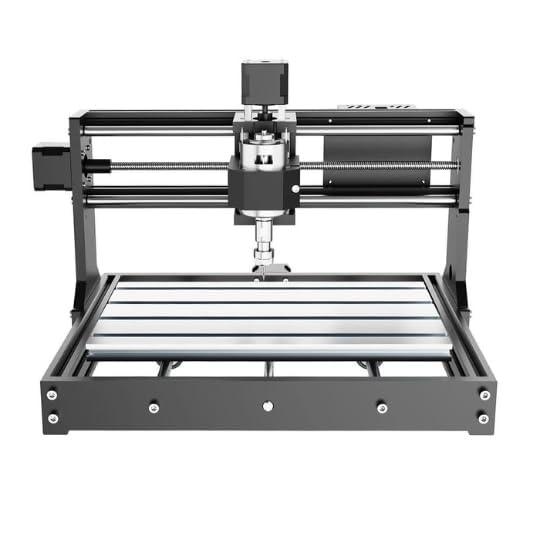
Figure 1: Front view of the TWOTREES DIY CNC 3018S Pro Engraver, showcasing its compact design and main components.
2. Safety Information
Always prioritize safety when operating the CNC machine. Failure to follow safety guidelines can result in injury or damage to the equipment.
- Read the entire manual before operation.
- Wear appropriate personal protective equipment (PPE), including safety glasses and hearing protection.
- Ensure the work area is well-ventilated and clear of obstructions.
- Keep hands and loose clothing away from moving parts.
- Disconnect power before performing any maintenance or adjustments.
- Do not operate the machine if any components are damaged.
- Only use the machine for its intended purpose and with compatible materials.
3. Components and Parts Overview
Familiarize yourself with the main components of your CNC engraver before assembly and operation.
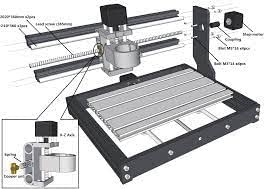
Figure 2: Exploded view diagram illustrating key components such as the spindle, stepper motors, aluminum profiles, T8 screws, and linear guides.
Key components include:
- Spindle: The rotating tool holder for engraving bits.
- Stepper Motors: Drive the movement along the X, Y, and Z axes.
- Aluminum Profile Frame: Provides the structural integrity of the machine.
- Linear Guides: Ensure smooth and precise movement of the gantry and spindle.
- T8 Screws: Lead screws for precise linear motion.
- Control Panel: Houses the GRBL control board and connections.
- Work Table: The surface where the material to be engraved is placed.
4. Setup and Assembly
The TWOTREES DIY CNC 3018S Pro Engraver requires assembly. Follow these steps carefully.
- Unpack Components: Carefully remove all parts from the packaging and verify against the parts list.
- Assemble Base Frame: Connect the aluminum profiles to form the base of the machine. Ensure all screws are tightened securely.
- Install Linear Guides and Lead Screws: Attach the linear guides and T8 lead screws to the frame, ensuring they are parallel and move freely.
- Mount Stepper Motors: Securely attach the stepper motors to their designated positions on the X, Y, and Z axes.
- Assemble Gantry: Construct the gantry (X-axis assembly) and attach the spindle mount.
- Install Spindle: Carefully insert the spindle motor into its mount.
- Connect Wiring: Connect all stepper motor wires, limit switch wires (if applicable), and spindle power wires to the GRBL control board. Refer to the wiring diagram provided in the separate assembly guide for detailed connections.
- Secure Work Table: Attach the work table to the base frame.
- Initial Power-Up: Connect the power adapter. The GRBL control board should power on.
- Software Setup: Install the necessary GRBL control software (e.g., Candle, UGS) on your computer and connect the CNC machine via USB. Configure the software according to the provided software guide.
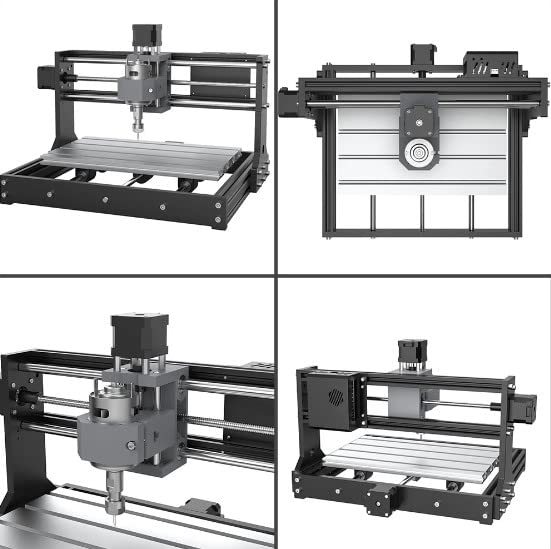
Figure 3: Various perspectives of the assembled CNC machine, showing the X, Y, and Z axes, and the work area.
5. Operating Instructions
Once assembled and software configured, you can begin operating your CNC engraver.
- Prepare Material: Securely fasten your material (e.g., wood, acrylic, PCB) to the work table using clamps or double-sided tape.
- Install Engraving Bit: Select the appropriate engraving bit for your material and task. Insert it into the spindle collet and tighten securely.
- Set Origin (Zero Point): Using the control software, manually move the spindle to the desired starting point (X0, Y0, Z0) on your material. Set this as the machine's origin.
- Load G-code: Load your prepared G-code file into the control software.
- Start Engraving/Cutting: Initiate the job from the software. Monitor the process closely.
- Emergency Stop: Be prepared to press the emergency stop button or disconnect power if any issues arise during operation.
The TWOTREES 3018S Pro is suitable for engraving and cutting a variety of soft materials, including:
- Plastic
- Wood and Bamboo
- Acrylic
- PVC
- PCB (Printed Circuit Boards)
- Soft Aluminum
- Leather
- Paper

Figure 4: Visual examples of materials that can be processed by the CNC engraver, such as wood, acrylic, leather, PCB, and paper.
6. Maintenance
Regular maintenance ensures the longevity and optimal performance of your CNC machine.
- Cleaning: After each use, clean dust and debris from the work area, lead screws, and linear guides using a brush or vacuum.
- Lubrication: Periodically apply a thin layer of light machine oil or grease to the lead screws and linear guides to ensure smooth movement.
- Check Connections: Regularly inspect all electrical connections and mechanical fasteners to ensure they are secure.
- Spindle Care: Keep the spindle clean and free of dust. Do not overtighten collets.
- Bit Sharpening/Replacement: Replace or sharpen dull engraving bits for best results and to prevent strain on the spindle motor.
7. Troubleshooting
This section addresses common issues you might encounter.
| Problem | Possible Cause | Solution |
|---|---|---|
| Machine not powering on | Power cable loose, power supply faulty, control board issue | Check power connections, test power supply, inspect control board for damage. |
| Motors not moving | Loose motor cables, incorrect software settings, motor driver issue | Verify motor connections, check GRBL settings in software, consult manufacturer for driver issues. |
| Inaccurate engraving | Loose belts/couplings, dull bit, incorrect G-code, material not secured | Tighten belts/couplings, replace bit, verify G-code, ensure material is firmly clamped. |
| Spindle not rotating | Spindle power cable loose, spindle motor faulty, software command issue | Check spindle power connection, test spindle motor, verify G-code for spindle commands. |
8. Specifications
Technical specifications for the TWOTREES DIY CNC 3018S Pro Engraver.
| Feature | Detail |
|---|---|
| Brand | MUTZTEQ (Manufacturer: TWOTREES) |
| Model Number | ttc3018s |
| ASIN | B0C6QC3YYQ |
| Item Weight | 10 kg |
| Control Software | GRBL (compatible with Candle, UGS, etc.) |
| Axes | 3-Axis (X, Y, Z) |
| Suitable Materials | Plastic, Wood, Acrylic, PVC, PCB, Soft Aluminum, Leather, Paper |
| Dimensions (Approx.) | 420mm (L) x 355mm (W) x 280mm (H) (Based on Figure 5) |
Figure 5: Diagram showing approximate dimensions and key labeled parts of the CNC machine.
9. Warranty and Support
For warranty information, technical support, or replacement parts, please contact the manufacturer or your point of purchase. Keep your purchase receipt as proof of purchase.
Manufacturer: TWOTREES
Brand: MUTZTEQ
Ask a question about this manual
Ask about setup, troubleshooting, compatibility, parts, safety, or missing instructions. Manuals+ will review the question and use this page’s manual context to help answer it.