
1. Introduction
Thank you for choosing the Depusheng DR2400 4-Channel Professional Wireless Microphone System. This system is designed for professional stage performances, karaoke, weddings, outdoor events, and parties, offering reliable wireless audio transmission and clear sound quality. It features a UHF wireless receiving system with excellent anti-interference capabilities and stability, supporting a long reception distance of up to 100 meters.
The DR2400 system includes four handheld wireless microphones and a receiver, allowing multiple units to be used simultaneously. Its user-friendly design incorporates a dynamic LCD screen, 100 groups of frequency adjustment, and a one-key scan function to quickly avoid disturbed frequencies, ensuring automatic frequency matching for optimal performance.

Image 1.1: Depusheng DR2400 4-Channel Wireless Microphone System overview, showing the receiver unit and four handheld microphones.
2. Product Components
The Depusheng DR2400 system includes the following components:
- 1 x Wireless Receiver Unit
- 4 x Wireless Handheld Microphones
- 4 x Antennas
- 1 x Power Adapter
- 1 x 6.35mm Audio Cable
- 4 x Anti-skid Ring (various colors)
- 1 x Instruction Manual (this document)

Image 2.1: Visual representation of all included components and their approximate dimensions.
3. Setup Instructions
3.1 Receiver Connection
- Connect Antennas: Screw the four antennas onto the corresponding ports on the rear panel of the receiver. Ensure they are securely tightened.
- Power Connection: Connect the provided power adapter to the DC IN port on the receiver and then plug it into a suitable power outlet.
- Audio Output: Connect the receiver to your audio mixer, amplifier, or speaker system using the supplied 6.35mm audio cable (MIX OUT) or XLR output cables (not included) for individual channel outputs.
3.2 Microphone Battery Installation
Each handheld microphone requires two AA batteries (8 AA batteries are needed for all four microphones). To install:
- Unscrew the bottom part of the microphone handle.
- Insert two AA batteries, ensuring correct polarity (+/-).
- Screw the bottom part back onto the microphone handle.
3.3 System Pairing (One-Key Frequency Sweep)
The DR2400 system features an automatic frequency matching function for easy setup.
- Power On Receiver: Press the POWER button on the receiver. The LCD display will illuminate.
- Power On Microphones: Turn on each handheld microphone by sliding its power switch.
- Initiate Pairing: On the receiver, for each channel (A, B, C, D), press the 'SYNC' button. The receiver will scan for available frequencies.
- Automatic Matching: Hold the microphone close to the IR sensor on the receiver (usually labeled 'IR' or 'TX') for the corresponding channel. The microphone and receiver will automatically synchronize to an interference-free frequency. The microphone's display will show the matched frequency.
- Repeat this process for all four microphones.

Image 3.1: Diagram illustrating the pairing process between the receiver and microphones.

Image 3.2: Close-up of the receiver showing the 'SYNC' button and IR sensor for one-key pairing.
4. Operating Instructions
4.1 Power On/Off
- Receiver: Press the POWER button on the front panel to turn the unit on or off.
- Microphones: Use the slide switch on each microphone to turn it on or off.
4.2 Volume Control
The receiver features individual volume controls for each of the four channels (A, B, C, D). Rotate the corresponding volume knob on the receiver's front panel to adjust the output level for each microphone.
4.3 Frequency Adjustment
The system supports 100 groups of frequency adjustment. While the one-key sync function automatically selects the best frequency, manual adjustment may be possible via the receiver's menu if needed. Refer to the receiver's display and control buttons (SET, ACT) for advanced frequency management options.
4.4 Optimal Usage Range
The Depusheng DR2400 system offers a stable signal range of up to 100 meters (approximately 328 feet) in optimal conditions. For best performance, ensure a clear line of sight between the microphones and the receiver, and avoid placing the receiver near large metal objects or other sources of strong electromagnetic interference.
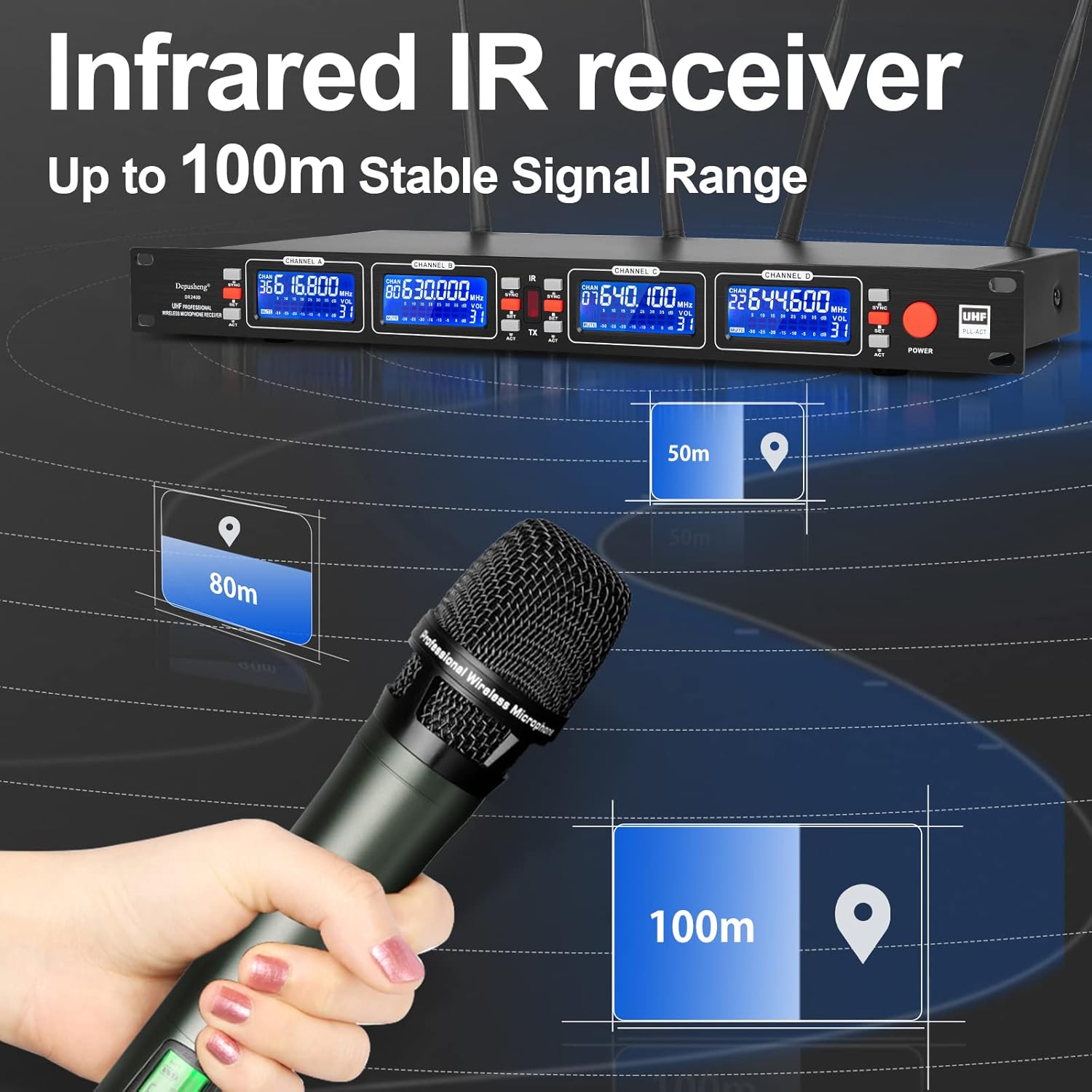
Image 4.1: Illustration of the wireless signal range, indicating stable reception up to 100 meters.
4.5 Microphone Features
Each microphone is equipped with a high-fidelity cardioid dynamic microphone core. This design provides intelligent noise reduction, ensuring clearer and more realistic sound capture while minimizing background noise.
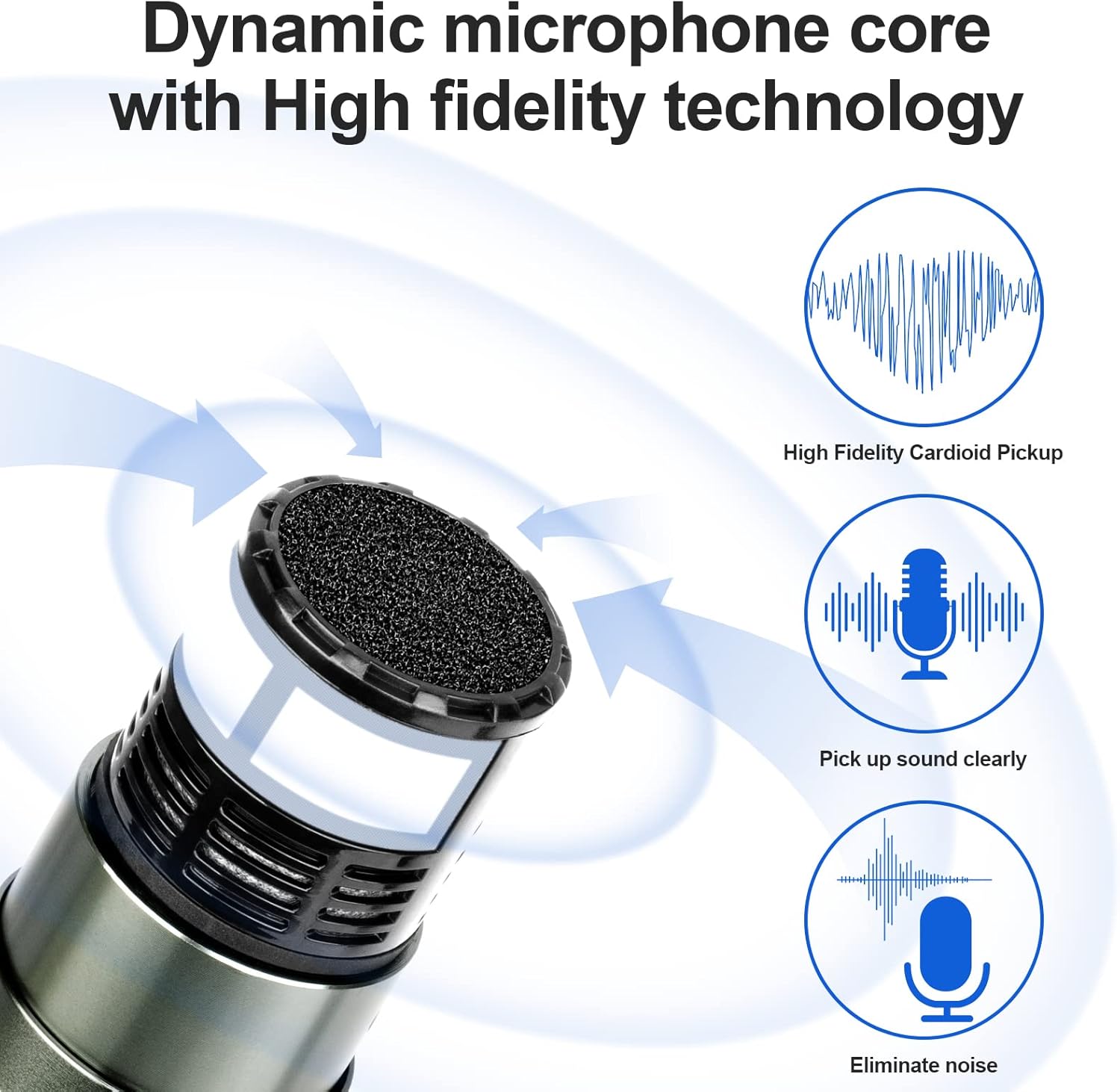
Image 4.2: Diagram showing the dynamic microphone core, highlighting high fidelity cardioid pickup, clear sound capture, and noise elimination.
5. Maintenance
5.1 Cleaning
- Wipe the receiver and microphones with a soft, dry cloth.
- Do not use liquid cleaners or abrasive materials, as they may damage the finish or internal components.
- Regularly clean the microphone grille to prevent dust and debris buildup.
5.2 Battery Care
- Remove batteries from microphones if they will not be used for an extended period to prevent leakage.
- Replace batteries when the battery indicator on the microphone or receiver shows low power.
- Dispose of used batteries responsibly according to local regulations.
5.3 Storage
Store the system in a cool, dry place away from direct sunlight, extreme temperatures, and high humidity. Keep components in their original packaging or a protective case to prevent damage.
6. Troubleshooting
If you encounter issues with your Depusheng DR2400 system, please refer to the following common troubleshooting steps:
- No Sound Output:
- Ensure the receiver is powered on and connected correctly to your audio system.
- Check that microphones are powered on and have fresh batteries.
- Verify that the receiver and microphones are successfully paired (check frequency display). Re-sync if necessary.
- Adjust the individual channel volume knobs on the receiver and the master volume on your audio system.
- Interference or Noise:
- Perform a one-key frequency sweep again to find a clearer channel.
- Ensure the receiver antennas are fully extended and positioned for optimal reception.
- Move the receiver away from other electronic devices (Wi-Fi routers, computers, large metal objects) that might cause interference.
- Ensure the operating distance is within the recommended 100-meter range.
- Microphone Not Pairing:
- Ensure the microphone has fresh batteries and is powered on.
- Hold the microphone's IR sensor directly facing the receiver's IR sensor during the SYNC process.
- Ensure no other strong wireless signals are interfering with the pairing process.
- Power Issues:
- Check the power adapter connection to both the receiver and the wall outlet.
- Verify that the power outlet is functional.
- No Mute Function on Microphones:
- Please note that the DR2400 microphones do not feature a dedicated mute button. To temporarily silence a microphone, either turn it off or lower its corresponding volume knob on the receiver.
7. Specifications
| Feature | Specification |
|---|---|
| Model Number | DR2400 |
| Microphone Form Factor | Handheld |
| Power Source | Corded Electric (Receiver), Battery (Microphones) |
| Battery Requirement | 8 AA batteries (2 per microphone) |
| Material | Metal |
| Number of Channels | 4 |
| Connectivity Technology | UHF, XLR |
| Connector Type | 6.35mm Jack, XLR |
| Special Features | Volume Control, Battery Indicator Light |
| Recommended Uses | Singing, Karaoke |
| Compatible Devices | Amplifier with preamp, Speaker, Effect unit, Mixer |
| Polar Pattern | Unidirectional |
| Audio Sensitivity | 120 Decibels |
8. Warranty and Support
Information regarding specific warranty terms and customer support for the Depusheng DR2400 system is not available in this manual. For detailed warranty information, technical support, or service inquiries, please refer to the official Depusheng website or contact your point of purchase.