
ciciglow ciciglowp7xgordgei-11
ciciglow V8S Live Sound Card User Manual
Model: ciciglowp7xgordgei-11
Introduction
The ciciglow V8S Live Sound Card is a versatile audio mixer board designed for live streaming, karaoke, podcasting, and various audio recording applications. It features 16 sound effects, 8 fun modes, and multiple connectivity options to enhance your audio experience. This manual provides detailed instructions for setting up, operating, and maintaining your sound card.

Image: The ciciglow V8S Live Sound Card, a compact black audio mixer with various knobs and buttons.
Product Features
- Connectivity: Supports Bluetooth for cell phone accompaniment and three cell phone connections (two for live streaming, one for accompaniment).
- Sound Effects: Equipped with 16 distinct sound effects including gunfire, gathering, evacuation, attention, laughter, cheer, and more, to create dynamic audio environments.
- Fun Modes: Features 8 unique modes such as electric sound, avoid, sound change, monitor, chat, shout mic, sing, and eliminate original sound for diverse audio manipulation.
- Light Design: Incorporates intelligent avoidance and original sound elimination, with indicator lights that act as breathing lights when no singing is detected.
- Knob Adjustment: Six major adjustment knobs allow for precise control over sound input and output, ensuring balanced and accurate sound effects.

Image: An overview of the ciciglow V8S Live Sound Card highlighting its 16 sound effects, 8 fun modes, 6 adjustment knobs, and 500mAh lithium battery.
Setup Guide
Package Contents
- ciciglow V8S Live Sound Card
- USB Charging Cable
- Audio Cables (2-3, depending on model variant)
- User Manual (this document)

Image: The ciciglow V8S Live Sound Card displayed with its accompanying USB charging cable and audio cables.
Connecting Your Device
The V8S sound card offers multiple connection ports for various devices. Refer to the diagram below for port identification.

Image: Rear view of the sound card showing various input/output ports, including "1 Live telecast", "2 Live telecast", "Accompany", "Charging", "Computer", "Earphone", "Headset", "Capacitor MIC", and "Dynamic MIC".
- Power On: Press and hold the "Power" button located on the top right of the sound card until the indicator lights illuminate.
- Charging: Connect the USB charging cable to the "Charging" port on the sound card and a power source. The indicator light will show charging status.
- Live Streaming Connection (Phones/Tablets):
- For live broadcast, connect your primary phone/tablet to the "1 Live telecast" port using an audio cable.
- For a secondary live broadcast, connect another phone/tablet to the "2 Live telecast" port.
- Accompaniment Connection: Connect a third phone/tablet or music source to the "Accompany" port for background music. This can also be done via Bluetooth.
- Computer Connection: Connect the sound card to your computer using the USB cable via the "Computer" port for recording or live streaming from a PC.
- Microphone Connection:
- Connect a condenser microphone to the "Capacitor MIC" port.
- Connect a dynamic microphone to the "Dynamic MIC" port.
- Headset/Earphone Connection:
- Plug your earphones into the "Earphone" port for monitoring audio output.
- If your headset has a microphone, connect it to the "Headset" port.
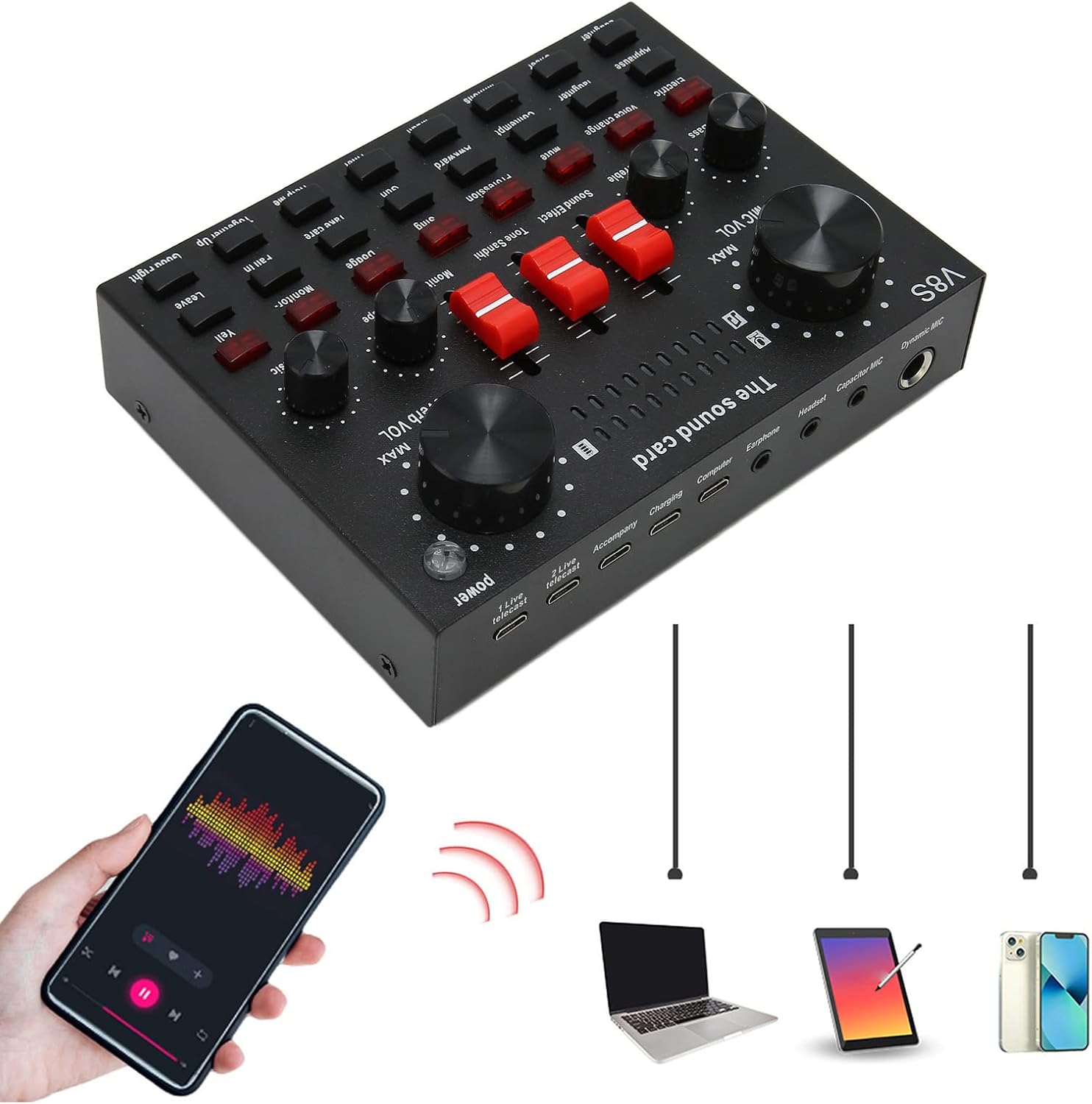
Image: The sound card shown with various devices connected, including a smartphone playing music and a laptop, illustrating its multi-device compatibility.
Operating Instructions
Control Knobs and Buttons
The V8S sound card features several knobs and buttons for precise audio control and effect selection.

Image: A close-up view of the sound card's main control knobs, including MIC VOL, Bass, Treble, and Reverb VOL, indicating balanced adjustment capabilities.
- MIC VOL (Microphone Volume): Adjusts the input volume of your microphone. Turn clockwise to increase, counter-clockwise to decrease.
- Bass: Controls the low-frequency response of your microphone audio.
- Treble: Controls the high-frequency response of your microphone audio.
- Reverb VOL (Reverb Volume): Adjusts the intensity of the reverb effect applied to your microphone audio.
- Music: Controls the volume of the background music or accompaniment.
- Monitor: Adjusts the volume of the audio you hear through your earphones/headset.
Sound Effects and Modes
Utilize the dedicated buttons to activate various sound effects and modes.

Image: The sound card displaying its array of 16 live effects buttons, designed for easy and fun live audio manipulation.
- 16 Sound Effects: Press the individual buttons labeled "Gunfire", "Gathering", "Evacuation", "Attention", "Laughter", "Cheer", "Muah", "Minions", "Awkward", "Contempt", "Thief", "Help Me", "Together Up", "Fall In", "Leave", "Good Fight" to trigger the respective sound effect.
- 8 Fun Modes:
- Electric Sound: Applies an electronic vocal effect.
- Avoid: Automatically lowers background music volume when you speak.
- Voice Change: Modifies your voice pitch (e.g., male to female, female to male, child voice).
- Monitor: Toggles real-time audio monitoring through your earphones.
- Chat: Optimizes audio for conversational use.
- Shout Mic: Enhances microphone sensitivity for shouting or loud vocals.
- Sing: Optimizes audio for singing, often adding a slight reverb.
- Eliminate Original Sound: Removes vocals from a song, leaving only the instrumental track for karaoke.

Image: A close-up of the sound card's buttons, emphasizing the 8 fun modes available for various audio effects and enhancements.
Maintenance
Proper maintenance ensures the longevity and optimal performance of your ciciglow V8S Live Sound Card.
- Cleaning: Use a soft, dry cloth to wipe the surface of the sound card. Avoid using liquid cleaners or abrasive materials, as they may damage the device.
- Storage: Store the sound card in a cool, dry place away from direct sunlight, extreme temperatures, and high humidity.
- Handling: Handle the device with care. Avoid dropping it or subjecting it to strong impacts.
- Cable Management: Ensure cables are not kinked or strained, which can lead to damage over time.
- Battery Care: If the device is battery-powered, avoid fully discharging the battery frequently. Charge it regularly to maintain battery health.
Troubleshooting
If you encounter issues with your ciciglow V8S Live Sound Card, refer to the following common troubleshooting steps:
| Problem | Possible Cause | Solution |
|---|---|---|
| No power/Device not turning on | Low battery or faulty charging cable/port. | Ensure the device is fully charged. Try a different USB cable and power adapter. |
| No sound output | Incorrect cable connection, low volume settings, or muted output. | Check all audio cable connections. Adjust "Monitor" and "Music" volume knobs. Ensure connected devices are not muted. |
| Microphone not working | Microphone not properly connected, "MIC VOL" too low, or microphone fault. | Ensure microphone is securely plugged into the correct port ("Capacitor MIC" or "Dynamic MIC"). Increase "MIC VOL". Test with another microphone if possible. |
| Sound distortion/noise | Input levels too high, faulty cables, or interference. | Lower input volumes (MIC VOL, Music). Try different audio cables. Ensure no strong electromagnetic interference sources are nearby. |
| Bluetooth connection issues | Device not in pairing mode, out of range, or interference. | Ensure the sound card's Bluetooth is active. Move devices closer. Disconnect other Bluetooth devices. |
Specifications
| Feature | Detail |
|---|---|
| Model Number | ciciglowp7xgordgei-11 |
| Brand | ciciglow |
| Item Weight | 12 ounces |
| Package Dimensions | 6.3 x 4.6 x 2 inches |
| Power Source | Battery Powered |
| Connectivity Technology | Auxiliary, Bluetooth |
| Number of Channels | 6 (referring to adjustment knobs/inputs) |
| Frequency Response | 20 KHz (as listed in specifications, likely upper limit) |
| Sound Effects | 16 types |
| Fun Modes | 8 types |
Warranty and Support
Warranty Information
Please refer to the product packaging or the point of purchase for specific warranty details. Typically, ciciglow products come with a standard manufacturer's warranty covering defects in materials and workmanship for a specified period from the date of purchase.
Customer Support
For further assistance, technical support, or inquiries regarding your ciciglow V8S Live Sound Card, please contact ciciglow customer service through the retailer's platform or the official ciciglow website. Have your product model number (ciciglowp7xgordgei-11) and purchase details ready when contacting support.
You can visit the ciciglow store on Amazon for more information: ciciglow Amazon Store
Related Documents - ciciglowp7xgordgei-11
 |
Live Sound Card User Manual: FRJ-F998 Audio Interface for Streaming & Karaoke User manual for the FRJ-F998 Live Sound Card, a versatile audio interface for live streaming, podcasting, and karaoke. Covers product features, setup, specifications, connection diagrams, troubleshooting, and best practices. |
 |
AyeBeau Live Sound Card User Manual User manual for the AyeBeau Live Sound Card, including setup instructions, connection diagrams, and technical specifications. |
 |
Hosabely K500 Multi-function Mixer Sound Card User's Guide Comprehensive user guide for the Hosabely K500 multi-function mixer sound card, detailing its features, connections, product parameters, and interface types for live broadcasting, recording, and podcasting. |
 |
Tenlamp KB11 Outdoor Sound Card User Manual Comprehensive user manual for the Tenlamp KB11 Outdoor Sound Card, covering setup, features, connections, troubleshooting, and technical specifications for live streaming, podcasting, and recording. |
 |
Pyle PKSCRD208 Compact Live Sound Card User Manual User manual for the Pyle PKSCRD208 Compact Live Sound Card, a voice changer device compatible with PS4, Xbox, smartphones, and computers, featuring multiple sound effects and connectivity options. |
 |
M10 Portable Voice Changer Card Specifications and Features Technical specifications and feature overview for the M10 portable voice changer card, designed for mobile phones and computers, featuring multiple sound effects and fine-tuning capabilities. |
Ask a question about this manual
Ask about setup, troubleshooting, compatibility, parts, safety, or missing instructions. Manuals+ will review the question and use this page’s manual context to help answer it.