
Diyeeni Diyeenid4qt7bgun2
Diyeeni X6 BT Earbuds User Manual
Model: Diyeenid4qt7bgun2
1. Introduction
The Diyeeni X6 BT Earbuds are advanced stereo headphones designed for a versatile audio experience, including gaming, hands-free calls, and music playback. Featuring BT V5.1 technology for stable and fast connections, CVC8.0 noise reduction, and intelligent touch controls, these earbuds offer pure and lossless sound quality. This manual will guide you through the proper use and care of your X6 BT Earbuds.

Image: The Diyeeni X6 BT Earbuds, showcasing both earbuds and their charging case with an illuminated digital display indicating battery percentage.
2. Setup
2.1 Initial Charging
Before first use, fully charge the earbuds and the charging case. The charging time is approximately 2 hours. The charging case provides extended battery life, with a standby time of about 280 hours.

Image: A close-up view of the Type-C charging port located on the Diyeeni X6 earbud charging case, with a charging cable connected, highlighting its fast and safe charging capabilities.
2.2 Pairing with a Device
- Ensure the earbuds are charged and placed in the charging case.
- Open the charging case lid. The earbuds will automatically enter pairing mode.
- On your device (e.g., smartphone, tablet), enable Bluetooth and search for available devices.
- Select "X6" or "Diyeeni X6" from the list of found devices to connect.
- Once connected, a voice prompt will confirm successful pairing.
3. Operating Instructions
3.1 Touch Controls
The X6 BT Earbuds feature intelligent touch controls for easy management of various functions:
- Play/Pause: Single tap on either earbud.
- Next Track: Double tap the right earbud.
- Previous Track: Double tap the left earbud.
- Answer/End Call: Single tap on either earbud.
- Reject Call: Press and hold either earbud for 2 seconds.
- Activate Voice Assistant: Triple tap on either earbud.
- Mode Switch (Game/Music): Tap the headset 4 times.

Image: The Diyeeni X6 Earbuds and charging case, illustrating the touch-sensitive areas on the earbuds for one-click control of various functions.
3.2 Dual Mode Decoding (Game/Music)
The earbuds support dual-mode decoding, allowing you to switch between Game Mode and Music Mode for optimized audio performance. In Game Mode, experience ultra-low latency (as low as 40ms) for synchronized audio and video, crucial for competitive gaming. Music Mode provides enhanced audio quality for listening to music.

Image: An illustration depicting the dual-mode decoding feature of the Diyeeni X6 Earbuds, showing distinct 'Game mode' for non-inductive delay and 'Music mode' with ACC advanced decoding.
3.3 Battery Level Display
The charging case features an LED digital display that shows the real-time battery level of both the left and right earbuds, as well as the charging bay's power. This allows you to monitor battery status at a glance without needing to open the lid.
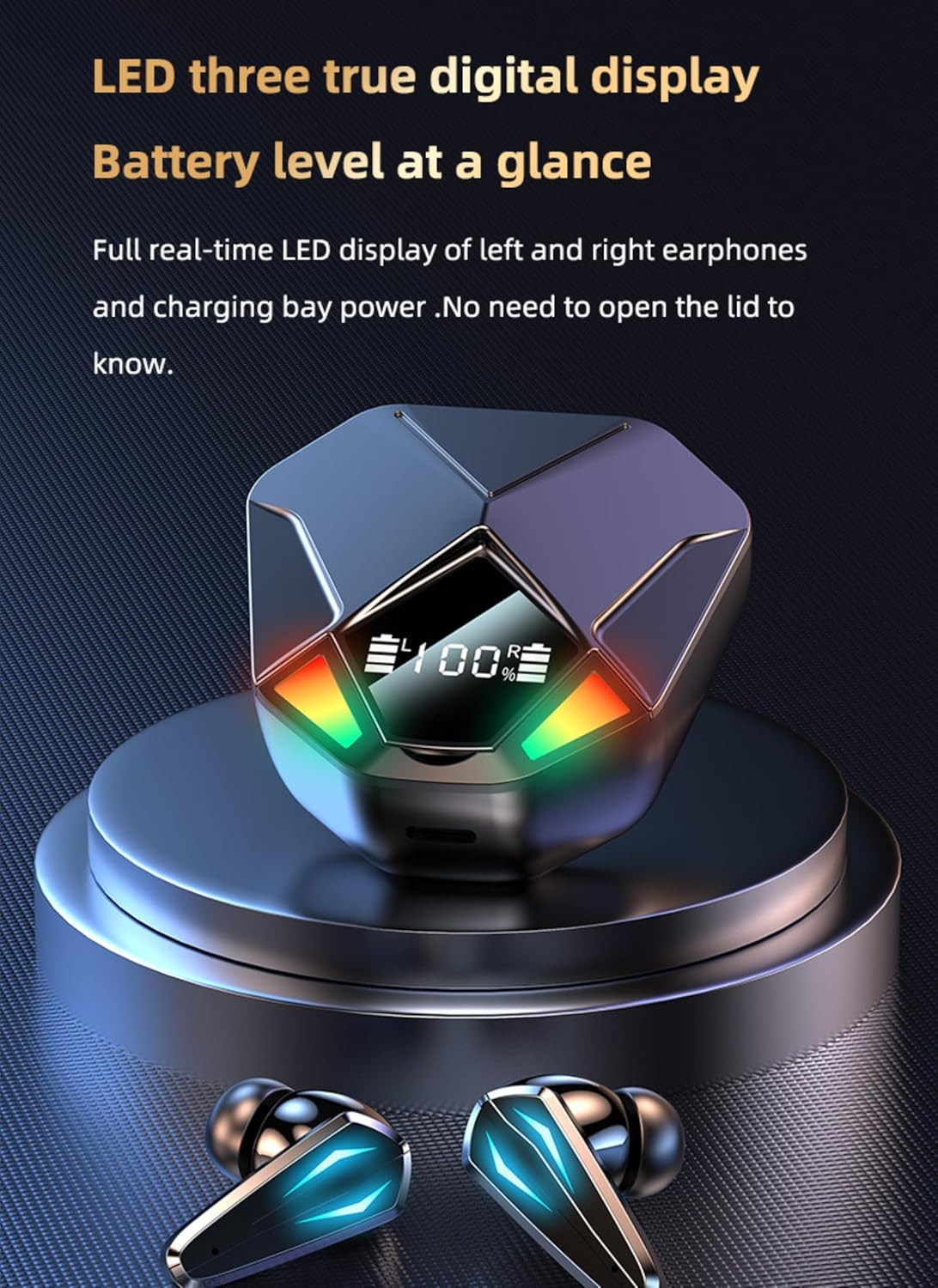
Image: A close-up of the Diyeeni X6 earbud charging case, highlighting its LED digital display that shows the battery level of the earbuds and the case itself.
4. Maintenance
Proper maintenance ensures the longevity and optimal performance of your Diyeeni X6 BT Earbuds.
- Cleaning: Regularly clean the earbuds and charging case with a soft, dry, lint-free cloth. Avoid using abrasive materials or harsh chemicals.
- Ear Tips: Remove and clean the ear tips periodically. You can gently wash them with water and mild soap, ensuring they are completely dry before reattaching.
- Storage: When not in use, store the earbuds in their charging case to protect them from dust and damage. Store in a cool, dry place away from extreme temperatures.
- Charging: Only use the provided Type-C cable or a certified equivalent for charging. Avoid overcharging by disconnecting once fully charged.
5. Troubleshooting
If you encounter issues with your earbuds, refer to the following common problems and solutions:
| Problem | Possible Solution |
|---|---|
| Earbuds not pairing | Ensure earbuds are charged. Turn off and on your device's Bluetooth. Place earbuds back in case, close lid, then open to re-enter pairing mode. |
| No sound from one earbud | Check battery level of both earbuds. Try re-pairing the earbuds with your device. Ensure both earbuds are properly seated in the charging case for connection. |
| Charging case not charging | Verify the Type-C cable is securely connected to both the case and the power source. Try a different charging cable or power adapter. |
| Low audio quality or disconnections | Ensure you are within the Bluetooth range (up to 20 meters). Reduce interference from other wireless devices. Check for obstructions between earbuds and device. |
| Touch controls not responding | Ensure your fingers are clean and dry. Try restarting the earbuds by placing them in the case and taking them out again. |
6. Specifications
Detailed technical specifications for the Diyeeni X6 BT Earbuds:
| Feature | Detail |
|---|---|
| Brand | Diyeeni |
| Model Name | Diyeenid4qt7bgun2 |
| Connectivity Technology | Wireless (Bluetooth) |
| Bluetooth Version | 5.1 |
| Bluetooth Range | 20 Meters |
| Audio Driver Type | Dynamic Driver (13mm bass diaphragm) |
| Frequency Range | 20 Hz - 20,000 Hz |
| Battery Life (Single Use) | 6 Hours |
| Charging Time | 2 Hours |
| Standby Time | Approx. 280 Hours |
| Control Method | Touch |
| Noise Reduction | CVC8.0 |
| Material | Plastic |
| Color | Black |
| Item Weight | 3.77 ounces |
| Package Dimensions | 5.12 x 3.94 x 1.57 inches |

Image: An infographic detailing the battery performance of the Diyeeni X6 Earbuds, showing 6 hours of single-use time, 280 hours of accumulated standby time, and 2 hours of charging time.
7. Warranty and Support
For warranty information or technical support, please refer to the product packaging or contact Diyeeni customer service through the retailer where the product was purchased. Keep your purchase receipt as proof of purchase.