
LINGDU LD02-2CH
LINGDU LD02-2CH Dual Dash Camera User Manual
Model: LD02-2CH | Brand: LINGDU
Introduction
The LINGDU LD02-2CH is an advanced dual dash camera system designed to provide comprehensive recording of your driving experience. It features high-resolution video capture, integrated connectivity options, and intelligent monitoring functions to enhance vehicle security and provide reliable evidence in case of incidents. This manual provides detailed instructions for setup, operation, and maintenance of your dash camera.
Key Features
- 5K Resolution: Single front camera records in 5K; front and rear dual dashcam records in 4K+2K.
- Built-in 5GHz WiFi: Easily connect to the LINGDU app to view, replay, download, and share recorded videos.
- Built-in GPS: Records driving routes, real-time speed, and location data.
- Super Night Vision: Large F1.8 aperture and WDR for clear recording in low-light conditions.
- 24H Parking Mode: Features G-Sensor for collision detection and Time-Lapse recording for continuous surveillance (requires hardwire kit, sold separately).
- Voice Control: Hands-free operation for common commands like locking video or taking pictures.
- Loop Recording: Automatically overwrites oldest files when the SD card is full.

Image: The LINGDU LD02-2CH dash camera highlighting its main features including 5K resolution, built-in GPS, 5GHz WiFi, 24H parking monitor, super night vision, smart voice control, Type-C interface, and super capacitor.
Package Contents
Please verify that all items listed below are included in your package:
- Front Dash Camera
- Rear Camera (6M/20ft cable)
- Car Charger
- Type-C USB Power Cable (3.5M/12ft)
- Electrostatic Films (x2)
- Cable Clips (x5)
- Pry Tool
- User Manual
- 64 GB SD Card

Image: All components included in the LINGDU LD02-2CH dash camera package, laid out neatly.
Setup and Installation
1. SD Card Insertion and Formatting
The dash camera comes with a 64GB SD card. Before first use, it is crucial to format the SD card within the camera to ensure proper functionality and compatibility.
- Insert the 64GB SD card into the designated slot on the dash camera.
- Power on the dash camera.
- Navigate to the system settings menu on the camera's display.
- Locate the "Format" option and confirm to format the SD card. This will erase all data on the card.
The camera supports up to a 128GB SD card. Ensure any new SD card is also formatted in the camera before use.
2. Camera Mounting and Wiring
Proper placement and secure wiring are essential for optimal performance and safety.
- Front Camera: Attach the front dash camera to your windshield using the provided mount. Position it centrally, ensuring it does not obstruct your view. The mount allows for adjustment of the camera angle (90° vertical, 45° horizontal).
- Rear Camera: Mount the rear camera on your rear windshield. The rear camera can be rotated 360° for optimal positioning.
- Wiring: Use the provided Type-C USB power cable and car charger to power the front camera. Route the cable neatly along the windshield and dashboard edges using the included cable clips and pry tool to conceal it. Connect the rear camera to the front camera using its dedicated cable.

Image: Diagrams illustrating the adjustable angles of the front camera, the rotatable rear camera, and a simplified wiring diagram for installation.

Image: An interior view of a car showing suggested cable routing for both front and rear dash cameras, along with close-ups of the mounted cameras.
Operating Instructions
1. Power On/Off and Recording
The dash camera automatically powers on and begins recording when your vehicle's ignition is turned on. It will power off automatically when the ignition is turned off.
- Loop Recording: The camera continuously records video in segments. When the SD card is full, the oldest unlocked video files will be automatically overwritten by new recordings. A 64GB card provides approximately 4 hours of recording, while a 128GB card provides about 8 hours.
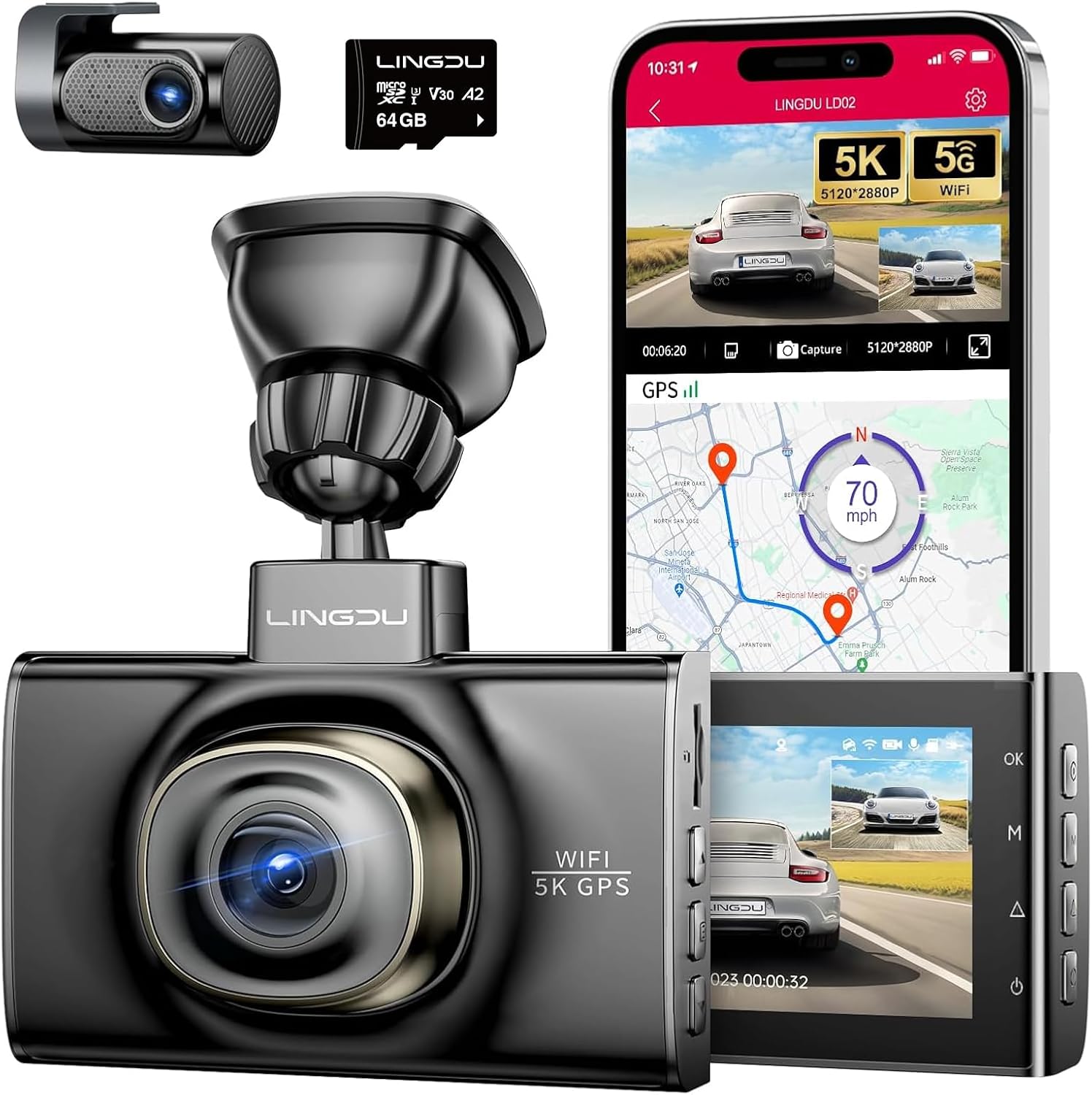
Image: A composite image showing the LINGDU LD02-2CH dash camera, its rear camera, a 64GB SD card, and a smartphone displaying the companion app with live view and GPS tracking.

Image: An illustration demonstrating the loop recording function, showing how older files are overwritten as the SD card fills up, with approximate recording durations for different card sizes.
2. Video Resolution
The LD02-2CH offers flexible recording resolutions:
- Single Front Camera: 5K resolution.
- Front and Rear Dual Dashcam: Front camera records in 4K (3840*2160P) and the rear camera records in 2K (2560*1440P).

Image: A comparison showing the clarity of 4K resolution from the front camera and 2K resolution from the rear camera, with example license plate details.
3. Super Night Vision
The LD02-2CH is equipped with a large F1.8 aperture and Wide Dynamic Range (WDR) technology, enabling clear video recording even in low-light conditions or at night.

Image: A night scene captured by the dash camera, demonstrating its clear night vision capabilities with visible details of vehicles and surroundings.
4. 24-Hour Parking Monitor
The parking monitor feature provides continuous surveillance when your vehicle is parked. This requires a hardwire kit (sold separately) for continuous power.
- G-Sensor Mode: If the built-in G-sensor detects a sudden shake or collision while parked, the camera will automatically start recording and lock the footage to prevent overwriting.
- Time-Lapse Mode: Records continuous video at a low frame rate, compressing hours of footage into minutes, ideal for long-term parking surveillance.

Image: An illustration depicting a car protected by the 24-hour parking monitor, with icons for G-Sensor mode (collision detection) and Time-Lapse mode.
5. Built-in 5GHz WiFi and App Connectivity
The integrated 5GHz WiFi allows for quick and easy connection to your smartphone via the LINGDU app. This enables live view, video playback, downloading, and sharing of recorded footage.
- Download the LINGDU app from your smartphone's app store.
- Enable WiFi on your dash camera (can be done via voice command or menu).
- Connect your smartphone to the dash camera's WiFi network (SSID and password usually displayed on camera screen).
- Open the LINGDU app to access camera functions.

Image: A visual representation of the dash camera connected wirelessly to a smartphone, showing the app interface for viewing, replaying, sharing, and downloading videos.
6. Built-in GPS Tracking
The built-in GPS module records your driving route, real-time speed, and location data. This information can be viewed alongside your video footage using the dedicated PC software or the LINGDU app.

Image: A split view showing a laptop screen with dash cam footage and a map displaying the recorded driving route, speed, and location, alongside a smartphone showing similar GPS data.
7. Voice Control
The LD02-2CH supports voice commands for hands-free operation, allowing you to control key functions without taking your hands off the wheel.
- "Lock the Video"
- "Open Recording"
- "Turn off Recording"
- "Take Picture"
- "Turn on WiFi"

Image: A driver's perspective inside a car, with callouts indicating various voice commands that can be used to control the dash camera.
Maintenance
- SD Card Care: Regularly back up important footage and format the SD card every few weeks to maintain optimal performance and prevent data corruption. Replace the SD card if you experience frequent errors or recording issues.
- Cleaning: Use a soft, dry cloth to clean the camera lens and screen. Avoid using abrasive cleaners or solvents.
- Temperature: Avoid exposing the dash camera to extreme temperatures for prolonged periods. The super capacitor design offers better heat resistance compared to traditional batteries.
Troubleshooting
| Problem | Possible Cause | Solution |
|---|---|---|
| Camera does not power on. | No power supply; loose connection. | Check car charger connection and vehicle's power outlet. Ensure the Type-C USB cable is securely connected. |
| Recording stops or freezes. | SD card error; full SD card; incompatible SD card. | Format the SD card in the camera. If issues persist, try a new, high-speed (Class 10 or U3) SD card up to 128GB. |
| Poor video quality at night. | Dirty lens; extreme low light conditions. | Clean the camera lens. Ensure no obstructions on the windshield. |
| GPS not tracking location/speed. | Poor GPS signal; camera not receiving satellite data. | Ensure the camera has a clear view of the sky. Avoid mounting near metallic objects that might interfere with the signal. |
| WiFi connection issues. | Incorrect password; app issues; interference. | Double-check WiFi password. Restart both camera and phone. Ensure no other devices are interfering with the 5GHz signal. |
Specifications
| Feature | Detail |
|---|---|
| Model Name | LD02-2CH |
| Video Capture Resolution | Single Front 5K / Front 4K + Rear 2K |
| Connectivity Technology | 5GHz Wi-Fi |
| Special Features | Super capacitor, Built-in 5G Wi-Fi/GPS, Voice guidance, Time-lapse, WDR, Loop Recording, G-sensor, Parking Monitor, Collision detection |
| Mounting Type | Windshield Mount |
| Storage Support | Up to 128GB SD card (64GB included) |
| Product Dimensions | 5.51 x 9.45 x 2.36 inches |
| Item Weight | 1.41 pounds |
| Color | Black |
Warranty and Support
LINGDU provides a 1-year warranty for this product and a 30-day product return service. Our dedicated R&D team offers 7x24 hours customer service. If you require any assistance or have questions, please do not hesitate to contact us. We aim to reply within 24 working hours to resolve any issues.
For further support, please refer to the official LINGDU website or contact their customer service directly.
Related documentsLD02-2CH


Ask a question about this manual
Ask about setup, troubleshooting, compatibility, parts, safety, or missing instructions. Manuals+ will review the question and use this page’s manual context to help answer it.