1. Introduction
Thank you for choosing the Generic BT 1304 Bluetooth 5.0 Wireless Neckband Earphones. This manual provides detailed instructions for setting up, operating, and maintaining your device to ensure optimal performance and longevity.
2. Package Contents
Please check the package for the following items:
- Generic BT 1304 Wireless Neckband Earphones
- Ear Cushions (various sizes)
- Charging Cable (USB)
- User Manual

Figure 2.1: Generic BT 1304 Neckband Earphones and retail packaging.
3. Product Features
- 10MM Dynamic Driver: Delivers clear sound details with enhanced bass.
- Bluetooth 5.0 Connectivity: Stable wireless connection with a range of up to 10 meters (33 feet).
- Multi-function Controls: Integrated buttons for music playback and call management.
- Long Playtime: Up to 10 hours of music playback on a single charge.
- Fast Charging: Quick charging capability, 1-2 hours for a full charge.
- Wide Compatibility: Compatible with most Android and iOS devices.
- Lightweight Neckband Design: Easy to wear and carry.
- Built-in Microphone: For hands-free calling.
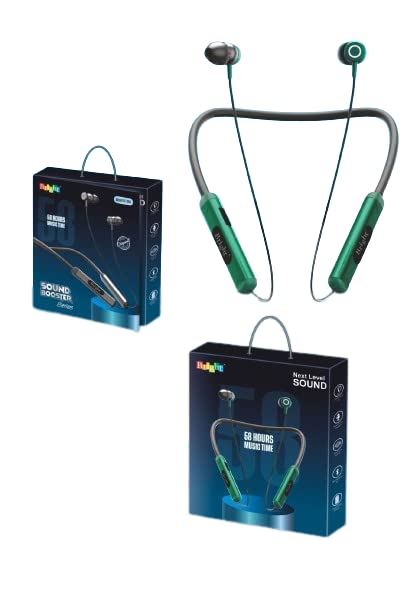
Figure 3.1: Overview of the Generic BT 1304 Neckband Earphones design.
4. Setup and Initial Use
4.1. Charging the Earphones
- Locate the hidden charging port on the side panel of the neckband.
- Connect the provided USB charging cable to the charging port on the earphones.
- Connect the other end of the USB cable to a compatible USB power source (e.g., computer USB port, wall adapter).
- The charging indicator light will illuminate, indicating that the earphones are charging.
- A full charge typically takes 1-2 hours. The indicator light will change or turn off once charging is complete.
Note: Ensure the earphones are fully charged before first use for optimal battery life.
4.2. Bluetooth Pairing
- Ensure the earphones are charged and powered off.
- Press and hold the multi-function button on the neckband until the indicator light flashes, usually alternating between blue and red, indicating pairing mode.
- On your smartphone or device, enable Bluetooth and search for available devices.
- Select "BT 1304" from the list of available devices.
- Once connected, the indicator light will typically show a steady blue light or flash slowly.
- The earphones will automatically connect to the last paired device when powered on, if the device's Bluetooth is active and within range.
Tip: For best connectivity, ensure your device is within 10 meters (33 feet) of the earphones.
5. Operating Instructions
5.1. Power On/Off
- Power On: Press and hold the multi-function button for approximately 3 seconds until the indicator light flashes blue.
- Power Off: Press and hold the multi-function button for approximately 5 seconds until the indicator light flashes red and then turns off.
5.2. Music Controls
- Play/Pause: Press the multi-function button once.
- Next Track: Press and hold the Volume Up (+) button.
- Previous Track: Press and hold the Volume Down (-) button.
- Volume Up: Press the Volume Up (+) button briefly.
- Volume Down: Press the Volume Down (-) button briefly.
5.3. Call Controls
- Answer/End Call: Press the multi-function button once.
- Reject Call: Press and hold the multi-function button for approximately 2 seconds.
- Redial Last Number: Double-press the multi-function button.
6. Maintenance and Care
- Keep the earphones dry. Avoid exposure to moisture, rain, or liquids.
- Clean the earphones with a soft, dry cloth. Do not use abrasive cleaners.
- Store the earphones in a cool, dry place away from extreme temperatures.
- Avoid dropping or subjecting the earphones to strong impacts.
- Do not attempt to disassemble or modify the earphones, as this will void the warranty.
7. Troubleshooting
7.1. Earphones not turning on
- Ensure the earphones are fully charged. Connect them to a power source and allow them to charge for at least 30 minutes before attempting to power on again.
7.2. Cannot pair with device
- Make sure the earphones are in pairing mode (indicator light flashing blue/red).
- Ensure Bluetooth is enabled on your device and it is within 10 meters of the earphones.
- Turn off Bluetooth on your device, then turn it back on.
- If previously paired, try "forgetting" or "unpairing" the earphones from your device's Bluetooth settings and then re-pair.
- Restart both the earphones and your device.
7.3. No sound or low volume
- Check the volume levels on both the earphones and your connected device.
- Ensure the earphones are properly connected to your device.
- Try playing different audio sources to rule out an issue with the media file.
7.4. Intermittent connection
- Ensure there are no obstacles between the earphones and your device.
- Move away from other wireless devices that might cause interference.
- Keep your device within the recommended 10-meter Bluetooth range.
8. Specifications
| Feature | Detail |
|---|---|
| Model Name | BT 1304 |
| Connectivity Technology | Wireless (Bluetooth 5.0) |
| Wireless Communication Technology | Bluetooth |
| Driver Size | 10MM Dynamic Driver |
| Bluetooth Range | Up to 10 meters (33 feet) |
| Playtime | Approx. 10 hours |
| Charging Time | 1-2 hours |
| Control Method | Touch/Button |
| Microphone | Included (In-Ear format) |
| Power Source | Battery-Powered |
| Form Factor | In Ear, Neckband |
| Material | Plastic |
| Product Dimensions | 15 x 12 x 3 cm |
| Item Weight | 200 g |
| Compatibility | Android, iOS |
9. Warranty and Support
This product comes with a standard warranty. For details regarding the warranty period and terms, please refer to the warranty information provided at the time of purchase or contact your retailer.
For technical support or further assistance, please contact the manufacturer or your local distributor. Keep your purchase receipt as proof of purchase for warranty claims.
Manufacturer: Generic
Manufacturer Address: MD IMRAN KHAN 13A, Kantal Parahoo, Mansatala Lane, Kolkata, WEST BENGAL, India


