1. Introduction
This manual provides essential information for the proper use and maintenance of your Generic brand replacement remote control, designed for various Nakamichi Car Bluetooth Multimedia Audio Stereo Receiver Systems, including models NA1650, NM-NA3020, NA3102i, NA3600, NA6605, and NM-NA6605, NA3600M. Please read this manual thoroughly before operating the remote control.
Important Note: This is an IR (Infrared) replacement remote. While it is designed to be compatible, some functions may differ or not be fully supported compared to the original remote control that came with your Nakamichi unit. No programming is required for this remote to function with compatible systems.
2. Safety Information
- Battery Handling: Always insert batteries with the correct polarity (+/-). Do not mix old and new batteries, or different types of batteries. Remove batteries if the remote will not be used for an extended period to prevent leakage.
- Disposal: Dispose of used batteries according to local regulations. Do not dispose of batteries in fire.
- General Care: Keep the remote control away from direct sunlight, heat sources, moisture, and extreme temperatures. Avoid dropping or subjecting the remote to strong impacts.
- Children: Keep the remote control out of reach of small children to prevent accidental ingestion of batteries or small parts.
3. Product Overview
The remote control features a standard layout for car audio system operation. Familiarize yourself with the button layout as shown in the images below.
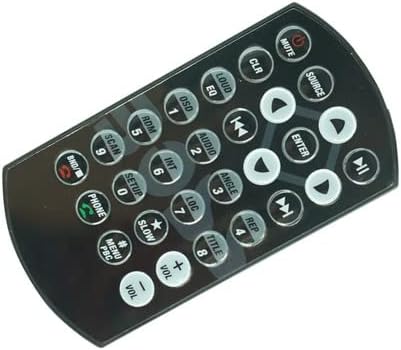
Figure 3.1: Front view of the primary compatible remote control. This image displays the main button layout, including power, volume, source selection, track navigation, numeric keypad, and menu controls.

Figure 3.2: Angled view of the primary compatible remote control. This perspective provides a clearer look at the button arrangement and the overall shape of the remote.
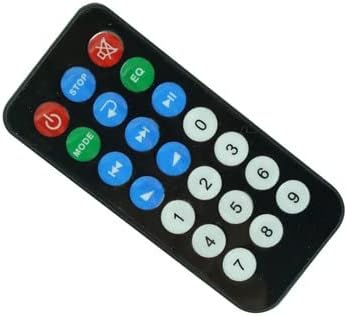
Figure 3.3: Front view of an alternative compatible remote control layout. This remote may be compatible with certain Nakamichi models and features a more simplified button arrangement, including basic power, mode, playback, and numeric functions.
Key Controls (Refer to Figure 3.1 for layout):
- POWER/MUTE: Turns the unit on/off or mutes/unmutes audio.
- VOL +/-: Adjusts the volume level.
- SOURCE: Cycles through available audio sources (e.g., Radio, CD, USB, Bluetooth).
- Navigation Buttons (Up/Down/Left/Right/ENTER): Used for menu navigation and selection.
- Track Skip (<< / >>): Skips to the previous or next track/station.
- Numeric Keypad (0-9): For direct input or preset selection.
- EQ/LOUD: Adjusts equalizer settings or activates loudness feature.
- PHONE: For call functions if supported by the head unit.
- Other buttons may vary in function depending on your specific Nakamichi car stereo model.
4. Setup
4.1 Battery Installation
The remote control requires one (1) CR2 battery (not included). Follow these steps to install the battery:
- Locate the battery compartment on the back of the remote control.
- Open the battery compartment cover by sliding or pressing the latch as indicated.
- Insert one CR2 battery, ensuring the positive (+) and negative (-) terminals align correctly with the markings inside the compartment.
- Close the battery compartment cover securely until it clicks into place.
Once the battery is installed, the remote control is ready for use. No additional programming or pairing is required.
5. Operating Instructions
To operate your Nakamichi car stereo system with this remote control, point the remote directly at the infrared receiver on your car stereo unit. Ensure there are no obstructions between the remote and the receiver.
5.1 Basic Functions
- Power On/Off: Press the POWER button.
- Volume Adjustment: Press VOL + to increase volume, VOL - to decrease volume.
- Mute: Press the MUTE button to silence audio. Press again to unmute.
- Source Selection: Press the SOURCE button to cycle through input sources (e.g., Radio, CD, USB, Bluetooth Audio).
- Track/Station Navigation: Use the Track Skip (<< / >>) buttons to change tracks, radio stations, or chapters.
- Numeric Input: Use the 0-9 buttons for direct frequency input or preset selection, if supported by your stereo.
5.2 Advanced Functions
The functionality of other buttons (e.g., EQ, LOUD, OSD, MENU, PHONE, etc.) depends on the specific features of your Nakamichi car stereo receiver. Refer to your stereo's original user manual for detailed instructions on these functions.
Note: As a replacement remote, some advanced or specific functions present on your original remote may not be available or may operate differently with this remote. This is normal for universal or replacement remote controls.
6. Maintenance
- Cleaning: Wipe the remote control with a soft, dry cloth. For stubborn dirt, slightly dampen the cloth with water or a mild, non-abrasive cleaner. Do not use harsh chemicals or abrasive materials.
- Battery Replacement: Replace the battery when the remote's range decreases or it becomes unresponsive. Follow the battery installation steps in Section 4.1.
- Storage: Store the remote in a cool, dry place when not in use. Avoid placing heavy objects on it.
7. Troubleshooting
| Problem | Possible Cause | Solution |
|---|---|---|
| Remote control is not working. |
|
|
| Some buttons do not function or have incorrect functions. |
|
|
| Buttons are hard to push or unresponsive. |
|
|
8. Specifications
- Model Number: NA1650 (Compatible with various Nakamichi models)
- Connectivity: Infrared (IR)
- Power Source: 1 x CR2 Battery (not included)
- Max Number of Supported Devices: 1 (One Nakamichi Car Stereo Receiver System)
- Manufacturer: SZHKHXD
- Country of Origin: China
- Special Feature: Replacement item; may not work with all functions as original.
9. Warranty and Support
This product is a replacement remote control. Please note the following regarding support and returns:
- No Instructions Included: As stated by the manufacturer, this product does not come with a printed instruction manual or battery. This document serves as a comprehensive guide.
- Functionality: It is important to understand that a replacement remote may not replicate every function of your original equipment manufacturer (OEM) remote.
- Returns: For return inquiries, please refer to the retailer's return policy where the product was purchased. Typically, a 30-day return/replacement policy may apply.
- Manufacturer: SZHKHXD. For specific product inquiries beyond the scope of this manual, please contact the seller or manufacturer directly.