
sofirn SD09L
Sofirn SD09L Scuba Diving Flashlight User Manual
Model: SD09L | Brand: Sofirn
1. Introduction
Thank you for choosing the Sofirn SD09L Scuba Diving Flashlight. This manual provides detailed instructions for the safe and effective use, maintenance, and troubleshooting of your new diving light. Please read this manual thoroughly before operation and retain it for future reference.
The Sofirn SD09L is a high-performance LED underwater light designed for scuba diving, snorkeling, and other water-related activities. It features high lumens output, durable construction, and IPX8 waterproof rating, ensuring reliable performance in demanding environments.

Image: The Sofirn SD09L Scuba Diving Flashlight, showcasing its robust design and powerful LED head.

Image: A diver utilizing the Sofirn SD09L flashlight underwater, demonstrating its powerful beam and suitability for diving environments. The image highlights its ultra-bright 3400 lumen output, IPX8 waterproof rating, and 85-degree beam angle.
2. Package Contents
- Sofirn SD09L Scuba Diving Flashlight
- Rechargeable Lithium Polymer Batteries (2 included)
- Battery Charger
- Charging Cable
- Spare O-rings
- User Manual
3. Setup and Initial Use
Before first use, please follow these steps to prepare your Sofirn SD09L flashlight:
- Battery Installation:
Unscrew the tail cap of the flashlight. Remove any insulating paper or plastic film from the battery compartment. Insert the two included Lithium Polymer batteries according to the polarity markings (+/-). Ensure the positive end of the battery faces towards the head of the flashlight.
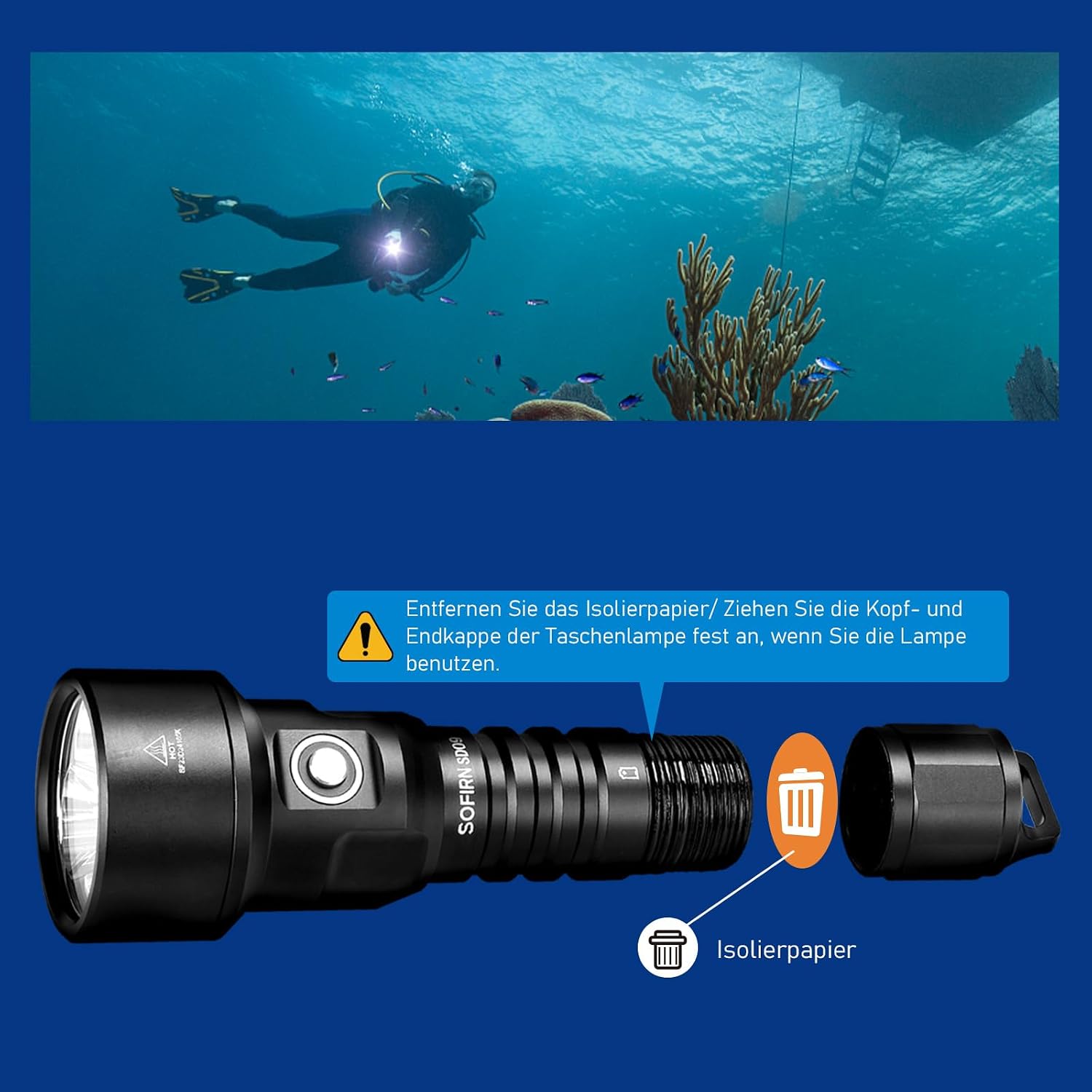
Image: Illustration showing the removal of insulating paper from the battery compartment and the proper tightening of the flashlight's head and tail caps. This ensures proper electrical contact and waterproof sealing.
After inserting the batteries, firmly screw the tail cap back on. Ensure it is tightened completely to maintain the IPX8 waterproof rating.
- Initial Charge:
Although batteries are included, it is recommended to fully charge them before first use. Connect the charging cable to the charger and then to a power source. Insert the batteries into the charger. The indicator on the charger will show the charging status. Once fully charged, remove the batteries.
- O-Ring Check:
Before each dive, inspect the O-rings for any dirt, debris, cuts, or cracks. Apply a thin layer of silicone grease to the O-rings to ensure a proper seal. This is crucial for maintaining the flashlight's waterproof integrity.
4. Operating Instructions
The Sofirn SD09L features a simple and intuitive operation via its side switch.
4.1 Power On/Off
- To Turn On: Press and hold the side switch for approximately 0.5 seconds.
- To Turn Off: Press and hold the side switch for approximately 0.5 seconds.
4.2 Mode Switching
When the flashlight is on, single-click the side switch to cycle through the brightness modes: Low → Medium → High. Double-click the switch to activate Strobe mode.

Image: Table illustrating the four lighting modes (Low, Medium, High, Strobe) with their respective lumen outputs and approximate runtimes. Low mode provides 500 lumens for 9 hours, Medium 1200 lumens for 4.75 hours, High 3400 lumens for 2.25 hours, and Strobe 3400 lumens.
4.3 Power Indicator
The side switch has a built-in power indicator that displays the battery status:
- Green (Stable): 75% - 100% battery remaining.
- Green (Blinking): 50% - 75% battery remaining.
- Red (Stable): 25% - 50% battery remaining.
- Red (Blinking): Less than 25% battery remaining. Please recharge the batteries.

Image: Visual representation of the power indicator light on the side switch, showing different colors and blinking patterns corresponding to battery charge levels (Green stable for 75-100%, Green blinking for 50-75%, Red stable for 25-50%, Red blinking for less than 25%).
4.4 Lockout Mode
The SD09L features a lockout mode to prevent accidental activation, which is particularly useful during transport or storage. If the flashlight is turned off for more than 1 minute, it automatically enters lockout mode.
- To Activate Lockout: The flashlight automatically enters lockout mode after 1 minute of being off.
- To Deactivate Lockout: Double-click the side switch to exit lockout mode and turn the flashlight on.

Image: Diagram illustrating the benefits of lockout mode, including preventing accidental activation, contributing to longer runtime by preventing unintended power drain, and making the flashlight convenient to carry without accidental turn-ons.
5. Maintenance
Proper maintenance ensures the longevity and reliable performance of your Sofirn SD09L flashlight, especially in harsh underwater environments.
- Cleaning: After each dive, rinse the flashlight thoroughly with fresh water to remove salt, sand, and other debris. Wipe it dry with a soft cloth. Do not use harsh chemicals or abrasive materials.
- O-Ring Care: Regularly inspect the O-rings for any signs of wear, cracks, or damage. Keep them clean and lightly lubricated with silicone grease. Replace O-rings if they appear damaged or worn. The product includes spare O-rings for this purpose.

Image: Exploded view of the flashlight highlighting key components such as the hardened mineral glass lens, A6061-T6 aluminum alloy body, improved lanyard slot, and the waterproof O-ring, emphasizing its design for underwater use up to 100 meters.
- Battery Care: Store the batteries in a cool, dry place when not in use. If the flashlight will not be used for an extended period, remove the batteries to prevent potential leakage. Recharge batteries regularly to maintain their health.
- Storage: Store the flashlight in a dry, well-ventilated area away from direct sunlight and extreme temperatures.
6. Troubleshooting
If you encounter issues with your Sofirn SD09L flashlight, please refer to the following common problems and solutions:
| Problem | Possible Cause | Solution |
|---|---|---|
| Flashlight does not turn on. |
|
|
| Light is dim or flickers. |
|
|
| Water ingress after diving. |
|
|
If the problem persists after trying these solutions, please contact Sofirn customer support for further assistance.
7. Specifications
| Feature | Detail |
|---|---|
| Model | SD09L (also known as 77-SD09) |
| Light Source | 3*SST40 LEDs |
| Maximum Brightness | 6800 Lumens |
| Beam Distance | Up to 542 Meters |
| Waterproof Rating | IPX8 (Underwater 100 Meters) |
| Material | A6061-T6 Grade Aluminum Alloy |
| Power Source | 2 x Lithium Polymer Batteries (included) |
| Voltage | 4.2 Volts |
| Dimensions | 9.91 x 3.05 x 3.05 cm |
| Weight | 203 g |
| Special Features | Durable, Rechargeable, Power Indicator, Lockout Mode, Enhanced Lanyard Slot |
8. Warranty and Support
Information regarding specific warranty terms and conditions for the Sofirn SD09L Scuba Diving Flashlight was not provided in the product data. Please refer to the product packaging or the official Sofirn website for the most up-to-date warranty information.
For technical support, troubleshooting assistance beyond this manual, or warranty claims, please contact Sofirn customer service through their official channels. Contact details are typically available on the product packaging or their official website.
Related documentsSD09L


Ask a question about this manual
Ask about setup, troubleshooting, compatibility, parts, safety, or missing instructions. Manuals+ will review the question and use this page’s manual context to help answer it.