
Vanclearidea CL-75200 Belt-2Pack
Instruction Manual for Vanclearidea Replacement Vacuum Belts
Models: Hoover UH75200, UH75210, UH75100, UH75110, UH75160
1. Introduction
This manual provides essential information for the installation, maintenance, and troubleshooting of Vanclearidea replacement vacuum belts. These belts are designed to restore optimal performance to your compatible Hoover High Performance Swivel XL Pet Upright Vacuum Cleaner.
2. Compatibility
These replacement vacuum belts are compatible with the following Hoover High Performance Swivel XL Pet Upright Vacuum Cleaner models:
- Hoover UH75200
- Hoover UH75210
- Hoover UH75100
- Hoover UH75110
- Hoover UH75160

Figure 2.1: Visual representation of compatible Hoover vacuum cleaner models.
3. Product Features
The Vanclearidea replacement vacuum belts offer the following features:
- Premium Quality: Manufactured from durable, high-quality rubber for extended lifespan.
- Elastic and Stretchable: Designed for flexibility and resistance to wear.
- Standard Size: Matches original belt dimensions for convenient replacement.
- Two-Pack Included: Provides a spare belt for future replacement.

Figure 3.1: Illustration of the belt's material and key attributes.
4. Safety Information
Before attempting any installation or maintenance, please observe the following safety precautions:
- Disconnect Power: Always unplug the vacuum cleaner from the electrical outlet before performing any service or maintenance.
- Allow Cooling: If the vacuum has been recently used, allow it to cool down before handling internal components.
- Wear Gloves (Optional): For sensitive skin or to improve grip, consider wearing work gloves.
- Keep Away from Children: Ensure children are not present during maintenance to prevent accidental injury.
5. Installation (Belt Replacement)
Follow these steps to replace the vacuum belt in your Hoover High Performance Swivel XL Pet Upright Vacuum Cleaner:

Figure 5.1: Vanclearidea replacement belts and a compatible Hoover vacuum.
- Prepare the Vacuum: Lay the vacuum cleaner flat on a clean, stable surface with the brush roll facing upwards.
- Access the Brush Roll: Depending on your specific Hoover model, you may need to remove a cover plate or screws to access the brush roll and existing belt. Refer to your vacuum cleaner's original manual for precise instructions on accessing this area.
- Remove the Old Belt: Carefully remove the worn or broken belt from the motor pulley and the brush roll. Dispose of the old belt responsibly.
- Clean the Area: While the brush roll is accessible, clean any accumulated hair, debris, or dust from the brush roll, belt path, and motor pulley area. This helps ensure optimal performance of the new belt.
- Install the New Belt:
- First, loop one end of the new Vanclearidea belt around the motor pulley.
- Next, stretch the belt and loop the other end around the brush roll.
- Ensure the belt is centered and properly seated on both the motor pulley and the brush roll.
- Reassemble: Reattach any covers or plates that were removed in step 2, securing them firmly.
- Test Operation: Plug in the vacuum cleaner and briefly turn it on to ensure the brush roll spins correctly and the new belt is functioning properly.
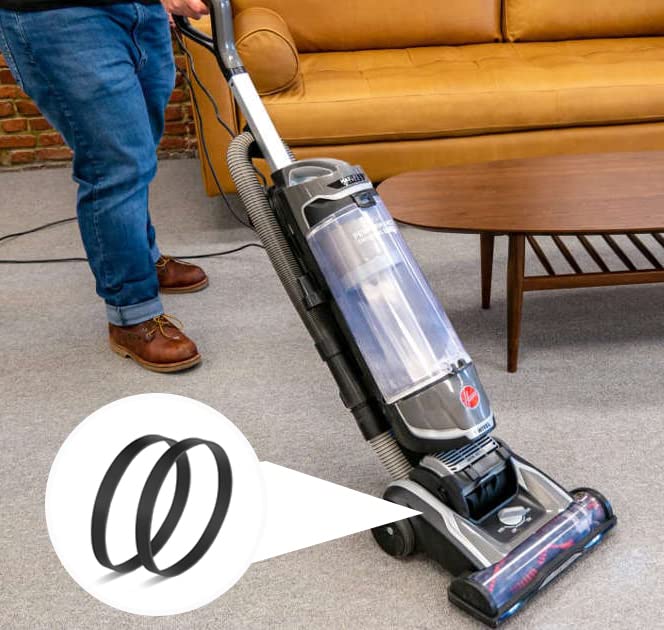
Figure 5.2: Ensure the brush roll operates smoothly after belt installation.
6. Maintenance
Regular maintenance of your vacuum belt ensures consistent cleaning performance and extends the life of your vacuum cleaner.
- Inspect Regularly: Periodically check the belt for signs of wear, cracking, stretching, or damage.
- Replace When Worn: Change your vacuum belt promptly if it appears worn or stretched. A worn belt can lead to reduced brush roll performance and inefficient cleaning.
- Clean Brush Roll: Regularly remove hair, strings, and debris from the brush roll to prevent strain on the belt and motor.
- Avoid Overloading: Do not force the vacuum over thick carpets or large debris that could jam the brush roll, as this can cause the belt to break prematurely.
7. Troubleshooting
If you encounter issues after replacing your vacuum belt, consider the following:
| Problem | Possible Cause | Solution |
|---|---|---|
| Brush roll not spinning | Belt is broken or dislodged. | Inspect and replace the belt if broken. Re-seat the belt if dislodged. |
| Reduced cleaning performance | Belt is stretched or worn. | Replace the belt with a new one. |
| Burning smell | Belt is slipping or brush roll is jammed. | Immediately unplug the vacuum. Check for brush roll obstructions. Replace the belt if it appears damaged or stretched. |
| New belt breaks quickly | Brush roll obstruction or incorrect installation. | Ensure brush roll is free of debris. Verify belt is correctly installed and not twisted. |
8. Specifications
Key specifications for the Vanclearidea replacement vacuum belts:
- Brand: Vanclearidea
- Model Number: CL-75200 Belt-2Pack
- Material: Rubber
- Belt Style: Flat Belt
- Compatible Devices: Hoover High Performance Swivel XL Pet Upright Vacuum Cleaner (UH75200, UH75210, UH75100, UH75110, UH75160)
- Package Contents: 2 x Replacement Vacuum Belts

Figure 8.1: Approximate dimensions of the replacement vacuum belt.
9. Warranty and Support
For information regarding returns or product support, please refer to the retailer's return policy or contact the manufacturer directly.
- Return Policy: This product typically falls under a 30-day return policy for refunds or replacements, as per standard retail terms. Please check with your point of purchase for specific details.
- Manufacturer: Vanclearidea
- Contact Support: For further assistance or inquiries, please visit the Vanclearidea brand page on the retailer's website or use the contact information provided with your purchase.
Ask a question about this manual
Ask about setup, troubleshooting, compatibility, parts, safety, or missing instructions. Manuals+ will review the question and use this page’s manual context to help answer it.