
1. Introduction
This manual provides detailed instructions for the installation, operation, maintenance, and troubleshooting of the WHFZN Carburetor and Air Filter Kit. This kit is designed as a direct replacement for the carburetor and associated components in Westinghouse WPX3200 3200PSI 2.5GPM Pressure Washers. Please read this manual thoroughly before attempting any installation or maintenance to ensure proper function and safety.
2. Package Contents
The WHFZN Carburetor and Air Filter Kit includes the following components:
- 1x Carburetor
- 1x Air Filter
- 1x Oil Filter
- 1x Spark Plug
- 3x Gaskets

Figure 2.1: All components included in the WHFZN Carburetor and Air Filter Kit. This image displays the carburetor, air filter, oil filter, spark plug, and three gaskets.
3. Safety Information
Always prioritize safety when working with power equipment. Disconnect the spark plug wire and ensure the engine is cool before performing any maintenance or installation. Wear appropriate personal protective equipment, including gloves and eye protection. Refer to your pressure washer's original manual for additional safety guidelines.
4. Setup and Installation
This kit is designed for straightforward installation, typically taking approximately 10 minutes. No debugging or complex adjustments are required prior to installation.
4.1 Carburetor Installation
- Preparation: Ensure the pressure washer engine is off and cool. Disconnect the spark plug wire. Drain any fuel from the fuel tank and carburetor bowl.
- Remove Old Carburetor: Carefully disconnect the fuel line, throttle linkage, and choke linkage from the old carburetor. Remove the mounting bolts that secure the carburetor to the engine. Note the position of any gaskets.
- Install New Carburetor: Place the new gaskets in their correct positions. Mount the new WHFZN carburetor onto the engine, ensuring a secure fit. Reconnect the throttle linkage, choke linkage, and fuel line.
- Install Air Filter: Replace the old air filter with the new one provided in the kit. Ensure it is seated correctly in the air filter housing.
- Install Spark Plug: Remove the old spark plug and install the new spark plug, ensuring it is tightened to the manufacturer's specifications.
- Install Oil Filter: If applicable to your pressure washer model, replace the oil filter.
- Final Checks: Double-check all connections for tightness and ensure no fuel leaks are present. Reconnect the spark plug wire.

Figure 4.1: The WHFZN replacement carburetor, shown with the included gaskets, fuel line, and fuel filter. This image highlights the main carburetor body and its associated components for installation.

Figure 4.2: A close-up view of the carburetor's inlet, indicating a diameter of 19mm. This measurement is crucial for ensuring compatibility with the engine's intake manifold.
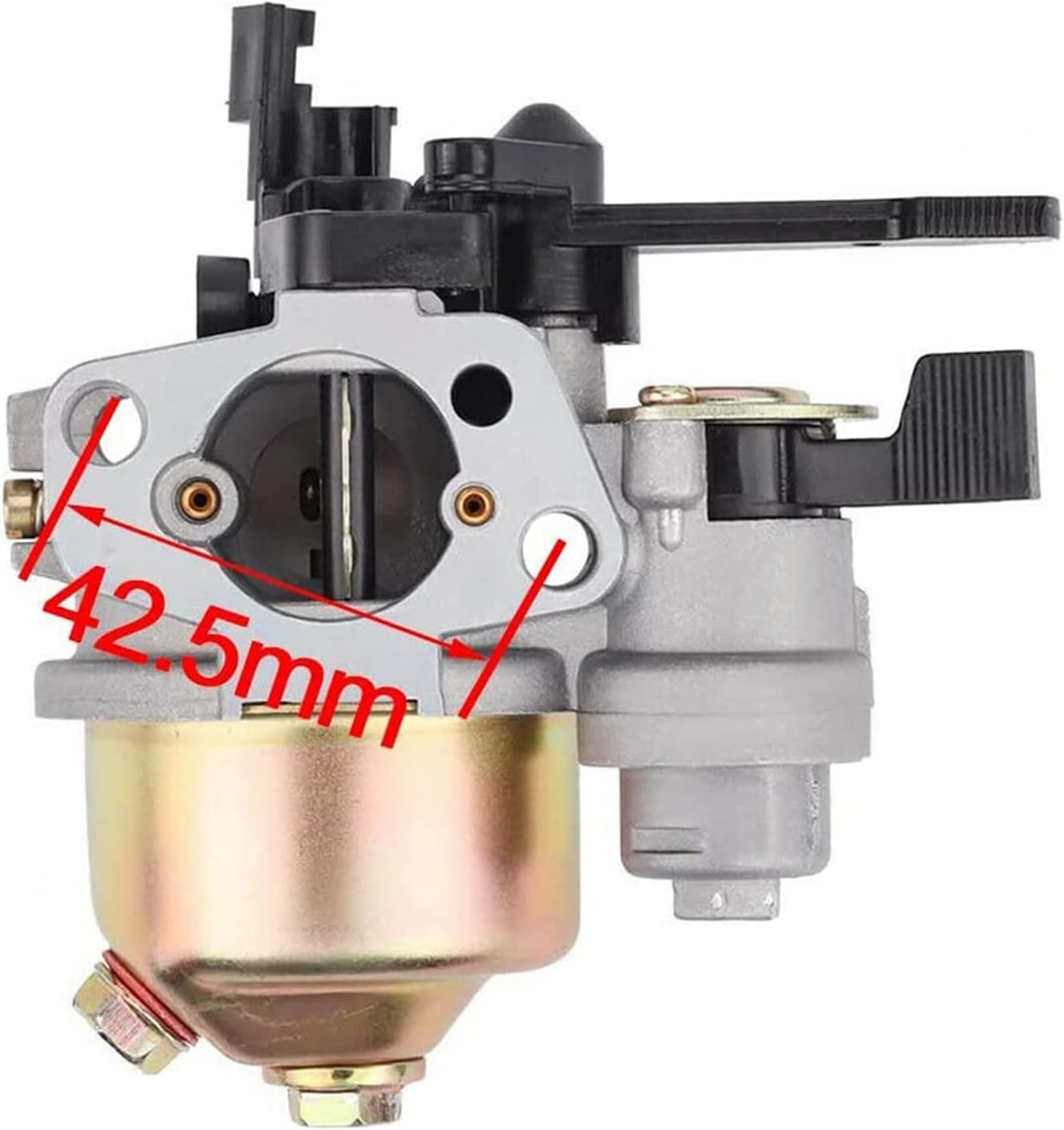
Figure 4.3: The distance between the carburetor's mounting holes is measured at 42.5mm. This dimension is important for proper alignment and secure attachment to the engine.

Figure 4.4: The replacement air filter included in the kit. This filter is essential for protecting the engine from dust and debris.
5. Operating Instructions
After successful installation of the carburetor and associated components, refill the fuel tank with fresh, appropriate fuel as specified by your pressure washer's manufacturer. Prime the fuel system if necessary, then follow the standard starting procedure for your Westinghouse WPX3200 pressure washer. The new carburetor should allow for smooth engine starting and operation without further adjustment.
6. Maintenance
Regular maintenance of your pressure washer's fuel and air systems is crucial for longevity and performance. The components in this kit are designed for durability, but periodic inspection is recommended.
- Air Filter: Inspect the air filter regularly (e.g., every 25 hours of operation or annually). Clean or replace it if it appears dirty or clogged to ensure proper airflow to the carburetor.
- Spark Plug: Check the spark plug annually or if starting issues occur. Replace if fouled or worn.
- Fuel System: Use fresh fuel and consider using a fuel stabilizer if the pressure washer will be stored for extended periods. Inspect fuel lines for cracks or leaks.
- Carburetor: While this replacement carburetor is pre-tuned, if performance issues arise after extended use, a professional service may be required for cleaning or adjustment.
7. Troubleshooting
If you encounter issues after installing the WHFZN Carburetor and Air Filter Kit, consider the following troubleshooting steps:
- Engine Starts, Then Shuts Off:
- Fuel Supply: Ensure there is sufficient fresh fuel in the tank and the fuel valve is open. Check the fuel line for kinks or blockages.
- Fuel Filter: Verify the fuel filter is clean and not obstructed.
- Air Filter: A clogged air filter can restrict airflow. Ensure the new air filter is properly installed and clean.
- Gaskets: Incorrectly installed or damaged gaskets can cause air leaks, leading to poor engine performance. Recheck gasket placement.
- Spark Plug: A faulty or improperly gapped spark plug can cause intermittent engine operation. Ensure the new spark plug is correctly installed.
- Engine Does Not Start:
- Confirm spark plug wire is connected.
- Check for spark at the spark plug.
- Ensure fuel is reaching the carburetor.
- Rough Idling or Poor Performance:
- Verify all linkages (throttle, choke) are correctly connected and moving freely.
- Ensure the air filter is clean.
If problems persist after performing these checks, it is recommended to consult a qualified service technician.
8. Specifications
Key specifications for the WHFZN Carburetor and Air Filter Kit:
| Feature | Specification |
|---|---|
| Model Compatibility | Westinghouse WPX3200 3200PSI 2.5GPM Pressure Washer |
| Carburetor Inlet Diameter | 19mm |
| Carburetor Mounting Hole Distance | 42.5mm |
| Item Weight | Approximately 15.5 ounces (total kit) |
| Product Dimensions (Carburetor) | Approximately 5.9 x 5.1 x 4.3 inches |
| Manufacturer Part Number | WPX3200 |
| Item Model Number | CB9851 |
9. Warranty Information
Specific warranty details for the WHFZN Carburetor and Air Filter Kit are not provided in this manual. For information regarding warranty coverage, terms, and conditions, please refer to the product packaging or contact the seller directly. Keep your proof of purchase for any warranty claims.
10. Customer Support
For technical assistance, installation questions, or any concerns regarding your WHFZN Carburetor and Air Filter Kit, please contact the seller or manufacturer through the platform where the purchase was made. Provide your order details and a clear description of the issue to facilitate prompt support.