
1. Product Overview
The Misolant MI300-5 Tall Drafting Office Chair is ergonomically designed with an S-shaped structure to conform to the human body, providing comprehensive torso protection and preventing work-related discomfort. It features adjustable components and is constructed from high-quality nylon material with sturdy metal feet, ensuring reliability and safety for confident use.
This chair incorporates an ingenious design with a waterfall cushion style that fully supports the thighs. The high-quality, high-elasticity natural sponge offers a soft and comfortable sitting experience, even during extended periods. The backrest is made of a mild, breathable mesh to enhance air circulation, reduce heat buildup, and prevent skin irritation.

Figure 1: Misolant Tall Drafting Office Chair in an office environment.
2. Setup and Assembly
The Misolant MI300-5 chair is designed for easy installation, typically taking approximately 20 minutes to complete. A detailed manual is included with your purchase to guide you through the assembly process. Ensure all components are present before beginning assembly.
Assembly Video Guide
Video 1: This video demonstrates the assembly process and key features of the Misolant MI300 Drafting Chair.
Important Safety Note: Ensure proper assembly of the gas lift mechanism. Do not exceed the maximum weight recommendation of 250 pounds to ensure safe operation and longevity of the chair.

Figure 2: Illustration of the chair's robust components, including the industrial-grade gas lift, metal footrest, PU casters, and 5-star metal base.
3. Operating Instructions
The Misolant MI300-5 chair offers multiple adjustment features to customize your seating experience for optimal comfort and support.
Height Adjustment
To adjust the chair's height, locate the lever beneath the seat. While seated, pull the lever up to lower the chair. To raise the chair, stand up slightly and pull the lever up. Release the lever at your desired height.
Lumbar Support Adjustment
The lumbar support can be adjusted vertically by 2 inches to provide tailored support for your lower back. Gently push or pull the lumbar support mechanism on the backrest to find your most comfortable position, reducing strain on lumbar muscles.

Figure 3: Adjustable lumbar support for personalized back comfort.
Flip-up Armrests
The thick and soft armrests can be flipped up 90 degrees. This feature allows you to push the chair closer to your desk or save space when not in use. Simply lift the armrests to rotate them upwards.
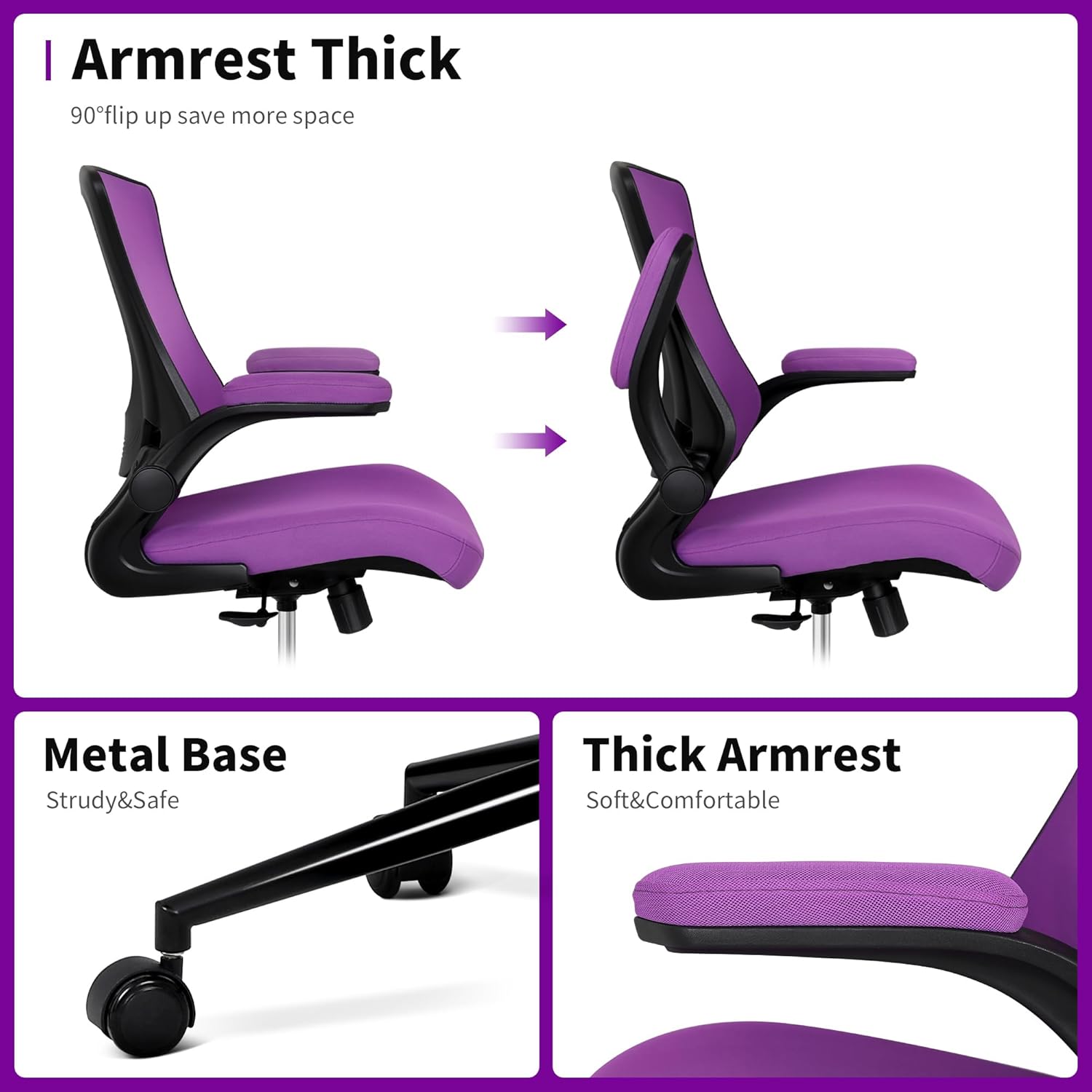
Figure 4: Flip-up armrests for space-saving and versatility.
Footrest Ring Adjustment
The footrest support ring can be adjusted up and down to accommodate your height and provide proper foot support, reducing thigh pressure and promoting blood circulation. Loosen the knob on the footrest ring, adjust to the desired height, and then tighten the knob securely.
Back Tilt Angle Adjustment
The chair features three back tilt angle adjustments: 90° for work, 105° for relaxation, and 115° for napping. Use the handle adjustment to select your preferred angle. Pull the handle out to experience different back angles, then push it inward to lock the back angle. The tilt tension adjustment knob can be loosened to make the rocking motion easier or tightened to restrict it.

Figure 5: Back tilt angle and tension adjustment controls.
Chair Adjustment Demonstration Video
Video 2: This video demonstrates the recline and height adjustment functions of the MI300 Standing Desk Chair.
4. Maintenance
To maintain the appearance and longevity of your Misolant MI300-5 chair, follow these simple care instructions:
- Cleaning: Wipe clean with a damp cloth. Avoid using harsh chemicals or abrasive cleaners, as these may damage the chair's materials.
- Inspection: Periodically check all screws and connections to ensure they are tight. Re-tighten if necessary.
- Casters: Keep the casters free of debris (hair, dust, etc.) to ensure smooth movement.
5. Troubleshooting
If you encounter any issues with your Misolant MI300-5 chair, please refer to the following common solutions:
- Chair not adjusting height: Ensure the gas lift lever is fully engaged or disengaged as required. If the issue persists, verify the gas lift mechanism was installed correctly during assembly.
- Chair feels unstable: Check all assembly screws and ensure they are securely tightened. Verify that the 5-star base is properly attached and the casters are fully inserted.
- Casters not rolling smoothly: Inspect casters for any trapped debris (hair, lint, etc.) and clean them thoroughly.
For issues not covered here, please contact Misolant customer service for assistance.
6. Specifications
| Feature | Detail |
|---|---|
| Brand | Misolant |
| Model Name | MI300-5 (Charles) |
| Color | Purple |
| Product Dimensions | 21.3"D x 25.2"W x 40"H |
| Chair Height (Adjustable) | 46.5 to 54.3 inches |
| Cushion Height (from floor) | 23.8 to 31.7 inches |
| Armrest Height (from floor) | 34.1 to 41.9 inches |
| Cushion Width | 20.9 inches |
| Material | Textile (Mesh back, Sponge fill) |
| Special Features | Adjustable Height, Adjustable Lumbar Support, Flip-up Armrests, Adjustable Footrest Ring |
| Weight Capacity | Up to 250 pounds (implied by gas lift safety) |
| Certifications | BIFMA tested, SGS certified (gas rod) |
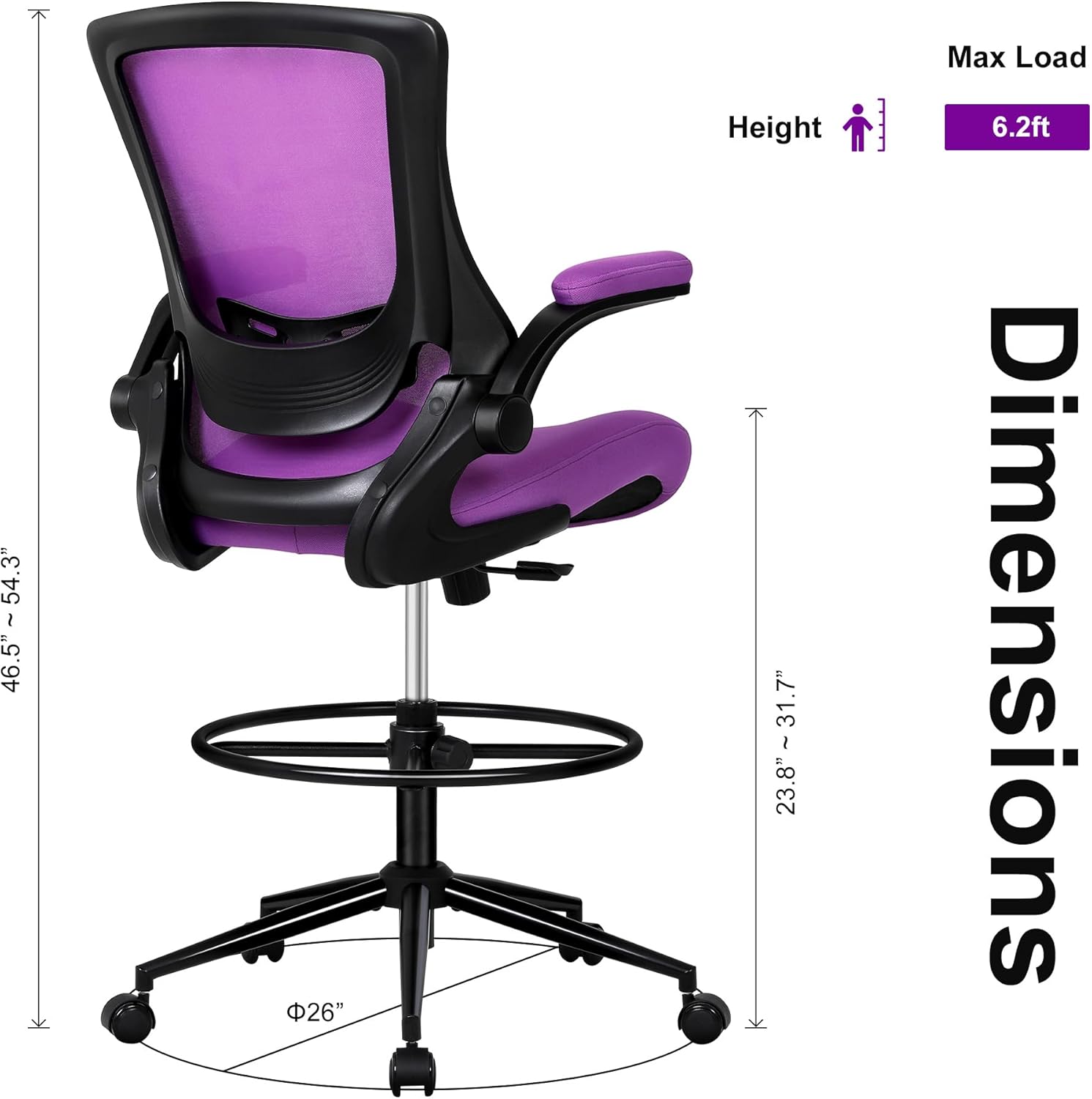
Figure 6: Detailed dimensions of the Misolant Tall Drafting Office Chair.
7. Warranty
The Misolant MI300-5 ergonomic drafting chair comes with a one-year quality guarantee from the date of purchase. This warranty covers manufacturing defects and material flaws under normal use.
8. Customer Support
Misolant is committed to providing excellent customer service. If you have any questions, require assistance with your chair, or need replacement accessories, please do not hesitate to contact our professional customer service team. We are dedicated to ensuring your satisfaction and will provide proactive solutions for any post-purchase concerns.
For support, please visit the Misolant Store on Amazon or refer to the contact information provided in your product packaging.