
Introduction
Thank you for choosing the ASVEGE 9-inch Android 10 Car Navigation Stereo Multimedia Player. This device is designed to enhance your driving experience with advanced navigation, multimedia, and connectivity features. This manual provides detailed instructions for installation, operation, maintenance, and troubleshooting to ensure optimal performance and longevity of your product. Please read this manual thoroughly before using the device.
Safety Information
- Always operate the device responsibly and in accordance with local traffic laws. Distracted driving can lead to accidents.
- Ensure all wiring is correctly connected to prevent short circuits or damage to the vehicle's electrical system.
- Do not attempt to disassemble or modify the unit. This may void the warranty and cause damage.
- Keep the screen clean and free from obstructions to maintain clear visibility.
- Avoid exposing the unit to extreme temperatures, direct sunlight for prolonged periods, or excessive moisture.
Package Contents
Verify that all components are present in the package before proceeding with installation.
- ASVEGE 9-inch Car Multimedia Player Unit
- Main Power Wiring Harnesses
- GPS Antenna
- USB Cables (x2)
- External Microphone
- RCA Input/Output Cables (for audio/video, backup camera)
- 4G Antenna
- Mounting Bracket/Frame (integrated with the unit)

This image provides an overview of all items included in the product package, such as the main unit, various wiring harnesses, GPS antenna, USB cables, and other accessories required for installation.
Setup and Installation
This multimedia player is designed for a custom fit in BMW Mini R60 models from 2010 to 2016, offering a plug-and-play installation. While the installation is designed to be straightforward, professional installation is recommended if you are unfamiliar with car electronics.
Compatibility
- Vehicle Model: BMW Mini Cooper R60
- Model Years: 2010, 2011, 2012, 2013, 2014, 2015, 2016
Installation Steps (General)
- Preparation: Disconnect the vehicle's battery to prevent electrical shorts.
- Remove Original Unit: Carefully remove the existing car stereo and dashboard trim, following your vehicle's specific disassembly instructions.
- Connect Wiring: Connect the provided wiring harnesses to the vehicle's existing connectors. Ensure all connections are secure.
- Connect Peripherals: Attach the GPS antenna, 4G antenna, USB cables, external microphone, and any optional accessories like a backup camera to the corresponding ports on the multimedia player.
- Mount the Unit: Position the ASVEGE multimedia player into the dashboard opening. The unit is designed for panel mounting and should fit seamlessly.
- Test Functionality: Reconnect the vehicle's battery and power on the unit to test basic functions (power, display, audio).
- Reassemble: Once confirmed working, carefully reassemble the dashboard trim.

This image shows the original BMW Mini R60 dashboard layout (top) and the integrated ASVEGE 9-inch multimedia player (bottom), demonstrating the seamless fit and updated display.
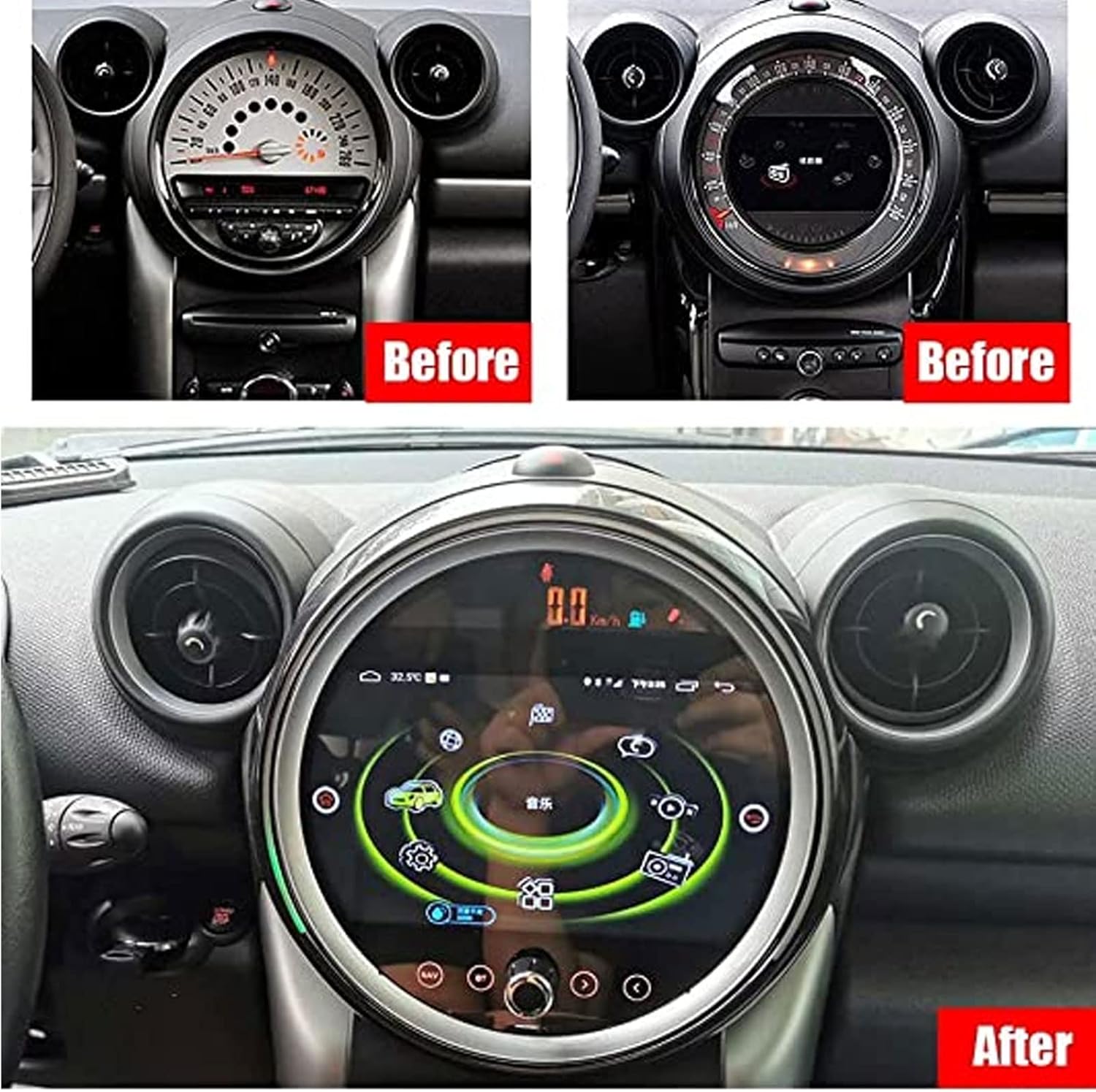
A clear view of the ASVEGE 9-inch multimedia player integrated into the dashboard of a BMW Mini Cooper, showcasing its large display and user interface.
Operating Instructions
The ASVEGE multimedia player runs on Android 10, providing a familiar and intuitive user interface.
Basic Operation
- Power On/Off: The unit typically powers on with the vehicle's ignition. A power button may also be present for manual control.
- Touchscreen: Navigate the interface using the capacitive multi-touch screen. Swipe, tap, and pinch gestures are supported.
- Volume Control: Adjust audio volume using the on-screen controls or your vehicle's steering wheel controls.
Android 10 OS
Access various applications and settings through the Android home screen. You can download additional apps from the Google Play Store (requires internet connection).

This image shows the ASVEGE multimedia player running the Android operating system, with several popular apps like Google Maps, YouTube, and social media icons visible on the home screen.
Wireless CarPlay & Android Auto
Connect your compatible smartphone wirelessly to access CarPlay or Android Auto. This allows for seamless integration of navigation, music, calls, and messages directly on the car's display.
- Ensure Bluetooth and Wi-Fi are enabled on your smartphone.
- Follow the on-screen prompts on the multimedia player to pair your device.

This image illustrates the wireless CarPlay and Android Auto functionality, showing a smartphone connected to the car stereo and displaying common app icons like Phone, Music, Maps, and Messages.
Navigation (GPS)
The unit comes with a pre-installed offline navigation application. Ensure the GPS antenna is properly connected and positioned for optimal signal reception. You can also use online navigation apps via CarPlay/Android Auto or by connecting to a 4G network.
Bluetooth 5.0
Pair your smartphone via Bluetooth for hands-free calling and audio streaming. Go to the Bluetooth settings on the unit to search for and connect to your device.
Radio (FM/AM)
Access the built-in FM/AM radio tuner. Scan for stations, save presets, and enjoy your favorite broadcasts.
Multimedia Playback
Play audio and video files from USB drives, SD cards, or internal storage. The unit supports a wide range of formats including MP3, WMA, APE, FLAC, AAC for audio, and MP4, AVI, WMV, RMVB, FLV, MKV, MOV, TS for video, including 4K ultra-clear video playback.
Digital Sound Processor (DSP)
Utilize the built-in 1GHz high-speed floating-point DSP for advanced audio customization. Adjust the 30-band equalizer, dynamic range compression (DRC), and high/low-pass filters to achieve your desired sound profile.

This image displays the DSP interface with controls for subwoofer output and a graphic equalizer, allowing users to customize their audio experience.

A screenshot of the DSP settings menu, specifically showing the bass range adjustment options for fine-tuning audio output.
4G Network Connectivity
The unit supports 4G GSM networks across all bands and formats globally. Insert a compatible SIM card (not included) to enable mobile data for online navigation, streaming, and app downloads.
Steering Wheel Control (SWC)
The player supports your vehicle's original steering wheel controls, allowing you to manage audio, calls, and other functions without taking your hands off the wheel.
Voice Command
Utilize voice commands for hands-free operation of various functions, enhancing safety and convenience.
Split Screen Function
Run two applications simultaneously on the screen, such as navigation and music playback, for enhanced multitasking.
Rear View Camera Support
The unit supports CVBS/AHD cameras and features built-in 3D 360 panorama audio integration for compatible camera systems, aiding in safer parking and reversing.
Maintenance
- Screen Cleaning: Use a soft, lint-free cloth to gently wipe the screen. For stubborn smudges, slightly dampen the cloth with water or a screen-safe cleaner. Avoid harsh chemicals.
- Software Updates: Periodically check for software updates to ensure optimal performance and access to new features. Updates can typically be performed via Wi-Fi or USB.
- General Care: Keep the unit free from dust and debris. Ensure proper ventilation around the unit to prevent overheating.
Troubleshooting
If you encounter issues, refer to the following common problems and solutions:
- No Power:
- Check all power connections and fuses.
- Ensure the vehicle's ignition is on.
- No Sound:
- Verify volume levels are not muted or set too low.
- Check speaker wiring connections.
- Ensure the correct audio source is selected.
- GPS Signal Loss:
- Ensure the GPS antenna is properly connected and has a clear view of the sky.
- Move the vehicle to an open area away from tall buildings or dense foliage.
- Bluetooth Connection Issues:
- Ensure Bluetooth is enabled on both the unit and your smartphone.
- Delete previous pairings and attempt to re-pair the devices.
- Restart both the unit and your smartphone.
- Touchscreen Unresponsive:
- Perform a soft reset of the unit (refer to the device's settings for a reset option).
- Ensure the screen is clean and free from debris.
Specifications
| Feature | Specification |
|---|---|
| Operating System | Android 10 |
| RAM + ROM | 4GB RAM + 64GB ROM |
| CPU | AUTOCHIPS AC8259E 8 Core (A53*8) 2.6GHZ IMG GE8300 |
| GPS / WIFI Module | MT6631N |
| Bluetooth Version | 5.0 |
| USB Support | 1.1/2.0/3.0, supports 64GB U-disk, 32GB SD card, 1TB hard disk expansion (2 USB 2.0 high-speed interfaces, 1 SD card slot) |
| Network Mode | 4G GSM (supports all bands/formats globally) |
| Touch Screen Type | 1920*720 IPS Blue ray anti-fingerprint, anti-scraping, full bonding process, capacitive multi-touch screen |
| DSP | Built-in 1GHZ high-speed floating-point DSP, DRC algorithm, 30-band EQ |
| Rear View Camera Support | CVBS/AHD camera, built-in 3D 360 panorama audio |
| Audio Formats | MP3, WMA, APE, FLAC, AAC (lossless quality playback) |
| Video Formats | MP4, AVI, WMV, RMVB, FLV, MKV, MOV, TS (supports 4K ultra-clear video) |
| System Languages | English, Español, Deutsche, Italiano, Français, and others |
| Operating Temperature | Standard 40 to 80 degrees Celsius |
| Display Size | 9 Inches |
| Mounting Type | Panel Mount |
Warranty and Support
Warranty Information
This product comes with a 1-year warranty from the date of purchase. The warranty covers manufacturing defects and malfunctions under normal use. It does not cover damage caused by improper installation, misuse, accidents, or unauthorized modifications.
Customer Support
For technical assistance, warranty claims, or any questions regarding your ASVEGE multimedia player, please contact the ASVEGE US Store where you purchased the product. Please have your purchase details and product model number (B0C6DCC3G8) ready when contacting support.
You can typically find contact information for the seller on your purchase receipt or order details page.