
MassaMAX MT339
MassaMAX 4D Massage Chair (MT339) Instruction Manual
Model: MT339 | Brand: MassaMAX
1. Important Safety Instructions
Please read all instructions carefully before using the MassaMAX 4D Massage Chair. Retain this manual for future reference.
- Consult a Physician: If you have any medical conditions, are pregnant, or have a pacemaker, consult your doctor before using this massage chair.
- Proper Power Connection: Ensure the chair is connected to a grounded power outlet with the correct voltage. Do not use extension cords or adapters.
- Keep Dry: Do not use the chair in wet or damp environments. Keep liquids away from the chair.
- Unplug When Not in Use: Always unplug the chair from the power outlet when not in use or before cleaning.
- Supervision: Close supervision is necessary when the chair is used by, on, or near children, invalids, or disabled persons. Keep children and pets away from the chair's moving parts.
- Weight Limit: The maximum weight recommendation for this chair is 250 pounds (113 kg).
- Age Restriction: This product is recommended for users aged 16 years and older.
- Avoid Overuse: Do not use the massage chair for excessively long periods. Refer to the "Time Adjustment" section for recommended durations.
- No Standing: Do not stand on or in the massage chair.
2. Product Overview
The MassaMAX 4D Massage Chair (MT339) offers a luxurious and therapeutic massage experience with advanced features designed for ultimate relaxation and well-being.
Key Features:
- Advanced 4D Massage: Cutting-edge technology delivers deep, therapeutic massages with adjustable depth, width, height, and speed.
- Automatic Extendable Footrest: Ensures optimal comfort and fit for various user heights.
- Deep Yoga Stretch Function: Enhances flexibility and promotes full-body relaxation.
- AI Voice Control: Conveniently control settings using intelligent voice commands.
- User-Friendly Touch Screen: Intuitive interface for easy navigation and control.
- Automatic Body Scan: Scans your body shape to customize the massage experience.
- Zero Gravity Design: Space capsule-inspired recline position to minimize pressure on the spine.
- Long SL Track: Provides comprehensive massage coverage from neck to glutes.
- Graphene Heating Therapy: Targeted heat therapy for the lower back to relieve discomfort.
- Foot Rollers: Invigorating foot massage for tired feet.
Product Dimensions:
- Dimensions (D x W x H): 69"D x 30"W x 35"H
- Item Weight: 192 pounds

Figure 2.1: MassaMAX 4D Massage Chair (MT339) in Magic Black.
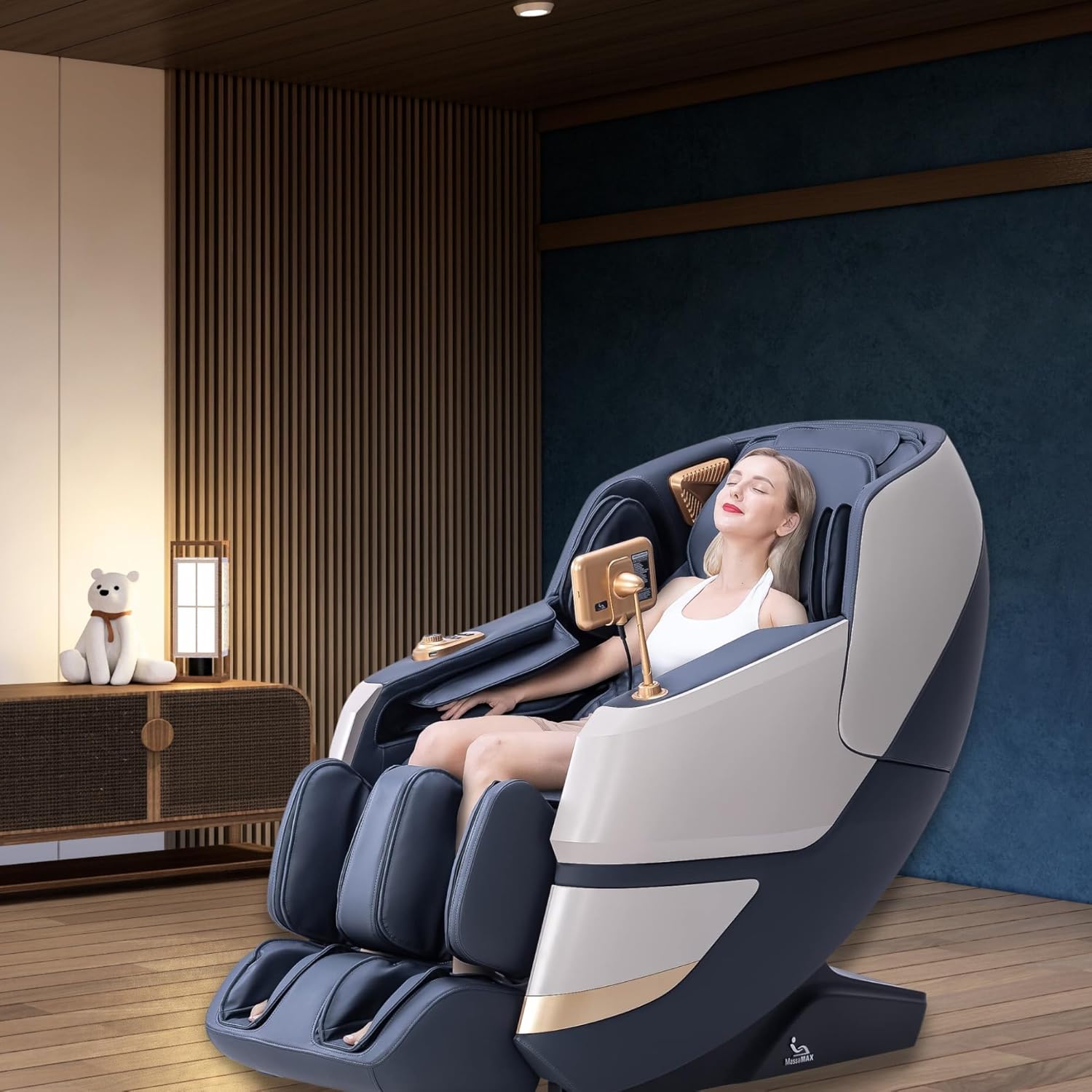
Figure 2.2: The MassaMAX 4D Massage Chair positioned in a modern living space.

Figure 2.3: Overhead view showcasing the full body coverage of the massage chair.

Figure 2.4: Illustration of the 53.15" Long SL Track and Zero Gravity position for comprehensive massage and reduced body pressure.

Figure 2.5: Detailed dimensions of the MassaMAX 4D Massage Chair.
Video 2.1: Overview of the MassaMAX MT339 4D Massage Chair features.
3. Setup Guide
Follow these steps to properly set up your MassaMAX 4D Massage Chair.
3.1 Footrest Assembly
The footrest requires assembly. Refer to the video below for detailed instructions.
- Connect Terminals and Air Hose: Carefully connect the electrical terminals and the air hose between the main chair body and the footrest unit.
- Open Buckles: Locate and open the buckles on the footrest assembly.
- Secure with Screws: Close the buckles and secure them firmly using the provided screws.
Video 3.1: Detailed instructions for assembling the footrest of the MT339 Massage Chair.
3.2 Initial Placement (Zero Space Feature)
The MassaMAX MT339 features a "Zero Space" design, allowing it to be placed close to a wall.
- Position the chair approximately 2 inches (5 cm) from the wall.
- When reclining, the chair will slide forward, requiring minimal space behind it.
4. Operating Instructions
This section details how to operate your MassaMAX 4D Massage Chair using its various functions.
4.1 Starting a Massage
- Power On: Press the power switch on the control panel to turn on the chair. The touch screen will display the MassaMAX logo.
- Select Automatic Mode: On the touch screen, choose from the available automatic massage modes (e.g., 4D Massage, Comfort, Good-night Sleep, Relax, Neck & Shoulder, Office Regimen, Full Body, Brain Refresh, Spine Care, Back & Waist, Health Recharge, Treatment, Keep Fit, Bottom Toning, Stretch).
- The chair will automatically adjust the backrest and footrest to preset angles for the selected mode.
Video 4.1: Quick tutorial on how to start a massage and navigate the main functions of the MT339.
4.2 Automatic Body Shape Detection
After the initial angle adjustment, the chair will perform a body shape detection to customize the massage rollers to your body contours. This process takes a moment. You can wait for it to complete or press the 'X' button on the screen to skip this step.
4.3 Shoulder Position Adjustment
After body shape detection, the chair will beep to indicate the detected shoulder position. If the detected position differs from your actual shoulder position, use the up or down arrows on the screen to manually adjust the massage roller's height to your shoulders.
4.4 Pause/Continue Massage
To temporarily stop or resume the massage, press the "Pause" button (play/pause icon) on the touch screen.
4.5 Massage Intensity Adjustment (4D)
Adjust the intensity of the 4D massage rollers using the '+' and '-' buttons next to the '4D' icon on the screen. There are 5 adjustable intensity levels.

Figure 4.1: Illustration of the advanced 4D massage mechanism.

Figure 4.2: The 4D Air Buffer Manipulator allows for adjustable depth, width, height, and speed of massage.
4.6 Manual Massage Techniques
In Manual Mode, you can select from six different massage techniques and adjust their speed and width:
- Kneading: Adjustable speed.
- Tapping: Adjustable speed and width.
- Simultaneous Kneading & Tapping: Adjustable speed and width.
- Shiatsu: Adjustable speed and width.
- 4D Massage: Adjustable speed, width of 4D-X and 4D-Y.
- Knocking: Adjustable speed and width.
4.7 Customize Back Massage Area
You can manually select specific massage areas on your back:
- Fixed Point: Massage at a specific fixed point.
- Local: Local round-trip massage in a small area.
- Upper Back: Round-trip massage on the upper back.
- Lower Back: Round-trip massage on the lower back.
- Full Back: Round-trip massage on the full back.
Use the 'Up Key' and 'Down Key' to adjust the back roller position within fixed point or local modes.
4.8 Airbag Massage
The upper and lower body airbag functions can be controlled separately. The airbag intensity can be adjusted in three levels using the '+' and '-' buttons for "Upper Air" and "Lower Air".
4.9 Foot Rollers Massage
The foot rollers massage intensity can also be adjusted in three levels using the '+' and '-' buttons for "Foot Roller".
4.10 Voice Control Function
Click the "Voice" icon on the touch screen to enable or disable the voice control function. Once enabled, you can use commands such as "Massage on", "Stretch massage", "Comfort Massage", "Relax massage", "Neck and shoulder massage", "Up the seat position", "Close the air pressure", "Back and waist massage", "Change the other mode", "Down the seat position", and "Open the air pressure".

Figure 4.3: Common voice commands for the AI Voice Control feature.
4.11 Heating Function
Click the "HEAT" button on the touch screen to turn the heating function on or off. The heating shawl provides warmth to the shoulder, back, waist, and abdomen areas.

Figure 4.4: Graphene heating therapy targets the lower back for pain relief and relaxation.
4.12 Program Customize and Recall Function
The "Customise" icon allows you to save and recall your preferred massage programs. Click the respective cloud icons to save your current settings or load a previously saved program.
4.13 Angle Adjustment (Zero Gravity, Footrest, Seat, Calf)
Click the "Angle" icon to access various position adjustments:
- Zero Gravity: Activates the zero gravity recline position (118° to 135°).
- Foot Adjust: Adjusts the footrest position.
- Seat Up/Down: Adjusts the overall seat height.
- Calf Up/Down: Adjusts the calfrest position.

Figure 4.5: The Deep Yoga Stretch function extends the body for enhanced flexibility.

Figure 4.6: Visual representation of the Deep Yoga Stretching feature.

Figure 4.7: The automatic calfrest extension provides customized leg support.

Figure 4.8: The footrest automatically extends up to 7.9 inches for optimal comfort.
4.14 Bluetooth Connectivity
Click the Bluetooth icon on the touch screen to enable or disable the Bluetooth function. Once enabled, you can connect your audio source device (e.g., smartphone) to the massage chair's audio system for music playback.
4.15 Time Adjustment
Click the time icon on the touch screen to adjust the massage duration. Each press increases the duration by 5 minutes. The total duration cannot exceed 30 minutes.
4.16 USB Charge Port
The chair is equipped with a USB charge port, allowing you to charge your mobile phone or other devices while enjoying your massage.
5. Maintenance
5.1 Cleaning Instructions
- Product Care: Wipe clean with a soft, damp cloth. Do not use abrasive cleaners or solvents.
- Ensure the chair is unplugged before cleaning.
5.2 Storage
- Store the chair in a cool, dry place away from direct sunlight and extreme temperatures.
- Cover the chair to protect it from dust if storing for extended periods.
6. Troubleshooting
If you encounter any issues with your MassaMAX 4D Massage Chair, please refer to the following general advice. For persistent problems, contact customer support.
- No Power: Check if the power cord is securely plugged into both the chair and a working electrical outlet. Ensure the power switch is in the "On" position.
- Massage Not Starting: Verify that an automatic program or manual setting has been selected on the touch screen. Ensure the chair is not in pause mode.
- Unusual Noises: Minor operational noises are normal. If you hear loud or unusual noises, stop the massage and contact customer support.
- Remote/Touch Screen Unresponsive: Try restarting the chair by turning it off and on again.
7. Specifications
| Attribute | Detail |
|---|---|
| Brand | MassaMAX |
| Model Name | SL-A339 (MT339) |
| Color | Magic Black |
| Product Dimensions (D x W x H) | 69"D x 30"W x 35"H |
| Item Weight | 192 pounds |
| Maximum Weight Recommendation | 250 Pounds |
| Age Range (Description) | 16+ |
| Fill Material | Foam |
| Special Features | Reclining, Arm Rest, Ergonomic, Heated, Cushion Availability, Automatic Extendable Footrest, Intelligent Voice Control |
| UPC | 850036071310 |
8. Warranty and Support
MassaMAX is committed to providing excellent customer service and support for your massage chair.
- Warranty: This product comes with a 3-year warranty.
- Service Points: MassaMAX has over 50 after-sales service points across the U.S. to ensure prompt assistance.
- Customer Support: 24/7 customer support is available for any product maintenance or repair needs.
Contact Information:
For support, you can:
- Scan the QR Code: Use your smartphone to scan the QR code below to access contact options.
- Ask a Question Online: Visit the MASSAGE CHAIR MAX seller page and click "Ask a question".
- Customer Service Phone: 866-909-6062

Figure 8.1: Scan this QR code for quick access to MassaMAX customer service options.
Related Documents - MT339
 |
MassaMAX MT336 Massage Chair Operation Instructions - User Manual Comprehensive operation instructions and user manual for the MassaMAX MT336 Massage Chair, covering safety, features, usage, and specifications. Learn how to operate your massage chair safely and effectively. |
 |
Manual del Usuario Silla de Masaje Deluxe MassaMAX MF600 Este manual de usuario de MassaMAX proporciona una guía esencial para el uso seguro y correcto de la Silla de Masaje Deluxe MF600. Detalla precauciones de seguridad, configuración, uso, mantenimiento y pasos de solución de problemas. Por favor, lea este manual detenidamente antes de usar el producto para una experiencia y seguridad óptimas. |
 |
MT398 Massage Chair Operation Instructions and User Guide Comprehensive operation instructions and user guide for the MT398 Massage Chair by MassaMAX, covering setup, usage, safety precautions, maintenance, and specifications. Learn how to operate your massage chair effectively. |