
1. Important Safety Instructions
Please read this manual carefully before operating the appliance and retain it for future reference. Failure to follow these instructions may result in electric shock, fire, or serious injury.
- Ensure the voltage indicated on the rating label matches your mains voltage.
- Do not immerse the appliance, cord, or plug in water or other liquids.
- Unplug from the outlet when not in use, before assembling or disassembling parts, and before cleaning.
- Keep the appliance out of reach of children.
- Do not operate any appliance with a damaged cord or plug, or after the appliance malfunctions or has been damaged in any manner.
- Place the appliance on a stable, flat surface.
- Do not block air inlets or outlets.
- Only fill the water tank with clean water. Do not exceed the MAX level or go below the MIN level.
- Avoid tilting or moving the unit when the water tank is full.
2. Product Overview
Familiarize yourself with the components of your Jocca Air Cooler.
2.1 Main Unit

Figure 1: Front view of the Jocca 4L Air Cooler, showing the main body, air outlet grille, and water level window.
- Control Panel: Located on the top of the unit.
- Air Outlet Grille: Front section where cooled air is expelled.
- Water Tank: Located at the bottom rear, accessible for filling.
- Water Level Indicator: Transparent window on the front to monitor water level.
- Casters: Wheels at the base for easy mobility.
- Rear Filter: Removable filter at the back for air intake.
2.2 Remote Control
The remote control allows convenient operation from a distance.
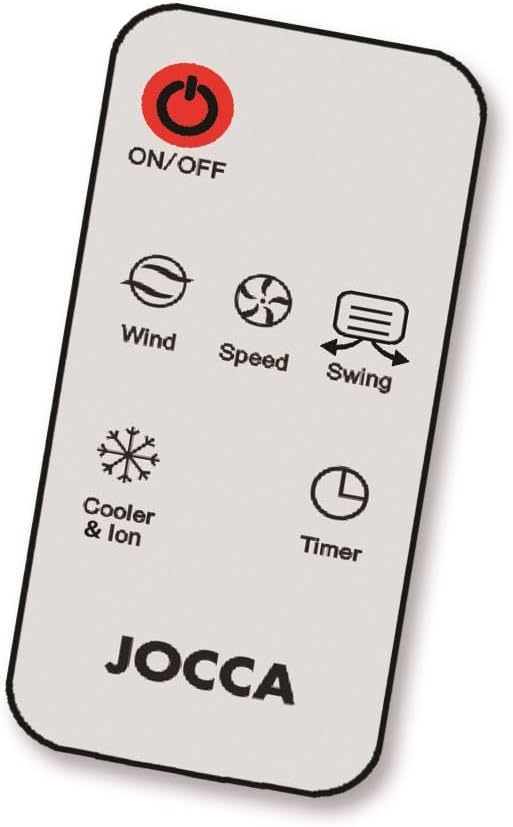
Figure 2: Remote control for the Jocca Air Cooler, detailing its function buttons.
- ON/OFF: Powers the unit on or off.
- Wind: Cycles through different wind modes (e.g., normal, natural, sleep).
- Speed: Adjusts fan speed (Low, Medium, High).
- Swing: Activates or deactivates the oscillation function for wider air distribution.
- Cooler & Ion: Engages the evaporative cooling and ionizer functions.
- Timer: Sets an operating time after which the unit will automatically turn off.
3. Setup
- Unpacking: Carefully remove the air cooler from its packaging. Retain packaging materials for future storage or transport.
- Placement: Place the unit on a firm, level surface. Ensure there is adequate space around the unit for proper airflow (at least 20 cm from walls or furniture).
- Fill Water Tank:
- Pull out the water tank from the rear of the unit.
- Fill the tank with clean, cool water. Do not exceed the "MAX" mark and ensure it is above the "MIN" mark. The capacity is approximately 4 liters.
- For enhanced cooling, place the provided ice packs (or frozen water bottles) into the water tank after filling.
- Carefully slide the water tank back into the unit until it is securely in place.
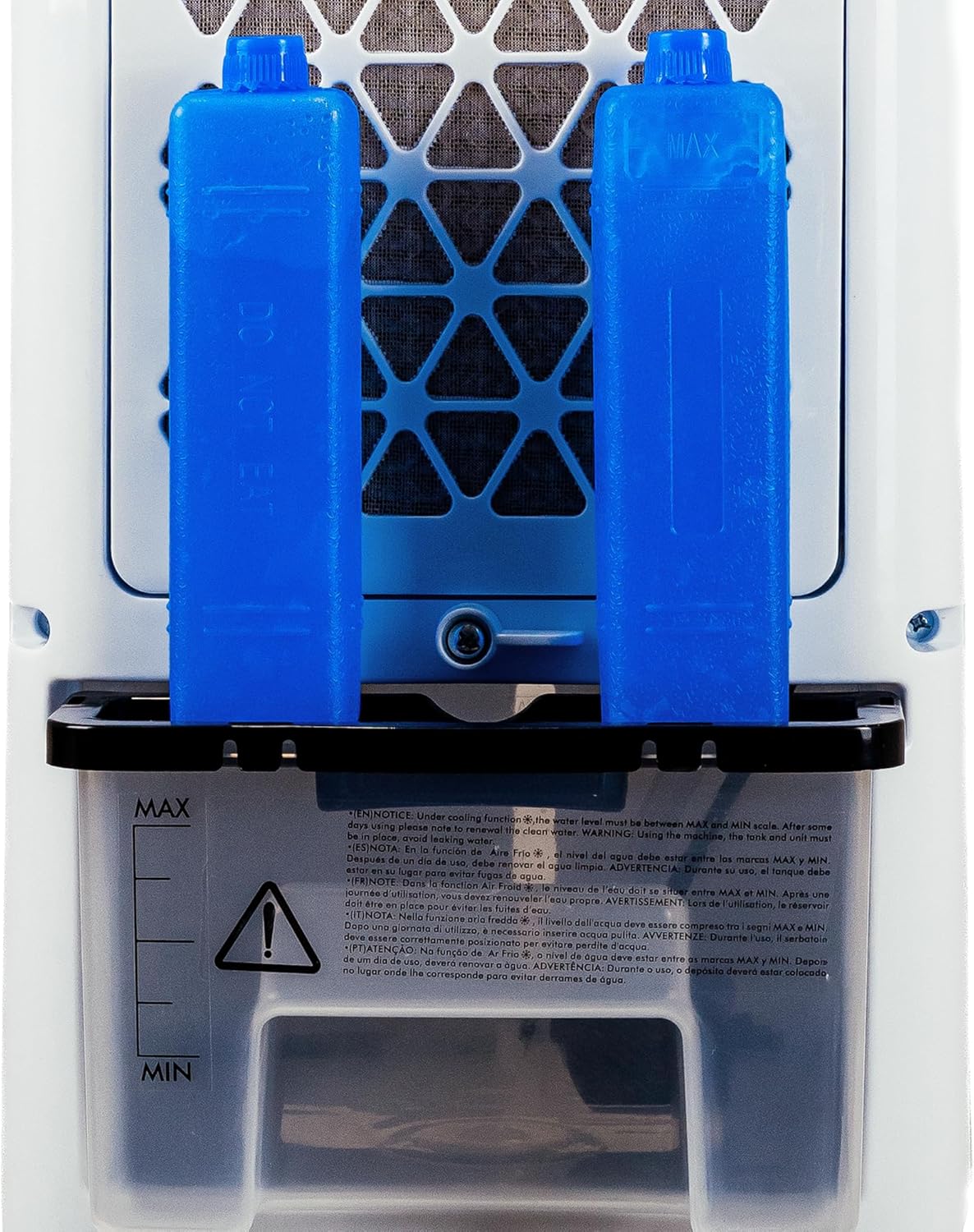
Figure 3: Water tank with MAX/MIN indicators and ice packs for improved cooling.
- Power Connection: Plug the power cord into a suitable electrical outlet.
4. Operating Instructions
Operate your air cooler using either the control panel on the unit or the remote control.
- Power On/Off: Press the ON/OFF button to turn the unit on or off.
- Adjust Fan Speed: Press the Speed button repeatedly to cycle through Low, Medium, and High fan speeds.
- Select Wind Mode: Press the Wind button to choose between Normal, Natural, or Sleep wind modes.
- Activate Swing Function: Press the Swing button to start or stop the automatic oscillation of the vertical louvers, distributing air more widely.
- Engage Cooler & Ion Function: Press the Cooler & Ion button to activate the evaporative cooling and air ionizer. Ensure the water tank is filled for cooling.
- Set Timer: Press the Timer button to set the desired operating time (e.g., 1 hour, 2 hours, up to a maximum). The unit will automatically shut off after the set time.
5. Maintenance
Regular maintenance ensures optimal performance and extends the lifespan of your air cooler.
- Before Cleaning: Always unplug the appliance from the power outlet before cleaning or performing any maintenance.
- Exterior Cleaning: Wipe the exterior surfaces with a soft, damp cloth. Do not use abrasive cleaners or solvents.
- Water Tank Cleaning:
- Empty the water tank regularly, especially if the unit will not be used for an extended period.
- Remove the water tank and clean it with mild soap and water. Rinse thoroughly.
- Allow the tank to air dry completely before reinserting it.
- Note: The design may require tilting the entire unit to fully drain the tank if a drain plug is not present.
- Air Filter Cleaning:
- The rear air filter should be cleaned periodically (e.g., every two weeks, depending on usage).
- Carefully remove the filter from the back of the unit.
- Wash the filter with clean water. For stubborn dirt, use a soft brush.
- Ensure the filter is completely dry before reinserting it into the unit.

Figure 4: Rear air filter, which should be cleaned regularly.
- Storage: If storing the unit for a long period, ensure it is clean and dry. Store it in a cool, dry place, preferably in its original packaging.
6. Troubleshooting
Before contacting customer support, please refer to the following common issues and solutions.
| Problem | Possible Cause | Solution |
|---|---|---|
| Unit does not turn on. | No power supply. | Check if the power cord is securely plugged into the outlet. Ensure the outlet is functional. |
| No cool air. | Water tank is empty or Cooler function is not activated. | Fill the water tank to the appropriate level. Press the "Cooler & Ion" button to activate cooling. Ensure ice packs are frozen if used. |
| Weak airflow. | Air filter is dirty or fan speed is too low. | Clean the air filter. Increase the fan speed using the "Speed" button. |
| Unusual noise during operation. | Unit is not on a level surface, or internal components are obstructed. | Ensure the unit is on a flat, stable surface. Check for any foreign objects inside the unit (after unplugging). If noise persists, contact support. |
If the problem persists after attempting these solutions, please contact Jocca customer support.
7. Specifications
Technical details for the Jocca 4L Air Cooler Model 1550.
| Model Number | 1550 |
| Brand | Jocca |
| Power | 80 Watts |
| Voltage/Frequency | 220-240V ~ 50-60 Hz |
| Dimensions (L x W x H) | 28 x 26 x 68.5 cm |
| Weight | 4.41 kg |
| Water Tank Capacity | Approx. 4 Liters |
| Noise Level | 65 Decibels |
| Material | Acrylonitrile Butadiene Styrene (ABS) |
| Number of Speeds | 3 |
| Special Features | Portable, Remote Control, Cooler & Ion Function, Timer, Swing Function |

Figure 5: Approximate dimensions of the Jocca Air Cooler.
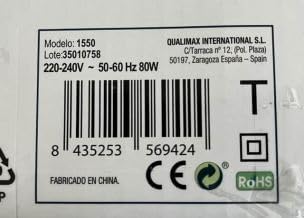
Figure 6: Product identification label with electrical specifications.
8. Warranty and Support
This Jocca Air Cooler Model 1550 comes with an official two-year warranty from the date of purchase. This warranty covers manufacturing defects under normal use.
For warranty claims, technical support, or spare parts inquiries, please contact your retailer or the official Jocca customer service. Please have your proof of purchase and the product model number (1550) ready when contacting support.
For more information, you may visit the Jocca official website.
