
MTYTOT MYT12.602&1.5M
MTYTOT 12.6V 2A AC/DC Adapter User Manual
Model: MYT12.602&1.5M
Product Overview
The MTYTOT 12.6V 2A AC/DC Adapter is a versatile power supply designed to convert alternating current (AC) from a wall outlet to direct current (DC) for various electronic devices. It features a universal input voltage range of 100-240V AC and provides a stable 12.6V DC output with a maximum current of 2A. This adapter is equipped with multiple safety protections to ensure reliable and secure operation.

Image: MTYTOT 12.6V 2A AC/DC Adapter with its power cord and DC plug.
Safety Information and Precautions
To ensure safe operation and prevent damage to the adapter or connected devices, please observe the following precautions:
- Verify Compatibility: Before connecting, always check the DC socket type, power consumption, and polarity of your device. The adapter's maximum output must not be exceeded by the device's power requirements. Incorrect connection or exceeding the adapter's capacity can cause damage.
- Polarity Check: The adapter features an inner positive (+) and outer negative (-) polarity. Ensure your device requires this specific polarity.
- Indoor Use Only: This product is not waterproof and is designed for indoor use only. Do not use it outdoors or in wet environments.
- Overload Protection: The adapter has built-in protection against overload, over voltage, over temperature, and short-circuits. If the LED indicator flashes red, immediately unplug the adapter and check for short-circuits or excessive power draw.
- Avoid Physical Damage: Do not drop, disassemble, or attempt to repair the adapter. Keep it away from heat sources and direct sunlight.
- Proper Ventilation: Ensure adequate ventilation around the adapter during use to prevent overheating.

Image: Diagram illustrating the multiple protection features of the adapter, including over charge, short circuit, over current, over voltage, temperature, and over load protection.
Setup
Follow these steps to set up your MTYTOT AC/DC Adapter:
- Identify Device Requirements: Confirm the voltage (12.6V), current (up to 2A), DC plug size (5.5mm x 2.1-2.5mm), and polarity (inner positive, outer negative) required by your electronic device. This adapter is designed for devices requiring 12.6V DC.
- Check DC Plug Compatibility: Ensure the DC plug of the adapter (5.5mm external diameter, 2.1-2.5mm internal diameter) fits securely into your device's power input port.
- Verify Polarity: The adapter's polarity is Center Positive (+), Outer Negative (-). Confirm your device also requires this polarity. Connecting with incorrect polarity can damage your device.
- Connect to Device: Insert the DC plug of the adapter firmly into the power input port of your device.
- Connect to Power Outlet: Plug the AC prongs of the adapter into a standard 100-240V AC 50/60Hz wall outlet.
- Observe Indicator: The LED indicator on the adapter will illuminate to show its status (see "Operating" section for details).

Image: Diagram showing the universal DC output tip dimensions (5.5mm x 2.1/2.5mm) and the correct polarity (inner positive, outer negative).

Image: Close-up diagram illustrating the positive and negative poles of the DC plug.
Operating
The MTYTOT AC/DC Adapter features an LED indicator to provide status feedback during operation:
- Green LED (No-load/Full Charge):
- When the adapter is plugged into a wall outlet but not connected to a device, or when the connected device's battery is fully charged, the LED indicator will be green.
- Red LED (Charging):
- When the adapter is connected to a device that is actively drawing power (e.g., charging a battery), the LED indicator will be red. This indicates the first phase of constant current charging.
- Red Flashing LED (Protection Mode):
- If the LED indicator flashes red, it signifies that the adapter has entered a protection mode (e.g., due to short-circuit, over-current, over-voltage, or over-temperature). Immediately unplug the adapter and troubleshoot the issue.
When charging a battery, the adapter will transition from constant current charging (red LED) to constant voltage charging as the battery approaches full capacity. The current will slowly decrease, and when the battery reaches approximately 90-95% charge, the LED will turn green, indicating near-full charge. The charger will continue to supply a small current until the battery is completely full.

Image: Illustration of the adapter plugged into an outlet, showing the LED indicator turning red during charging and green when fully charged.
Maintenance
Proper maintenance ensures the longevity and safe operation of your MTYTOT AC/DC Adapter:
- Cleaning: Disconnect the adapter from the power outlet and any devices before cleaning. Use a soft, dry cloth to wipe the exterior. Do not use liquid cleaners or abrasive materials.
- Storage: Store the adapter in a cool, dry place away from direct sunlight, moisture, and extreme temperatures. When storing, avoid tightly coiling the cord to prevent damage to the internal wires.
- Cable Care: Regularly inspect the power cord and DC plug for any signs of damage, such as fraying, cuts, or bent pins. Do not use the adapter if the cord or plug is damaged.
- Ventilation: Ensure the adapter is used in a well-ventilated area. Do not cover the adapter or place it in enclosed spaces that could restrict airflow during operation.
Troubleshooting
If you encounter issues with your MTYTOT AC/DC Adapter, refer to the following common problems and solutions:
| Problem | Possible Cause | Solution |
|---|---|---|
| Adapter LED is off. | No power from outlet, loose connection, or adapter malfunction. | Check if the wall outlet is functional. Ensure the adapter is firmly plugged into the outlet. Try a different outlet. |
| Adapter LED flashes red. | Overload, short-circuit, over-voltage, or over-temperature protection activated. | Immediately unplug the adapter. Check the connected device for short-circuits. Ensure the device's power consumption does not exceed the adapter's maximum output (12.6V 2A). Allow the adapter to cool down if it feels hot. |
| Device not charging/powering on. | Incorrect DC plug size, wrong polarity, insufficient power, or device issue. | Verify the DC plug size (5.5mm x 2.1-2.5mm) and polarity (inner positive, outer negative) match your device. Confirm your device requires 12.6V DC and draws less than 2A. Test the device with its original power supply if available. |
| Adapter feels excessively hot. | Overload, poor ventilation, or internal issue. | Unplug immediately. Ensure the device's power consumption is within limits. Provide adequate ventilation around the adapter. If the issue persists, discontinue use. |
Specifications
Detailed technical specifications for the MTYTOT 12.6V 2A AC/DC Adapter:
| Parameter | Value |
|---|---|
| Model Number | MYT12.602&1.5M |
| Input Voltage | 100-240V AC, 50/60 Hz |
| Output Voltage | 12.6V DC |
| Output Current | 2A (2000mA) Max |
| Output Wattage | 25W Max |
| DC Plug Size | 5.5mm x 2.1-2.5mm |
| Polarity | Inner Positive (+), Outer Negative (-) |
| Cord Length | Approximately 4.6 FT (1.4 meters) |
| Product Dimensions | 3.23 x 2.01 x 1.3 inches (8.2 x 5.1 x 3.3 cm) |
| Item Weight | 3.52 ounces (100 grams) |
| Color | Black |
| Special Features | Short Circuit Protection, Over Voltage Protection, Over Temperature Protection, Overload Protection, Over Current Protection |

Image: Table summarizing the product parameters including input, output voltage, current, wattage, DC connector, plug polarity, and cord length.
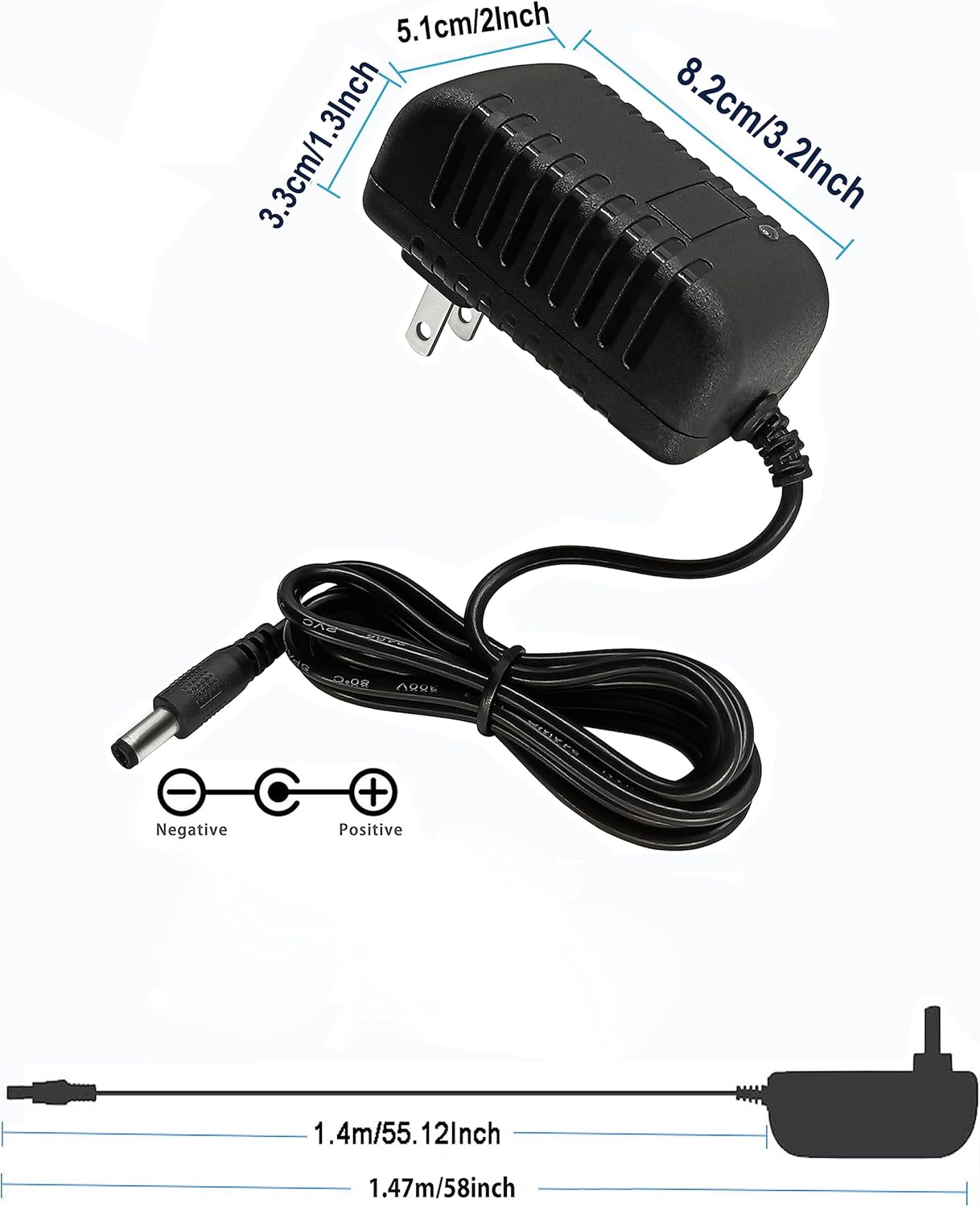
Image: Visual representation of the adapter's dimensions in inches and centimeters, and the total cord length.
Application Scope
This 12.6V 2A AC/DC adapter is suitable for a wide range of electronic devices that require a 12.6V DC power input with a 5.5mm x 2.1-2.5mm DC plug and matching polarity. Common applications include, but are not limited to:
- 12.6V Lithium Battery Chargers
- AC-DC Converters
- Cameras (e.g., security cameras)
- MP3 Players
- LED Strips
- LED Lamps
- Digital Products
- Fascial Guns
- Various small electronic devices requiring 12.6V DC power.

Image: Visual examples of devices compatible with the adapter, including a fascial gun, battery, digital product, LED strip, camera, and LED lamp.
Warranty and Support
This MTYTOT product is backed by a manufacturer's warranty. For specific warranty terms and conditions, please refer to the product packaging or contact the seller directly. If you experience any issues or have questions regarding the use, maintenance, or troubleshooting of your 12.6V 2A AC/DC Adapter, please reach out to the manufacturer or the retailer from whom you purchased the product for assistance.
When contacting support, please have your product model number (MYT12.602&1.5M) and purchase information readily available.
Ask a question about this manual
Ask about setup, troubleshooting, compatibility, parts, safety, or missing instructions. Manuals+ will review the question and use this page’s manual context to help answer it.