
ANTELA LCW511
ANTELA Smart WiFi LED Ceiling Light Instruction Manual
Model: LCW511
1. Introduction
Thank you for choosing the ANTELA Smart WiFi LED Ceiling Light. This manual provides essential information for the safe installation, operation, and maintenance of your new smart lighting product. Please read this manual thoroughly before installation and keep it for future reference.

Image 1.1: The ANTELA Smart WiFi LED Ceiling Light showcasing its vibrant color capabilities and compatibility with smart home assistants and mobile app control.
2. Safety Information
- Electrical Safety: Always disconnect power at the circuit breaker before installation, maintenance, or cleaning. Installation should be performed by a qualified electrician if you are unsure.
- Voltage: Ensure the supply voltage matches the product's requirements (230 Volts AC).
- Water Resistance: This product is IP65 rated, meaning it is protected against dust ingress and low-pressure water jets from any direction. It is suitable for damp locations like bathrooms, balconies, or patios, but not for submersion.
- Operating Environment: Do not install near heat sources or in extremely high humidity environments beyond its IP65 rating.
- Children: Keep packaging materials and small parts away from children.

Image 2.1: Illustration of the IP65 waterproof rating, demonstrating suitability for outdoor or damp environments where the light may be exposed to water splashes.
3. Product Overview
The ANTELA Smart WiFi LED Ceiling Light (Model LCW511) is a versatile lighting solution designed for modern homes. It offers a wide range of features for personalized illumination and smart home integration.
Key Features:
- Power & Brightness: 20W, 2200 Lumens, providing ample light for various spaces.
- Color & Temperature: Full RGB spectrum with 16 million colors, plus tunable white light from 2700K (warm white) to 6500K (cool white).
- Dimmable: Adjust brightness from 1% to 100%.
- IP65 Waterproof: Suitable for use in damp locations, protected against dust and water jets.
- Smart Control: Compatible with Smart Life/Tuya app, Google Home, and Amazon Alexa for voice and remote control.
- Connectivity: Operates on 2.4GHz WiFi networks only.
- Long Lifespan: Rated for 15,000 hours of operation.
- High CRI: Color Rendering Index (CRI) of >80 for accurate color representation.

Image 3.1: Visual representation of the product's physical dimensions and core technical specifications.
4. Package Contents
Please check the package for the following items:
- 1 x ANTELA Smart WiFi LED Ceiling Light (Model LCW511)
- 1 x Instruction Manual
- Mounting Hardware (screws, wall anchors)
5. Installation and Setup
5.1 Physical Installation
- Power Off: Before starting, ensure the power supply to the installation area is turned off at the main circuit breaker.
- Mounting: Securely attach the mounting bracket to the ceiling using the provided screws and wall anchors. Ensure the bracket is firmly fixed.
- Wiring: Connect the live (L), neutral (N), and ground (GND) wires from your ceiling to the corresponding terminals on the light fixture. Ensure all connections are secure.
- Attach Light Fixture: Carefully attach the light fixture to the mounting bracket, ensuring it clicks or screws into place securely.
- Power On: Restore power at the circuit breaker. The light should turn on.

Image 5.1: General installation steps for mounting the ceiling light and connecting electrical wires.
5.2 Smart App Pairing (Smart Life/Tuya)
To control your light via smartphone, download the Smart Life or Tuya Smart app.
- Download App: Search for "Smart Life" or "Tuya Smart" in your mobile app store (iOS or Android) and install it.
- Register/Login: Open the app and register a new account or log in with an existing one.
- Reset Light: Turn the light ON-OFF-ON-OFF-ON (with 2-second intervals) until the light blinks rapidly, indicating it's in pairing mode.
- Add Device: In the app, tap the "+" icon (usually top right) to add a device. Select "Lighting" > "Ceiling Light (Wi-Fi)" or similar.
- Connect to WiFi: Confirm the light is blinking rapidly. Enter your 2.4GHz WiFi network name and password. (Note: 5GHz WiFi is not supported).
- Pairing: The app will begin searching for the device. Once found, you can rename the light and complete the setup.

Image 5.2: The Smart Life/Tuya app interface for controlling the light, demonstrating remote access and smart home integration.
5.3 Connecting to Google Home / Amazon Alexa
Once your light is paired with the Smart Life/Tuya app, you can link it to your voice assistant.
- Open Voice Assistant App: Open the Google Home or Amazon Alexa app.
- Add Device/Skill:
- For Alexa: Go to "Skills & Games," search for "Smart Life" or "Tuya Smart," and enable the skill.
- For Google Home: Go to "Set up device" > "Works with Google," search for "Smart Life" or "Tuya Smart."
- Link Account: You will be prompted to link your Smart Life/Tuya account. Enter your credentials.
- Discover Devices: Once linked, ask your voice assistant to "Discover devices" or manually initiate discovery in the app.
- Assign Rooms: Assign your ceiling light to a specific room for easier control.

Image 5.3: Demonstrates hands-free voice control functionality with Amazon Alexa and Google Home.
6. Operating Instructions
6.1 App Control (Smart Life/Tuya)
The Smart Life/Tuya app provides comprehensive control over your ceiling light:
- Color Selection: Choose from 16 million RGB colors using a color wheel.
- White Light Adjustment: Adjust color temperature from 2700K (warm) to 6500K (cool).
- Brightness Control: Dim or brighten the light from 1% to 100%.
- Scene Modes: Select pre-set scenes or create custom ones for different moods or activities.
- Music Sync: Synchronize the light's colors with music playing on your device.
- Timer & Schedule: Set timers for the light to turn on/off automatically at specific times.
- Group Control: Group multiple ANTELA smart lights together for simultaneous control.
- Device Sharing: Share control of the light with family members or friends through the app.

Image 6.1: The app interface for selecting RGB colors and adjusting white light temperature and brightness.


Image 6.2: Examples of advanced app functions: Music Sync and Timer/Schedule settings.


Image 6.3: Examples of advanced app functions: Shared Functions and Group Control.
6.2 Voice Control Commands
Once linked to Alexa or Google Home, use the following example commands:
- "Alexa/Hey Google, turn on [Light Name]."
- "Alexa/Hey Google, turn off [Light Name]."
- "Alexa/Hey Google, set [Light Name] to 50 percent."
- "Alexa/Hey Google, change [Light Name] to blue."
- "Alexa/Hey Google, set [Light Name] to warm white."
7. Maintenance
Regular maintenance ensures optimal performance and longevity of your ceiling light.
- Cleaning: Ensure power is off before cleaning. Wipe the light fixture with a soft, dry, or slightly damp cloth. Do not use abrasive cleaners or solvents.
- Inspection: Periodically check for any loose connections or damage to the fixture. If any damage is found, disconnect power and contact support.
- No User-Serviceable Parts: The LED components are integrated and not user-replaceable. Do not attempt to disassemble the fixture.

Image 7.1: The sealed design of the light helps prevent dust and insects from entering, simplifying maintenance.
8. Troubleshooting
If you encounter issues with your ANTELA Smart WiFi LED Ceiling Light, refer to the following common solutions:
| Problem | Possible Cause | Solution |
|---|---|---|
| Light does not turn on. | No power supply; Loose wiring; Faulty fixture. | Check circuit breaker; Verify wiring connections; Contact support if issue persists. |
| Cannot connect to WiFi. | Incorrect WiFi password; Not 2.4GHz network; Light not in pairing mode; Router too far. | Ensure correct 2.4GHz WiFi password; Reset light to pairing mode (ON-OFF-ON-OFF-ON); Move router closer or use a WiFi extender. |
| Voice control not working. | Smart Life/Tuya account not linked; Device not discovered; Incorrect commands. | Ensure Smart Life/Tuya skill/service is enabled and linked in Alexa/Google Home app; Ask assistant to "Discover devices"; Use correct device name and commands. |
| Light flickers or changes color unexpectedly. | Unstable power supply; WiFi interference; Software glitch. | Check power source stability; Reduce WiFi interference; Restart the light by turning off and on at the switch for 10 seconds. |
9. Specifications
Detailed technical specifications for the ANTELA Smart WiFi LED Ceiling Light (Model LCW511).
| Feature | Specification |
|---|---|
| Model Number | LCW511 |
| Brand | ANTELA |
| Dimensions (L x W x H) | 22 x 22 x 5 cm |
| Weight | 600 g |
| Power | 20 Watts |
| Luminous Flux | 2200 Lumens |
| Color Temperature | 2700K - 6500K (RGB+CCT) |
| Color Rendering Index (CRI) | ≥80 |
| Input Voltage | 230 Volts (AC) |
| Lifespan | 15,000 hours |
| IP Rating | IP65 (Dustproof, Water-jet proof) |
| Wireless Connectivity | 2.4GHz WiFi (IEEE 802.11 b/g/n) |
| Compatibility | Smart Life/Tuya App, Amazon Alexa, Google Home |
| Certifications | CE, RoHS |
| Energy Efficiency Class | E |
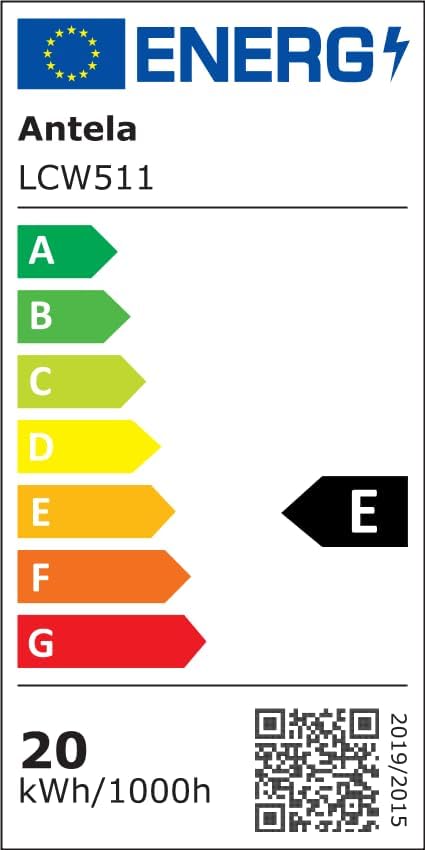
Image 9.1: EU Energy Label for Model LCW511. For more details, visit the EPREL database.
10. Warranty and Support
ANTELA products are designed and manufactured to the highest quality standards. This product is covered by a standard manufacturer's warranty against defects in materials and workmanship from the date of purchase.
For warranty claims, technical support, or further assistance, please contact ANTELA customer service through your purchase platform or visit the official ANTELA website. Please have your purchase receipt and product model number (LCW511) ready when contacting support.