
1. Introduction
The Heelay Electric Dehumidifier, model KW-CS02, is designed to effectively reduce humidity levels in your indoor environment, creating a more comfortable and healthier living space. This appliance also features an integrated air purification function with a HEPA filter and a colorful night light. Please read this manual thoroughly before operating the device to ensure safe and efficient use.
2. Safety Instructions
To prevent injury to the user or others and property damage, the following instructions must be followed. Incorrect operation due to ignoring instructions may cause harm or damage.
- Always ensure the dehumidifier is placed on a stable, level surface.
- Do not immerse the unit, power cord, or plug in water or other liquids.
- Keep the appliance away from heat sources, direct sunlight, and flammable materials.
- Do not block the air inlet or outlet. Ensure at least 20 cm clearance around the unit.
- Unplug the dehumidifier before cleaning, maintenance, or when not in use.
- Do not operate the unit with a damaged cord or plug. Contact customer support for repairs.
- This appliance is not intended for use by persons (including children) with reduced physical, sensory or mental capabilities, or lack of experience and knowledge, unless they have been given supervision or instruction concerning use of the appliance by a person responsible for their safety.
- Empty the water tank regularly to prevent overflow.
3. Package Contents
Please check the package contents upon unpacking:
- Heelay Electric Dehumidifier Unit (Model KW-CS02)
- Power Adapter
- HEPA Filters (x2)
- User Manual
4. Product Overview

Figure 4.1: Front view of the Heelay Electric Dehumidifier KW-CS02, showing the control panel, dehumidifier body, and transparent water tank.
4.1 Components
- Control Panel: Located on the top of the unit, with touch buttons for various functions.
- Air Inlet/Outlet: Grilles for air circulation.
- Water Tank: Transparent, removable tank at the bottom for collecting condensed water. Capacity: 3200 ml.
- HEPA Filter Slot: Located inside the unit for air purification.
- Power Port: For connecting the power adapter.
4.2 Control Panel Functions

Figure 4.2: Multi-function Control Panel.
- Night Light On/Off Button: Activates or deactivates the colorful LED night light.
- Power Switch / Auto-off Button: Turns the unit on or off.
- 1-7H Off Timer Button: Sets the automatic shutdown timer for 1 to 7 hours.
- Intelligent Defrost Protection: Automatically activates when temperatures drop below 15°C.
- Replace Filter Indicator: Illuminates when the HEPA filter needs replacement.
5. Setup
- Unpack: Carefully remove the dehumidifier and all accessories from the packaging.
- Placement: Place the unit on a firm, level surface in the desired location. Ensure there is at least 20 cm of free space around the air inlet and outlet for optimal performance. Avoid placing it near heat sources or in direct sunlight.
- Install HEPA Filter: Open the filter compartment (refer to Figure 4.3 for general location) and insert the HEPA filter(s) as indicated. Ensure it is securely in place.
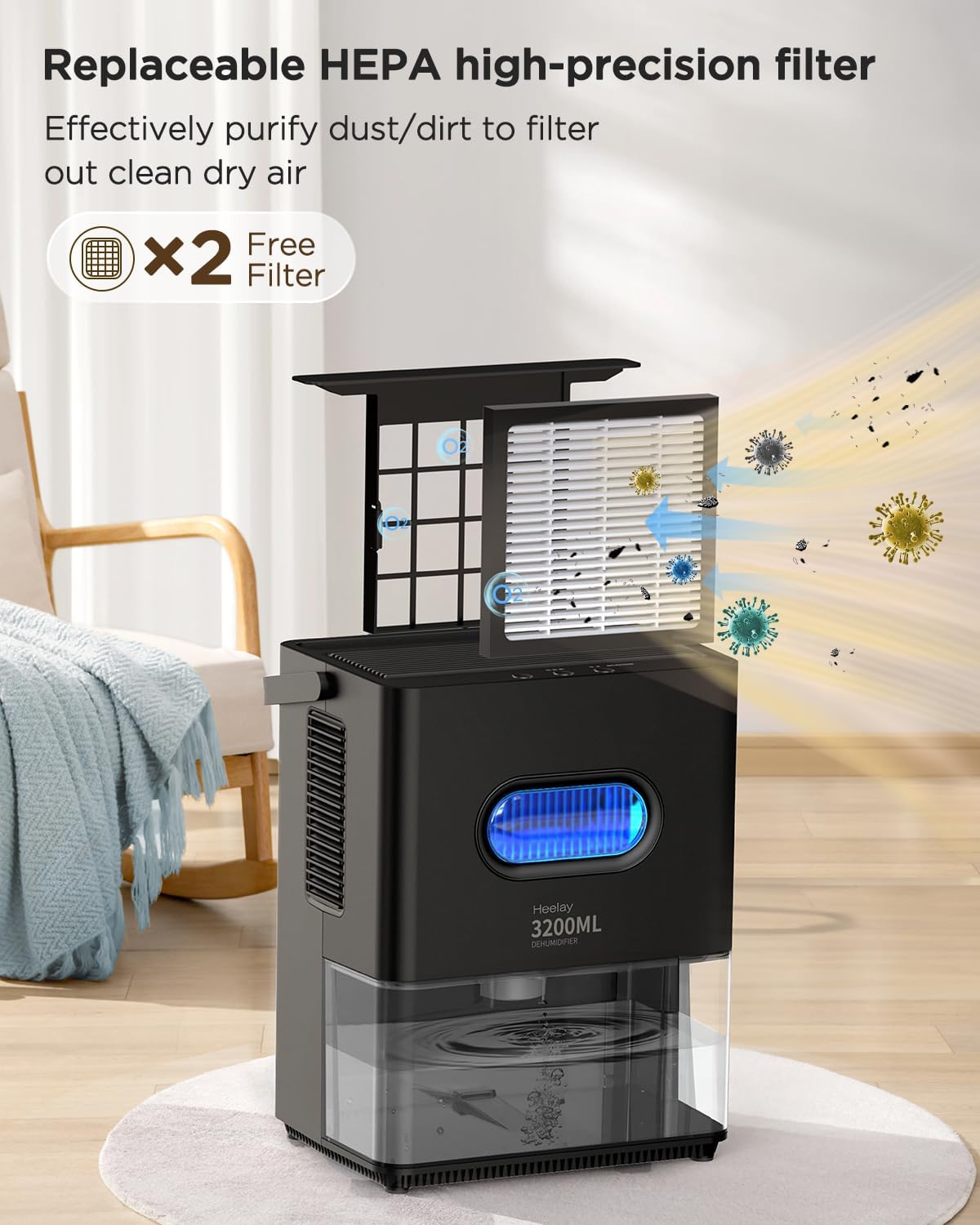
Figure 4.3: HEPA filter installation.
- Connect Power: Plug the power adapter into the dehumidifier's power port, then plug the adapter into a suitable electrical outlet.
6. Operating Instructions
6.1 Power On/Off
- Press the Power Switch button (refer to Figure 4.2) to turn the dehumidifier on. The unit will start operating in dehumidification mode.
- Press the Power Switch button again to turn the unit off.
6.2 Dehumidification Function
The dehumidifier uses a double semiconductor system for efficient moisture removal, capable of extracting up to 500 ml of water daily at 30°C and 85% RH, covering an area of approximately 30m² (322 sq.ft).

Figure 6.1: Double Semiconductor Dehumidification System.

Figure 6.2: Dehumidifier operating in a room.
6.3 Timer Function
- Press the 1-7H Off Timer button (refer to Figure 4.2) repeatedly to set the desired operating time (1 to 7 hours).
- The unit will automatically shut off once the set time has elapsed.

Figure 6.3: Timer and Night Light features.
6.4 Night Light
- Press the Night Light On/Off button (refer to Figure 4.2) to activate the colorful LED night light.
- Press again to turn off the night light.
6.5 Auto Shut-off and Full Water Tank Indicator
The dehumidifier is equipped with a 3200 ml water tank. When the tank is full, the unit will automatically shut off, and a red light will flash to indicate that the tank needs to be emptied.

Figure 6.4: Automatic shut-off with full water tank indicator.
6.6 Intelligent Defrost Protection
The unit features an intelligent defrost protection system that automatically activates when the ambient temperature drops below 15°C, ensuring continuous operation even in cooler conditions.
7. Maintenance
7.1 Emptying the Water Tank
- When the water tank is full, the dehumidifier will automatically stop operating, and the red indicator light will flash.
- Carefully pull out the water tank from the bottom of the unit.
- Pour out the collected water.
- Slide the empty water tank back into the unit until it clicks into place. The dehumidifier will resume operation.
7.2 Cleaning the Unit
- Always unplug the dehumidifier before cleaning.
- Wipe the exterior of the unit with a soft, damp cloth. Do not use abrasive cleaners or solvents.
- Clean the air inlet and outlet grilles with a soft brush or vacuum cleaner to remove dust.
7.3 Replacing the HEPA Filter
The dehumidifier includes a HEPA filter for air purification. The "Replace Filter" indicator on the control panel will illuminate when it's time to replace the filter.
- Unplug the dehumidifier.
- Locate the filter compartment (refer to Figure 4.3).
- Remove the old HEPA filter.
- Insert a new HEPA filter, ensuring it is correctly oriented and securely seated.
- Close the filter compartment.
- Plug in the dehumidifier and reset the filter indicator if necessary (refer to control panel instructions).
Note: Information regarding the purchase of replacement HEPA filters may be available from the manufacturer or retailer.
8. Troubleshooting
| Problem | Possible Cause | Solution |
|---|---|---|
| Dehumidifier does not turn on. | No power supply. Water tank is full or not correctly installed. | Check if the power adapter is securely plugged into the unit and the wall outlet. Empty the water tank and ensure it is properly seated. |
| No water collected / Low dehumidification efficiency. | Low room humidity. Air inlet/outlet blocked. Room temperature too low. HEPA filter is clogged. | Dehumidifier may not be needed. Ensure clear space around the unit. Unit operates best above 15°C (59°F). Clean or replace the HEPA filter. |
| Unit is noisy. | Unit not on a level surface. Obstruction in fan. | Place the unit on a flat, stable surface. Check for any foreign objects and remove them (unplug first). |
| Red light flashing, but water tank is not full. | Water tank sensor malfunction or obstruction. | Remove and re-insert the water tank. Ensure no debris is blocking the sensor. If problem persists, contact customer support. |
9. Specifications
| Brand: | Heelay |
| Model Number: | KW-CS02 (CS02DE-3200BL) |
| Color: | Black |
| Product Dimensions (L x W x H): | 30 x 23 x 34.2 cm |
| Item Weight: | 3.35 Kilograms |
| Water Tank Capacity: | 3200 Milliliters (3.2 Liters) |
| Power: | 50 Watts |
| Number of Speeds: | 2 |
| Special Feature: | Portable |
| Recommended Uses: | Living rooms, bathrooms, offices, caravans, garages |

Figure 9.1: Energy-saving design, consuming only 1.2 kWh per 24 hours.
10. Warranty and Support
Heelay is committed to providing quality products and customer satisfaction. If you have any questions, require technical assistance, or encounter any issues with your dehumidifier, please do not hesitate to contact our customer support team.
Please retain your proof of purchase for any warranty claims.