
B0C68SPN43
Remote Control User Manual
For YesSources YS-SPK-28-01-1012 & Ridgeway DISCO3210BA Karaoke Portable Bluetooth Party PA DJ Speaker System
Introduction
This document provides essential information for the use and maintenance of your Generic IR Replacement Remote Control. This remote is designed to be compatible with YesSources YS-SPK-28-01-1012 and Ridgeway DISCO3210BA Karaoke Portable Bluetooth Party PA DJ Speaker Systems. It is crucial to verify that your current remote matches the appearance of the remote shown in this manual to ensure compatibility. This manual aims to provide guidance for setup, operation, and troubleshooting.
Important Note: This remote is an IR (Infrared) replacement. Please ensure your original remote is identical to the one pictured in this manual before attempting to use it. If your specific speaker model is not explicitly mentioned in the product title or if your original remote differs, this replacement may not be fully compatible or offer all original functions.
Product Overview
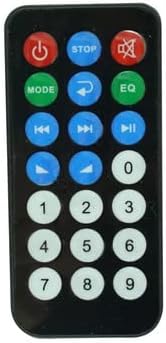
Figure 1: Front view of the remote control. This image displays the layout of all functional buttons, including power, mode selection, playback controls (play/pause, skip), volume adjustments, equalizer (EQ), mute, and a numeric keypad.
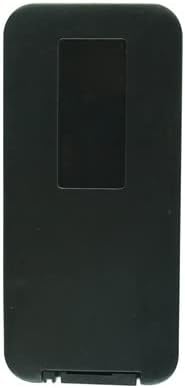
Figure 2: Back view of the remote control. This image shows the rear casing of the remote, which is typically where the battery compartment is located.

Figure 3: Back view of the remote control with the battery cover open. This image illustrates how to access the battery compartment for installation or replacement of the CR2 battery.

Figure 4: Angled view of the remote control. This perspective highlights the overall design and ergonomic features of the remote.
Setup
- Battery Installation:
Locate the battery compartment on the back of the remote control (refer to Figure 2 and Figure 3). Slide the battery cover downwards or in the direction indicated by an arrow to open it. Insert one (1) CR2 battery, ensuring the positive (+) and negative (-) terminals align correctly with the markings inside the compartment. Close the battery cover securely.
- Compatibility Check:
Before first use, confirm that your speaker system (YesSources YS-SPK-28-01-1012 or Ridgeway DISCO3210BA) is listed as compatible. Visually compare your original remote control with the images provided in this manual (Figure 1). If they do not match, the remote may not function as expected.
- Initial Use:
Point the remote control directly at the infrared receiver on your speaker system. Ensure there are no obstructions between the remote and the speaker. Press the Power button (●) to turn on your speaker system.
Operating Instructions
This remote control provides essential functions for managing your compatible speaker system. Below are common button functions:
- Power Button (Red Circle): Turns the speaker system on or off.
- STOP Button (Blue Square): Stops current playback.
- Mute Button (Red Speaker with X): Mutes or unmutes the audio output.
- MODE Button (Green): Cycles through different input modes (e.g., Bluetooth, USB, AUX, FM).
- Return/Repeat Button (Blue Arrow): Function may vary by speaker model, often for repeating tracks or navigating menus.
- EQ Button (Green): Adjusts equalizer settings or cycles through preset sound modes.
- Previous/Next Track Buttons (Blue Double Arrows): Skips to the previous or next track during media playback.
- Play/Pause Button (Blue Triangle): Starts or pauses media playback.
- Volume Up/Down Buttons (Blue Triangles): Increases or decreases the speaker volume.
- Numeric Keypad (0-9): Used for direct track selection, radio frequency input, or other numerical inputs depending on the speaker's features.
For specific advanced functions or detailed operation, please refer to the original user manual of your YesSources YS-SPK-28-01-1012 or Ridgeway DISCO3210BA speaker system.
Maintenance
- Cleaning: Use a soft, dry cloth to wipe the surface of the remote control. Do not use liquid cleaners, aerosols, or abrasive materials, as these can damage the remote.
- Battery Replacement: When the remote's range decreases or buttons become unresponsive, it is likely time to replace the CR2 battery. Follow the battery installation steps in the "Setup" section. Dispose of old batteries responsibly according to local regulations.
- Storage: Store the remote control in a cool, dry place away from direct sunlight, extreme temperatures, and high humidity. If storing for an extended period, it is advisable to remove the battery to prevent leakage.
- Handling: Avoid dropping the remote control or subjecting it to strong impacts, as this can damage internal components.
Troubleshooting
If you encounter issues with your remote control, please try the following steps:
- Remote Not Responding:
- Check the battery: Ensure the CR2 battery is inserted correctly with the correct polarity. Replace the battery if it is old or depleted.
- Line of Sight: Make sure there are no obstructions between the remote control and the speaker system's IR receiver.
- Distance: Ensure you are within the effective operating range of the remote control.
- Some Functions Not Working:
- Compatibility: This remote is a replacement. Not all functions of your original remote may be replicated. Verify that your original remote matches the one pictured in this manual.
- Speaker Specifics: Some functions may require specific modes or settings on your speaker system. Refer to your speaker's original manual.
- Interference:
- Other IR devices: Ensure other infrared devices are not causing interference.
- Strong light sources: Direct sunlight or strong artificial light can sometimes interfere with IR signals.
If problems persist after attempting these troubleshooting steps, please contact the seller for further assistance. As stated in the product description, "Any doubts, message us freely first pls!"
Specifications
| Attribute | Detail |
|---|---|
| Brand | Generic |
| Model Compatibility | YesSources YS-SPK-28-01-1012, Ridgeway DISCO3210BA |
| Connectivity Technology | Infrared (IR) |
| Special Feature | Ergonomic, Replacement (ensure old remote looks the same) |
| Batteries Required | 1 CR2 battery |
| Manufacturer | Easytry |
| ASIN | B0C68SPN43 |
| Date First Available | May 25, 2023 |
Warranty and Support
Specific warranty information for this replacement remote control is not provided in the product details. For any questions regarding warranty coverage, returns, or technical support, please contact the seller directly through the platform where the purchase was made. The seller encourages direct communication for any doubts or issues.
Seller: Easytry123
Ask a question about this manual
Ask about setup, troubleshooting, compatibility, parts, safety, or missing instructions. Manuals+ will review the question and use this page’s manual context to help answer it.