
Introduction
This manual provides comprehensive instructions for the Generic M10 TWS Bluetooth 5.1 Wireless Earbuds. Please read this manual carefully before using the product to ensure proper operation and to maximize your user experience. Keep this manual for future reference.
Package Contents
- Generic M10 TWS Bluetooth Earbuds (Left and Right)
- Wireless Charging Case
- USB Charging Cable
- User Manual
Product Overview
Familiarize yourself with the components and features of your M10 TWS Earbuds.

Figure 1: The M10 TWS Bluetooth earbuds and their charging case, displayed alongside a smartphone and keyboard. The charging case features a digital display indicating battery levels for both the case and individual earbuds.

Figure 2: The charging case features a digital display that shows the remaining battery percentage of the case and the charging status of each earbud. This large capacity charging cabin ensures extended use.

Figure 3: The M10 charging case can function as a portable power bank, allowing you to charge other devices via its USB output port. This feature provides additional utility beyond charging the earbuds.
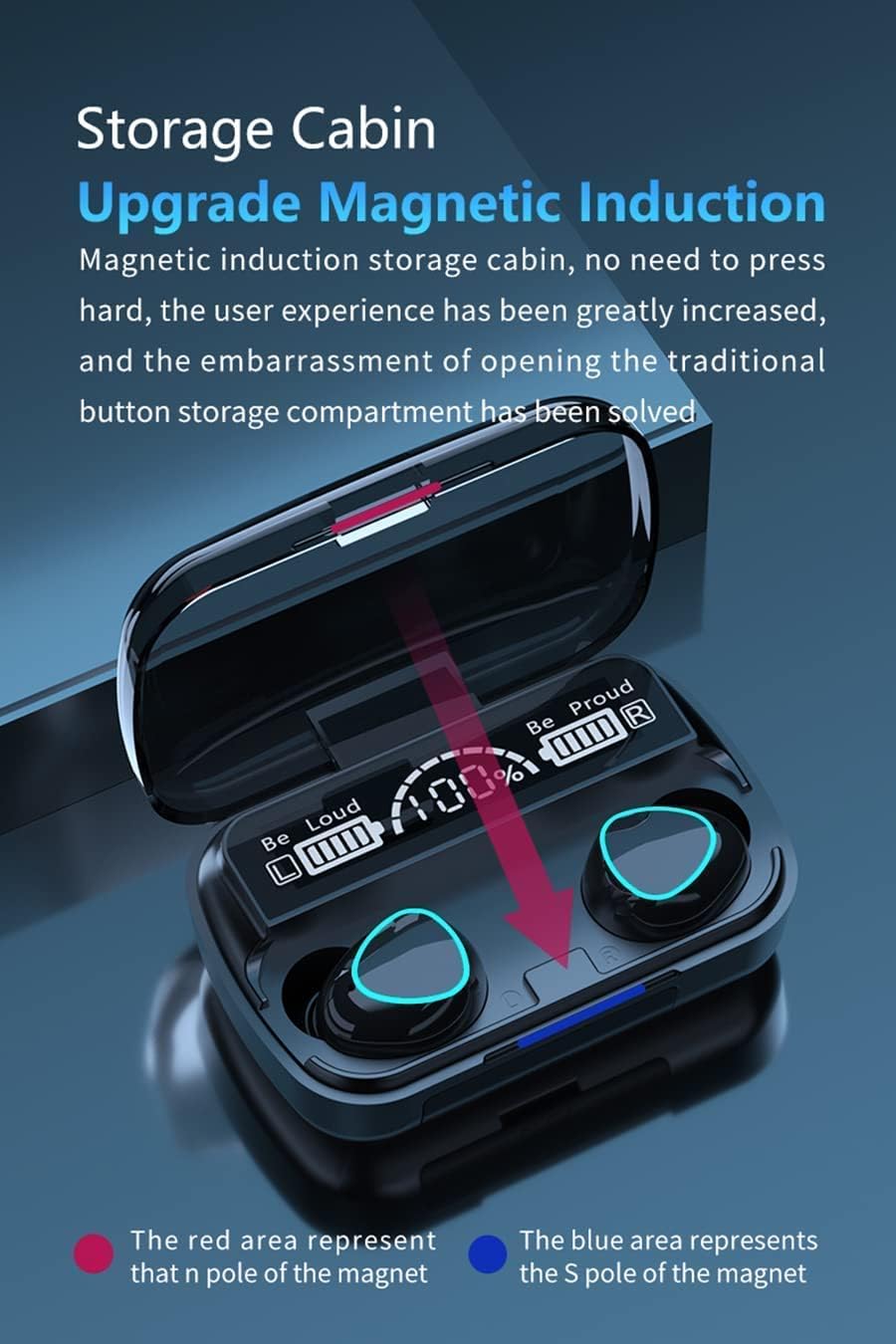
Figure 4: The charging case utilizes magnetic induction for secure and convenient storage of the earbuds. This design eliminates the need for physical buttons to open the compartment, enhancing user experience.
Setup
1. Charging the Earbuds and Charging Case
- Initial Charge: Before first use, fully charge both the earbuds and the charging case.
- Charging the Case: Connect the provided USB charging cable to the charging port on the case and a power source (e.g., USB wall adapter, computer USB port). The digital display on the case will show the charging progress.
- Charging the Earbuds: Place the earbuds into their respective slots in the charging case. Ensure they are correctly seated; magnetic contacts will hold them in place. The case's display will indicate that the earbuds are charging.
- Power Bank Function: The charging case can also be used to charge other devices. Connect your device to the USB output port on the charging case using an appropriate cable.
2. Pairing with a Bluetooth Device
- Power On: Open the charging case. The earbuds will automatically power on and enter pairing mode. You may see indicator lights flashing on the earbuds.
- Activate Bluetooth: On your smartphone or other Bluetooth-enabled device, go to the Bluetooth settings and ensure Bluetooth is turned on.
- Select Device: In the list of available Bluetooth devices, look for "M10" (or a similar name) and select it to connect.
- Confirmation: Once successfully paired, the earbuds will usually provide an audio prompt, and the indicator lights may stop flashing or change color.
- Automatic Reconnection: After initial pairing, the earbuds will automatically connect to the last paired device when removed from the charging case, provided Bluetooth is active on the device.
Operating Instructions
The M10 TWS Earbuds feature touch controls for various functions.

Figure 5: The earbuds feature a 3D touch sensitive area for controlling various functions. This allows for quick and intuitive recognition of user instructions.
Touch Control Functions
- Play/Pause: Single tap on either earbud.
- Next Track: Double tap the right earbud.
- Previous Track: Double tap the left earbud.
- Answer/End Call: Single tap on either earbud during an incoming call.
- Reject Call: Long press on either earbud during an incoming call.
- Activate Voice Assistant: Long press for 2 seconds on either earbud.

Figure 6: Long pressing the touch area for 2 seconds activates your device's voice assistant (e.g., Siri, Google Assistant). This allows for hands-free control and information retrieval.
Wearing the Earbuds
Gently insert the earbuds into your ear canals. Adjust them for a comfortable and secure fit to ensure optimal sound quality and noise isolation.
Maintenance
- Cleaning: Regularly clean the earbuds and charging case with a soft, dry, lint-free cloth. Do not use harsh chemicals or abrasive materials.
- Charging Contacts: Ensure the charging contacts on both the earbuds and the case are clean and free of debris to maintain proper charging.
- Storage: When not in use, store the earbuds in their charging case to protect them and keep them charged.
- Water Resistance: The earbuds are rated as waterproof. However, avoid prolonged exposure to water or submersion. Dry them thoroughly if they get wet.
- Battery Care: To prolong battery life, avoid fully discharging the earbuds and charging case frequently. Charge them regularly, even if not in constant use.
Troubleshooting
| Problem | Possible Cause | Solution |
|---|---|---|
| Earbuds not pairing with device. | Bluetooth is off; earbuds are out of charge; earbuds are already paired to another device; pairing mode not active. | Ensure Bluetooth is on your device. Charge earbuds and case. Turn off Bluetooth on other devices. Place earbuds back in case, close, then open to re-enter pairing mode. |
| Only one earbud is working. | One earbud is out of charge; earbuds are not properly connected to each other; connection issue. | Ensure both earbuds are charged. Try placing both earbuds back in the case, closing it, and then opening it again to reset their connection. Re-pair with your device. |
| Earbuds not charging. | Charging contacts are dirty; charging cable is faulty; charging case is out of power. | Clean the charging contacts on both earbuds and case. Try a different USB cable or power source. Ensure the charging case itself is charged. |
| Low sound quality or buzzing noise. | Poor fit; low battery; interference; faulty unit. | Adjust earbuds for a secure fit. Ensure earbuds and device are fully charged. Move away from sources of strong electromagnetic interference. If problem persists, contact customer support. |
| Voice assistant not responding. | Incorrect gesture; device's voice assistant not enabled. | Ensure you are performing a long press for 2 seconds. Check your smartphone settings to confirm the voice assistant is enabled and configured. |
Specifications
- Model: M10
- Brand: Generic
- Connectivity: Wireless (Bluetooth 5.1)
- Ear Placement: In Ear
- Form Factor: True Wireless
- Noise Control: Active Noise Cancellation
- Impedance: 140 Ohm
- Control Type: Voice Control, Touch Control
- Material: Metal
- Special Feature: Lightweight, Waterproof
- Battery: 1 Nonstandard Battery (required for earbuds)
- Package Dimensions: 11.3 x 10.7 x 4.5 cm
- Weight: 200 g (package)
Warranty and Support
For warranty information or technical support, please refer to the retailer or manufacturer's official website where the product was purchased. Keep your proof of purchase for any warranty claims.
For further assistance, you may contact the seller directly through the platform where you made your purchase.