
1. Introduction
Thank you for purchasing the Crosley C62C Turntable HiFi System. This manual provides essential information for the proper setup, operation, and maintenance of your new record player. Please read these instructions thoroughly before use to ensure optimal performance and longevity of your system.
2. Safety Information
To reduce the risk of fire or electric shock, do not expose this appliance to rain or moisture. Do not open the cabinet. Refer servicing to qualified personnel only. Always ensure the unit is disconnected from the power source before cleaning or performing any maintenance.
WARNING: This product can expose you to chemicals including lead, which is known to the State of California to cause cancer and birth defects or other reproductive harm. For more information go to www.P65Warnings.ca.gov.
3. What's in the Box
Carefully unpack all components and ensure you have the following items:
- Turntable Unit
- Turntable Lid (Dust Cover)
- Turntable Platter
- Turntable Slipmat
- 45 RPM Adapter
- Tonearm Counterweight
- Drive Belt
- Cartridge Alignment Protractor
- Power Adapter
- Speakers (x2)
- Speaker Wire (x2)
4. Product Overview
The Crosley C62C is a two-speed belt-drive turntable system designed for high-fidelity audio playback. It features an adjustable tonearm, a pre-mounted Audio-Technica moving magnet cartridge, and comes with matching bookshelf speakers.
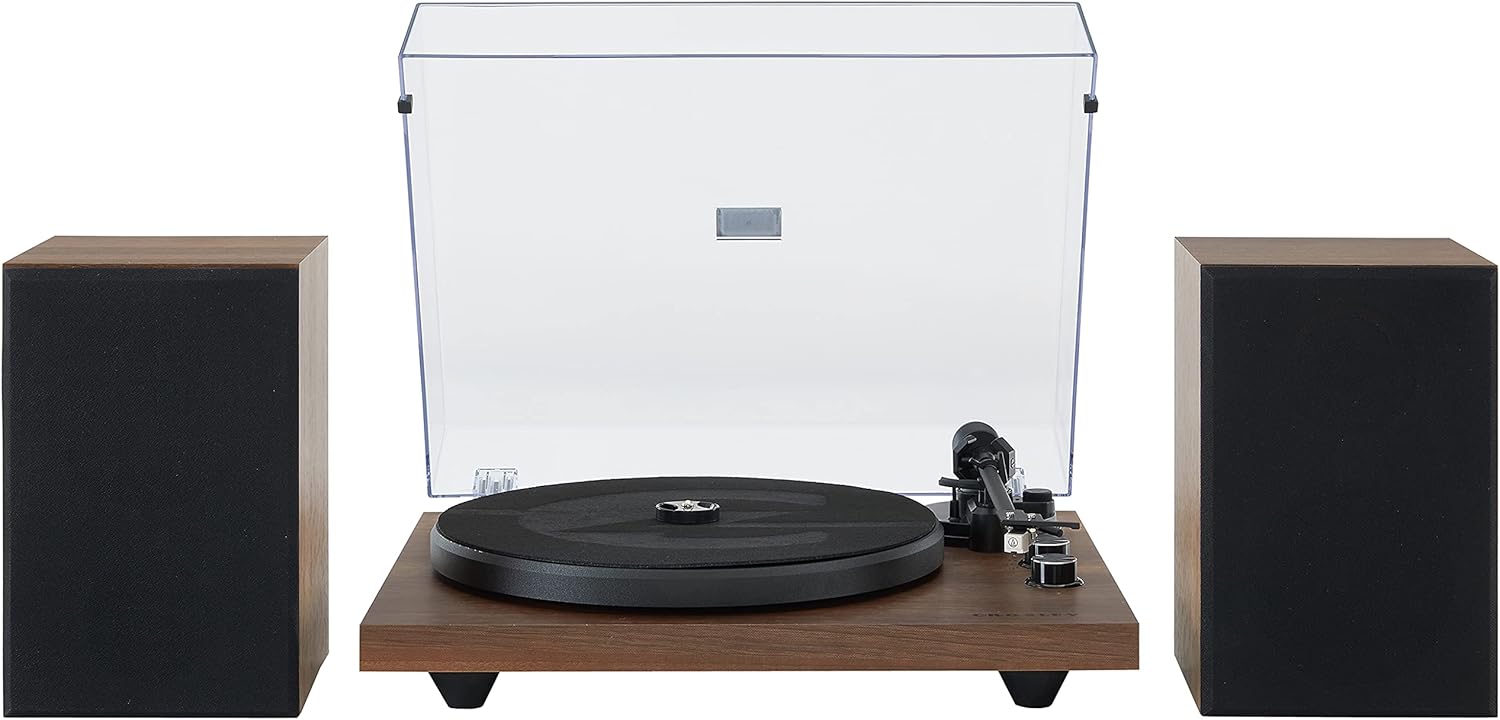
Image: The Crosley C62C turntable unit positioned between its two accompanying bookshelf speakers, showcasing the complete system.
Key Components:
- Platter: The circular platform where records are placed.
- Tonearm: Holds the cartridge and stylus, tracking the record's grooves.
- Dust Cover: A clear lid to protect the turntable from dust and debris.
- Speakers: Two external bookshelf speakers for stereo sound output.
- Controls: Includes speed selection (33 1/3, 45 RPM) and volume.

Image: A detailed view highlighting the turntable's ability to play two speeds (33 1/3 & 45 RPM), its aluminum tonearm, and the adjustable counterweight for precise tracking.

Image: An annotated diagram illustrating key structural features: the clear dust cover, vibration-absorbing feet, audio-grade MDF plinth, and the belt-driven motor system.

Image: A close-up shot of the pre-mounted Audio-Technica moving magnet cartridge, emphasizing its standard half-inch mount and diamond stylus for accurate sound reproduction.
5. Setup
5.1 Placement
Place the turntable on a stable, level surface away from direct sunlight, heat sources, and excessive vibration. Ensure adequate space around the unit for ventilation and operation.
5.2 Assembly
- Install the Platter and Belt: Carefully place the platter onto the center spindle. Locate the drive belt and stretch it around the motor pulley and the inner rim of the platter.
- Attach the Counterweight: Slide the counterweight onto the rear of the tonearm.
- Balance the Tonearm: Gently lower the tonearm onto its rest. Adjust the counterweight until the tonearm floats horizontally. Once balanced, rotate the tracking force dial to the recommended setting (typically 2.0-3.0 grams for the pre-mounted cartridge).
- Adjust Anti-Skate: Set the anti-skate dial to match the tracking force setting. This helps prevent the stylus from skipping across the record.
- Connect Speakers: Use the provided speaker wires to connect the turntable's speaker outputs to the corresponding inputs on the bookshelf speakers. Ensure correct polarity (+ to + and - to -).
- Connect Power: Plug the power adapter into the turntable's DC input and then into a wall outlet.

Image: The rear panel of the turntable, illustrating the various input and output ports for connecting speakers and power, as well as the switchable preamp.
6. Operation
6.1 Playing a Record
- Place a record on the platter and put the slipmat on top.
- Select the correct speed (33 1/3 or 45 RPM) using the speed selector switch. For 45 RPM singles, place the 45 RPM adapter on the spindle.
- Lift the tonearm using the cueing lever.
- Carefully position the stylus over the desired starting groove of the record.
- Gently lower the cueing lever to allow the stylus to descend onto the record.
- Adjust the volume using the volume knob on the turntable.
- When the record finishes playing, lift the tonearm using the cueing lever and return it to its rest.
6.2 Bluetooth Connectivity
The Crosley C62C features Bluetooth connectivity, allowing you to stream music from your mobile device through the included speakers.
- Ensure the turntable is powered on.
- Switch the input mode to Bluetooth (refer to your unit's specific controls for the Bluetooth input selection).
- On your mobile device, enable Bluetooth and search for available devices.
- Select "Crosley C62C" (or similar) from the list to pair.
- Once paired, you can stream audio from your device to the turntable's speakers.

Image: A smartphone with the Bluetooth logo displayed, positioned near the Crosley C62C turntable, illustrating the wireless audio streaming capability.
7. Maintenance
7.1 Cleaning the Unit
Wipe the turntable and speakers with a soft, dry cloth. Do not use abrasive cleaners or solvents. The dust cover can be cleaned with a soft, damp cloth and then dried thoroughly.
7.2 Stylus Care
The stylus is delicate. Clean it periodically using a soft brush, brushing gently from back to front. Avoid touching the stylus with your fingers.
7.3 Record Care
Keep your records clean and free of dust. Store them vertically in their sleeves to prevent warping. Handle records by their edges to avoid transferring oils from your skin.
8. Troubleshooting
If you experience issues with your Crosley C62C, refer to the following common problems and solutions:
| Problem | Possible Cause | Solution |
|---|---|---|
| No power | Power adapter not connected; outlet not active | Ensure power adapter is securely connected to the unit and a working outlet. |
| No sound from speakers | Speakers not connected; volume too low; incorrect input mode | Check speaker wire connections and polarity. Increase volume. Ensure correct input (Phono for records, Bluetooth for streaming). |
| Sound distorted or skipping | Stylus dirty or worn; tonearm not balanced; record dirty or damaged | Clean stylus and record. Re-balance tonearm and adjust tracking force. Inspect record for damage. |
| Bluetooth not pairing | Turntable not in pairing mode; device too far; interference | Ensure turntable is in Bluetooth input mode. Move device closer. Avoid other wireless devices. |
9. Specifications
| Feature | Detail |
|---|---|
| Product Dimensions | 30 x 14.25 x 9.75 inches |
| Item Weight | 21.7 pounds |
| Model Number | C62C-WA |
| Connectivity Technology | Bluetooth |
| Maximum Rotational Speed | 45 RPM (supports 33 1/3 RPM) |
| Special Features | Adjustable Anti-Skate Control, Adjustable Speed, Built-In Preamp, Dust Cover |
| Material | Engineered Wood, Plastic |
| Power Consumption (On-mode) | 31 watts |
10. Warranty and Support
Crosley products are designed for reliability and performance. For warranty information, product registration, or technical support, please visit the official Crosley website or contact their customer service department. Keep your purchase receipt as proof of purchase for warranty claims.
For further assistance, you may visit the Crosley Store on Amazon.


