
1. Introduction
This manual provides essential information for the safe and efficient use of your Samsung EcoFlex AI RB38C603DEL combined refrigerator. Please read it thoroughly before operating the appliance and retain it for future reference.
Key Features:
- SpaceMax Technology: Thinner walls provide more internal storage capacity without increasing external dimensions.
- Total No Frost: Prevents ice buildup in both the refrigerator and freezer compartments, eliminating the need for manual defrosting.
- All Around Cooling: Ensures uniform temperature distribution throughout the refrigerator, keeping food fresh longer.
- Digital Inverter Compressor: Adjusts its speed in response to cooling demand, leading to quieter operation, energy efficiency, and extended durability.
- SmartThings with AI Energy Mode: Monitor and reduce energy consumption by up to 15% through the SmartThings app.
- Optimal Fresh+ & Humidity Fresh+: Specialized drawers for optimal preservation of different food types.
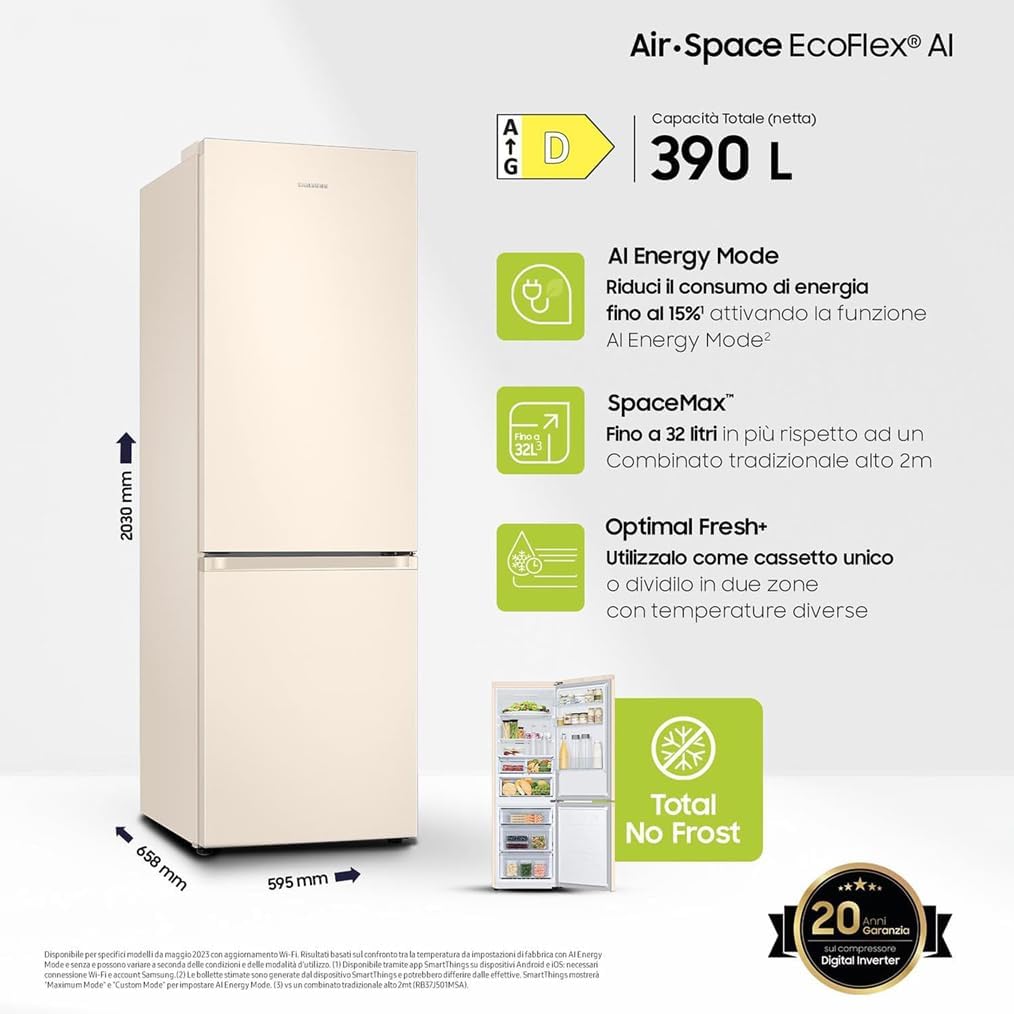
Figure 1: Overview of the Samsung EcoFlex AI RB38C603DEL Refrigerator, highlighting its dimensions and core technologies like SpaceMax, AI Energy Mode, Optimal Fresh+, and Total No Frost.
2. Safety Information
To ensure safe operation, please adhere to the following guidelines:
- Read all instructions before using the appliance.
- Ensure the refrigerator is properly grounded.
- Do not store explosive substances such as aerosol cans with a flammable propellant in this appliance.
- Keep ventilation openings clear of obstruction.
- Do not use mechanical devices or other means to accelerate the defrosting process, other than those recommended by the manufacturer.
- Do not damage the refrigerant circuit.
- Do not use electrical appliances inside the food storage compartments, unless they are of the type recommended by the manufacturer.
- Unplug the appliance before cleaning or performing maintenance.
- Children should be supervised to ensure they do not play with the appliance.
3. Setup Guide
3.1 Unboxing and Placement
- Carefully remove all packaging materials.
- Place the refrigerator on a firm, level surface away from direct sunlight, heat sources, and moisture. Ensure adequate clearance around the appliance for proper ventilation (minimum 5 cm on sides and back, 10 cm on top).
- Allow the refrigerator to stand upright for at least 2-3 hours before plugging it in to allow refrigerants to settle.
3.2 Leveling the Appliance
Use the adjustable front feet to level the refrigerator. Turn the leveling feet clockwise to raise the appliance or counter-clockwise to lower it. Ensure the doors close smoothly and seal properly.
3.3 Initial Power-On
After placement and leveling, plug the refrigerator into a dedicated grounded electrical outlet. The internal lights will illuminate, and the compressor will begin to operate. Allow the appliance to run for several hours (e.g., 4-6 hours) to reach its optimal operating temperature before storing food.

Figure 2: Front view of the refrigerator, illustrating its sleek design suitable for various kitchen aesthetics.
4. Operating Instructions
4.1 Temperature Control
Your refrigerator features a digital display on the door for easy temperature adjustment. The Digital Inverter Compressor maintains precise temperatures, while the All Around Cooling system ensures consistent cold air circulation on every shelf.
- Refrigerator Temperature: Typically set between 1°C and 7°C.
- Freezer Temperature: Typically set between -15°C and -23°C.

Figure 3: The interior of the refrigerator, demonstrating the All Around Cooling system with air vents ensuring even temperature distribution.
4.2 SmartThings App and AI Energy Mode
Connect your refrigerator to the Samsung SmartThings app via Wi-Fi to access advanced features, including AI Energy Mode.
- Download the SmartThings app on your smartphone (Android or iOS).
- Follow the in-app instructions to connect your refrigerator.
- Activate AI Energy Mode to monitor and optimize energy consumption, potentially reducing it by up to 15%. The app provides insights into your energy usage patterns.

Figure 4: The SmartThings app interface, showing how AI Energy Mode helps monitor and reduce the refrigerator's energy consumption.
4.3 Storage Features
- SpaceMax: Enjoy increased internal capacity due to the refrigerator's slim-wall insulation technology.
- Optimal Fresh+: This drawer can be used as a single zone or divided into two zones with different temperatures, ideal for storing meat, fish, or fruits and vegetables.
- Humidity Fresh+: A specialized drawer where humidity levels can be adjusted by rotating a knob, creating an optimal environment for preserving fruits and vegetables.

Figure 5: The spacious interior, demonstrating the benefits of SpaceMax technology for maximizing storage.
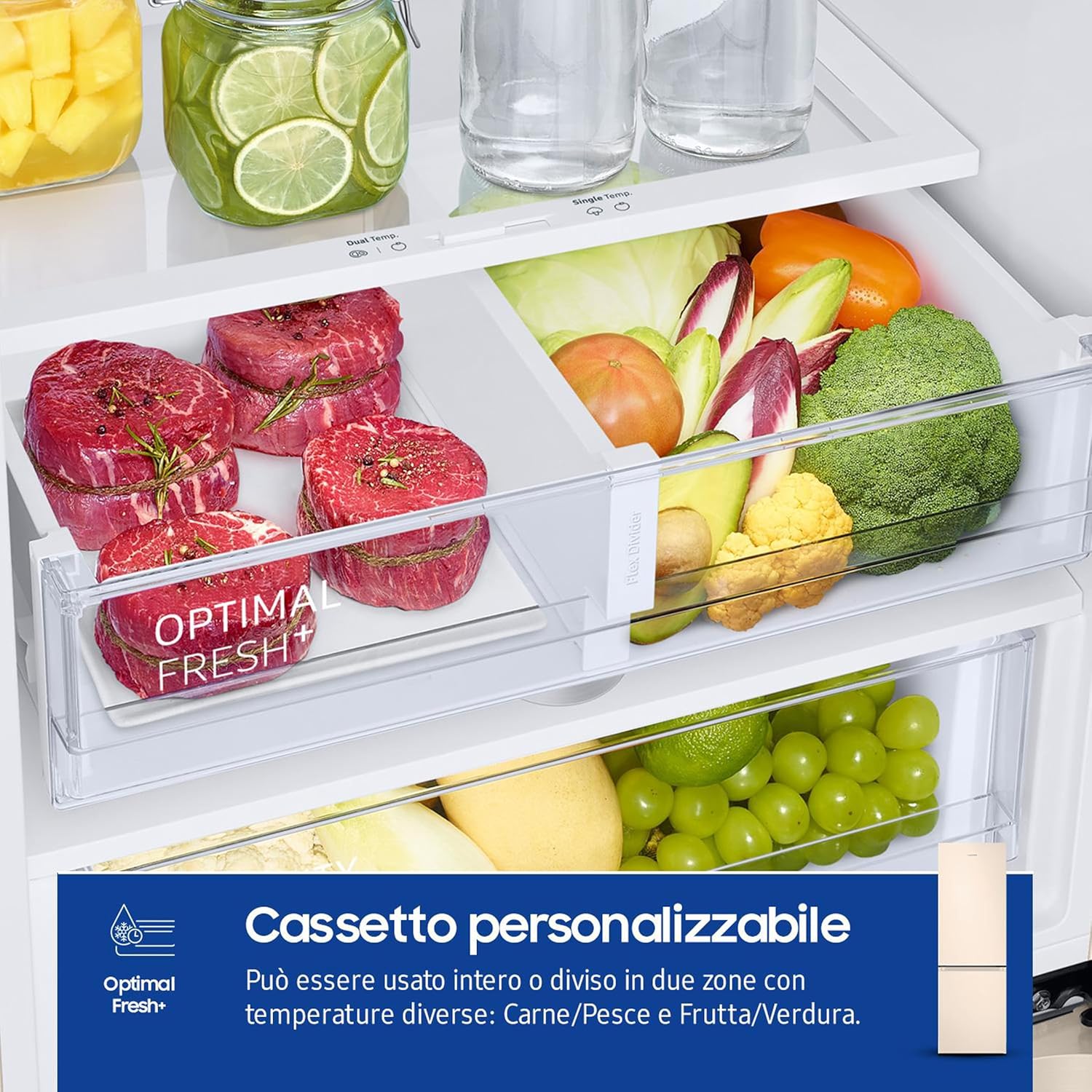
Figure 6: The Optimal Fresh+ drawer, illustrating its versatility for storing different food types at ideal temperatures.

Figure 7: The Humidity Fresh+ drawer, showing the adjustable humidity control for optimal fruit and vegetable preservation.
5. Maintenance
5.1 Cleaning the Refrigerator
Regular cleaning helps maintain hygiene and efficiency.
- Exterior: Wipe surfaces with a soft cloth dampened with mild detergent and water. Dry thoroughly.
- Interior: Remove all food items. Clean shelves, drawers, and interior walls with a solution of baking soda and warm water (2 tablespoons baking soda to 1 liter of water). Rinse and dry thoroughly.
- Door Seals: Clean door gaskets regularly with a soft cloth and warm water to ensure a tight seal.
- Condenser Coils: Periodically vacuum the condenser coils at the back or bottom of the refrigerator to improve efficiency.
5.2 Total No Frost System
Your refrigerator is equipped with a Total No Frost system, which automatically prevents ice buildup in both the freezer and refrigerator compartments. This means manual defrosting is not required.
6. Troubleshooting
Before contacting service, check the following common issues:
| Problem | Possible Cause | Solution |
|---|---|---|
| Refrigerator not cooling | Power outage; plug not inserted; temperature setting too high; door left open. | Check power supply; ensure plug is secure; adjust temperature setting; ensure door is closed properly. |
| Excessive noise | Refrigerator not level; items vibrating inside; normal operating sounds (e.g., refrigerant flow). | Level the appliance; rearrange items; consult manual for normal sounds. |
| Water on floor/inside | Drain hose clogged; door not sealed properly. | Clear drain hose; check door seal for obstructions. |
| SmartThings app connectivity issues | Wi-Fi signal weak; incorrect app settings; router issues. | Check Wi-Fi signal strength; restart router; re-pair device in app. |
7. Specifications
| Feature | Detail |
|---|---|
| Model Number | RB38C603DEL/EF |
| Brand | Samsung |
| Type | Combined Refrigerator (Fridge-Freezer) |
| Installation Type | Freestanding |
| Total Net Capacity | 390 Liters |
| Refrigerator Capacity | 276 Liters |
| Freezer Capacity | 114 Liters |
| Dimensions (WxHxD) | 59.5 x 203 x 65.8 cm |
| Weight | 71 kg |
| Energy Efficiency Class | D |
| Annual Energy Consumption | 211 kWh/annum |
| Noise Level | 35 dB |
| Defrost System | Automatic (Total No Frost) |
| Special Features | Total No Frost, AI Energy Mode, All Around Cooling, Digital Inverter Compressor, SpaceMax, Optimal Fresh+, Humidity Fresh+ |
| Compressor Warranty | 20 Years (Digital Inverter) |

Figure 8: The EU Energy Label for the RB38C603DEL model, indicating its energy efficiency class and consumption details. For more details, visit the official EU EPREL database: https://eprel.ec.europa.eu/qr/1501943
8. Warranty and Support
8.1 Digital Inverter Compressor Warranty
Your Samsung EcoFlex AI RB38C603DEL refrigerator comes with a 20-year warranty on the Digital Inverter Compressor, ensuring long-term reliability and peace of mind.

Figure 9: The Digital Inverter Compressor, highlighting its energy efficiency, low noise, and extended 20-year warranty.
8.2 Product Support
For further assistance, troubleshooting, or warranty claims, please contact Samsung customer support. You can find contact information on the official Samsung website or through the SmartThings app.